वॉइस सीक्वेंस स्टेप चुनें
Warning: Voice sequences are in preview. Steps, entry data, and the sequence definition format can change in ways that break existing sequences and API requests.
अर्ली एक्सेस: Webhook decision अर्ली एक्सेस में है और अभी सभी के लिए उपलब्ध नहीं है। Webhook decision और मैनेज्ड ट्रांसफ़र को डैशबोर्ड में नहीं चुना जा सकता।
हर स्टेप की सेटिंग, आउटपुट और उदाहरण देखने के लिए स्टेप कैटलॉग खोलें। टेम्पलेट से आया या नाम बदला गया कैनवस स्टेप किसी खास काम से जुड़ा नाम दिखा सकता है।
कैटलॉग में वे स्टेप दिखते हैं जो डैशबोर्ड में उपलब्ध हैं। नीचे दी गई तालिका उन अर्ली एक्सेस स्टेप को भी बताती है जिन्हें अभी चुना नहीं जा सकता।
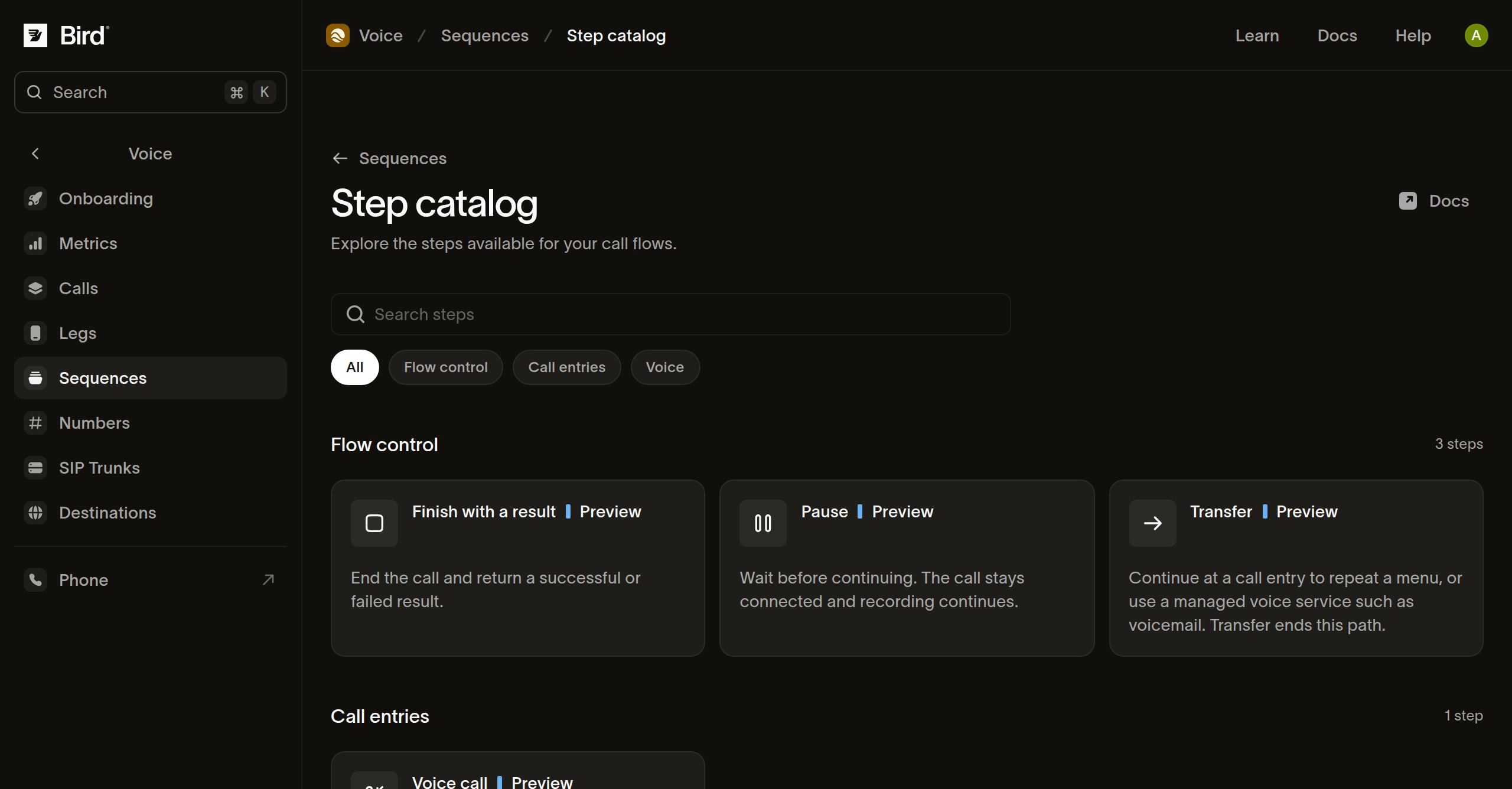
अपने काम के लिए स्टेप चुनें
| स्टेप | उद्देश्य | आगे का पाथ |
|---|---|---|
| कॉल शुरू करें | कॉल एंट्री और उसके द्वारा स्वीकार किया जाने वाला डेटा तय करें। | इवेंट आउटपुट को पहले स्टेप से जोड़ें। |
| मीडिया | स्पीच, ऑडियो, टोन, विराम या रिकॉर्डिंग कमांड का क्रमबद्ध सेट चलाएँ। | कमांड पूरे होने के बाद आगे बढ़ें। |
| अंक एकत्र करें | बीच में रोके जा सकने वाले प्रॉम्प्ट चलाएँ और कीपैड इनपुट एकत्र करें। | नामित अंक मिलान, टाइमआउट या बिना मिलान वाले इनपुट का पाथ चुनें। |
| वेबहुक निर्णय (अर्ली एक्सेस) | कॉल डेटा को HTTPS रिसीवर को भेजें और उसकी प्रतिक्रिया के आधार पर पाथ चुनें। | कॉन्फ़िगर किए गए हर बिज़नेस परिणाम और विफलता परिणाम को जोड़ें। |
| ब्रांच | क्रमबद्ध शर्तों के आधार पर एक पथ चुनें। | पहला मेल खाने वाला पथ या डिफ़ॉल्ट पथ लिया जाता है। |
| मान सेट करें | इस एंट्री विज़िट में आगे के चरणों के लिए नामित मान सहेजें। | आगे बढ़ें; सहेजे गए मान अगले चरणों के लिए उपलब्ध रहते हैं। |
| रुकें | कॉल को जुड़ा रखते हुए और चल रही रिकॉर्डिंग को सक्रिय रखते हुए प्रतीक्षा करें। | तय अवधि के बाद आगे बढ़ें। |
| डायल करें | किसी गंतव्य को कॉल करें और उसे मौजूदा कॉलर से जोड़ें। | पूर्ण, व्यस्त, कोई उत्तर नहीं और विफल परिणामों को संभालें। |
| ट्रांसफ़र करें | किसी दूसरी एंट्री या प्रबंधित सेवा पर कॉल जारी रखें। | नियंत्रण गंतव्य के पास चला जाता है; इस चरण का कोई सामान्य अगला पथ नहीं होता। |
| कॉल समाप्त करें | कॉल समाप्त करें। | कोई अगला चरण नहीं। |
| परिणाम के साथ समाप्त करें | सफल या विफल स्थिति, वैकल्पिक कारण और ऑब्जेक्ट परिणाम के साथ समाप्त करें। | कोई अगला चरण नहीं। |
कैटलॉग से कॉन्फ़िगर करें
- किसी चरण के समर्थित फ़ील्ड और उदाहरण देखने के लिए उसे खोलें।
- उसे संबंधित परिणाम से अपने ड्राफ़्ट में जोड़ें।
- उदाहरण वाले मानों को बदलें और उसके कॉन्फ़िगर किए गए आउटपुट पथ जाँचें।
- आपका फ़्लो जिन परिणामों को संभालता है, उनमें से हर एक के लिए एक सैंपल का प्रीव्यू देखें।
कीपैड पाथ उन मिलानों पर निर्भर करते हैं जिन्हें आप कॉन्फ़िगर करते हैं। किसी स्टेप को बदलने से मौजूदा कनेक्शन, मैपिंग या प्रीव्यू सैंपल अमान्य हो सकते हैं। स्टेप का कॉन्ट्रैक्ट बदलने के बाद Checks का उपयोग करें।
स्पष्ट परिणाम चुनें
जब रिपोर्ट को hours_played या no_input जैसे व्यावसायिक परिणाम की ज़रूरत हो, तब Finish with a result का उपयोग करें। स्टेटस को उस परिणाम के अनुसार कॉन्फ़िगर करें और एक ऑब्जेक्ट परिणाम दें; जब किसी फ़ील्ड की ज़रूरत न हो, तब {} दें।
जानबूझकर विफल किया गया परिणाम विफल रन में गिना जाता है, भले ही कोई तकनीकी त्रुटि न हुई हो। सफल परिणाम का अर्थ है कि कॉन्फ़िगर किया गया पाथ पूरा हुआ; इससे यह साबित नहीं होता कि किसी व्यक्ति ने संदेश सुना या कोई बाहरी व्यावसायिक काम सफल हुआ। रद्द होने या कॉल की सफ़ाई विफल होने पर कॉन्फ़िगर किया गया परिणाम दर्ज नहीं हो सकता।
अगले कदम
संबंधित संसाधन
इस विषय के लिए दस्तावेज़, गाइड और उदाहरणों के साथ आगे बढ़ें।