WhatsApp कीवर्ड नियम
Bird कीवर्ड कैटलॉग पहले से देता है, इसलिए जो प्राप्तकर्ता आपके इनबाउंड संदेश लेने वाले किसी नंबर पर STOP लिखकर जवाब देता है, उसकी ऑप्ट-आउट आपकी ओर से बिना किसी सेटअप के दर्ज हो जाती है। START इसे पलट देता है। आपका अपना नियम जिस दायरे पर लागू होता है, उसमें वह Bird के डिफ़ॉल्ट की जगह ले लेता है।
यह पेज बताता है कि Bird क्या पहचानता है, आने वाले संदेश का मिलान कैसे होता है, और शब्द बदलने या कीवर्ड जोड़ने का तरीका क्या है। डैशबोर्ड में यही काम कीवर्ड पेज पर होता है।
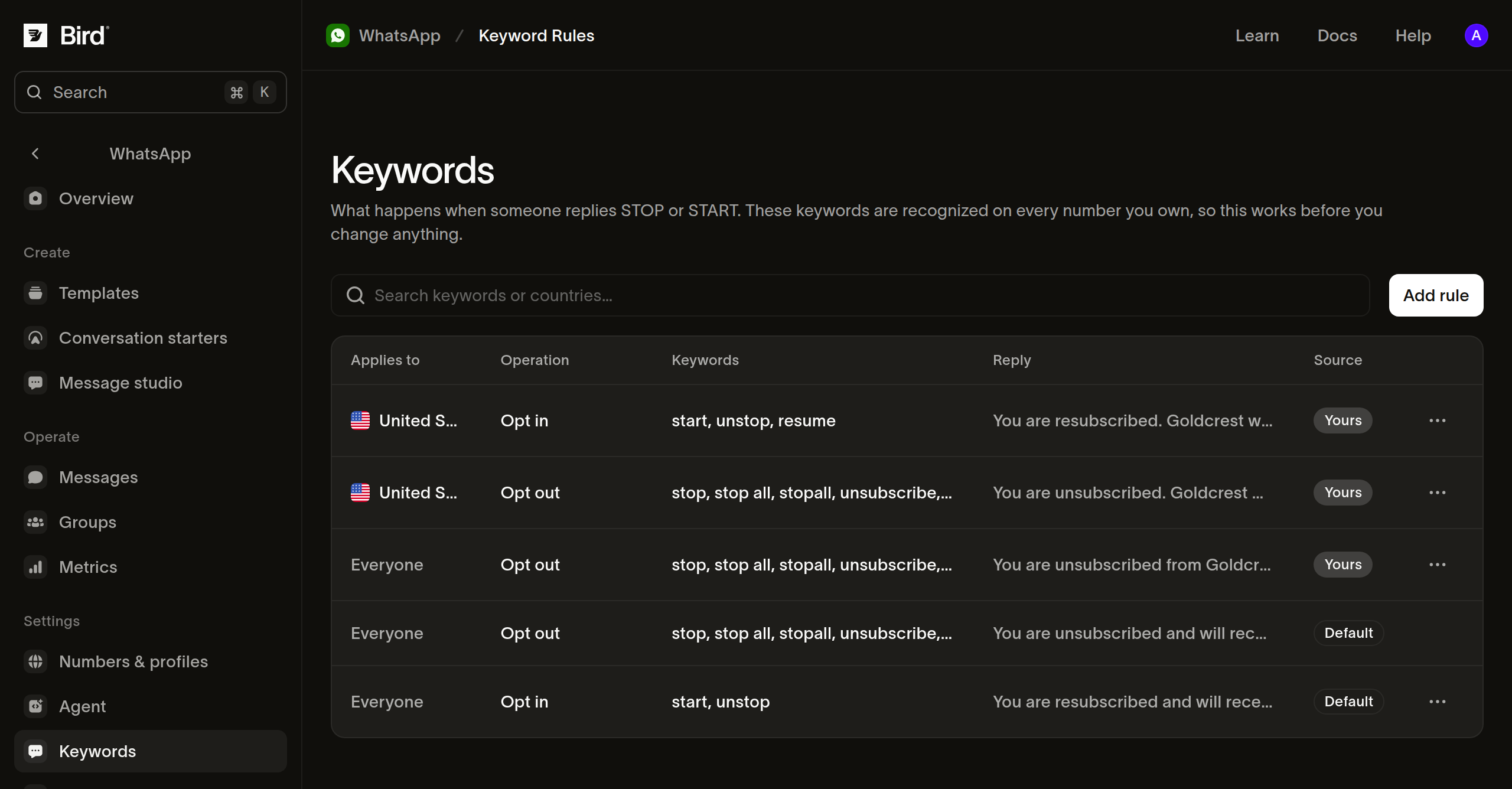
Bird डिफ़ॉल्ट रूप से क्या पहचानता है
नौ शब्द ऑप्ट-आउट दर्ज करते हैं:
stop, stop all, stopall, unsubscribe, cancel, end, quit, revoke, optout
दो शब्द इसे पलटते हैं: start और unstop।
मिलान पूरे संदेश पर होता है, उसके किसी हिस्से पर नहीं। cancel और end कीवर्ड हैं, इसलिए यह अंतर मायने रखता है: "cancel my 3pm delivery" एक सामान्य संदेश है, सहमति वापस लेना नहीं। अक्षरों का केस, एक्सेंट, बार-बार आए स्पेस और अंत के विराम चिह्न अनदेखे किए जाते हैं, इसलिए Stop! और STOP दोनों मेल खाते हैं। शब्द से पहले या उसके भीतर आए विराम चिह्न अनदेखे नहीं होते, इसलिए #stop मेल नहीं खाता।
जहाँ कीवर्ड का मिलान नहीं होता
समूह संदेश के अंदर आए कीवर्ड को छोड़ दिया जाता है, इसलिए कोई प्रतिभागी वहाँ जवाब देकर ऑप्ट आउट नहीं कर सकता। समूह के किसी सदस्य ने ऑप्ट आउट की बात कही हो, तो उसका पालन अपने भेजने के लॉजिक में करें।
प्राथमिकता कब दर्ज होती है
वर्गीकरण whatsapp.received इवेंट से पहले नहीं, बल्कि उसके साथ-साथ चलता है। इसलिए उस इवेंट पर नज़र रखने वाला इंटीग्रेशन STOP को उसकी दर्ज की जाने वाली प्राथमिकता के बनने से पहले ही आता देख सकता है। अगर आपका हैंडलर इनबाउंड संदेश के जवाब में कुछ भेजता है, तो इवेंट के क्रम पर भरोसा करने के बजाय प्राप्तकर्ता के रिकॉर्ड फिर से पढ़ें।
यह देखना कि क्या लागू होता है
GET /v1/whatsapp/keyword-rules बताता है कि आपके नंबरों पर आए जवाबों को कैसे संभाला जाता है। बिना फ़िल्टर के यह Bird का कैटलॉग और आपके बनाए सभी नियम लौटाता है। इसे country, waba, operation या scope से सीमित करें:
scope=systemBird का कैटलॉग लौटाता है, जिसमें वह डिफ़ॉल्ट भी शामिल है जिसे आपका कोई नियम ओवरराइड करता है।scope=workspaceआपके अपने नियम लौटाता है।
const rules = await bird.whatsapp.keywordRules.list({ operation: "opt_out" });
for (const rule of rules.data ?? []) {
  console.log(rule.scope, rule.effective_keywords);
}
rules = client.whatsapp.keyword_rules.list(operation="opt_out")
for rule in rules.data or []:
print(rule.scope, rule.effective_keywords)rules, err := client.Whatsapp.KeywordRules.List(context.Background(), bird.WhatsappKeywordRulesListParams{
Operation: "opt_out", // omit for both operations, Bird's rules and your own
})
if err != nil {
log.Fatal(err)
}
for _, rule := range rules.Data {
fmt.Println(rule.Scope, rule.EffectiveKeywords)
}$rules = $bird->whatsapp->keywordRules->list(['operation' => 'opt_out']);
foreach ($rules->getData() ?? [] as $rule) {
echo $rule->getScope(), ' ', implode(',', $rule->getEffectiveKeywords() ?? []), PHP_EOL;
}bird whatsapp keyword-rules listcurl "https://us1.platform.bird.com/v1/whatsapp/keyword-rules?operation=opt_out" \
-H "Authorization: Bearer $BIRD_API_KEY"नियम सबसे विशिष्ट से शुरू होकर लौटते हैं, और इनबाउंड संदेश का मिलान भी इसी क्रम में होता है। हर नियम में effective_keywords होता है: उस ऑपरेशन और देश के लिए Bird का सेट, साथ में आपके जोड़े गए कीवर्ड।
आपके जिस नियम में country नहीं है, उसके लिए effective_keywords Bird का विश्वव्यापी सेट दिखाता है, क्योंकि नियम का कोई देश नहीं है और संदेश आने तक भेजने वाले का देश पता नहीं होता। वह नियम भेजने वाले के देश के लिए Bird के सेट से मिलान करता है, जो बड़ा सेट हो सकता है। वे भेजने वाले ठीक-ठीक किससे मिलान करते हैं, यह देखने के लिए अपने नियम पर country सेट करें।
country भेजने वाले का देश है, जो उस नंबर से नहीं निकाला जाता जिस पर उन्होंने संदेश भेजा, बल्कि उनके अपने फ़ोन नंबर से निकाला जाता है। यही देश का संकेत WhatsApp भेजता है। बिज़नेस-स्कोप वाले यूज़र ID से पहचाने गए भेजने वाले का कोई देश नहीं होता, इसलिए उसका संदेश देश-आधारित नियमों को छोड़कर किसी विश्वव्यापी नियम से मिलान करता है।
जवाब बदलना
Bird के डिफ़ॉल्ट जवाब सही हैं, पर सामान्य हैं। अपने नाम से जवाब देने के लिए एक नियम बनाएँ:
const rule = await bird.whatsapp.keywordRules.create({
  operation: "opt_out",
  country: "US", // the SENDER's country, from their own number
  reply: "You're off the list. ACME Courier won't message you again.",
});
// effective_keywords is Bird's set plus any of your own.
console.log(rule.id, rule.effective_keywords);
rule = client.whatsapp.keyword_rules.create(
operation="opt_out",
country="US", # the SENDER's country, from their own number
reply="You're off the list. ACME Courier won't message you again.",
)
# effective_keywords is Bird's set plus any of your own.
print(rule.id, rule.effective_keywords)rule, err := client.Whatsapp.KeywordRules.Create(context.Background(), bird.WhatsappKeywordRulesCreateParams{
Operation: "opt_out",
Country: bird.String("US"), // the SENDER's country, from their own number
Reply: bird.String("You're off the list. ACME Courier won't message you again."),
})
if err != nil {
log.Fatal(err)
}
// EffectiveKeywords is Bird's set plus any of your own.
fmt.Println(rule.Id, rule.EffectiveKeywords)$rule = $bird->whatsapp->keywordRules->create(
(new WhatsAppKeywordRuleCreate())
->setOperation('opt_out')
->setCountry('US')
->setReply("You're off the list. ACME Courier won't message you again."),
);
// getEffectiveKeywords() is Bird's set plus any of your own.
echo $rule->getId(), ' ', implode(',', $rule->getEffectiveKeywords() ?? []);bird whatsapp keyword-rules create \
--country US \
--keywords 'no more texts' \
--keywords 'remove me' \
--operation opt_out \
--reply "You're off the list. ACME Courier won't message you again." \
--waba 102290129340398curl -X POST https://us1.platform.bird.com/v1/whatsapp/keyword-rules \
-H "Authorization: Bearer $BIRD_API_KEY" \
-H "Content-Type: application/json" \
-d '{"operation":"opt_out","country":"US","reply":"You'"'"'re off the list. ACME Courier won'"'"'t message you again."}'आपका नियम उस दायरे के लिए Bird के जवाब की जगह लेता है और Bird के कीवर्ड बनाए रखता है। आपके keywords प्रतिस्थापन नहीं, बल्कि जोड़ हैं, इसलिए Bird बाद में जो कीवर्ड जोड़ता है, वह आपकी ओर से कोई बदलाव किए बिना मिलान करने लगता है।
ऑप्ट-आउट दर्ज करते हुए भी कुछ न भेजने के लिए, नियम बनाते समय reply छोड़ दें। किसी मौजूदा नियम को मौन करने के लिए, नीचे दिए गए अपडेट में JSON बॉडी के भीतर reply को null पर सेट करें; CLI फ़्लैग null नहीं ले जा सकता।
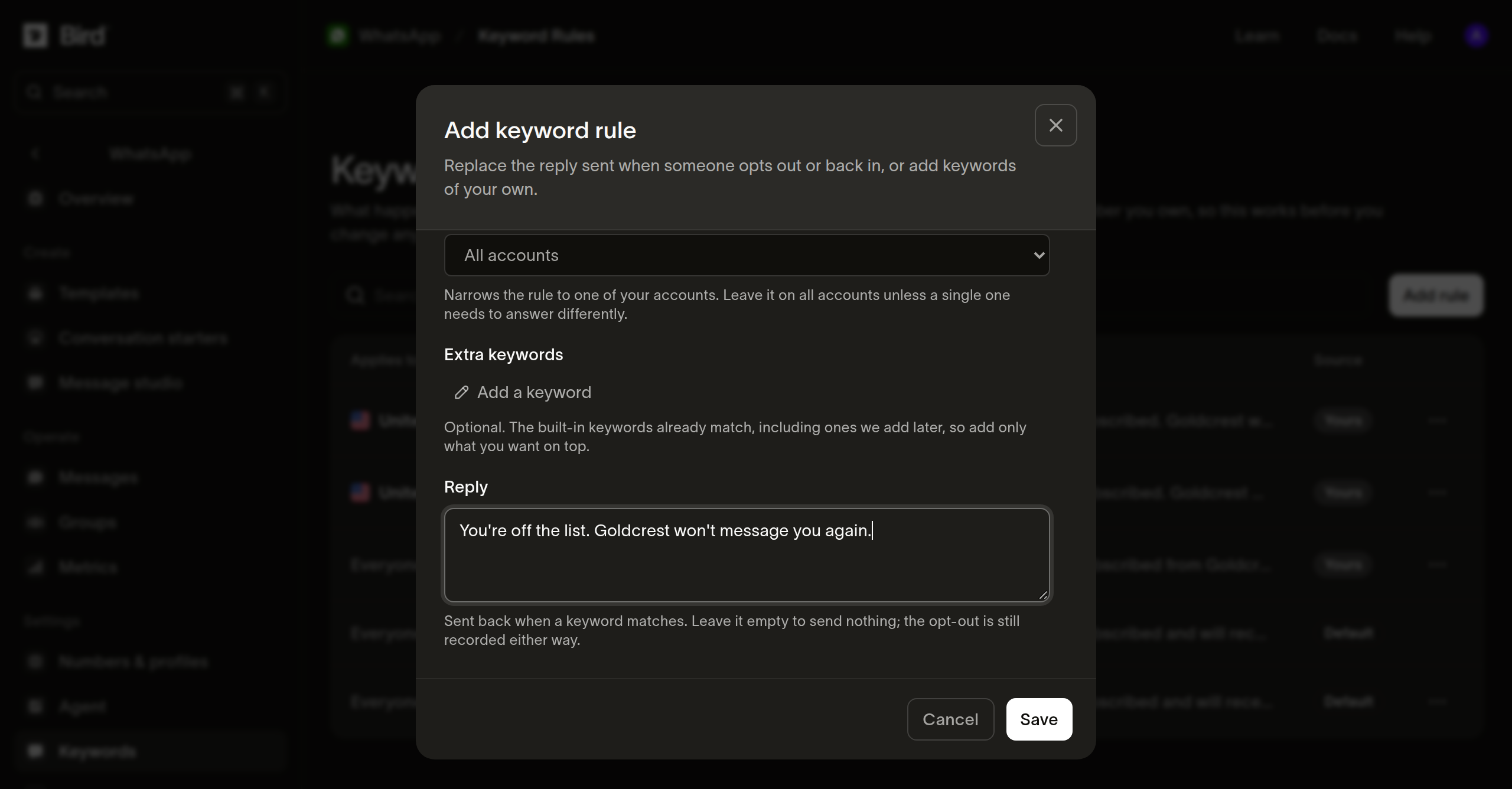
अपने कीवर्ड जोड़ना
// Omitting keywords leaves the set alone; an empty array clears your additions
// back to Bird's. reply: null switches the auto-reply off and still records
// the opt-out.
const rule = await bird.whatsapp.keywordRules.update("wkr_01m2kj8x4te9p0rr7e5w2n1abc", {
  keywords: ["no more texts", "remove me"],
});
console.log(rule.effective_keywords);
# Omitting keywords leaves the set alone; an empty list clears your additions
# back to Bird's.
rule = client.whatsapp.keyword_rules.update(
"wkr_01m2kj8x4te9p0rr7e5w2n1abc", keywords=["no more texts", "remove me"]
)
print(rule.effective_keywords)// Omitting keywords leaves the set alone; an empty slice clears your
// additions back to Bird's.
rule, err := client.Whatsapp.KeywordRules.Update(context.Background(),
"wkr_01m2kj8x4te9p0rr7e5w2n1abc", bird.WhatsappKeywordRulesUpdateParams{
Keywords: []string{"no more texts", "remove me"},
})
if err != nil {
log.Fatal(err)
}
fmt.Println(rule.EffectiveKeywords)// Omitting keywords leaves the set alone; an empty array clears your additions
// back to Bird's.
$rule = $bird->whatsapp->keywordRules->update(
'wkr_01m2kj8x4te9p0rr7e5w2n1abc',
(new WhatsAppKeywordRuleUpdate())->setKeywords(['no more texts', 'remove me']),
);
echo implode(',', $rule->getEffectiveKeywords() ?? []);bird whatsapp keyword-rules update <id> \
--keywords 'no more texts' \
--reply "You're off the list. ACME Courier won't message you again."curl -X PATCH https://us1.platform.bird.com/v1/whatsapp/keyword-rules/wkr_01m2kj8x4te9p0rr7e5w2n1abc \
-H "Authorization: Bearer $BIRD_API_KEY" \
-H "Content-Type: application/json" \
-d '{"keywords":["no more texts"]}'keywords छोड़ देने पर आपके जोड़े गए कीवर्ड जैसे हैं वैसे रहते हैं। खाली array भेजने पर वे हट जाते हैं और Bird का सेट लागू हो जाता है।
नियम का दायरा और डुप्लिकेट
कोई नियम waba से एक WhatsApp Business Account तक, country से भेजने वाले के एक देश तक, दोनों तक, या किसी तक भी सीमित नहीं हो सकता है। ऑपरेशन, देश और अकाउंट के हर संयोजन के लिए आपका एक ही नियम हो सकता है। उसी संयोजन के लिए दूसरी बार लिखने पर डुप्लिकेट त्रुटि लौटती है।
Bird ऐसे नियम को अस्वीकार करता है जो stop को opt_in से जोड़ता है, चाहे वह शब्द Bird के कैटलॉग से आया हो या आपके किसी अन्य नियम से, ताकि ऑप्ट-आउट वाले शब्द से सहमति न दी जा सके।
नियम हटाना
अपना नियम हटाने पर वह दायरा मिलान क्रम के अगले नियम को मिल जाता है, जो हमेशा आपका नियम नहीं होता। क्रम इस प्रकार है:
- किसी अकाउंट और देश के लिए आपका नियम।
- अकाउंट के लिए आपका नियम।
- देश के लिए आपका नियम।
- भेजने वाले के देश के लिए Bird का नियम।
- आपका विश्वव्यापी नियम।
- Bird का विश्वव्यापी नियम।
इसलिए किसी देश के लिए अपना नियम हटाने पर वह दायरा आपके अपने विश्वव्यापी नियम से पहले उस देश के लिए Bird के नियम को मिलता है:
// The next rule in the ladder answers the scope, which is another rule of yours if you hold a less specific one; STOP never stops working.
await bird.whatsapp.keywordRules.delete("wkr_01m2kj8x4te9p0rr7e5w2n1abc");
# The next rule in the ladder answers the scope, which is another rule of yours if you hold a less specific one; STOP never stops working.
client.whatsapp.keyword_rules.delete("wkr_01m2kj8x4te9p0rr7e5w2n1abc")if err := client.Whatsapp.KeywordRules.Delete(context.Background(),
"wkr_01m2kj8x4te9p0rr7e5w2n1abc"); err != nil {
log.Fatal(err)
}// The next rule in the ladder answers the scope, which is another rule of yours if you hold a less specific one; STOP never stops working.
$bird->whatsapp->keywordRules->delete('wkr_01m2kj8x4te9p0rr7e5w2n1abc');bird whatsapp keyword-rules delete <id> --yescurl -X DELETE https://us1.platform.bird.com/v1/whatsapp/keyword-rules/wkr_01m2kj8x4te9p0rr7e5w2n1abc \
-H "Authorization: Bearer $BIRD_API_KEY"नियम हटाने से STOP काम करना बंद नहीं करता। इससे शब्द और कीवर्ड सेट उस क्रम में अगले नियम के अनुसार हो जाते हैं।
अगले कदम
- प्राथमिकताएँ: कीवर्ड से बनने वाले रिकॉर्ड, और उनमें से किन्हें आप पलट सकते हैं।
- सप्रेशन: वे पते जिन्हें आपका वर्कस्पेस सीधे ब्लॉक करता है।
संबंधित संसाधन
इस विषय के लिए दस्तावेज़, गाइड और उदाहरणों के साथ आगे बढ़ें।