ऑथेंटिकेशन और API कुंजियाँ
वर्कस्पेस की API कुंजियाँ बेयरर टोकन के रूप में Bird API को भेजे गए अनुरोधों को ऑथेंटिकेट करती हैं। ये किसी वर्कस्पेस की होती हैं, इनकी अनुमतियाँ आप बदल सकते हैं, और ये पूरी केवल एक बार दिखाई जाती हैं।
सर्विस क्रेडेंशियल और डेलीगेटेड एक्सेस के बीच का अंतर जानने के लिए API कुंजियाँ और OAuth टोकन देखें।
अनुरोध कैसे ऑथेंटिकेट होते हैं
हर अनुरोध में अपनी कुंजी Authorization हेडर में भेजें। SDK और CLI कुंजी एक बार लेते हैं और हेडर आपके लिए सेट कर देते हैं:
import { BirdClient } from "@messagebird/sdk";

const bird = new BirdClient({ apiKey: process.env.BIRD_API_KEY! });

await bird.email.send({
  from: "hello@yourdomain.com",
  to: ["delivered@messagebird.dev"],
  subject: "Hi",
  text: "Hello.",
});
import os
from bird import Bird
client = Bird(api_key=os.environ["BIRD_API_KEY"])
client.email.send(
from_="hello@yourdomain.com",
to=["delivered@messagebird.dev"],
subject="Hi",
text="Hello.",
)client, err := bird.NewClient(option.WithAPIKey(os.Getenv("BIRD_API_KEY")))
if err != nil {
log.Fatal(err)
}
_, err = client.Email.Send(context.Background(), bird.EmailSendParams{
From: "hello@yourdomain.com",
To: []string{"delivered@messagebird.dev"},
Subject: "Hi",
Text: "Hello.",
})use MessageBird\Bird;
$bird = new Bird(getenv('BIRD_API_KEY') ?: '');
$bird->email->send(
from: 'hello@yourdomain.com',
to: ['delivered@messagebird.dev'],
subject: 'Hi',
text: 'Hello.',
);export BIRD_API_KEY="bk_us1_..."
bird email send \
--from hello@yourdomain.com \
--to delivered@messagebird.dev \
--subject Hi \
--text Hello.curl -X POST https://us1.platform.bird.com/v1/email/messages \
-H "Authorization: Bearer $BIRD_API_KEY" \
-H "Content-Type: application/json" \
-d '{ "from": "hello@yourdomain.com", "to": ["delivered@messagebird.dev"], "subject": "Hi", "text": "Hello." }'कुंजी के प्रीफ़िक्स में मौजूद रीजन बताता है कि किस होस्ट को कॉल करना है: bk_us1_... कुंजियाँ https://us1.platform.bird.com पर जाती हैं, और bk_eu1_... कुंजियाँ https://eu1.platform.bird.com पर। आधिकारिक Bird SDK और CLI कुंजी से रीजन पढ़कर आपके लिए होस्ट चुन लेते हैं। गलत रीजनल होस्ट पर भेजी गई कुंजी 421 (टाइप misdirected_error) लौटाती है; रीजन देखें।
कुंजी न होने या अमान्य होने पर 401 मिलता है। अगर मान्य कुंजी के पास वह अनुमति नहीं है जो किसी एंडपॉइंट के लिए ज़रूरी है, तो 403 मिलता है। हेडर का अर्थ और त्रुटि प्रतिक्रियाएँ ऑथेंटिकेशन संदर्भ में दी गई हैं।
कुंजी की संरचना
bk_us1_Ab3xKq9mP2wR5tY8uI1oL4n3A3aww
└┬┘└┬┘ └──────────┬──────────┘└─┬──┘
 │  │          payload      checksum
 │  └ region (routes the request)
└ Bird key prefix- प्रीफ़िक्स:
bk_{region}_क्रेडेंशियल का प्रकार और उसका रीजन बताता है। इस तय और अलग पहचान वाले प्रीफ़िक्स की वजह से सीक्रेट स्कैनर कोड में Bird कुंजी को पहचान पाते हैं, और रीजन वाला हिस्सा आपके अनुरोध को सही होस्ट पर भेजता है। - पेलोड: 23 रैंडम अक्षर, जिनमें 136 बिट एन्ट्रॉपी होती है।
- चेकसम: अंतिम 6 अक्षर कुंजी के बाकी हिस्से का चेकसम होते हैं, इसलिए कोई SDK या API गलत टाइप की गई या अधूरी कुंजी को खोजे जाने से पहले ही तुरंत अस्वीकार कर सकता है।
पूरी कुंजी एक बार लौटाई जाती है, उसी प्रतिक्रिया में जो उसे बनाती है। आप बाद में प्लेनटेक्स्ट प्राप्त नहीं कर सकते। बाद की प्रतिक्रियाओं में पहले 15 अक्षर key_prefix के रूप में शामिल होते हैं, उदाहरण के लिए bk_us1_Ab3xKq9m। इनमें एक स्थिर 12-अक्षर का fingerprint भी होता है, जिससे आप कुंजी का मान उजागर किए बिना लॉग और सपोर्ट बातचीत में उसका मिलान कर सकते हैं।
अगर आपकी कुंजी खो जाए, तो नए सीक्रेट के लिए उसे रोटेट करें, या उसे रद्द करें और नई कुंजी बनाएँ।
कुंजी बनाना
डैशबोर्ड में Platform tools > API कुंजियाँ के अंतर्गत कुंजियाँ बनाएँ। कुंजी एक नाम, एक या अधिक स्कोप और वैकल्पिक समाप्ति के साथ बनाई जाती है। केवल उसे बनाने वाली प्रतिक्रिया में ही token फ़ील्ड (पूरी कुंजी) होता है: उसे तुरंत अपने सीक्रेट मैनेजर में सहेजें।
आप ब्राउज़र के बिना भी bird api-keys create से कुंजी बना सकते हैं। कुंजी जारी करने के लिए api_keys:write स्कोप चाहिए, जो केवल-पढ़ने वाले डिफ़ॉल्ट लॉगिन में शामिल नहीं होता, इसलिए साइन इन करते समय इसका अनुरोध करें:
bird auth login --scope api_keys:write
bird api-keys create --body-file - <<'JSON'
{
  "name": "Email operations production key",
  "scopes": [{ "scope": "emails", "level": "write" }]
}
JSON
संपादित करने के लिए पूरी बॉडी प्रिंट करने हेतु bird api-keys create --example चलाएँ।
स्कोप ही वह चीज़ है जो कोई कुंजी खुद को नहीं दे सकती: api_keys:write API कुंजियों के लिए उपलब्ध नहीं है, इसलिए कोई कुंजी कभी दूसरी कुंजी जारी नहीं कर सकती। कुंजी जारी करना आपकी पहचान से चलता है, डैशबोर्ड सत्र पर या CLI या MCP अनुमति पर।
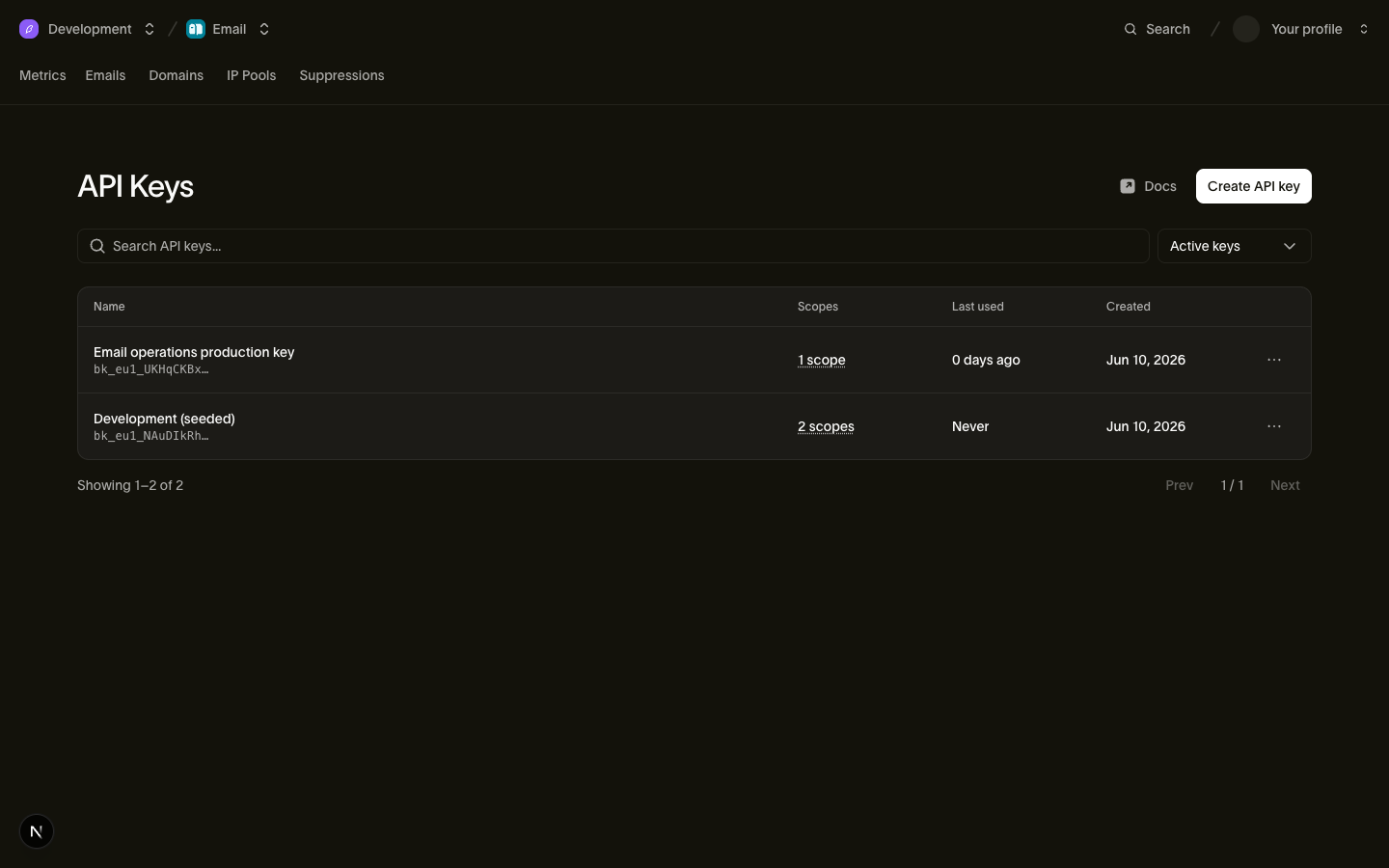
कुंजी बनाने के बाद आप उसे प्रबंधित कर सकते हैं:
- स्कोप संपादित किए जा सकते हैं। संपादन अनुमतियों के सेट को बदल देता है और सीक्रेट वही रहता है। आप वे स्कोप दे सकते हैं जो आपके अपने खाते के पास हैं। अगर कुंजी
voiceजैसी किसी अनुमति के समर्थन से पहले बनाई गई थी, तो वह अनुमति जोड़ने के लिए उसे रोटेट करें। रद्द की गई कुंजियाँ और रोटेशन से बदली जा चुकी कुंजियाँ संपादित नहीं की जा सकतीं। - समाप्ति तय रहती है। जब किसी कुंजी को किसी ज्ञात समय पर काम करना बंद करना हो (किसी कॉन्ट्रैक्टर का अनुबंध, माइग्रेशन की अवधि), तब
expires_atसेट करें। उस समय के बाद कुंजी401लौटाती है; बिना समाप्ति वाली कुंजी रद्द होने तक काम करती रहती है। - कुंजी प्रबंधन लोगों के हाथ में रहता है। कुंजियाँ बनाने, संपादित करने और रद्द करने के लिए
api_keys:writeअनुमति चाहिए। यह अनुमति वर्कस्पेस के एडमिन और डेवलपर रोल के पास होती है (देखें उपयोगकर्ता, टीमें और रोल), और इसे किसी API कुंजी को कभी नहीं दिया जा सकता। लीक हुई कुंजी नई कुंजियाँ नहीं बना सकती।
API कुंजियाँ पेज हर कुंजी को उसके key_prefix, स्कोप और last_used_on तारीख (दिन तक सटीक) के साथ दिखाता है, ताकि आप पुरानी, अप्रयुक्त कुंजियाँ एक नज़र में पहचान सकें। रद्द की गई कुंजियाँ सूची में तभी दिखती हैं जब आप उन्हें दिखाना चुनें।
स्कोप और स्तर
किसी कुंजी का हर स्कोप एक {scope, level} जोड़ी है, जिसमें level या तो read होता है या write (write में read शामिल है)। API कुंजियों के पास ये स्कोप हो सकते हैं:
| स्कोप | read | write |
|---|---|---|
emails | भेजे गए संदेश और डिलीवरी स्थिति पढ़ना | ईमेल भेजना |
email_management | सप्रेशन, ईमेल कॉन्फ़िगरेशन और टेम्पलेट पढ़ना | सप्रेशन, ईमेल कॉन्फ़िगरेशन और टेम्पलेट प्रबंधित करना |
email_marketing | संपर्क, ऑडियंस और ब्रॉडकास्ट पढ़ना | संपर्क, ऑडियंस और ब्रॉडकास्ट प्रबंधित करना |
domains | भेजने वाले डोमेन और उनके DNS रिकॉर्ड पढ़ना | भेजने वाले डोमेन जोड़ना, सत्यापित करना और प्रबंधित करना |
sms | भेजे गए SMS और डिलीवरी स्थिति पढ़ना | SMS भेजना |
sms_management | सेंडर, पंजीकरण, सप्रेशन, कीवर्ड जवाब, गंतव्य और टेम्पलेट पढ़ना | सेंडर, पंजीकरण, सप्रेशन, कीवर्ड जवाब, गंतव्य और टेम्पलेट प्रबंधित करना |
whatsapp | भेजे गए WhatsApp संदेश और उनकी स्थिति पढ़ना | WhatsApp संदेश भेजना |
whatsapp_management | WhatsApp टेम्पलेट और सेटिंग्स पढ़ना | WhatsApp टेम्पलेट और सेटिंग्स प्रबंधित करना |
verify | सत्यापन की स्थिति पढ़ना | सत्यापन कोड भेजना और जाँचना |
realtime | Realtime ऐप, चैनल और चैनल सदस्य पढ़ें | ऐप बनाना और इवेंट प्रकाशित करना |
voice | लेग लॉग और कॉल आँकड़े पढ़ना | SIP कॉल ऑथेंटिकेट करना और सेशन क्रेडेंशियल बनाना |
voice_management | ट्रंक, गेटवे, नंबर, कॉलर ID और गंतव्य पढ़ना | ट्रंक, गेटवे, नंबर, कॉलर ID और गंतव्य प्रबंधित करना |
mailbox | मेलबॉक्स, थ्रेड और संदेश पढ़ना | मेलबॉक्स संदेश भेजना और उनका जवाब देना |
mailbox_management | रिसीव नियम और मेलबॉक्स कॉन्फ़िगरेशन पढ़ना | मेलबॉक्स और रिसीव नियम बनाना, अपडेट करना और हटाना |
assets | एसेट और फ़ोल्डर पढ़ना | एसेट और फ़ोल्डर अपलोड करना, अपडेट करना और हटाना |
compliance | अनुपालन आवश्यकताएँ, सबमिशन, अटैचमेंट और व्यावसायिक पहचान पढ़ना | पंजीकरण के कागज़ात दाखिल करना और सुधारना, तथा अटैचमेंट अपलोड करना और हटाना |
workspace | वर्कस्पेस का नाम, संगठन ID और सेटिंग्स पढ़ना | उपलब्ध नहीं |
webhooks | वेबहुक सब्सक्रिप्शन और उनके डिलीवरी प्रयास पढ़ना | वेबहुक बनाना, अपडेट करना, हटाना, टेस्ट करना, रीप्ले करना और उसका सीक्रेट रोटेट करना |
lookup | उपलब्ध नहीं | फ़ोन नंबर, ईमेल पते और पहचान मिलान खोजें |
वर्कस्पेस सेटिंग्स बदलना, सदस्यों को प्रबंधित करना, कुंजियाँ जारी करना और IP पूल प्रबंधित करना जानबूझकर API कुंजियों को नहीं दिया जा सकता, इसलिए ये काम कुंजी के बजाय किसी व्यक्ति के रूप में चलते हैं: डैशबोर्ड से, या ऐसे ग्रांट पर CLI या MCP सर्वर से जिसके पास वह स्कोप हो। उतना ही सबसे सीमित सेट दें जितने से काम चले: जो कुंजी केवल ईमेल भेजती है, उसके पास सिर्फ़ emails:write होना चाहिए और कुछ नहीं।
lookup में पढ़ने के स्तर का कोई ऑपरेशन नहीं है: हर लुकअप एंडपॉइंट के लिए, किसी मौजूदा परिणाम को प्राप्त करने के लिए भी, write ज़रूरी है।
कुंजी रद्द करना
Platform tools > API keys में कुंजी की पंक्ति से उसे रद्द करें। रद्द करना स्थायी है: रद्द की गई कुंजी दोबारा सक्रिय नहीं की जा सकती, और उसका रिकॉर्ड ऑडिट के लिए revoked_at सेट करके सुरक्षित रखा जाता है।
रद्द करना आमतौर पर लगभग तुरंत लागू हो जाता है, हालाँकि थोड़ी देरी संभव है। लागू होने के बाद, उस कुंजी वाले अनुरोध 401 लौटाते हैं।
कुंजी रोटेट करना
रोटेट करने से आपकी मौजूदा कुंजी की जगह एक नई कुंजी जारी होती है, और उसका token केवल एक बार, उसी प्रतिक्रिया में लौटाया जाता है। नई कुंजी में स्रोत कुंजी का नाम, स्कोप और स्रोत IP प्रतिबंध रहते हैं। उसकी कोई समाप्ति नहीं होती। Platform tools > API keys में कुंजी की पंक्ति से उसे रोटेट करें, या ब्राउज़र के बिना bird api-keys rotate और api_keys_rotate MCP टूल से:
bird auth login --scope api_keys:write
bird api-keys rotate key_01hqz8kp3v9x2m --yes
पिछली कुंजी एक ग्रेस अवधि तक काम करती रहती है, जो डिफ़ॉल्ट रूप से 24 घंटे है, ताकि पुरानी कुंजी बंद होने से पहले आप नया टोकन डिप्लॉय कर सकें। अगर कुंजी उजागर हो गई है, तो उसे बिना ग्रेस अवधि के रद्द करने के लिए grace_period: 0 (CLI पर --grace-period 0) दें। जिस कुंजी की समाप्ति ग्रेस अवधि से पहले तय है, उसकी अपनी समाप्ति बनी रहती है, क्योंकि रोटेट करने से कुंजी की अवधि कभी नहीं बढ़ती।
कुंजी रोटेशन को स्वचालित करने से पहले दो सीमाएँ जान लें। रोटेशन में समाप्ति कभी आगे नहीं जाती, इसलिए तय समय पर समाप्त होने वाली कुंजी की नई कुंजी रद्द होने तक चलती है; जब समाप्ति ज़रूरी हो, तो create के साथ दोबारा जारी करें। साथ ही, कोई कुंजी केवल एक बार रोटेट की जा सकती है: उसी कुंजी का दूसरा रोटेशन 409 लौटाता है, इसलिए Idempotency-Key भेजें, ताकि फिर से प्रयास करने पर मूल प्रतिक्रिया दोबारा मिले। इसके बिना, जिस रोटेशन का जवाब आपको नहीं मिला, उसने एक सक्रिय कुंजी बना दी होगी जिसका टोकन आप दोबारा नहीं पढ़ सकते।
जब आप अनुमान नहीं लगा सकते कि बदलाव में कितना समय लगेगा, तब दो कुंजियों को हाथ से साथ-साथ चलाना अधिक सुरक्षित तरीका है, क्योंकि ग्रेस अवधि रोटेट करते समय तय हो जाती है और बाद में बढ़ाई नहीं जा सकती:
- उन्हीं स्कोप के साथ एक नई कुंजी बनाएँ।
- नई कुंजी को अपनी सेवाओं में डिप्लॉय करें।
- ट्रैफ़िक के नई कुंजी पर आ जाने तक पुरानी कुंजी का
last_used_onदेखते रहें। - पुरानी कुंजी रद्द करें।
कुंजियाँ वर्कस्पेस की होती हैं
API कुंजी आपके वर्कस्पेस से बंधी होती है और उसी वर्कस्पेस के अधिकार से ऑथेंटिकेट करती है। बनाने वाले व्यक्ति की निजी अनुमतियों का उस पर कोई असर नहीं पड़ता। इसके दो व्यावहारिक परिणाम हैं:
- कर्मचारियों के जाने के बाद भी कुंजियाँ बनी रहती हैं। जब कोई कर्मचारी कंपनी छोड़ता है और उसका यूज़र अकाउंट हटा दिया जाता है, तब भी उसकी बनाई कुंजियाँ काम करती रहती हैं। "create" पर क्लिक करने वाले व्यक्ति के कंपनी छोड़ने से आपका प्रोडक्शन कभी बंद नहीं होता। (फिर भी उसका जाना उन कुंजियों को रोटेट करने का अच्छा मौका है जिन तक उसकी पहुँच थी।)
- कुंजी की पहुँच वर्कस्पेस तक सीमित रहती है। यह संगठन स्तर के ऑपरेशन कभी नहीं कर सकती: बिलिंग, संगठन के सदस्य और संगठन की सेटिंग।
कुंजी वर्कस्पेस तय कर देती है, इसलिए कुंजी वाले अनुरोधों को किसी अतिरिक्त संदर्भ की ज़रूरत नहीं होती। वर्कस्पेस और उसके ऊपर का संगठन आपकी पहुँच को कैसे बाँटते हैं, यह जानने के लिए वर्कस्पेस देखें।
डेलीगेटेड तरीका: CLI और MCP सर्वर के लिए OAuth टोकन
API कुंजियाँ सेवाओं के लिए हैं। जब कोई व्यक्ति साइन इन करता है, तो Bird CLI और Bird MCP सर्वर OAuth का उपयोग करते हैं। आप ब्राउज़र से लॉग इन करते हैं, एक वर्कस्पेस चुनते हैं और अपनी अनुमतियों का एक हिस्सा प्रदान करते हैं। इसके बाद टूल को कम अवधि वाला bt_{region}_... यूज़र टोकन मिलता है।
हर टोकन केवल उन्हीं अनुमतियों तक सीमित होता है जो आपके पास हैं। आप Profile > Connected apps में हर टूल की पहुँच रद्द कर सकते हैं। ये टोकन टूल खुद संभालते हैं, इसलिए इन्हें कॉपी न करें और न ही किसी सीक्रेट मैनेजर में रखें। सर्वर वर्कलोड के लिए API कुंजियों का उपयोग करें।
अगले कदम
- ऑथेंटिकेशन संदर्भ: अनुरोध हेडर का अर्थ और त्रुटि प्रतिक्रियाएँ
- रीजन: रीजनल होस्ट और रूटिंग
- उपयोगकर्ता, टीमें और रोल: कुंजियाँ कौन प्रबंधित कर सकता है
- वर्कस्पेस: वह वर्कस्पेस जिससे कुंजी जुड़ी होती है
एक ही संगठन में कई वर्कस्पेस प्रबंधित करने वाले इंटीग्रेशन के लिए संगठन मास्टर कुंजियाँ देखें। यह सुविधा अनुरोध पर उपलब्ध है। इसे अपने संगठन के लिए चालू करवाने हेतु अपने Bird प्रतिनिधि से संपर्क करें।