अपनी पहली Apple Messages बातचीत का जवाब दें
किसी टेस्ट Apple डिवाइस से अपने बिज़नेस को एक संदेश भेजें, फिर Bird डैशबोर्ड से जवाब दें। यह क्विकस्टार्ट डैशबोर्ड का उपयोग करता है; डेवलपर API जवाब गाइड का पालन कर सकते हैं।
सेवा की योजना से लेकर लॉन्च तक की पूरी प्रक्रिया के लिए ऑनबोर्डिंग गाइड देखें।
शुरू करने से पहले
आपको इनकी ज़रूरत है:
- एक Bird वर्कस्पेस, जिसमें Apple Messages पढ़ने और जवाब भेजने की अनुमति हो।
- एक कनेक्ट किया गया बिज़नेस। Draft स्थिति वाला बिज़नेस स्वीकृति से पहले टेस्ट संदेश भेज सकता है। अगर आपने इसे कनेक्ट नहीं किया है, तो रजिस्ट्रेशन के चरणों का पालन करें।
- जब तक आपका Apple खाता टेस्टिंग में है, तब तक किसी अधिकृत टेस्टर खाते से साइन इन किया हुआ Apple डिवाइस। उपयोग करने से पहले टेस्टर को Apple Business Register में सबमिट करें।
इससे कनेक्ट किए गए चैनल के ज़रिए एक असली संदेश जाता है और शुल्क लग सकता है। ऐसी बातचीत का उपयोग करें जिसे टेस्ट करने के लिए आप अधिकृत हैं।
1. ग्राहक बातचीत शुरू करें
Apple Messages > Businesses खोलें और अपना बिज़नेस चुनें। उसकी Apple Business ID कॉपी करें। यह Apple का UUID है, Bird के बिज़नेस-रिकॉर्ड की ID नहीं।
टेस्ट डिवाइस पर नीचे दिया गया पता खोलें, और उसमें APPLE_BUSINESS_ID की जगह वह UUID डालें:
https://bcrw.apple.com/urn:biz:APPLE_BUSINESS_IDMessages में आपके बिज़नेस की बातचीत खुलती है। कोई छोटा अनुरोध लिखें, जैसे मैं स्टोर विज़िट तय करना चाहता हूँ, और उसे भेजें। केवल लिंक खोलने से ग्राहक का कोई मैसेज नहीं भेजा जाता।
2. Bird में मैसेज ढूँढें
उसी वर्कस्पेस में Apple Messages > Conversations खोलें। अपने बिज़नेस के हिसाब से फ़िल्टर करें और नई बातचीत खोलें। पुष्टि करें कि ट्रांसक्रिप्ट में आपका भेजा गया अनुरोध है और बातचीत की स्थिति Open है।
अगर बातचीत नहीं दिखती, तो बाकी फ़िल्टर हटाएँ और पेज रीफ़्रेश करें। अगर वह फिर भी नहीं दिखती, तो गायब बातचीत की जाँच देखें।
3. ग्राहक को जवाब दें
Reply to the customer में कोई छोटा जवाब लिखें, जैसे हम आपकी विज़िट तय करने में मदद कर सकते हैं। आपके लिए कौन-सा दिन ठीक रहेगा? फिर Send reply चुनें।
Bird पुष्टि करता है कि जवाब स्वीकार कर लिया गया है और उसे बातचीत में जोड़ देता है। अगर कंपोज़र उपलब्ध नहीं है, तो आगे बढ़ने से पहले बिज़नेस की मंज़ूरी, बातचीत की स्थिति और अपनी भेजने की अनुमति जाँचें।
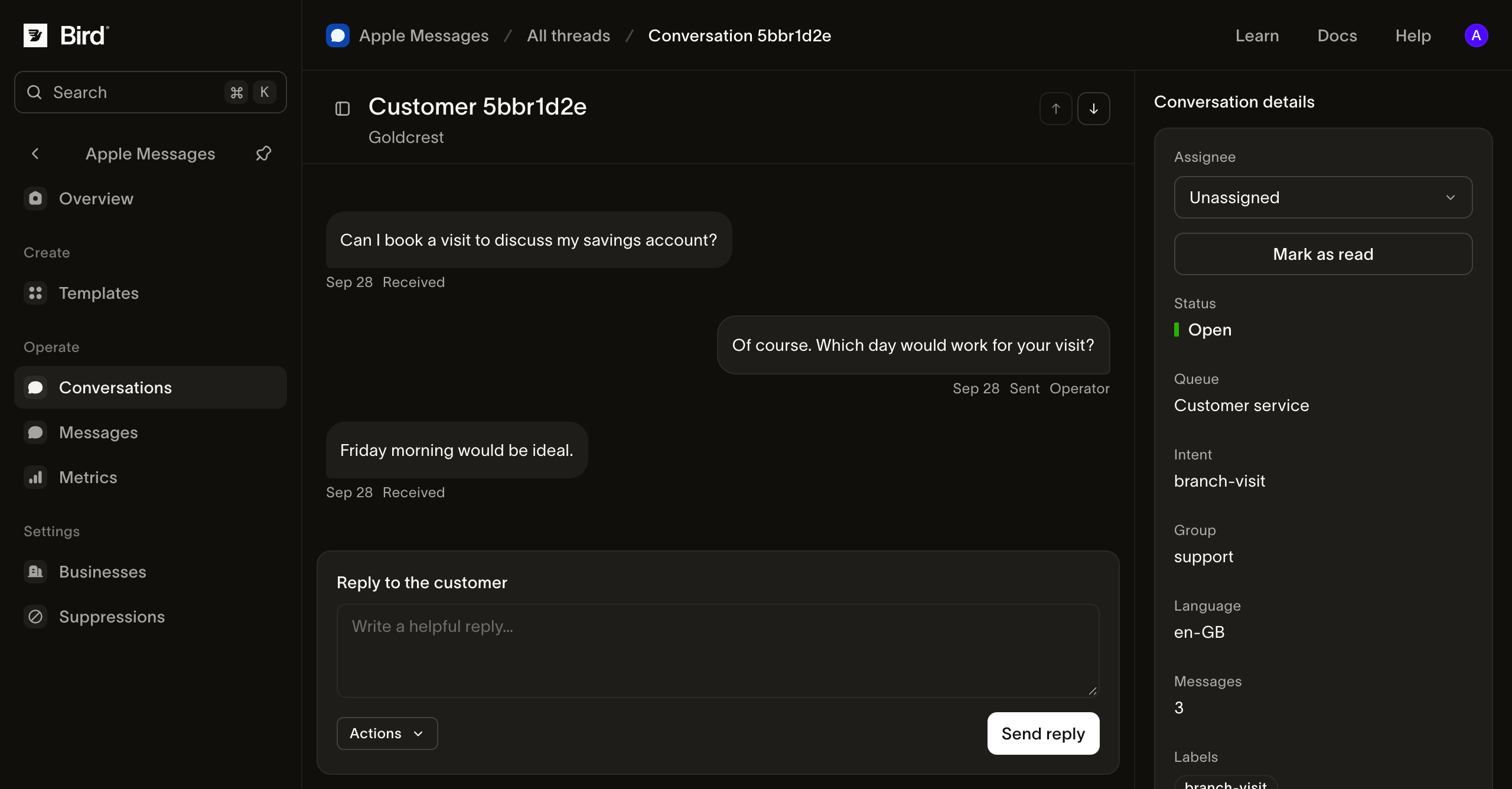
स्क्रीनशॉट पूरे आकार में देखें।
4. नतीजा जाँचें
Apple Messages > Messages खोलें और अपना जवाब चुनें। संदेश इतिहास गाइड की मदद से उसकी स्थिति और इवेंट इतिहास देखें।
Sent का अर्थ है कि Apple के गेटवे ने संदेश स्वीकार कर लिया है। आपका जवाब सही ढंग से दिखा या नहीं, यह पुष्टि करने के लिए टेस्ट डिवाइस को अलग से जाँचें। Bird Apple की ओर से डिलीवरी या पढ़े जाने की रसीद नहीं देता।
टेस्ट डिवाइस से फिर से जवाब दें। आने वाला संदेश उसी Bird बातचीत में दिखना चाहिए। अब आपने बातचीत की दोनों दिशाएँ जाँच ली हैं।
अगले कदम
- अपनी सेवा टीम के साथ बातचीत प्रबंधित करें।
- नेटिव विकल्पों या मीडिया के साथ सहेजा गया टेम्पलेट भेजें।
- लॉन्च की मंज़ूरी मिलने के बाद एंट्री पॉइंट जोड़ें।