WhatsApp सप्रेशन
सप्रेशन ऐसा पता है जिसे आपका वर्कस्पेस संदेश नहीं भेजेगा, और यह एक दायरे के साथ दर्ज होता है। Bird सप्रेस किए गए पते पर भेजे गए संदेश को WhatsApp तक पहुँचने से पहले ही रोक देता है।
सूची पर काम करने के लिए Suppressions पेज खोलें, या नीचे दिया गया API इस्तेमाल करें। प्राप्तकर्ताओं द्वारा बताए गए रिकॉर्ड इसी पेज के Preferences टैब पर रहते हैं और अलग नियमों का पालन करते हैं।
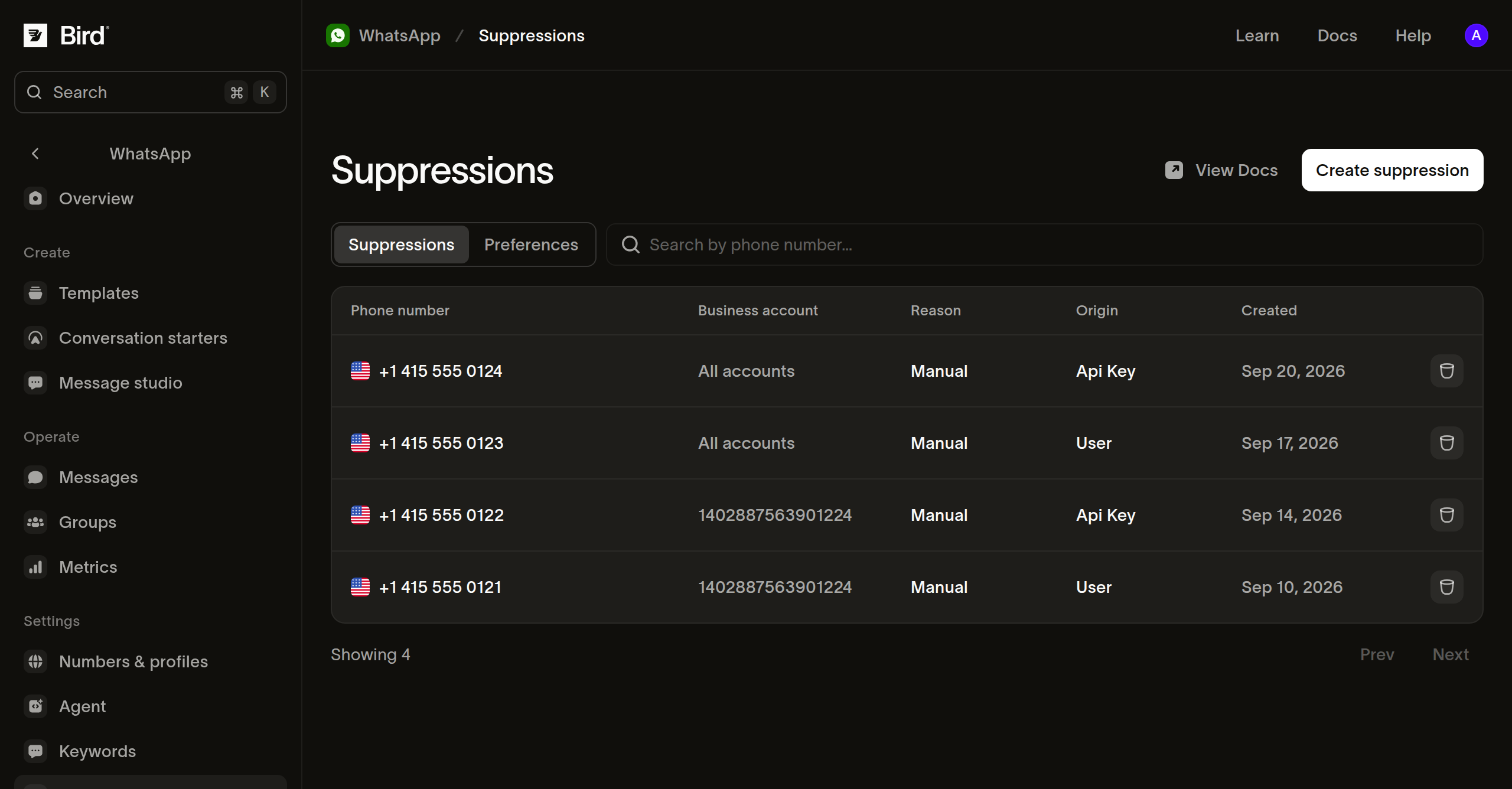
किसी बिज़नेस खाते के लिए सप्रेशन
Suppressions टैब से किसी फ़ोन नंबर के लिए सप्रेशन बनाएँ और वह बिज़नेस खाता चुनें जिस पर यह लागू होगा। Bird उस खाते से भेजे गए संदेशों को रोकता है, जबकि आपके दूसरे खाते उस नंबर को संदेश भेज सकते हैं। सूची का Business account कॉलम वह खाता दिखाता है जिस तक सप्रेशन का दायरा सीमित है, और पूरे वर्कस्पेस पर लागू सप्रेशन के लिए All accounts दिखाता है।
POST /v1/whatsapp/suppressions कोड से यही रिकॉर्ड दर्ज करता है। waba वह खाता है जिस तक दायरा सीमित करना है। इसे छोड़ देने पर पता आपके पूरे वर्कस्पेस के लिए ब्लॉक हो जाता है, जिसमें बाद में जोड़े जाने वाले खाते भी शामिल हैं:
// Omit waba to block the address for the whole workspace, whichever account
// sends. With it, your other accounts keep reaching them, and the same
// address for two accounts is two records.
const suppression = await bird.whatsapp.suppressions.add({
  address: "+15550001234",
  waba: "102290129340398",
});
console.log(suppression.id, suppression.applies_to);
# Omit waba to block the address for the whole workspace, whichever account
# sends. With it, your other accounts keep reaching them, and the same
# address for two accounts is two records.
suppression = client.whatsapp.suppressions.add(
address="+15550001234",
waba="102290129340398",
)
print(suppression.id, suppression.applies_to)suppression, err := client.Whatsapp.Suppressions.Add(context.Background(), bird.WhatsappSuppressionsAddParams{
Address: "+15550001234",
// Omit Waba to block the address for the whole workspace, whichever account
// sends. With it, your other accounts keep reaching them, and the same
// address for two accounts is two records.
Waba: &waba,
})
if err != nil {
log.Fatal(err)
}
fmt.Println(suppression.Id, suppression.AppliesTo)// Omit setWaba to block the address for the whole workspace, whichever account
// sends. With it, your other accounts keep reaching them, and the same address
// for two accounts is two records.
$suppression = $bird->whatsapp->suppressions->add(
(new WhatsAppSuppressionCreate())
->setAddress('+15550001234')
->setWaba('102290129340398'),
);
echo $suppression->getId(), ' ', $suppression->getAppliesTo();bird whatsapp suppressions add --address +5511977670804curl -X POST https://us1.platform.bird.com/v1/whatsapp/suppressions \
-H "Authorization: Bearer $BIRD_API_KEY" \
-H "Content-Type: application/json" \
-d '{"address":"+15550001234","waba":"102290129340398"}'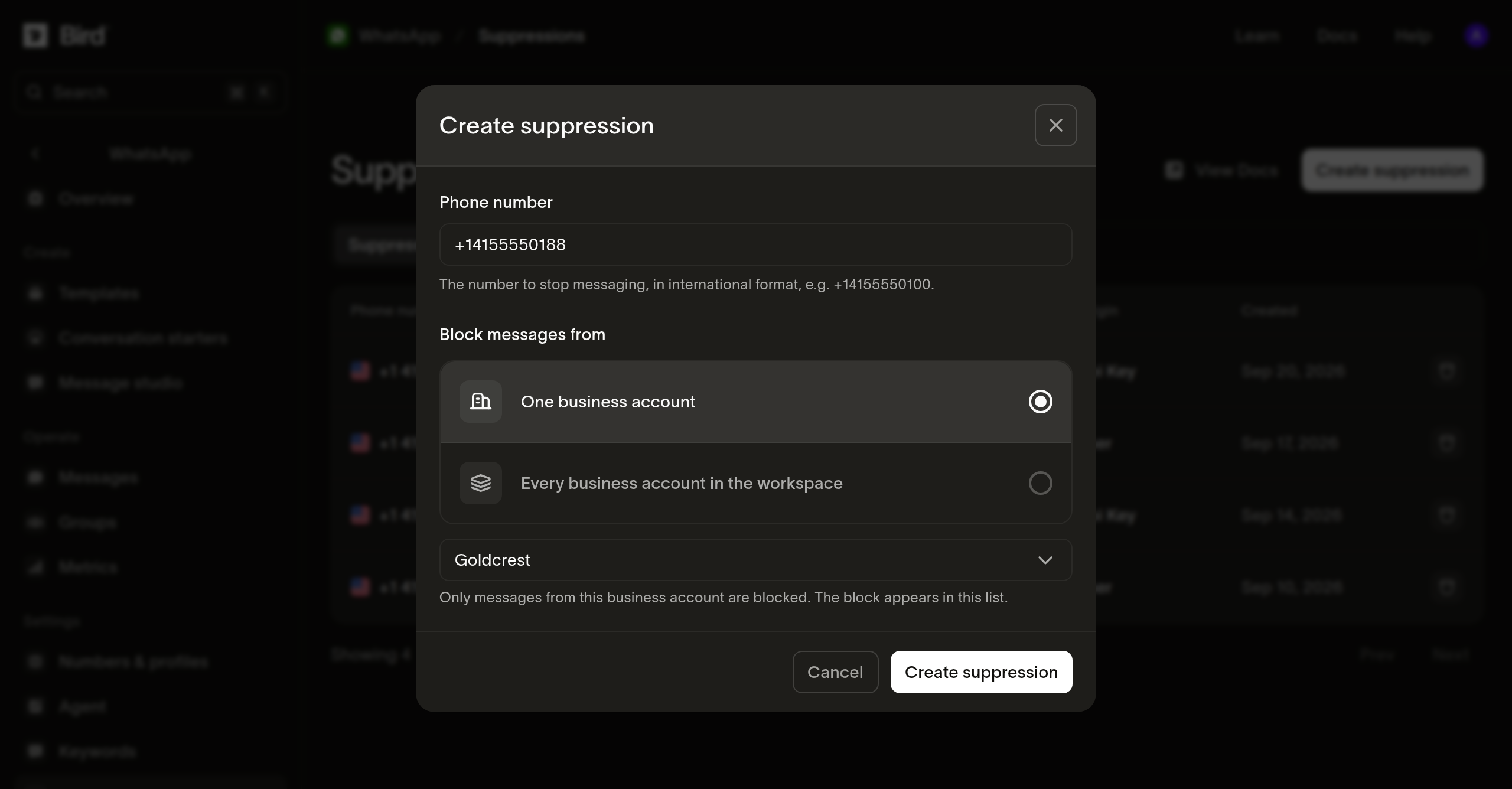
एक दायरा, एक रिकॉर्ड
हर सप्रेशन का एक ही दायरा होता है, इसलिए दो खातों के लिए ब्लॉक किया गया एक ही पता एक नहीं, बल्कि दो रिकॉर्ड होता है। पूरे वर्कस्पेस को शामिल करने के लिए waba के बिना एक कॉल करें।
जिस पते पर उस स्कोप के लिए पहले से सप्रेशन मौजूद है, उसे दोबारा जोड़ने पर दूसरा रिकॉर्ड नहीं बनता, बल्कि मौजूदा रिकॉर्ड के साथ 200 लौटता है। नया रिकॉर्ड बनने पर 201 लौटता है।
सप्रेशन उसी पते पर आधारित होता है जिसे आप रिकॉर्ड करते हैं। फ़ोन नंबर से पहुँचा गया प्राप्तकर्ता और बिज़नेस-स्कोप वाली यूज़र ID से पहुँचा गया वही प्राप्तकर्ता दो अलग कुंजियाँ हैं, इसलिए एक को सप्रेस करने से दूसरा सप्रेस नहीं होता। अगर आप एक ही व्यक्ति को दोनों तरीकों से संदेश भेजते हैं, तो दोनों को रिकॉर्ड करें।
अपनी सप्रेशन सूची पढ़ना
GET /v1/whatsapp/suppressions लागू सप्रेशन को कर्सर पेज के रूप में लौटाता है, सबसे नए पहले। address प्रीफ़िक्स के आधार पर फ़िल्टर करता है और अक्षरों के छोटे-बड़े होने को अनदेखा करता है: आंशिक मान उसके अंतर्गत आने वाले हर पते से मेल खाता है, और पूरा मान केवल उसी पते से मेल खाता है। reason सूची को किसी श्रेणी तक सीमित करता है, जैसे आपके जोड़े गए सप्रेशन के लिए manual:
// address is a prefix, so a partial value matches every address under it.
const suppressions = await bird.whatsapp.suppressions.list({ address: "+1555" });
for (const suppression of suppressions.data ?? []) {
  console.log(suppression.address, suppression.waba ?? "every account");
}
# address is a prefix, so a partial value matches every address under it.
suppressions = client.whatsapp.suppressions.list(address="+1555")
for suppression in suppressions.data or []:
print(suppression.address, suppression.waba or "every account")for suppression, err := range client.Whatsapp.Suppressions.List(context.Background(), bird.WhatsappSuppressionsListParams{
Address: "+1555", // a prefix, so a partial value matches every address under it
}) {
if err != nil {
log.Fatal(err)
}
fmt.Println(suppression.Address, suppression.Reason)
}// address is a prefix, so a partial value matches every address under it.
foreach ($bird->whatsapp->suppressions->list(['address' => '+1555']) as $suppression) {
echo $suppression->getAddress(), ' ', $suppression->getWaba() ?? 'every account', PHP_EOL;
}bird whatsapp suppressions listcurl "https://us1.platform.bird.com/v1/whatsapp/suppressions?address=%2B1555" \
-H "Authorization: Bearer $BIRD_API_KEY"सूची में केवल लागू रिकॉर्ड होते हैं, और समाप्त हो चुके रिकॉर्ड इसमें शामिल नहीं होते। किसी पते का सूची में न होना यह साबित नहीं करता कि वर्कस्पेस ने उसे कभी सप्रेस नहीं किया; हो सकता है उसका रिकॉर्ड समाप्त हो चुका हो। पुष्टि के लिए उसे ID से पढ़ें।
एक रिकॉर्ड पढ़ना
GET /v1/whatsapp/suppressions/{suppression_id} लागू रिकॉर्ड के साथ-साथ समाप्त हो चुके रिकॉर्ड को भी लौटाता है, और बताता है कि वह कब और किस कारण से समाप्त हुआ:
// Resolves a record that has already ended, which the list leaves out.
const suppression = await bird.whatsapp.suppressions.get("was_01krdgeqcxet5s7t44vh8rt9mg");
console.log(suppression.reason, suppression.ended_at ?? "still in force");
# Resolves a record that has already ended, which the list leaves out.
suppression = client.whatsapp.suppressions.get("was_01krdgeqcxet5s7t44vh8rt9mg")
print(suppression.reason, suppression.ended_at or "still in force")suppression, err := client.Whatsapp.Suppressions.Get(context.Background(), "was_01krdgeqcxet5s7t44vh8rt9mg")
if err != nil {
log.Fatal(err)
}
fmt.Println(suppression.Reason, suppression.EndedAt)// Resolves a record that has already ended, which the list leaves out.
$suppression = $bird->whatsapp->suppressions->get('was_01krdgeqcxet5s7t44vh8rt9mg');
echo $suppression->getReason(), ' ', $suppression->getEndedAt()?->format(DATE_ATOM) ?? 'still in force';bird whatsapp suppressions get <suppression-id>curl https://us1.platform.bird.com/v1/whatsapp/suppressions/was_01krdgeqcxet5s7t44vh8rt9mg \
-H "Authorization: Bearer $BIRD_API_KEY"सप्रेशन समाप्त करना
सप्रेशन वाली पंक्ति पर Delete कार्रवाई सप्रेशन को हटाती नहीं, बल्कि समाप्त करती है। ब्लॉक रुक जाता है। रिकॉर्ड पढ़ा जा सकता है और दिखाता है कि वह कब और किसने समाप्त किया। DELETE /v1/whatsapp/suppressions/{suppression_id} भी यही करता है और 204 लौटाता है:
// Only a manual suppression can be ended; a recipient's own opt-out is
// theirs to reverse. The record is kept and still reads back by id.
await bird.whatsapp.suppressions.remove("was_01krdgeqcxet5s7t44vh8rt9mg");
# Only a manual suppression can be ended; a recipient's own opt-out is
# theirs to reverse. The record is kept and still reads back by id.
client.whatsapp.suppressions.remove("was_01krdgeqcxet5s7t44vh8rt9mg")if err := client.Whatsapp.Suppressions.Remove(context.Background(), "was_01krdgeqcxet5s7t44vh8rt9mg"); err != nil {
log.Fatal(err)
}// Only a manual suppression can be ended; a recipient's own opt-out is theirs
// to reverse. The record is kept and still reads back by id.
$bird->whatsapp->suppressions->remove('was_01krdgeqcxet5s7t44vh8rt9mg');bird whatsapp suppressions remove <suppression-id> --yescurl -X DELETE https://us1.platform.bird.com/v1/whatsapp/suppressions/was_01krdgeqcxet5s7t44vh8rt9mg \
-H "Authorization: Bearer $BIRD_API_KEY"आपके द्वारा खुद जोड़े गए सप्रेशन का कारण manual होता है और उसे समाप्त किया जा सकता है। प्राप्तकर्ता का अपना ऑप्ट-आउट केवल वही पलट सकता है, और ऐसा करने का प्रयास 422 लौटाता है। पहले से समाप्त सप्रेशन पर इसे फिर से कॉल करना सफल होता है और कुछ नहीं बदलता, और जो ID वर्कस्पेस में नहीं है उसके लिए 404 लौटता है।
सप्रेशन समाप्त करने के लिए उसकी ID चाहिए, इसलिए पहले सूची में उसे खोजें।
नए सप्रेशन पर नज़र रखना
जब कोई सप्रेशन दर्ज होता है, तब whatsapp_suppression.created फ़ायर होता है, ताकि आपका अपना सिस्टम बार-बार पोल किए बिना नए ब्लॉक देख सके। इसके पेलोड में ये होते हैं:
suppression_id, रिकॉर्ड का पहचानकर्ता।address, E.164 फ़ॉर्मैट में सप्रेस किया गया नंबर।waba, वह अकाउंट जिस तक ब्लॉक सीमित है, या null जब ब्लॉक पूरे वर्कस्पेस पर लागू होता है।reasonऔरworkspace_id।
सप्रेशन खत्म होने पर कोई इवेंट फ़ायर नहीं होता, इसलिए अपने पास रखी कॉपी पर भरोसा करने से पहले सूची फिर से पढ़ें। पूरे पेलोड के लिए WhatsApp सप्रेशन वेबहुक देखें।
अगले कदम
- प्राथमिकताएँ: प्राप्तकर्ताओं द्वारा बताए गए रिकॉर्ड, और उनमें से कौन-से आप पलट सकते हैं।
- मैसेज स्टेटस वेबहुक: ब्लॉक किया गया भेजना जो
whatsapp.rejectedपेलोड बनाता है। - WhatsApp मैसेज भेजना: भेजने का API और उसका एसिंक्रोनस डिलीवरी मॉडल।
संबंधित संसाधन
इस विषय के लिए दस्तावेज़, गाइड और उदाहरणों के साथ आगे बढ़ें।