ईमेल टेम्पलेट
टेम्पलेट एक विषय पंक्ति और ईमेल बॉडी है, जिसे आप एक बार सहेजते हैं और कई बार भेजते हैं। बदलने वाले हिस्सों को आप {{ variable }} प्लेसहोल्डर के रूप में लिखते हैं, टेम्पलेट प्रकाशित करते हैं, और फिर हर API कॉल में वही HTML चिपकाने के बजाय उसे स्लग से भेजते हैं। टेम्पलेट आपके वर्कस्पेस का होता है।
टेम्पलेट Email > Templates में, /v1/email/templates के ज़रिए, bird CLI से, या MCP सर्वर के ज़रिए बनाएँ और प्रबंधित करें। टाइप किए गए मेथड TypeScript, Python, PHP और Go SDK में email.templates के अंतर्गत उपलब्ध हैं। पूरे अनुरोध और प्रतिक्रिया स्कीमा API संदर्भ में हैं। प्रकाशित टेम्पलेट को सामान्य भेजने वाले एंडपॉइंट से भेजें।
टेम्पलेट में क्या होता है
हर टेम्पलेट के दो नाम होते हैं, और दोनों अलग-अलग काम करते हैं:
slugवह नाम है जिससे आप टेम्पलेट भेजते हैं, उदाहरण के लिएwelcome-email। इसे आप टेम्पलेट बनाते समय चुनते हैं, और बाद में इसे बदला नहीं जा सकता। स्लग में छोटे अक्षर, अंक, हाइफ़न और अंडरस्कोर हो सकते हैं। यह किसी अक्षर या अंक से शुरू और खत्म होना चाहिए, और अधिकतम 63 वर्ण लंबा हो सकता है। दो उपसर्ग वर्जित हैं:bird_, जो हमारे बिल्ट-इन टेम्पलेट के लिए आरक्षित है, औरemt_, जो टेम्पलेट ID का फ़ॉर्मैट है। डैशबोर्ड में इस फ़ील्ड को Alias कहा जाता है।nameएक मुक्त-पाठ प्रदर्शन लेबल है। डिफ़ॉल्ट रूप से यह स्लग के बराबर होता है, और आप इसे कभी भी बदल सकते हैं। नाम से कुछ भी रिज़ॉल्व नहीं होता, इसलिए प्रदर्शन के लिए टेम्पलेट का नाम बदलने से कोई भेजना कभी विफल नहीं होता।
इनके अलावा, टेम्पलेट की एक स्थायी emt_ ID होती है, जो उसके पूरे जीवनकाल में नहीं बदलती। इसकी एक category भी होती है, जो marketing या transactional होती है, और एक लेखन source होता है: html, यानी आपका दिया हुआ तैयार मार्कअप, जिसे वैकल्पिक रूप से Liquid से वैयक्तिकृत किया जा सकता है। श्रेणी और स्रोत दोनों टेम्पलेट बनाते समय तय हो जाते हैं।
हम बिल्ट-इन टेम्पलेट का एक कैटलॉग देते हैं, और उन सभी के स्लग bird_ से शुरू होते हैं। बिल्ट-इन टेम्पलेट किसी वर्कस्पेस का नहीं होता, उसे संपादित नहीं किया जा सकता, और उसे हमेशा जैसा है वैसा ही भेजा जा सकता है। उसे अपना बनाने के लिए उसकी कॉपी अपने वर्कस्पेस में बनाएँ। तब वह एक सामान्य टेम्पलेट बन जाता है जिसे आप संपादित कर सकते हैं। कॉपी एक अप्रकाशित ड्राफ़्ट के रूप में आती है, जिसे मूल टेम्पलेट की श्रेणी, स्रोत और भाषा सेटिंग विरासत में मिलती हैं, इसलिए भेजने से पहले उसे प्रकाशित करें।
ड्राफ़्ट और प्रकाशित संस्करण
हर टेम्पलेट में ठीक एक ड्राफ़्ट होता है, जो वह कार्यशील कॉपी है जिसे आप संपादित करते हैं। इसमें कितने भी प्रकाशित संस्करण हो सकते हैं। हर संस्करण क्रमांकित होता है (1, 2, 3 आदि) और बनने के बाद कभी नहीं बदलता। संपादन करने से ड्राफ़्ट उसी जगह बदलता है। प्रकाशित करने पर मौजूदा ड्राफ़्ट का स्नैपशॉट लिया जाता है, उसे अगले क्रमांकित संस्करण में बदला जाता है, और भेजे जाने वाले ईमेल उसी संस्करण का उपयोग करने लगते हैं। ड्राफ़्ट खुद संपादन योग्य रहता है, इसलिए आप अगले संस्करण पर काम जारी रख सकते हैं।
भेजने के लिए अहम नियम यह है: हर भेजना हमेशा टेम्पलेट के प्रकाशित संस्करण का उपयोग करता है, और ड्राफ़्ट अपने आप कभी नहीं भेजा जाता। जब तक एक स्थिर संस्करण भेजा जा रहा है, आप ड्राफ़्ट संपादित करते रह सकते हैं और बदलाव तैयार होने पर उसे प्रकाशित कर सकते हैं। नया संस्करण प्रकाशित करने से बाद में भेजे जाने वाले ईमेल की सामग्री बदलती है। जो भेजना पहले ही स्वीकार हो चुका है, उस पर बाद में हुए प्रकाशन का कोई असर नहीं पड़ता।
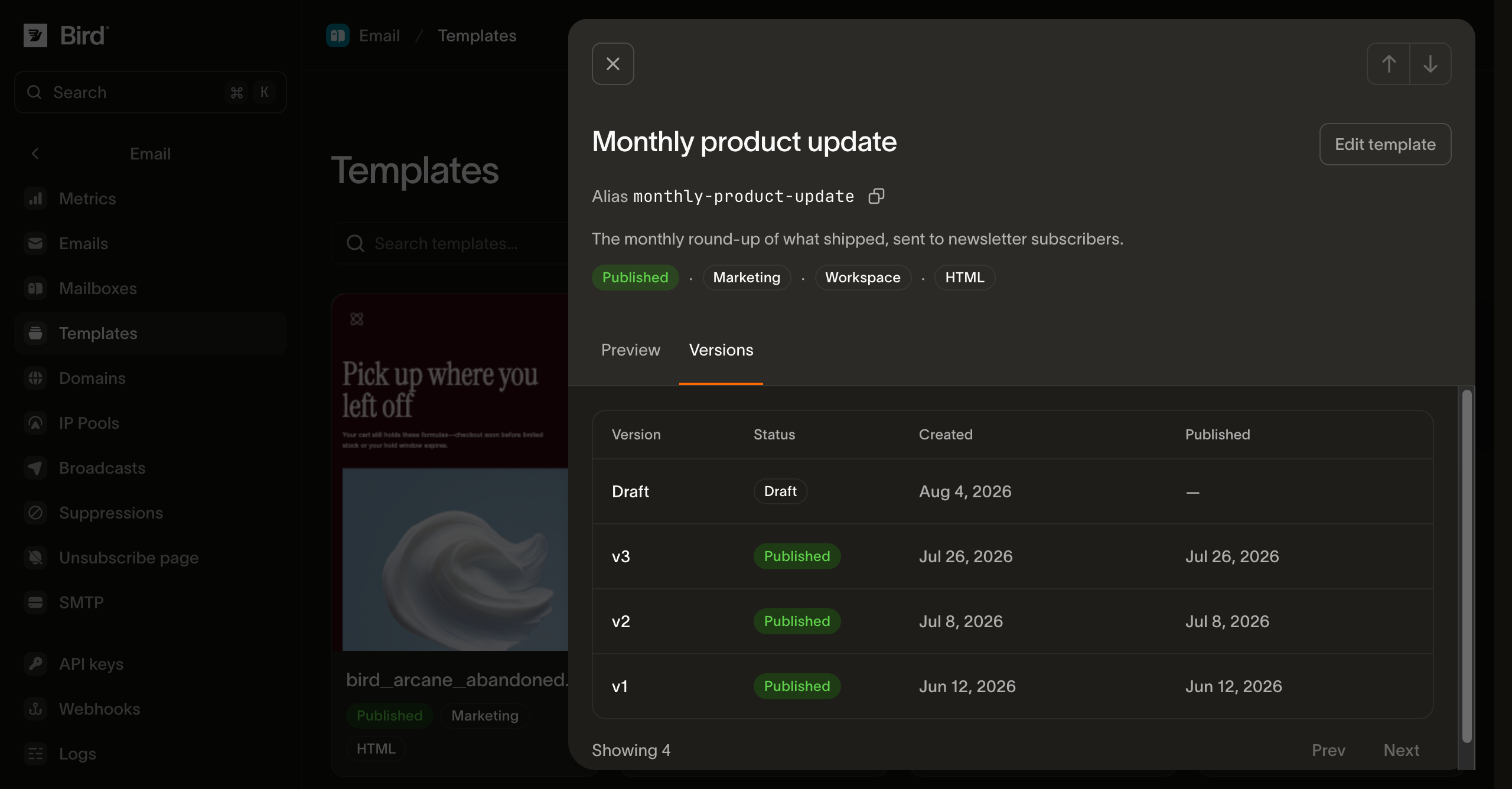
संस्करणों के साथ दो और काम किए जा सकते हैं। ड्राफ़्ट को उस स्थिति पर लौटाने के लिए जो इस समय प्रकाशित है, ड्राफ़्ट के बदलाव हटाएँ। या किसी पुराने प्रकाशित संस्करण को फिर से भेजे जाने वाला संस्करण बनाने के लिए रोल बैक करें। आप केवल किसी प्रकाशित संस्करण पर रोल बैक कर सकते हैं, खुद ड्राफ़्ट पर कभी नहीं। रोल बैक करने पर ड्राफ़्ट की जगह उस संस्करण की सामग्री आ जाती है, इसलिए ड्राफ़्ट में जो कुछ सहेजा नहीं गया है वह खो जाता है, और आगे का संपादन उसी संस्करण से शुरू होता है। रोल बैक से कोई नया संस्करण नहीं बनता।
कोई मौजूदा इमेज चुनने के लिए आपको वर्कस्पेस की मीडिया लाइब्रेरी पढ़ने की अनुमति चाहिए। नई इमेज अपलोड करने, पेस्ट करने या ड्रॉप करने के लिए लिखने की अनुमति चाहिए। अगर Insert image बंद है या आप ब्राउज़ या अपलोड नहीं कर पा रहे हैं, तो वर्कस्पेस एडमिनिस्ट्रेटर से मीडिया लाइब्रेरी की संबंधित अनुमति माँगें। सिर्फ़ टेम्पलेट संपादन की अनुमति से मीडिया लाइब्रेरी की पहुँच नहीं मिलती।
डैशबोर्ड में अपनी मीडिया लाइब्रेरी खोजने या मीडिया लाइब्रेरी की अपलोड सीमाओं के भीतर PNG, JPEG, GIF या स्थिर WebP इमेज अपलोड करने के लिए Visual > Insert image चुनें। स्थिर WebP अपलोड PNG या JPEG में बदल दिए जाते हैं। इमेज का Image description, दिखने की चौड़ाई, संरेखण और लिंक सेट करने के लिए इमेज चुनें। किसी इमेज को Decorative image तभी चिह्नित करें जब वह कोई जानकारी न जोड़ती हो; लिंक वाली इमेज के लिए ऐसा विवरण ज़रूरी है जो बताए कि लिंक कहाँ ले जाता है। हर भाषा के इमेज विवरण और लेआउट अलग रहते हैं।
चुनी गई इमेज को बदलने और उसका विवरण, लिंक, चौड़ाई और संरेखण बनाए रखने के लिए Replace image का उपयोग करें। आप विज़ुअल एडिटर में एक इमेज फ़ाइल पेस्ट या ड्रॉप भी कर सकते हैं। सहेजने या टेस्ट भेजने से पहले अपलोड पूरा होने दें या उसे रद्द करें। प्रीव्यू जाँचें, फिर मौजूदा सामग्री खुद को भेजने के लिए More actions > Test email खोलें। HTML संपादित करने के लिए Code उपलब्ध रहता है।
मीडिया लाइब्रेरी से इमेज हटाने पर वह पहले भेजे गए ईमेल से नहीं हटती। इमेज बदलने पर नया URL इस्तेमाल होता है, इसलिए पुराने संदेशों में मूल इमेज ही दिखती रहती है।
सहेजना एक रिविज़न नंबर से सुरक्षित रहता है। आप जिस भाषा को सहेज रहे हैं, उसके लिए पिछली बार पढ़ा गया revision भेजें। अगर इस बीच किसी और ने वह भाषा बदल दी है, तो उनका काम ओवरराइट करने के बजाय सहेजना टकराव के रूप में अस्वीकार कर दिया जाता है। बिना शर्त सहेजने के लिए revision छोड़ दें। प्रकाशित करना और रोल बैक करना भी इसी तरह ड्राफ़्ट के अपने revision का उपयोग करते हैं।
एक से ज़्यादा भाषाओं में सामग्री
एक टेम्पलेट में 25 तक भाषाओं की सामग्री हो सकती है। हर भाषा का अपना विषय और बॉडी होता है, और उसे en या pt-BR जैसे BCP-47 कोड से टैग किया जाता है। एक भाषा टेम्पलेट की डिफ़ॉल्ट होती है। टेम्पलेट प्रकाशित करने पर उसकी सभी भाषाएँ एक साथ प्रकाशित होती हैं। आप अकेली एक भाषा प्रकाशित नहीं कर सकते, इसलिए पहले सभी भाषाएँ पूरी होनी चाहिए। हर भाषा में विषय और बॉडी ज़रूरी है, और टेम्पलेट की डिफ़ॉल्ट भाषा उन भाषाओं में से एक होनी चाहिए जिन्हें आपने भरा है। इनमें से कुछ भी छूटा हो तो कुछ भी प्रकाशित नहीं होता, और त्रुटि हर भाषा में छूटी चीज़ें बताती है, ताकि आप सब कुछ एक ही बार में ठीक कर सकें। सभी भाषाएँ पहले से पूरी करना ज़रूरी नहीं है: जो तैयार हैं उन्हें प्रकाशित करें और बाकी बाद में जोड़ें।
हर भाषा के लिए HTML बॉडी ज़रूरी है। आप उसका text छोड़ सकते हैं: तब प्रकाशित करते समय HTML से अपने आप एक प्लेन-टेक्स्ट विकल्प बन जाता है, इसलिए दूसरा भाग खुद लिखे बिना आपको दोनों भाग मिल जाते हैं।
हर भाषा में प्रीव्यू टेक्स्ट भी हो सकता है, जिसे कभी-कभी प्रीहेडर कहा जाता है: यह वह पंक्ति है जो इनबॉक्स अपनी संदेश सूची में विषय के बाद दिखाता है। यह वैकल्पिक है, अधिकतम 255 अक्षरों का हो सकता है, और इसमें विषय की तरह ही {{ variable }} प्लेसहोल्डर इस्तेमाल किए जा सकते हैं। इसे छोड़ देने पर इनबॉक्स उसकी जगह बॉडी की पहली पंक्ति दिखाता है, जो शायद ही कभी वह पंक्ति होती है जिसे आप चुनते। जिस भाषा की बॉडी में HTML हिस्सा नहीं है, उसमें प्रीव्यू टेक्स्ट होने पर प्रकाशन अस्वीकार हो जाता है, क्योंकि मेल क्लाइंट प्रीव्यू पंक्ति को केवल छिपे हुए HTML मार्कअप से पढ़ता है। प्रीव्यू टेक्स्ट में {{ bird.unsubscribe_url }} होने पर भी प्रकाशन उसी कारण से अस्वीकार होता है जिस कारण विषय में यह नहीं हो सकता: इनमें से किसी में भी लिंक नहीं रखा जा सकता।
जब कोई भेजा जाने वाला ईमेल ऐसी भाषा नहीं बताता जिसकी सामग्री टेम्पलेट में है, तब दो सेटिंग्स लागू होती हैं, और ये अलग-अलग गलतियों से बचाती हैं:
| सेटिंग | यह क्या नियंत्रित करती है |
|---|---|
on_missing_language | जब कोई भेजा जाने वाला ईमेल ऐसी भाषा माँगता है जो टेम्पलेट में नहीं है, तब क्या होता है। डिफ़ॉल्ट fallback सबसे नज़दीकी मेल वाली भाषा देता है। यह पहले उसी भाषा का व्यापक रूप आज़माता है, इसलिए सहेजी गई pt भाषा pt-BR के अनुरोध को पूरा कर सकती है। इसके बाद यह टेम्पलेट की डिफ़ॉल्ट भाषा पर लौटता है। fail इसकी जगह भेजने को अस्वीकार कर देता है। यह उस सामग्री के लिए है जहाँ गलत भाषा में भेजना बिल्कुल न भेजने से ज़्यादा बुरा है। |
language_source_required | क्या भेजे जाने वाले ईमेल को कोई भाषा बताना ज़रूरी है। यह डिफ़ॉल्ट रूप से बंद रहती है, इसलिए जो ईमेल कोई भाषा नहीं बताता उसे डिफ़ॉल्ट भाषा मिलती है। इसे चालू करने पर ऐसा ईमेल अस्वीकार हो जाता है। ब्रॉडकास्ट अपनी पूरी ऑडियंस के लिए एक ही भाषा बताता है, इसलिए यह सेटिंग चालू वाले टेम्पलेट के लिए ब्रॉडकास्ट भेजने से पहले वह भाषा चुननी होती है। |
आप इन दोनों को अलग-अलग सेट कर सकते हैं। अकेले fail केवल तब लागू होती है जब भेजा जाने वाला ईमेल ऐसी भाषा बताता है जो हमारे पास नहीं है, इसलिए कोई भाषा न बताने वाला ईमेल फिर भी भेजा जाता है। अगर आप चाहते हैं कि हर ईमेल जानबूझकर कोई भाषा बताए, तो दोनों सेटिंग्स एक साथ चालू करें।
वेरिएबल से पर्सनलाइज़ करना
एकल, बैच और शेड्यूल किए गए टेम्पलेट भेजने में संपर्क के मानों का उपयोग किया जा सकता है। जब टेम्पलेट bird.contact.* पढ़ता है, तो हर To पता किसी संपर्क से मेल खाना चाहिए।
विषय, प्रीव्यू टेक्स्ट और बॉडी में {{ variable }} प्लेसहोल्डर लिखें। हम इन्हें सभी भाषाओं से मिलाकर अपने-आप पहचान लेते हैं, इसलिए आपको इन्हें अलग से घोषित नहीं करना पड़ता। प्लेसहोल्डर का प्रीफ़िक्स दोनों प्रकारों में अंतर करता है। bird. से शुरू होने वाला पाथ हमारे डेटा से पढ़ता है, यानी किसी संपर्क रिकॉर्ड या अनसब्सक्राइब लिंक से। बाकी सब पैरामीटर हैं, जिनका मान आप भेजते समय देते हैं।
पैरामीटर का नाम एक ही शब्द होता है, जैसे {{ animal }}। बिंदु वाला नाम ऐसी संरचना तक पहुँचने की कोशिश करता है जो पैरामीटर में नहीं होती, इसलिए ऐसे नाम वाला टेम्पलेट प्रकाशित करने पर अस्वीकार हो जाता है: मान को उसके अपने पैरामीटर के रूप में लिखें, या इसकी जगह bird.contact.<attribute> से संपर्क डेटा पढ़ें।
एकल भेजने या बैच में, किसी पैरामीटर का मान भेजने के template.parameters ऑब्जेक्ट से उसके नाम की कुंजी के आधार पर लिया जाता है। मानों का एक ही सेट उस भेजने के हर प्राप्तकर्ता पर लागू होता है। वहाँ केवल bird नाम का उपयोग नहीं किया जा सकता: bird नाम की template.parameters कुंजी 422 के साथ अस्वीकार कर दी जाती है।
प्राप्तकर्ता की संपर्क प्रॉपर्टी पढ़ने के लिए bird.contact.<attribute> का उपयोग करें, जिनमें बिल्ट-इन first_name, last_name और email फ़ील्ड शामिल हैं। एकल और बैच भेजने में हर To पते को उसी वर्कस्पेस के किसी संपर्क से मिलाया जाता है। Cc और Bcc प्राप्तकर्ताओं को हर To प्राप्तकर्ता के वैयक्तिकृत ईमेल की एक कॉपी मिलती है; उनके लिए मेल खाने वाले संपर्क ज़रूरी नहीं हैं। ब्रॉडकास्ट अपनी ऑडियंस के संपर्क पढ़ता है और अपने टेम्पलेट पैरामीटर में कॉलर के मान भी स्वीकार करता है।
Hi {{ bird.contact.first_name }},रिज़ॉल्व हुई भाषा में उपयोग होने वाले ज़रूरी कॉलर पैरामीटर दें। कोई ज़रूरी पैरामीटर छूटने पर 422 लौटता है। किसी ज़रूरी पैरामीटर का मान null होने पर भी 422 लौटता है; जानबूझकर दी गई खाली स्ट्रिंग मान्य रहती है। संस्करण की variables सूची उसकी सभी भाषाओं को कवर करती है, इसलिए जो पैरामीटर केवल किसी दूसरी भाषा में उपयोग होता है, उसे इस भेजने के लिए मान की ज़रूरत नहीं है।
प्रकाशित करते समय हर भाषा में उपयोग होने वाली संपर्क विशेषताएँ दर्ज की जाती हैं। भेजते समय केवल चुनी गई भाषा और भेजने के फ़ील्ड में उपयोग होने वाली विशेषताएँ ही लाई जाती हैं। जिस भेजने में संपर्क का कोई संदर्भ नहीं है, उसमें संपर्क लुकअप नहीं होता।
bird.contact.* पढ़ने वाले टेम्पलेट के हर To प्राप्तकर्ता के लिए वर्कस्पेस में मेल खाने वाला संपर्क होना ज़रूरी है। अगर किसी To प्राप्तकर्ता का संपर्क नहीं है, तो अनुरोध किसी भी संदेश को स्वीकार करने से पहले E04099 के साथ 422 लौटाता है, बैच या शेड्यूल किए गए भेजने में भी। पहले संपर्क बनाएँ या अपडेट करें, या इसके बजाय कॉलर पैरामीटर का उपयोग करें। Liquid का default फ़िल्टर या कंडीशनल यह आवश्यकता नहीं हटाता। संपर्क विशेषताओं के बिना कॉलर पैरामीटर या bird.unsubscribe_url का उपयोग करने वाले टेम्पलेट को मेल खाने वाले संपर्क की ज़रूरत नहीं है।
उदाहरण के लिए, Hello {{ bird.contact.first_name }} को Alice और Bob को भेजें, और Charlie को Cc में रखें:
| डिलीवरी | अभिवादन | दिखने वाला To |
|---|---|---|
| Alice | Hello Alice | Alice |
| Charlie, Alice के ईमेल में कॉपी किया गया | Hello Alice | Alice |
| Bob | Hello Bob | Bob |
| Charlie, Bob के ईमेल में कॉपी किया गया | Hello Bob | Bob |
Charlie को दो कॉपी मिलती हैं, इसलिए इस अनुरोध से चार डिलीवरी होती हैं। Bcc भी इसी तरह काम करता है, बस Bcc पता छिपा रहता है। ये अलग-अलग वैयक्तिकृत ईमेल तब बनते हैं जब टेम्पलेट संपर्क विशेषताओं का उपयोग करता है; सामान्य भेजने में पते पहले की तरह ही लगते हैं। बैच API के हर संदेश पर भी यही नियम लागू होता है।
मौजूदा संपर्क का पहला या अंतिम नाम खाली हो सकता है। अनुपस्थित नाम खाली दिखते हैं और अभिवादन आप टेम्पलेट में चुनते हैं। पहले नाम से अभिवादन के लिए Hello {{ bird.contact.first_name | default: "there" }}! इस्तेमाल करें। पूरे नाम के लिए दोनों भाग जोड़ें, सिरों की खाली जगह हटाएँ और फिर डिफ़ॉल्ट चुनें:
{% assign full_name = bird.contact.first_name | append: " " | append: bird.contact.last_name | strip %}
Hello {{ full_name | default: "there" }}!
संबंधित नाम मौजूद होने पर यह Hello Jane Doe!, Hello Jane! या Hello Doe! दिखाता है, और दोनों नाम अनुपस्थित होने पर Hello there!। पूरे वर्कस्पेस के लिए स्थानापन्न नाम तय करने की ज़रूरत नहीं है।
आपकी बनाई संपर्क प्रॉपर्टी अपने कॉन्फ़िगर किए हुए फ़ॉलबैक मान बनाए रखती हैं। संग्रहीत null को अनुपस्थित माना जाता है; स्पष्ट रूप से खाली स्ट्रिंग, false या शून्य एक मान ही रहता है। फ़ॉलबैक के बिना अनुपस्थित प्रॉपर्टी खाली दिखती है। अज्ञात प्रॉपर्टी और अमान्य संग्रहीत मान संदेश स्वीकार होने से रोकते हैं। लुकअप विफल होने पर फिर से प्रयास किया जा सकता है; उस स्थिति में फ़ॉलबैक मान नहीं लगाए जाते।
bird.contact.* प्लेसहोल्डर में किसी बिल्ट-इन एट्रिब्यूट या पंजीकृत कस्टम प्रॉपर्टी का नाम होना चाहिए। कॉलर पैरामीटर के नाम इन प्लेटफ़ॉर्म पाथ से अलग रहते हैं। एकल और बैच टेम्पलेट भेजने में प्राप्तकर्ता के मान स्वीकार होते समय सहेजे जाते हैं, शेड्यूल किए गए भेजने में भी, और डिलीवरी के फिर से प्रयास तथा संदेश पढ़ने में दोबारा उपयोग होते हैं। ब्रॉडकास्ट अपनी तैयारी का समय अलग रखते हैं। एकल और बैच भेजने में संवेदनशील इनपुट स्वीकार होने से पहले ही अस्वीकार कर दिए जाते हैं।
किसी प्रॉपर्टी को आर्काइव करने पर वह एडिटर के प्रॉपर्टी पिकर से हट जाती है। उसे पढ़ने वाले नए टेम्पलेट वर्शन प्रकाशित नहीं किए जा सकते, और त्रुटि में उस प्रॉपर्टी का नाम होता है। पहले से प्रकाशित टेम्पलेट भेजे जाते रहते हैं। नए वर्शन में उसे फिर से उपयोग करने के लिए प्रॉपर्टी को अनआर्काइव करें।
प्लेसहोल्डर Liquid का उपयोग करते हैं, इसलिए साधारण प्रतिस्थापन के साथ फ़िल्टर और कंट्रोल फ़्लो भी काम करते हैं। {% if %} कंडीशनल और किसी ऐरे मान पर {% for %} लूप, दोनों ठीक हैं। कुछ संरचनाएँ प्रकाशित करते समय अस्वीकार कर दी जाती हैं, और त्रुटि ठीक-ठीक बताती है कि क्या बदलना है:
{% include %}या{% render %}से पार्शियल इनक्लूड।increment,decrementऔरifchangedटैग।money,format_date,format_time,json,inspectऔरtypeफ़िल्टर।emptyयाblankसे तुलना करना। इसके बजाय.size == 0का उपयोग करें।- ऐसे ब्लॉक जो वास्तविक ईमेल मार्कअप की ज़रूरत से कहीं अधिक गहराई तक नेस्ट किए गए हों।
ब्रॉडकास्ट के टेम्पलेट पैरामीटर स्केलर मान स्वीकार करते हैं; ऐरे और ऑब्जेक्ट समर्थित नहीं हैं। कॉलर के पैरामीटर के बिना, {% for %} और {% tablerow %} दोनों (1..3) जैसी लिटरल रेंज और Liquid में split से बनाई गई सूचियों का समर्थन करते हैं। कॉलर के पैरामीटर का उपयोग करने वाला ब्रॉडकास्ट split से बनी सूची पर {% for %} का समर्थन करता है, लेकिन रेंज और {% tablerow %} को अस्वीकार करता है। दोनों मामलों में, कॉलर के पैरामीटर या संपर्क की प्रॉपर्टी को सीधे पढ़ने वाला लूप टैग अस्वीकार किया जाता है। इसमें वे रेंज भी शामिल हैं जिनका अंतिम बिंदु इनमें से किसी मान को पढ़ता है।
हर टेम्पलेट Liquid का उपयोग करता है, वह भी जिसमें केवल {{ variable }} प्लेसहोल्डर हों। प्रकाशित करने से पहले हम विषय, प्रीव्यू टेक्स्ट, HTML और प्लेन-टेक्स्ट सामग्री को Liquid के रूप में जाँचते हैं। हम हर उस HTML आउटपुट में escape फ़िल्टर भी जोड़ते हैं जो पहले से escape या escape_once पर खत्म नहीं होता, ताकि & या < वाला कोई मान आसपास के मार्कअप को न बदल सके। आरक्षित अनसब्सक्राइब आउटपुट वैसा ही रहता है, ताकि भेजते समय उसे बदला जा सके। विषय पंक्ति और प्लेन-टेक्स्ट बॉडी जैसी लिखी गई हैं वैसी ही रहती हैं। प्रकाशन ये फ़िल्टर जोड़ता है, इसलिए प्रकाशित संस्करण से पढ़ा गया HTML आपके भेजे गए HTML से बाइट-दर-बाइट मेल नहीं खा सकता।
पूरा URL सीधे href में रखें, जैसे <a href="{{ sign_in_url }}">Sign in</a>। पूरे मान पर url_encode न जोड़ें। यह https://, /, ? और & को प्रतिशत-एन्कोड कर देता है, जिससे परिणाम एब्सोल्यूट लिंक के रूप में काम नहीं करता। हम URL की संरचना बनाए रखते हुए HTML एस्केपिंग जोड़ते हैं। जब कोई पैरामीटर URL का एक हिस्सा देता है, तो उस हिस्से को स्पष्ट रूप से एन्कोड करें: <a href="https://example.com/search?q={{ query | url_encode }}">Search</a>।
प्रकाशित करने से पहले प्रीव्यू करना
सैंपल मानों के साथ टेम्पलेट रेंडर करें और वही विषय पंक्ति तथा HTML और प्लेन-टेक्स्ट बॉडी वापस पाएँ जो भेजा जाने वाला ईमेल डिलीवर करता। प्रीव्यू हमारे लोकल Liquid रेंडरर का उपयोग करता है और डिफ़ॉल्ट रूप से ड्राफ़्ट रेंडर करता है, इसलिए आप किसी बदलाव के लाइव होने से पहले उसे जाँच सकते हैं। यह इसके बजाय कोई प्रकाशित संस्करण भी रेंडर कर सकता है। यह आपके अपने टेम्पलेट और हमारे बिल्ट-इन टेम्पलेट दोनों के लिए काम करता है, और कुछ भी भेजा नहीं जाता।
ड्राफ़्ट पढ़वाने के बजाय आप सामग्री खुद भी दे सकते हैं। विषय और बॉडी पास करें, तो वही रेंडर होते हैं और उन्हें बिल्कुल ड्राफ़्ट की तरह माना जाता है। इसी से कोई एडिटर पहले कुछ सेव किए बिना, टाइप होते ही बदलाव दिखा सकता है।
पर्सनलाइज़ेशन आपके लिए भर दिया जाता है, इसलिए लौटने वाली सामग्री {{ }} प्लेसहोल्डर के बजाय तैयार कॉपी जैसी दिखती है। कोई contact दें, तो हर bird.contact.<attribute> उस संपर्क की अपनी प्रॉपर्टी से भरता है। इससे आप किसी को ईमेल मिलने से पहले अपने शब्दों को असली रिकॉर्ड पर जाँच सकते हैं। मान उसी प्रोजेक्शन से आते हैं जिससे ब्रॉडकास्ट अपने प्लेसहोल्डर भरता है, इसलिए प्रीव्यू वही नतीजा देता है जो भेजा गया ईमेल देता।
contact छोड़ दें, तो उसकी जगह नमूना मान भरे जाते हैं: पहले और आखिरी नाम के लिए Bird और Test, ईमेल के लिए bird.test@example.com, और बाकी हर प्रॉपर्टी के लिए उसका अपना पंजीकृत फ़ॉलबैक। जिस संदर्भित प्रॉपर्टी का कोई फ़ॉलबैक नहीं है, वह कोष्ठक में अपनी कुंजी के रूप में रेंडर होती है, जैसे [loyalty_tier]। इससे पता चलता है कि मान प्लेसहोल्डर है और किस प्रॉपर्टी को अभी फ़ॉलबैक चाहिए।
संपर्क को उसकी मौजूदा स्थिति में पढ़ा जाता है। इसलिए प्रीव्यू उस सामग्री को जाँचने के लिए सही है जिसे आप भेजने वाले हैं, लेकिन यह जानने के लिए नहीं कि किसी पिछले सेंड में क्या था। किसी सेंड ने असल में क्या डिलीवर किया, यह देखने के लिए उस संदेश को ईमेल लॉग में खोलें, जो उसे उस सेंड के मानों से रेंडर करता है।
किसी खास भाषा को रेंडर करने के लिए language जोड़ें, या टेम्पलेट की डिफ़ॉल्ट भाषा के लिए इसे छोड़ दें। प्रतिक्रिया बताती है कि कौन-सी भाषा रेंडर हुई। यह तब काम आता है जब माँगी गई भाषा टेम्पलेट में नहीं है और टेम्पलेट के on_missing_language ने निकटतम मिलान दिया।
अगर ड्राफ़्ट में ऐसा पर्सनलाइज़ेशन है जो प्रकाशित करते समय अस्वीकार होगा, तो प्रीव्यू वही त्रुटि लौटाता है। इसलिए इससे आप समस्याएँ पहले ही पकड़ सकते हैं।
डैशबोर्ड के टेम्पलेट बिल्डर में, बाईं पट्टी के नीचे Preview with contact data रेंडर किया गया ईमेल उस सामग्री के बगल में दिखाता है जिसे आप एडिट कर रहे हैं, विज़ुअल और कोड दोनों एडिटर में। उसके नीचे का पिकर चुनता है कि किसका डेटा प्लेसहोल्डर भरेगा, और Sample data ऊपर बताए गए नमूना मान हैं।
टेम्पलेट से भेजना
भेजने के अनुरोध के template फ़ील्ड में एक ऑब्जेक्ट सेट करें जो टेम्पलेट का नाम बताए, या तो id (emt_...) से या slug से, और इन दोनों में से ठीक एक का ही उपयोग करें। उसके वेरिएबल के मान template.parameters में डालें। कोई विशेष भाषा चुनने के लिए language जोड़ें, या टेम्पलेट की डिफ़ॉल्ट भाषा भेजने के लिए इसे छोड़ दें, बशर्ते टेम्पलेट हर भेजने में भाषा का नाम अनिवार्य न करता हो। subject, html और text को पूरी तरह छोड़ दें, क्योंकि टेम्पलेट इन्हें पहले से देता है।
{
  "from": "hello@yourdomain.com",
  "to": ["delivered@messagebird.dev"],
  "category": "transactional",
  "template": {
    "slug": "welcome-email",
    "parameters": { "first_name": "Jane" }
  }
}
एक व्यवहार को ध्यान में रखकर योजना बनाएँ: टेम्पलेट की श्रेणी एक डिफ़ॉल्ट है, और भेजने के अनुरोध का अपना category उसे ओवरराइड करता है। category न दें, तो भेजना टेम्पलेट की श्रेणी अपना लेता है, इसलिए एक ऑपरेशनल टेम्पलेट हर कॉल में दोहराए बिना ट्रांज़ैक्शनल के रूप में भेजा जाता है। category सेट करें, तो आपका मान लागू होता है। भेजने की बाकी शर्तें टेम्पलेट के साथ भेजना में हैं।
डैशबोर्ड के बाहर टेम्पलेट बनाना
पूरा जीवनचक्र डैशबोर्ड के बाहर भी उपलब्ध है: API के ज़रिए, email.templates के अंतर्गत SDK में, bird CLI से, और email_templates_* MCP टूल से। SDK में संस्करण और भाषा से जुड़े ऑपरेशन email.templates.versions और email.templates.versions.languages के अंतर्गत हैं। वहाँ प्रकाशित करने के चरण का नाम submit है, और यह ड्राफ़्ट को अगले प्रकाशित संस्करण में बदल देता है।
आप टेम्पलेट अपनी रिपॉज़िटरी में रख सकते हैं और उन्हें बिल्ड चरण से सिंक कर सकते हैं। ड्राफ़्ट और प्रकाशित संस्करण पढ़ने पर अलग HTML लौटाते हैं, इसलिए वह रीड चुनें जो आपके टूल की ज़रूरत से मेल खाता हो:
- ड्राफ़्ट ठीक वैसा ही लौटता है जैसा आपने सहेजा था। ड्राफ़्ट की किसी भाषा में आप जो HTML सहेजते हैं, वह उस भाषा के रीड (
GET /v1/email/templates/{id}/versions/{draft_version_id}/languages/{language}) और संस्करण के रीड से बाइट-दर-बाइट वापस आता है, जिसमें doctype,<style>ब्लॉक, टिप्पणियाँ, व्हाइटस्पेस, लाइन एंडिंग और गैर-ASCII टेक्स्ट शामिल हैं। सहेजने पर कोई सामग्री नहीं लौटती, इसलिए जब आपको पुष्टि करनी हो कि क्या संग्रहीत हुआ, तो भाषा को वापस पढ़ें। - प्रकाशित संस्करण भेजने के लिए तैयार रूप में लौटता है। प्रकाशित करने पर HTML तीन तरह से बदलता है: हर
{{ }}आउटपुट जो पहले सेescapeयाescape_onceपर समाप्त नहीं होता, उसमेंescapeफ़िल्टर जुड़ जाता है, सिवाय{{ bird.unsubscribe_url }}के, जो लिखे अनुसार रहता है; प्रीव्यू टेक्स्ट को शुरुआती<body>टैग के ठीक बाद एक छिपे ब्लॉक में जोड़ा जाता है, या HTML में यह टैग न हो तो बिल्कुल शुरुआत में; और खालीtextको HTML से बने प्लेन-टेक्स्ट विकल्प से भर दिया जाता है। उस संस्करण को पढ़ने पर बदली हुई सामग्री लौटती है, इसलिए वह आपकी सोर्स फ़ाइल से अलग होती है।
आपने जो सोर्स लिखा है उसे एक्सपोर्ट करने के लिए ड्राफ़्ट पढ़ें। किसी टेम्पलेट को पढ़ने या टेम्पलेट की सूची बनाने पर मेटाडेटा और हर भाषा की स्थिति लौटती है, पर HTML नहीं।
नीचे के उदाहरण {{ first_name }} का उपयोग करते हैं, जो template.parameters में दिया जाने वाला कॉलर पैरामीटर है, जैसे "parameters": {"first_name": "Jane"}। जब टेम्पलेट को प्राप्तकर्ता का वर्कस्पेस संपर्क पढ़ना हो, तो इसके बजाय {{ bird.contact.first_name }} का उपयोग करें। एकल और बैच, दोनों तरह से भेजते समय प्राप्तकर्ताओं को ईमेल पते से बताएँ। प्रकाशित टेम्पलेट में सहेजी गई स्टाइलिंग उसी संस्करण का हिस्सा रहती है। रनटाइम पर कोई bird.brandkit.* नेमस्पेस नहीं होता।
टेम्पलेट को उसकी पहली भाषा के साथ बनाएँ। प्रतिक्रिया में टेम्पलेट का id और draft_version_id होता है, जिनकी ज़रूरत संस्करण और भाषा के ऑपरेशन को होती है। उदाहरण preview_text भी सेट करता है, यानी वह प्रीव्यू टेक्स्ट जो इनबॉक्स अपनी संदेश सूची में विषय के बाद दिखाता है। प्रकाशित करने पर यह HTML में एक छिपे ब्लॉक के रूप में जुड़ जाता है, और यही एक कारण है कि प्रकाशित संस्करण पढ़ने पर ड्राफ़्ट से अलग HTML लौटाता है:
const template = await bird.email.templates.create({
  slug: "welcome-email",
  category: "transactional",
  source: "html",
  languages: {
    en: {
      subject: "Welcome, {{ first_name }}",
      preview_text: "Your account is ready",
      html: "<!DOCTYPE html>\n<html>\n<body>\n<p>Hi {{ first_name }}, thanks for signing up.</p>\n</body>\n</html>\n",
    },
  },
});
console.log(template.id, template.draft_version_id);
template = client.email.templates.create(
slug="welcome-email",
category="transactional",
source="html",
languages={
"en": {
"subject": "Welcome, {{ first_name }}",
"preview_text": "Your account is ready",
"html": "<!DOCTYPE html>\n<html>\n<body>\n<p>Hi {{ first_name }}, thanks for signing up.</p>\n</body>\n</html>\n",
},
},
)
print(template.id, template.draft_version_id)template, err := client.Email.Templates.Create(context.Background(), bird.EmailTemplatesCreateParams{
Slug: "welcome-email",
Category: "transactional",
Source: "html",
Languages: map[string]bird.EmailTemplateLanguageContent{
"en": {
Subject: bird.String("Welcome, {{ first_name }}"),
PreviewText: bird.String("Your account is ready"),
Html: bird.String("<!DOCTYPE html>\n<html>\n<body>\n<p>Hi {{ first_name }}, thanks for signing up.</p>\n</body>\n</html>\n"),
},
},
})
if err != nil {
log.Fatal(err)
}
fmt.Println(template.Id, *template.DraftVersionId)$template = $bird->email->templates->create(
slug: 'welcome-email',
category: 'transactional',
source: 'html',
languages: [
'en' => [
'subject' => 'Welcome, {{ first_name }}',
'preview_text' => 'Your account is ready',
'html' => "<!DOCTYPE html>\n<html>\n<body>\n<p>Hi {{ first_name }}, thanks for signing up.</p>\n</body>\n</html>\n",
],
],
);
echo $template->getId(), ' ', $template->getDraftVersionId();bird email templates create --body-file - <<'EOF'
{
"slug": "welcome-email",
"category": "transactional",
"source": "html",
"languages": {
"en": {
"subject": "Welcome, {{ first_name }}",
"preview_text": "Your account is ready",
"html": "<!DOCTYPE html>\n<html>\n<body>\n<p>Hi {{ first_name }}, thanks for signing up.</p>\n</body>\n</html>\n"
}
}
}
EOFcurl -X POST https://us1.platform.bird.com/v1/email/templates \
-H "Authorization: Bearer bk_us1_..." \
-H "Content-Type: application/json" \
-d '{
"slug": "welcome-email",
"category": "transactional",
"source": "html",
"languages": {
"en": {
"subject": "Welcome, {{ first_name }}",
"preview_text": "Your account is ready",
"html": "<!DOCTYPE html>\n<html>\n<body>\n<p>Hi {{ first_name }}, thanks for signing up.</p>\n</body>\n</html>\n"
}
}
}'बाद में किसी भाषा को बदलने के लिए उसी भाषा पाथ पर bird email templates versions languages set या PUT से उसे फिर से सहेजें। बॉडी फ़्लैट है: subject, जो अनिवार्य है, साथ में preview_text, html और text। जो फ़ील्ड आप छोड़ देते हैं, वह साफ़ हो जाता है। अगर इस बीच किसी और ने वह भाषा बदल दी हो तो सहेजना रोकने के लिए, आपने आखिरी बार जो revision पढ़ा था उसे जोड़ें।
डैशबोर्ड के विज़ुअल एडिटर का लेआउट भी इसी तरह साफ़ होने वाले फ़ील्ड में से एक है, क्योंकि API, SDK और CLI इसे नहीं भेज सकते। विज़ुअल एडिटर में बनाई गई भाषा को इस तरह सहेजने पर उसका HTML बना रहता है पर लेआउट हट जाता है, इसलिए डैशबोर्ड उस भाषा को कोड एडिटर में खोलता है।
अगले चरणों में TEMPLATE_ID और DRAFT_VERSION_ID उन id और draft_version_id के लिए हैं जो create कॉल ने लौटाए थे। HTML को ठीक उसी रूप में पाने के लिए जैसा वह संग्रहीत है, ड्राफ़्ट भाषा को वापस पढ़ें:
const language = await bird.email.templates.versions.languages.get(
  "TEMPLATE_ID",
  "DRAFT_VERSION_ID",
  "en",
);
console.log(language.content?.html);
language = client.email.templates.versions.languages.get(
"TEMPLATE_ID",
"DRAFT_VERSION_ID",
"en",
)
if language.content is not None:
print(language.content.html)language, err := client.Email.Templates.Versions.Languages.Get(context.Background(),
"TEMPLATE_ID", "DRAFT_VERSION_ID", "en")
if err != nil {
log.Fatal(err)
}
if language.Content != nil && language.Content.Html != nil {
fmt.Println(*language.Content.Html)
}$language = $bird->email->templates->versions->languages->get(
'TEMPLATE_ID',
'DRAFT_VERSION_ID',
'en',
);
echo $language->getContent()?->getHtml();bird email templates versions languages get "$TEMPLATE_ID" "$DRAFT_VERSION_ID" en \
| jq -j .content.html > welcome-email.htmlcurl "https://us1.platform.bird.com/v1/email/templates/$TEMPLATE_ID/versions/$DRAFT_VERSION_ID/languages/en" \
-H "Authorization: Bearer bk_us1_..." \
| jq -j .content.html > welcome-email.htmljq -j स्ट्रिंग के अंत में नई पंक्ति जोड़े बिना उसे लिखता है, इसलिए फ़ाइल में वही बाइट्स रहते हैं जो API ने संग्रहीत किए थे।
पहले ड्राफ़्ट को validate_only के साथ सबमिट करें। यह हर भाषा पर असली सबमिट जैसी ही जाँचें चलाता है और मिली सभी समस्याएँ एक ही प्रतिक्रिया में बताता है, बिना कुछ प्रकाशित किए। फिर अगला संस्करण प्रकाशित करने के लिए validate_only के बिना सबमिट करें, जिसके बाद भेजे जाने वाले ईमेल इसी संस्करण का उपयोग करते हैं:
const templateId = "TEMPLATE_ID";
const draftVersionId = "DRAFT_VERSION_ID";
const check = await bird.email.templates.versions.submit(templateId, draftVersionId, {
  validate_only: true,
});
for (const problem of check.errors) {
  console.log(problem.language, problem.field, problem.message);
}
if (check.valid) {
  const result = await bird.email.templates.versions.submit(templateId, draftVersionId);
  console.log(result.version?.version_number);
}
template_id = "TEMPLATE_ID"
draft_version_id = "DRAFT_VERSION_ID"
check = client.email.templates.versions.submit(template_id, draft_version_id, validate_only=True)
for problem in check.errors:
print(problem.language, problem.field, problem.message)
if check.valid:
result = client.email.templates.versions.submit(template_id, draft_version_id)
if result.version is not None:
print(result.version.version_number)ctx := context.Background()
templateID := "TEMPLATE_ID"
draftVersionID := "DRAFT_VERSION_ID"
check, err := client.Email.Templates.Versions.Submit(ctx, templateID, draftVersionID,
bird.EmailTemplatesVersionsSubmitParams{ValidateOnly: bird.Bool(true)})
if err != nil {
log.Fatal(err)
}
if check.Errors != nil {
for _, problem := range *check.Errors {
fmt.Println(*problem.Message)
}
}
if check.Valid != nil && *check.Valid {
result, err := client.Email.Templates.Versions.Submit(ctx, templateID, draftVersionID,
bird.EmailTemplatesVersionsSubmitParams{})
if err != nil {
log.Fatal(err)
}
fmt.Println(*result.Version.VersionNumber)
}$templateId = 'TEMPLATE_ID';
$draftVersionId = 'DRAFT_VERSION_ID';
$check = $bird->email->templates->versions->submit(
$templateId,
$draftVersionId,
(new EmailTemplateSubmit())->setValidateOnly(true),
);
foreach ($check->getErrors() ?? [] as $problem) {
echo $problem->getLanguage(), ' ', $problem->getField(), ' ', $problem->getMessage(), "\n";
}
if ($check->getValid() === true) {
$result = $bird->email->templates->versions->submit($templateId, $draftVersionId, new EmailTemplateSubmit());
echo $result->getVersion()?->getVersionNumber();
}bird email templates versions submit "$TEMPLATE_ID" "$DRAFT_VERSION_ID" --validate-only
bird email templates versions submit "$TEMPLATE_ID" "$DRAFT_VERSION_ID"curl -X POST "https://us1.platform.bird.com/v1/email/templates/$TEMPLATE_ID/versions/$DRAFT_VERSION_ID/submit" \
-H "Authorization: Bearer bk_us1_..." \
-H "Content-Type: application/json" \
-d '{"validate_only": true}'
curl -X POST "https://us1.platform.bird.com/v1/email/templates/$TEMPLATE_ID/versions/$DRAFT_VERSION_ID/submit" \
-H "Authorization: Bearer bk_us1_..." \
-H "Content-Type: application/json" \
-d '{}'सबमिट का बॉडी validate_only और expected_revision लेता है। अगर आपके पिछली बार पढ़ने के बाद ड्राफ़्ट बदल गया हो, तो प्रकाशन रोकने के लिए टेम्पलेट का revision को expected_revision के रूप में भेजें।
भेजने के अनुरोध में दिया जाने वाला स्लग खोजने के लिए अपने वर्कस्पेस के टेम्पलेट सूचीबद्ध करें:
for await (const tpl of bird.email.templates.list({ scope: "workspace" })) {
  console.log(tpl.slug, tpl.name);
}
for template in client.email.templates.list(scope="workspace"):
print(template.slug, template.name)for tpl, err := range client.Email.Templates.List(context.Background(), bird.EmailTemplatesListParams{Scope: "workspace"}) {
if err != nil {
log.Fatal(err)
}
fmt.Println(*tpl.Slug, tpl.Name)
}foreach ($bird->email->templates->list(['scope' => 'workspace']) as $template) {
echo $template->getSlug(), ' ', $template->getName(), "\n";
}bird email templates list --scope workspacecurl "https://us1.platform.bird.com/v1/email/templates?scope=workspace" \
-H "Authorization: Bearer bk_us1_..."प्रकाशित टेम्पलेट को स्लग से भेजें, और उसमें उपयोग होने वाले हर पैरामीटर का मान template.parameters में दें, यहाँ first_name:
const msg = await bird.email.send({
  from: { email: "onboarding@messagebird.dev", name: "Bird" },
  to: ["delivered@messagebird.dev"],
  category: "transactional",
  template: {
    slug: "welcome-email",
    parameters: { first_name: "Jane" },
  },
});
console.log(msg.id, msg.status);
msg = client.email.send(
from_={"email": "onboarding@messagebird.dev", "name": "Bird"},
to=["delivered@messagebird.dev"],
category="transactional",
template="welcome-email",
parameters={"first_name": "Jane"},
)
print(msg.id, msg.status)msg, err := client.Email.Send(context.Background(), bird.EmailSendParams{
From: "onboarding@messagebird.dev",
To: []string{"delivered@messagebird.dev"},
Category: "transactional",
Template: "welcome-email",
Parameters: map[string]any{"first_name": "Jane"},
})
if err != nil {
log.Fatal(err)
}
fmt.Println(msg.Id, *msg.Status)$message = $bird->email->send(
from: 'Bird <onboarding@messagebird.dev>',
to: ['delivered@messagebird.dev'],
category: 'transactional',
template: (new EmailMessageSendRequestTemplate())
->setSlug('welcome-email')
->setParameters(['first_name' => 'Jane']),
);
echo $message->getId(), ' ', $message->getStatus();bird email send \
--category transactional \
--from hello@yourdomain.com \
--parameters '{"first_name":"Jane"}' \
--template welcome-email \
--to delivered@messagebird.devcurl -X POST https://us1.platform.bird.com/v1/email/messages \
-H "Authorization: Bearer bk_us1_..." \
-H "Content-Type: application/json" \
-d '{
"from": "hello@yourdomain.com",
"to": ["delivered@messagebird.dev"],
"category": "transactional",
"template": {
"slug": "welcome-email",
"parameters": { "first_name": "Jane" }
}
}'अगले कदम
- ईमेल भेजना: पूरा सेंड पेलोड, और टेम्पलेट से भेजे जाने वाले ईमेल उसमें कैसे फ़िट होते हैं
- श्रेणियाँ: हर बार भेजते समय
marketingयाtransactionalचुनना bird email templates: टर्मिनल से टेम्पलेट प्रबंधित करना- API संदर्भ: टेम्पलेट के सभी अठारह ऑपरेशनों के पूरे अनुरोध और प्रतिक्रिया स्कीमा
- SDK: TypeScript, Python, PHP और Go में टाइप किए गए
email.templatesमेथड - MCP सर्वर: किसी एजेंट से टेम्पलेट बनवाना और प्रकाशित करवाना
- ईमेल टेम्पलेट कैसे बनाएँ: एक वीडियो, जिसमें डैशबोर्ड में एक टेम्पलेट बनाया जाता है और फिर एक एजेंट से दूसरा टेम्पलेट बनवाया जाता है
संबंधित संसाधन
इस विषय के लिए दस्तावेज़, गाइड और उदाहरणों के साथ आगे बढ़ें।