IP वार्मअप
नए IP पते का कोई भेजने का इतिहास नहीं होता। उस IP से अचानक भारी मात्रा में मेल भेजने पर मेलबॉक्स प्रदाता उसके मेल को धीमा या फ़िल्टर कर सकते हैं। वार्मअप मात्रा को धीरे-धीरे बढ़ाता है, ताकि IP अपनी भेजने की प्रतिष्ठा बना सके। हर डेडिकेटेड IP पूरी मात्रा संभालने से पहले वार्मअप से गुज़रता है। क्या डेडिकेटेड IP से ईमेल डिलीवरेबिलिटी बेहतर होती है? में बताया गया है कि अपनी IP प्रतिष्ठा बनाना कब मदद करता है और कब साझा भेजना बेहतर रहता है।
रैंप
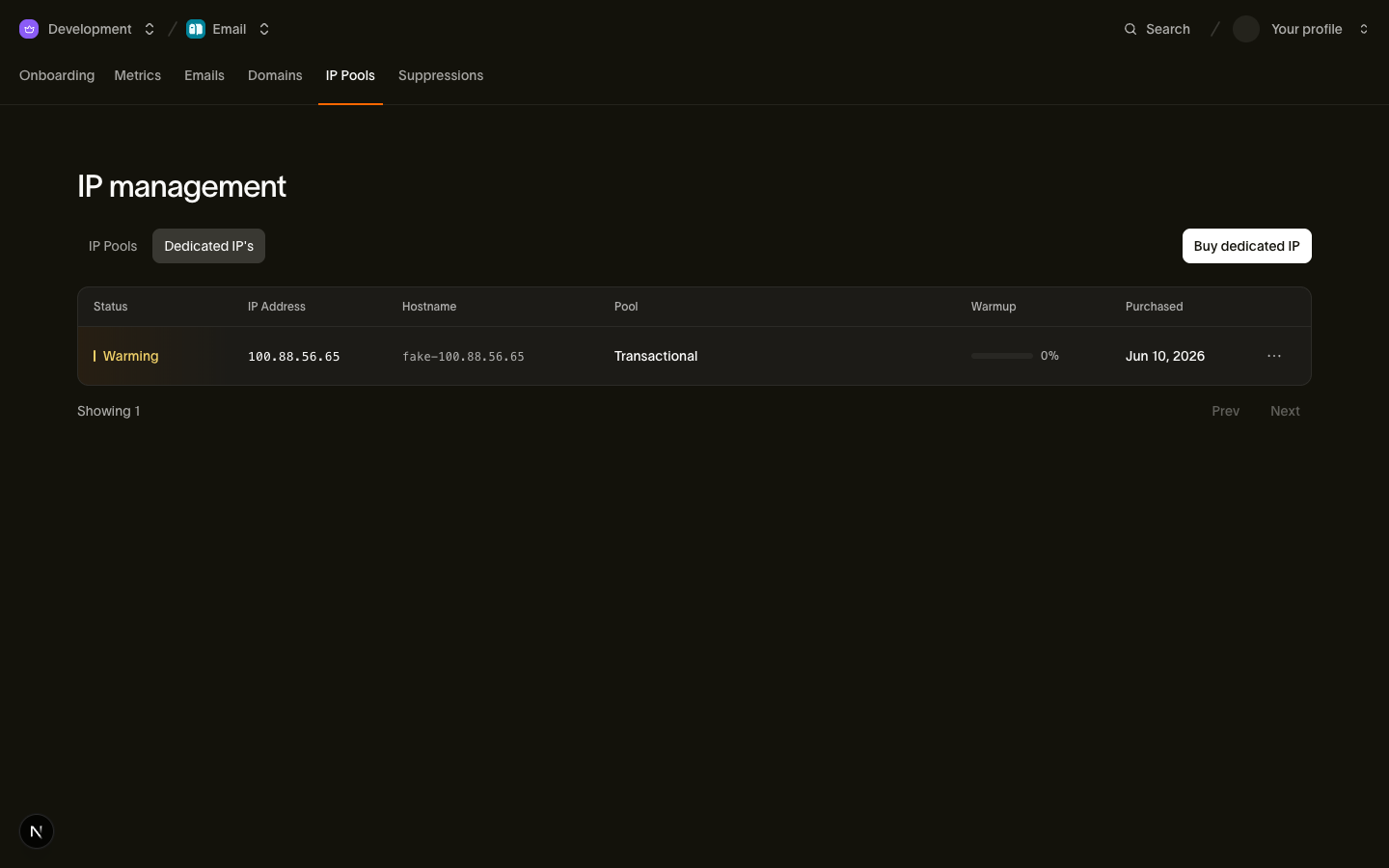
आपको वार्मअप खुद नहीं संभालना पड़ता। हर नया खरीदा गया डेडिकेटेड IP warming स्थिति में शुरू होता है, और हम उसे लगभग 30 दिनों में अपने-आप वार्मअप करते हैं। रैंप चरणों की एक तय शृंखला है। हर चरण में नया IP आपके ट्रैफ़िक का बड़ा हिस्सा लेता है, और जितना वह सुरक्षित रूप से संभाल सकता है उससे अधिक ट्रैफ़िक साझा पूल से होकर जाता है। इस पूरे समय आपका मेल पूरी मात्रा में जाता रहता है। रैंप आगे बढ़ने के साथ केवल नए IP और साझा इंफ्रास्ट्रक्चर के बीच का बँटवारा बदलता है।
रैंप को तीन तथ्य परिभाषित करते हैं:
warmup_progressरैंप का पूरा हुआ हिस्सा है,0से100तक। चरण पूरे होने के साथ यह लगातार बढ़ता है, इसलिए इसमें अचानक उछाल नहीं, बल्कि नियमित बढ़ोतरी दिखती है।- प्रगति हर घंटे सिंक होती है। हम हर वार्मअप हो रहे IP को घंटे में एक बार भेजने वाले इंफ्रास्ट्रक्चर से मिलाते हैं, इसलिए किसी बदलाव को दिखने में एक घंटे तक लग सकता है। इससे अधिक बार पोल करने से कोई लाभ नहीं होता।
- पूरा होने पर स्थिति
activeहो जाती है। अंतिम चरण पूरा होने परwarmup_progressका मान100होता है,warmup_completed_atसेट हो जाता है, और IP अपने पूल से भेजी गई पूरी मात्रा संभालता है, साझा इंफ्रास्ट्रक्चर में कोई ओवरफ़्लो नहीं जाता।
डेडिकेटेड IP जिन सभी स्थितियों की रिपोर्ट कर सकता है, रद्दीकरण सहित, वे डेडिकेटेड IP और पूल में दी गई हैं।
वार्मअप पर नज़र रखना
स्थिति और प्रगति Email > IP Pools > Dedicated IPs में देखें, या CLI से IP संसाधन पढ़ें:
bird email dedicated-ips get dip_6jeq30c6f79n9st5z6002c349r{
"address": "198.51.100.22",
"created_at": "2026-06-29T13:56:39Z",
"hostname": "mta2.send.goldcrest.dev",
"id": "dip_6jeq30c6f79n9st5z6002c349r",
"ip_pool_id": "ipp_1btmn1nnkd8y6a4jckbkvvt9eh",
"organization_id": "org_01ky7m235keybaf72b0fdgfwj4",
"purchased_at": "2026-06-29T13:56:39Z",
"status": "warming",
"updated_at": "2026-07-23T13:56:39Z",
"warmup_progress": 45,
"warmup_started_at": "2026-06-29T13:56:39Z"
}वार्मअप फ़ील्ड:
warmup_progress: रैंप का कितना हिस्सा पूरा हो चुका है,0से100तक।warmup_started_at: रैंप कब शुरू हुआ, यानी खरीद का समय।warmup_completed_at: वार्मअप पूरा होने और IP केactiveस्थिति में जाने पर दिखाई देता है। जब तक IP का वार्मअप चल रहा है, यह मौजूद नहीं रहता।
अपना डिफ़ॉल्ट कब बदलें
रैंप आपको वॉल्यूम बढ़ने के जोखिम से बचाता है, लेकिन दो फ़ैसले आपके हाथ में रहते हैं:
- जब तक आप इसे नहीं बदलते, शेयर्ड पूल ही आपका डिफ़ॉल्ट रहता है। डेडिकेटेड IP खरीदने से आपका ट्रैफ़िक कभी दूसरे रास्ते पर नहीं जाता। जिन संदेशों में कोई पूल नहीं बताया गया, वे वार्मअप हो चुके शेयर्ड पूल से ही जाते रहते हैं, इसलिए ट्रैफ़िक कभी ज़बरदस्ती नए IP पर नहीं भेजा जाता। जब आप तैयार हों, अपने डेडिकेटेड पूल को डिफ़ॉल्ट बनाएँ; इसके नियम डेडिकेटेड IP और पूल में हैं।
- डिफ़ॉल्ट बदलने से पहले
activeका इंतज़ार करें। आप ट्रैफ़िक ऐसे पूल पर भेज सकते हैं जिसके IP का वार्मअप अभी चल रहा है। ओवरफ़्लो रूटिंग के कारण मेल फिर भी डिलीवर होता है।warmup_completed_atसेट होने तक शेयर्ड पूल को डिफ़ॉल्ट रहने दें, फिर बदलें। अपना पूरा वॉल्यूम नए खरीदे गए IP पर डालने की योजना कभी न बनाएँ, क्योंकि वार्मअप का मकसद ही वह प्रतिष्ठा बनाना है।
अगर आप कई पूल चलाते हैं, तो हर नए IP के साथ ऐसा ही करें: उसे उसके पूल में खरीदें, warmup_progress पर नज़र रखें, और IP के active होने के बाद ही डेडिकेटेड ट्रैफ़िक सोच-समझकर भेजें।
अगले कदम
- डेडिकेटेड IP और पूल: IP खरीदना, पूल व्यवस्थित करना और डिफ़ॉल्ट पूल के नियम
- डिलीवरेबिलिटी · ईमेल: प्रतिष्ठा मॉडल में वार्मअप की भूमिका
संबंधित संसाधन
इस विषय के लिए दस्तावेज़, गाइड और उदाहरणों के साथ आगे बढ़ें।