Send your first email
Create an API key, send through Bird's shared onboarding domain, and check the result. You do not need to verify a sending domain or publish DNS records for this guide. Verify your own domain before sending to customers.
1. Create an API key
In the dashboard, go to Developers > API keys and create a key. Keys are scoped to a region and look like bk_us1_... or bk_eu1_...; the region in the prefix tells you which API host to call: https://us1.platform.bird.com or https://eu1.platform.bird.com.
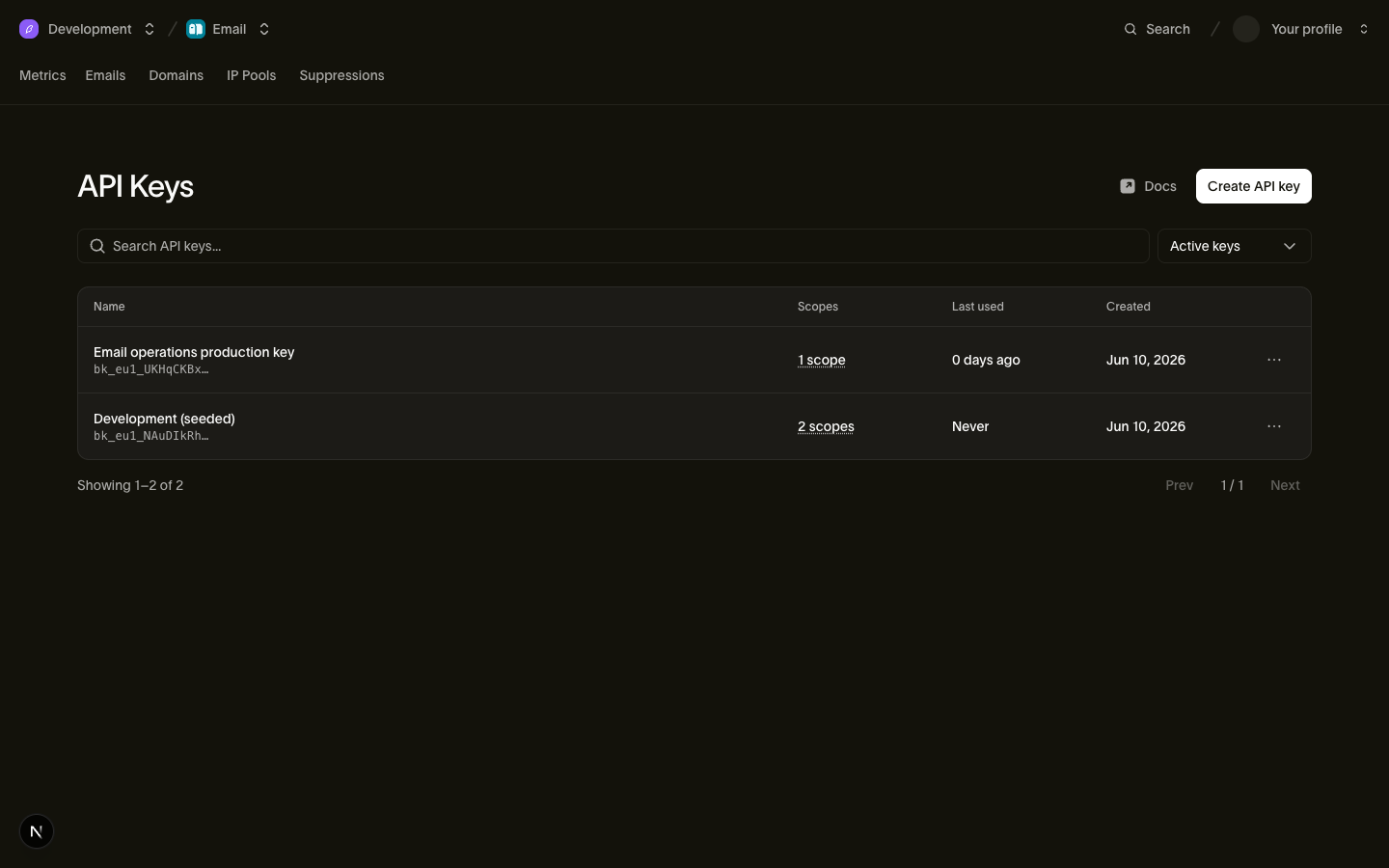
The full key is shown once, at creation time. Copy it somewhere safe, then export it so the step 2 snippets can read it:
export BIRD_API_KEY="bk_us1_..."2. Send an email
Send from onboarding@messagebird.dev, Bird's shared onboarding domain, available in your workspace with no setup. Address it to delivered@messagebird.dev, a sandbox recipient that always delivers, so the result is deterministic without a real mailbox.
The cURL call names the US host. If your key starts with bk_eu1_, call https://eu1.platform.bird.com instead. The SDK reads the region from your key and selects the host. The TypeScript tab requires npm install @messagebird/sdk.
import { BirdClient } from "@messagebird/sdk";

const bird = new BirdClient({ apiKey: process.env.BIRD_API_KEY! });

const msg = await bird.email.send({
  from: { email: "onboarding@messagebird.dev", name: "Bird" },
  to: ["delivered@messagebird.dev"],
  subject: "Hello from Bird",
  html: "<p>My first Bird email.</p>",
});

console.log(msg.id, msg.status);
from bird import APIError, Bird
with Bird() as client:
try:
message = client.email.send(
from_={"email": "onboarding@messagebird.dev", "name": "Bird"},
to=["delivered@messagebird.dev"],
subject="Hello from Bird",
html="<p>My first Bird email.</p>",
)
print(message.id, message.status)
except APIError as err:
print("send failed:", err)package main
import (
"encoding/json"
"errors"
"log"
"net/http"
"os"
bird "github.com/messagebird/bird-sdk-go"
"github.com/messagebird/bird-sdk-go/option"
)
func main() {
client, err := bird.NewClient(option.WithAPIKey(os.Getenv("BIRD_API_KEY")))
if err != nil {
log.Fatal(err)
}
http.HandleFunc("POST /send", func(w http.ResponseWriter, r *http.Request) {
msg, err := client.Email.Send(r.Context(), bird.EmailSendParams{
From: "onboarding@messagebird.dev",
To: []string{"delivered@messagebird.dev"},
Subject: "Hello from Bird",
HTML: "<p>My first Bird email.</p>",
})
if err != nil {
var apiErr *bird.APIError
if errors.As(err, &apiErr) {
http.Error(w, apiErr.Error(), apiErr.StatusCode)
return
}
http.Error(w, err.Error(), http.StatusInternalServerError)
return
}
w.Header().Set("Content-Type", "application/json")
w.WriteHeader(http.StatusAccepted)
_ = json.NewEncoder(w).Encode(msg)
})
log.Fatal(http.ListenAndServe(":3000", nil))
}<?php
// Send your first email. Set BIRD_API_KEY in your environment, then run:
// php examples/quickstart-email.php
declare(strict_types=1);
require __DIR__ . '/../vendor/autoload.php';
use MessageBird\Bird;
$bird = new Bird(getenv('BIRD_API_KEY') ?: '');
$message = $bird->email->send(
from: 'Bird <onboarding@messagebird.dev>',
to: ['delivered@messagebird.dev'],
subject: 'Hello from Bird',
html: '<p>My first Bird email.</p>',
);
echo $message->getId(), ' ', $message->getStatus(), "\n";bird email send \
--from 'Bird <onboarding@messagebird.dev>' \
--html '<p>My first Bird email.</p>' \
--subject 'Hello from Bird' \
--to delivered@messagebird.devcurl -X POST "https://us1.platform.bird.com/v1/email/messages" \
-H "Authorization: Bearer $BIRD_API_KEY" \
-H "Content-Type: application/json" \
-d '{
"from": { "email": "onboarding@messagebird.dev", "name": "Bird" },
"to": ["delivered@messagebird.dev"],
"subject": "Hello from Bird",
"html": "<p>My first Bird email.</p>"
}'For complete installation and run steps in each language or framework, use the SDK quickstarts.
3. See the result
The API responds with 202: Bird has accepted the send for asynchronous processing. Check the delivery status separately. The *_count fields track recipients through the delivery states. In the initial response, one recipient is accepted and none are delivered.
{
  "id": "em_01ky7ma8y2es1s2akzk53tmjn0",
  "status": "accepted",
  "category": "marketing",
  "from": { "email": "onboarding@messagebird.dev" },
  "to": [{ "email": "delivered@messagebird.dev" }],
  "subject": "Hello from Bird",
  "accepted_count": 1,
  "processed_count": 0,
  "delivered_count": 0,
  "deferred_count": 0,
  "bounced_count": 0,
  "complained_count": 0,
  "rejected_count": 0,
  "open_count": 0,
  "click_count": 0,
  "track_opens": true,
  "track_clicks": true,
  "created_at": "2026-07-23T13:58:20.866Z"
}
Fetch the message by its em_ ID to see its current state. A message moves from accepted through processed to delivered. Poll until the sandbox message reaches delivered:
const msg = await bird.email.get("em_abc123");
msg.status; // "accepted" | "processed" | "delivered" | "bounced" | …
msg.delivered_count;
msg.bounced_count;
message = client.email.get("em_abc123")
print(message.id, message.status, message.delivered_count)package main
import (
"context"
"fmt"
"log"
"os"
bird "github.com/messagebird/bird-sdk-go"
"github.com/messagebird/bird-sdk-go/option"
)
func main() {
client, err := bird.NewClient(option.WithAPIKey(os.Getenv("BIRD_API_KEY")))
if err != nil {
log.Fatal(err)
}
msg, err := client.Email.Get(context.Background(), "em_abc123")
if err != nil {
log.Fatal(err)
}
fmt.Println(*msg.Status, *msg.DeliveredCount)
}$message = $bird->email->get('em_01krdgeqcxet5s7t44vh8rt9mg');
echo $message->getStatus();bird email get <message-id>curl -X GET "https://{region}.platform.bird.com/v1/email/messages/{message_id}" \
-H "Authorization: Bearer $TOKEN"In the cURL tab, replace {region} and {message_id}, and use $BIRD_API_KEY in place of $TOKEN.
The read now shows status: "delivered", delivered_count: 1, and a delivered_at timestamp. See the events guide for what delivered establishes for a real recipient.
Because you sent to delivered@messagebird.dev, the outcome is guaranteed: the message flows through Bird's real delivery pipeline, including production event and webhook shapes, but never touches a real mailbox. To test a bounce, send to bounce@messagebird.dev. The testing sandbox guide lists every sandbox address and its simulated outcome.
About the onboarding domain
The shared onboarding@messagebird.dev sender is available for onboarding and has these limits:
- Apart from the
@messagebird.devsandbox addresses, it only delivers to verified members of your workspace; any other recipient is rejected with a422. - Sends are capped at 50 recipients per organization per UTC day, counting every
to,cc, andbccaddress, sandbox recipients included. Past the cap the API returns a429.
When you're ready to email real customers, verify your own sending domain and put your own address in from; everything else in the request stays the same.
Next steps
- Per-SDK quickstarts: the same flow in your language and framework.
- Sending domains: verify your own domain for production sending.
- Testing sandbox: every sandbox address and the events it triggers.
- Email API reference: the full request and response schema.
- Getting started with email: a video of the dashboard onboarding, which goes further than this page and adds a sending domain with its DNS records
Related resources
Continue with the documentation, guides and examples for this topic.