WhatsApp 发送抑制
屏蔽是工作区不再发送消息的地址,附带一个作用域。Bird 会在发送到达 WhatsApp 之前拦截发往被屏蔽地址的消息。
打开 Suppressions 页面操作列表,或使用下方的 API。收件人自行声明的记录位于同一页面的 Preferences 标签页中,遵循不同的规则。
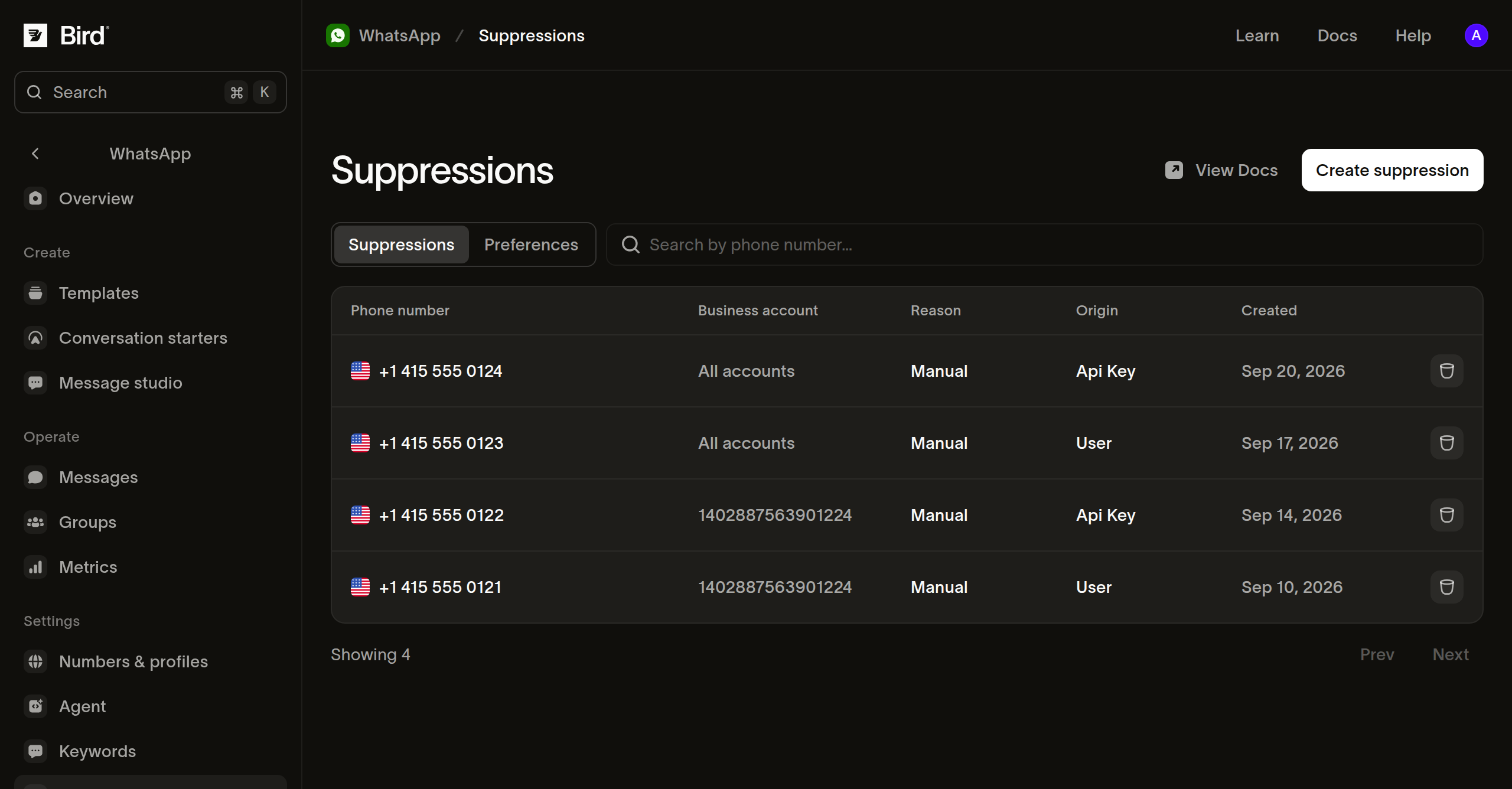
按业务账户屏蔽
在 Suppressions 标签页中,为某个电话号码创建屏蔽记录并选择其适用的业务账户。Bird 会拦截来自该账户的消息,而你的其他账户仍可向该号码发送消息。列表的 Business account 列显示屏蔽记录所限定的账户名称,或对覆盖整个工作区的记录显示 All accounts。
POST /v1/whatsapp/suppressions 通过代码完成同样的操作。waba 是要限定的账户;省略它可为整个工作区屏蔽该地址,包括你之后接入的账户:
// Omit waba to block the address for the whole workspace, whichever account
// sends. With it, your other accounts keep reaching them, and the same
// address for two accounts is two records.
const suppression = await bird.whatsapp.suppressions.add({
  address: "+15550001234",
  waba: "102290129340398",
});
console.log(suppression.id, suppression.applies_to);
# Omit waba to block the address for the whole workspace, whichever account
# sends. With it, your other accounts keep reaching them, and the same
# address for two accounts is two records.
suppression = client.whatsapp.suppressions.add(
address="+15550001234",
waba="102290129340398",
)
print(suppression.id, suppression.applies_to)suppression, err := client.Whatsapp.Suppressions.Add(context.Background(), bird.WhatsappSuppressionsAddParams{
Address: "+15550001234",
// Omit Waba to block the address for the whole workspace, whichever account
// sends. With it, your other accounts keep reaching them, and the same
// address for two accounts is two records.
Waba: &waba,
})
if err != nil {
log.Fatal(err)
}
fmt.Println(suppression.Id, suppression.AppliesTo)// Omit setWaba to block the address for the whole workspace, whichever account
// sends. With it, your other accounts keep reaching them, and the same address
// for two accounts is two records.
$suppression = $bird->whatsapp->suppressions->add(
(new WhatsAppSuppressionCreate())
->setAddress('+15550001234')
->setWaba('102290129340398'),
);
echo $suppression->getId(), ' ', $suppression->getAppliesTo();bird whatsapp suppressions add --address +5511977670804curl -X POST https://us1.platform.bird.com/v1/whatsapp/suppressions \
-H "Authorization: Bearer $BIRD_API_KEY" \
-H "Content-Type: application/json" \
-d '{"address":"+15550001234","waba":"102290129340398"}'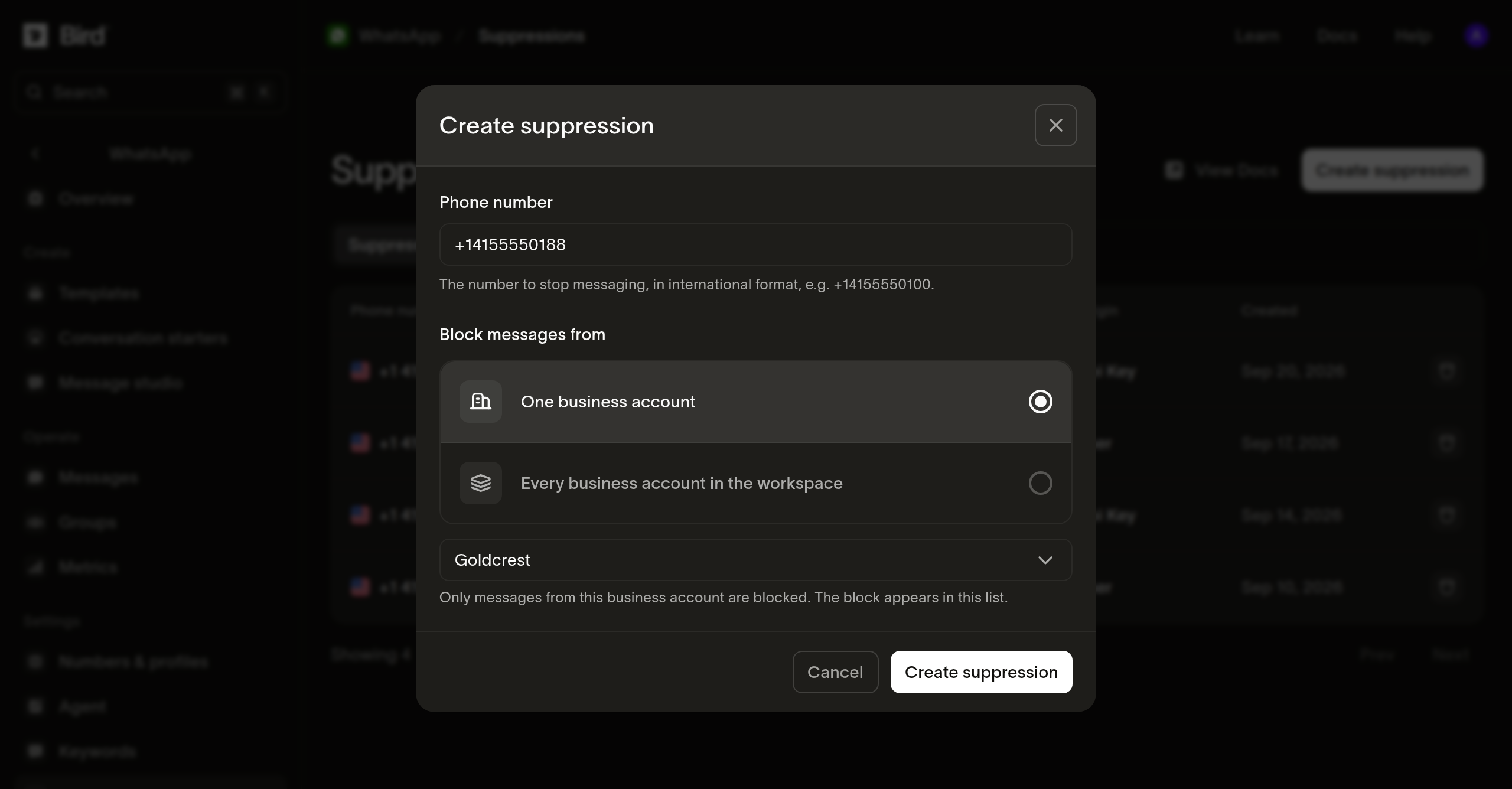
一个作用域,一条记录
一条屏蔽记录只携带一个作用域,因此同一地址被两个账户屏蔽就是两条记录而非一条。要覆盖整个工作区,只需调用一次且不传 waba。
添加一个在该作用域下已被屏蔽的地址会返回 200 及已有记录,而不会创建第二条。新记录返回 201。
屏蔽记录以你录入的地址为键。通过电话号码联系的收件人和通过业务级用户 ID 联系的同一收件人是两个键,屏蔽其中一个不会屏蔽另一个。如果你以两种方式联系同一个人,请同时记录两条。
读取屏蔽列表
GET /v1/whatsapp/suppressions 以游标分页方式返回当前生效的屏蔽记录,最新的排在前面。address 按前缀过滤且不区分大小写:部分值匹配其下的所有地址,完整值仅匹配该地址。reason 按类别筛选,例如 manual 表示你手动添加的记录:
// address is a prefix, so a partial value matches every address under it.
const suppressions = await bird.whatsapp.suppressions.list({ address: "+1555" });
for (const suppression of suppressions.data ?? []) {
  console.log(suppression.address, suppression.waba ?? "every account");
}
# address is a prefix, so a partial value matches every address under it.
suppressions = client.whatsapp.suppressions.list(address="+1555")
for suppression in suppressions.data or []:
print(suppression.address, suppression.waba or "every account")for suppression, err := range client.Whatsapp.Suppressions.List(context.Background(), bird.WhatsappSuppressionsListParams{
Address: "+1555", // a prefix, so a partial value matches every address under it
}) {
if err != nil {
log.Fatal(err)
}
fmt.Println(suppression.Address, suppression.Reason)
}// address is a prefix, so a partial value matches every address under it.
foreach ($bird->whatsapp->suppressions->list(['address' => '+1555']) as $suppression) {
echo $suppression->getAddress(), ' ', $suppression->getWaba() ?? 'every account', PHP_EOL;
}bird whatsapp suppressions listcurl "https://us1.platform.bird.com/v1/whatsapp/suppressions?address=%2B1555" \
-H "Authorization: Bearer $BIRD_API_KEY"列表只包含当前生效的记录,已结束的记录不在其中。缺少某个地址并不能证明工作区从未屏蔽过它;该记录可能已结束。通过 ID 读取以确认。
读取单条记录
GET /v1/whatsapp/suppressions/{suppression_id} 能解析已结束和仍生效的记录,并报告其结束时间和结束原因:
// Resolves a record that has already ended, which the list leaves out.
const suppression = await bird.whatsapp.suppressions.get("was_01krdgeqcxet5s7t44vh8rt9mg");
console.log(suppression.reason, suppression.ended_at ?? "still in force");
# Resolves a record that has already ended, which the list leaves out.
suppression = client.whatsapp.suppressions.get("was_01krdgeqcxet5s7t44vh8rt9mg")
print(suppression.reason, suppression.ended_at or "still in force")suppression, err := client.Whatsapp.Suppressions.Get(context.Background(), "was_01krdgeqcxet5s7t44vh8rt9mg")
if err != nil {
log.Fatal(err)
}
fmt.Println(suppression.Reason, suppression.EndedAt)// Resolves a record that has already ended, which the list leaves out.
$suppression = $bird->whatsapp->suppressions->get('was_01krdgeqcxet5s7t44vh8rt9mg');
echo $suppression->getReason(), ' ', $suppression->getEndedAt()?->format(DATE_ATOM) ?? 'still in force';bird whatsapp suppressions get <suppression-id>curl https://us1.platform.bird.com/v1/whatsapp/suppressions/was_01krdgeqcxet5s7t44vh8rt9mg \
-H "Authorization: Bearer $BIRD_API_KEY"结束屏蔽
对屏蔽行执行 Delete 操作会结束屏蔽,而非删除它。拦截停止,记录仍可读取,并显示结束时间和操作人。DELETE /v1/whatsapp/suppressions/{suppression_id} 执行相同操作并返回 204:
// Only a manual suppression can be ended; a recipient's own opt-out is
// theirs to reverse. The record is kept and still reads back by id.
await bird.whatsapp.suppressions.remove("was_01krdgeqcxet5s7t44vh8rt9mg");
# Only a manual suppression can be ended; a recipient's own opt-out is
# theirs to reverse. The record is kept and still reads back by id.
client.whatsapp.suppressions.remove("was_01krdgeqcxet5s7t44vh8rt9mg")if err := client.Whatsapp.Suppressions.Remove(context.Background(), "was_01krdgeqcxet5s7t44vh8rt9mg"); err != nil {
log.Fatal(err)
}// Only a manual suppression can be ended; a recipient's own opt-out is theirs
// to reverse. The record is kept and still reads back by id.
$bird->whatsapp->suppressions->remove('was_01krdgeqcxet5s7t44vh8rt9mg');bird whatsapp suppressions remove <suppression-id> --yescurl -X DELETE https://us1.platform.bird.com/v1/whatsapp/suppressions/was_01krdgeqcxet5s7t44vh8rt9mg \
-H "Authorization: Bearer $BIRD_API_KEY"你自行添加的屏蔽记录原因为 manual,可以结束。收件人自己的退订需由收件人自行撤销,尝试结束会返回 422。对已结束的屏蔽再次调用会成功但不做任何更改,工作区中不存在的 ID 会返回 404。
结束屏蔽需要提供其 ID,因此请先通过列表查找。
监听新增屏蔽
whatsapp_suppression.created 在屏蔽记录创建时触发,你的系统无需轮询即可感知新的拦截。其载荷包含:
suppression_id,记录的标识符。address,被屏蔽号码,E.164 格式。waba,拦截所限定的账户;覆盖整个工作区时为 null。reason和workspace_id。
屏蔽结束时不会触发事件,因此在使用本地副本之前请重新读取列表。完整载荷请参阅 WhatsApp 屏蔽 webhook。
后续步骤
- Preferences:收件人自行声明的记录,以及哪些可以由你撤销。
- 消息状态 webhook:被阻止的发送所产生的
whatsapp.rejected载荷。 - 发送 WhatsApp 消息:发送 API 及其异步投递模型。