发送验证
验证用户需要两次调用。POST /v1/verify/verifications 将验证码发送到电子邮件地址或电话号码。POST /v1/verify/verifications/check 提交用户输入的值并报告是否匹配。Bird 生成验证码,不会在 API 响应中返回它,并强制执行过期和尝试次数限制。
发送验证码
最简单的有效请求只需一个 to 收件人:
const verification = await bird.verify.verifications.create({
  to: { phone_number: "+15551234567" },
});
console.log(verification.id, verification.status);
verification = client.verify.verifications.create(to={"phone_number": "+15551234567"})
print(verification.id, verification.status)verification, err := client.Verify.Verifications.Create(context.Background(), bird.VerifyVerificationsCreateParams{
To: bird.VerificationTo{PhoneNumber: bird.String("+15551234567")},
})
if err != nil {
log.Fatal(err)
}
fmt.Println(verification.Id, *verification.Status)$verification = $bird->verify->verifications->create(
(new VerificationCreateRequest())->setTo((new VerificationTo())->setPhoneNumber('+15551234567')),
);
echo $verification->getId(), ' ', $verification->getStatus();bird verify verifications create --body-file - <<'JSON'
{
"to": {
"phone_number": "+15551234567"
},
"metadata": {
"correlation_id": "signup-7f3a"
}
}
JSONcurl -X POST https://us1.platform.bird.com/v1/verify/verifications \
-H "Authorization: Bearer bk_us1_..." \
-H "Content-Type: application/json" \
-d '{
"to": { "phone_number": "+15551234567" }
}'使用你的区域主机(https://us1.platform.bird.com 或 https://eu1.platform.bird.com)和匹配的 bk_{region}_... 密钥。
收件人
to 通过 email、E.164 格式的 phone_number,或两者同时提供来标识收件人。提供电子邮件地址即可启用邮件投递。电话号码会解析为其目的地国家/地区可用的渠道,按国家/地区配置中设定的顺序排列。大多数国家/地区先尝试 WhatsApp 再尝试 SMS,而部分国家/地区先尝试 SMS;Telegram 在平台回退顺序中排在两者之后。只有在你已开启语音的国家/地区才会使用语音呼叫。当你同时提供两个地址时,一次失败的尝试可以推进到另一个可用渠道。
选项
options 仅为本次请求覆盖设置:
code_length:本次验证的验证码长度,4 到 8 位数字,覆盖默认值。channels:为本次请求重新排序或缩减投递渠道。按你希望尝试的顺序列出渠道名称(sms、whatsapp、email、telegram、voice);你省略的渠道不会被使用,不在收件人已解析计划中的名称会被忽略。你无法通过这种方式添加渠道,只能裁剪或重新排序收件人和国家/地区配置已允许的渠道;如果列表中没有可用渠道,请求将失败并返回422。language:一个 BCP 47 标签,如fr或pt-BR,用于选择验证码消息使用的内置翻译。省略此项时,语言跟随收件人的电话号码;参见消息语言。
元数据
metadata 是一个自由格式的对象,在每次读取时返回;用它来携带你自己的用户 ID 或会话引用。发送方选择和验证设置不随请求传递:它们来自你的工作区配置,在控制面板中管理(参见验证设置)。
响应
{
  "id": "vrf_01ky7q1fdze3695yvyz7z9nm3a",
  "status": "pending",
  "reason": null,
  "to": { "phone_number": "+15551234567" },
  "channels": [{ "channel": "whatsapp" }, { "channel": "sms" }],
  "last_channel": "whatsapp",
  "expires_at": "2026-07-23T14:55:58Z",
  "verified_at": null,
  "created_at": "2026-07-23T14:45:58Z",
  "updated_at": "2026-07-23T14:45:58Z"
}
channels 是本次验证解析出的有序投递计划(电话收件人按尝试顺序列出其电话渠道),last_channel 是最近一次验证码发送到的渠道。expires_at 是在没有正确验证码到达时验证失效的时间;重新发送不会延长它。
消息语言
Bird 的 SMS、邮件以及共享 WhatsApp 消息内置了 40 种翻译。自定义 WhatsApp 发送方使用其所选身份验证模板的已批准语言。Telegram 会生成自己的消息,语音呼叫则用英语朗读验证码,因此该设置对这两者均无效。
不设置 options.language 时,语言取决于收件人的电话号码。法国号码使用法语,日本号码使用日语,无需你额外指定。没有电话号码的验证发送英语,所在国家/地区没有对应翻译时也发送英语。
设置 options.language 来自行选择语言,例如匹配用户在你的应用中选择的语言,而非其号码所在国家/地区:
{
  "to": { "phone_number": "+15551234567" },
  "options": { "language": "es" }
}没有对应内置翻译的标签会回退到其基础语言,再回退到英语:en-GB 发送英语,pt-BR 发送葡萄牙语。只有格式错误的标签会被拒绝,返回 422。以下是可用的内置翻译,全部可用于 SMS 和邮件,除蒙古语外均可用于 Bird 的共享 WhatsApp 发送方:
| 语言 | 标签 |
|---|---|
| 阿拉伯语 | ar |
| 保加利亚语 | bg |
| 简体中文 | zh |
| 繁体中文 | zh-TW |
| 克罗地亚语 | hr |
| 捷克语 | cs |
| 丹麦语 | da |
| 荷兰语 | nl |
| 英语 | en |
| 芬兰语 | fi |
| 法语 | fr |
| 德语 | de |
| 希腊语 | el |
| 希伯来语 | he |
| 印地语 | hi |
| 匈牙利语 | hu |
| 印度尼西亚语 | id |
| 意大利语 | it |
| 日语 | ja |
| 韩语 | ko |
| 拉脱维亚语 | lv |
| 立陶宛语 | lt |
| 马其顿语 | mk |
| 马来语 | ms |
| 蒙古语 | mn |
| 挪威语 | no |
| 书面挪威语 | nb-NO |
| 波兰语 | pl |
| 葡萄牙语 | pt |
| 罗马尼亚语 | ro |
| 俄语 | ru |
| 塞尔维亚语 | sr |
| 斯洛伐克语 | sk |
| 斯洛文尼亚语 | sl |
| 西班牙语 | es |
| 瑞典语 | sv |
| 泰语 | th |
| 土耳其语 | tr |
| 乌克兰语 | uk |
| 越南语 | vi |
创建验证参考文档是权威列表。
语言在验证创建时即固定,因此重新发送或切换到其他渠道发出的消息与第一条消息使用相同语言。对同一收件人使用不同的 language 再次调用 create 会复用进行中的验证,不会更改语言。
如果发生了回退,发送实际使用的翻译可能与你传入的标签不同。在 Verifications 页面打开该验证即可确认:每次尝试都会以 Template 标签显示实际使用的语言。Bird 的共享 WhatsApp 发送方没有蒙古语(mn)模板,因此该语言会发送英语,而 SMS 和邮件仍使用蒙古语。你自己的 WhatsApp 模板遵循其已批准的语言和语言策略;无法发送的语言可能导致 WhatsApp 尝试失败。
你可以按请求选择语言,但不能在请求中传入消息文案。自定义 WhatsApp 发送方使用其所选身份验证模板的文案。发送方与品牌展示了发送方选项和 Bird 的消息文本。
校验验证码
将用户输入的内容提交到 POST /v1/verify/verifications/check,使用相同的收件人作为键;无需验证 ID。提供的 to 集合必须与创建验证时完全一致:同时使用两个地址创建的验证无法仅通过其中一个地址找到。
const result = await bird.verify.verifications.check({
  to: { phone_number: "+15551234567" },
  code: "123456",
});
console.log(result.success);
result = client.verify.verifications.check(
to={"phone_number": "+15551234567"}, code="123456"
)
print(result.success)result, err := client.Verify.Verifications.Check(context.Background(), bird.VerifyVerificationsCheckParams{
To: bird.VerificationTo{PhoneNumber: bird.String("+15551234567")},
Code: "123456",
})
if err != nil {
log.Fatal(err)
}
fmt.Println(*result.Success)$result = $bird->verify->verifications->check(
(new VerificationCheckRequest())
->setTo((new VerificationTo())->setPhoneNumber('+15551234567'))
->setCode('123456'),
);
echo $result->getSuccess() ? 'verified' : 'failed';bird verify verifications check 123456 --phone-number +15551234567curl -X POST https://us1.platform.bird.com/v1/verify/verifications/check \
-H "Authorization: Bearer bk_us1_..." \
-H "Content-Type: application/json" \
-d '{
"to": { "phone_number": "+15551234567" },
"code": "123456"
}'响应指示是否匹配:
{
  "success": false,
  "reason": "incorrect_code",
  "attempts_remaining": 4,
  "verification": {
    "id": "vrf_01ky7q1fdze3695yvyz7z9nm3a",
    "status": "pending",
    "reason": null,
    "to": { "phone_number": "+15551234567" },
    "channels": [{ "channel": "whatsapp" }, { "channel": "sms" }],
    "last_channel": "whatsapp",
    "expires_at": "2026-07-23T14:55:58Z",
    "verified_at": null,
    "created_at": "2026-07-23T14:45:58Z",
    "updated_at": "2026-07-23T14:46:38Z"
  }
}
处理以下两种响应行为:
- 错误的验证码返回
200。 将带有reason(incorrect_code、expired、attempts_exhausted)的success: false视为正常应答。attempts_remaining告诉你还剩多少次尝试机会。将错误处理留给请求失败的情况。 - 已结束的验证无法再次校验。 验证进入任何最终状态后,后续校验返回
404。存储第一次确定性结果,而不是再次校验。
如果用户请求新的验证码,使用相同收件人再次调用 create 端点:进行中的验证会被复用而非替换。重新发送冷却时间(默认 60 秒)过后会发出新验证码;冷却期内调用会返回当前验证而不再次发送。为当前验证发出的每个验证码在验证解决或过期之前都保持有效,因此用户可以输入任何一个收到的验证码。
通过其他渠道发送验证码
当用户报告完全没有收到验证码时,POST /v1/verify/verifications/next-channel 将验证推进到其计划中的下一个渠道并在那里发送新的验证码。这就是 "I didn't receive my code" 按钮背后的端点:由你的应用决定切换渠道,而非等待投递状态信号。
与校验一样,使用创建验证时相同的收件人作为键:
const verification = await bird.verify.verifications.nextChannel({
  to: { phone_number: "+15551234567" },
});
console.log(verification.last_channel);
verification = client.verify.verifications.next_channel(
to={"phone_number": "+15551234567"}
)
print(verification.last_channel)verification, err := client.Verify.Verifications.NextChannel(context.Background(), bird.VerifyVerificationsNextChannelParams{
To: bird.VerificationTo{PhoneNumber: bird.String("+15551234567")},
})
if err != nil {
log.Fatal(err)
}
if verification.LastChannel != nil {
fmt.Println(*verification.LastChannel)
}$verification = $bird->verify->verifications->nextChannel(
(new VerificationNextChannelRequest())->setTo((new VerificationTo())->setPhoneNumber('+15551234567')),
);
echo $verification->getLastChannel();bird verify verifications next-channel --phone-number +15551234567curl -X POST "https://{region}.platform.bird.com/v1/verify/verifications/next-channel" \
-H "Authorization: Bearer $TOKEN" \
-H "Content-Type: application/json" \
-d '{
"to": {
"phone_number": "+15551234567"
}
}'响应是验证对象,last_channel 指示新验证码发送到的渠道。之前发送的每个验证码仍然有效,因此迟到的消息仍可校验。
与重新发送相比,有两点不同:
- 重新发送冷却时间不适用。 主动切换渠道与在同一渠道上再次请求是不同的行为,因此发送会立即执行。
- 只有渠道向前推进。 过期时间、尝试次数预算和验证 ID 保持不变。
当用户希望在有效渠道上再试一次时使用重新发送,当渠道本身看起来有问题时使用此端点。计划为先 WhatsApp 后 SMS 的电话号码会推进到 SMS;只有一个可用渠道的收件人无处可进。
以下四种响应需要专门处理,而非简单重试:
| 状态 | 发生了什么 | 应对措施 |
|---|---|---|
404 | 该收件人没有进行中的验证 | 创建一个 |
422 NoNextChannel | 计划中没有更多渠道可推进 | 再次调用 create 在当前渠道重新发送 |
422 NoAvailableChannel | 所有剩余渠道均发送失败 | 向用户展示失败信息;该验证无法投递 |
429 | 该账户的发送请求过于频繁 | 按 Retry-After 响应头中的时长进行退避 |
此端点发送的每个验证码与其他 Verify 发送一样计费;参见费用与计费。
状态
验证处于 pending 状态,直到进入最终状态,reason 说明原因:
| 状态 | 含义 | 原因 |
|---|---|---|
verified | 在有效期内收到了正确的验证码 | 无 |
failed | 错误尝试次数过多,或投递计划以失败告终,表明未发送任何验证码 | attempts_exhausted、undeliverable |
expired | 有效期已过,未收到正确的验证码 | ttl_elapsed |
reason 是一个开放枚举。遇到无法识别的值时应保留它,而非将响应视为无效。
退信、运营商拒绝或投递超时可能会使会话保持待处理状态,因为收件人可能仍持有有效的验证码。仅投递计划用尽并不意味着会话失败。失败条件详见 Verify 事件。
在控制面板中跟踪验证
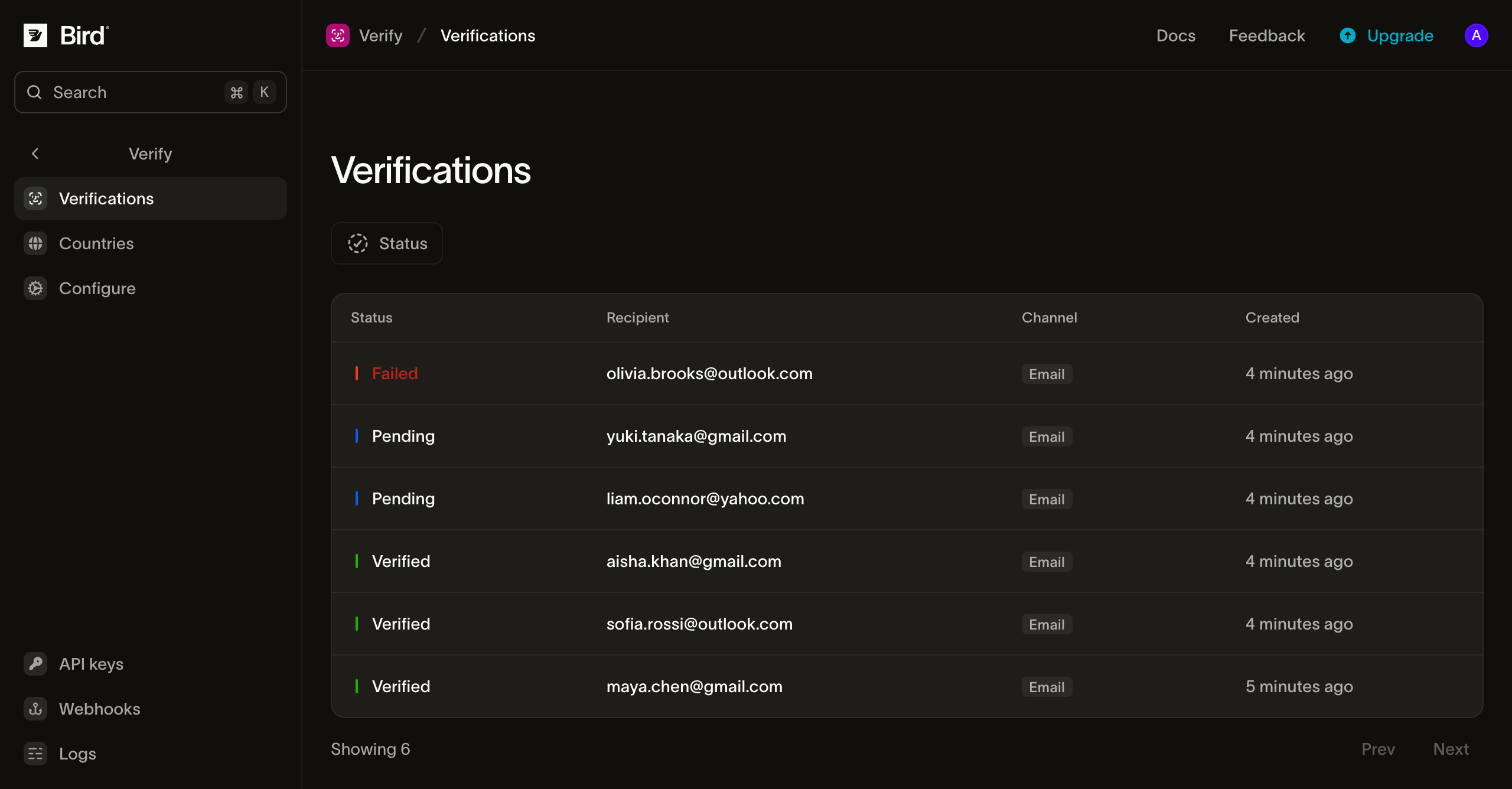
Verifications 页面列出工作区创建的所有验证,可按状态筛选。点击每一行可查看收件人、渠道计划、最后使用的渠道、过期和验证时间以及元数据。生成的验证码不会显示。
验证设置
Configure 页面设置工作区的验证周期。每个字段显示生效值:如果你设置了覆盖值则显示你的值,否则显示 Bird 的平台默认值。
- Duration:验证码的有效时长。默认 10 分钟;范围 1 到 999 分钟。
- Maximum Retries:验证因
attempts_exhausted而失败前允许的校验尝试次数。默认 5 次;范围 1 到 10。 - Retry Delay:向同一收件人重新发送验证码前的冷却时间。默认 60 秒;范围 0 到 3600。
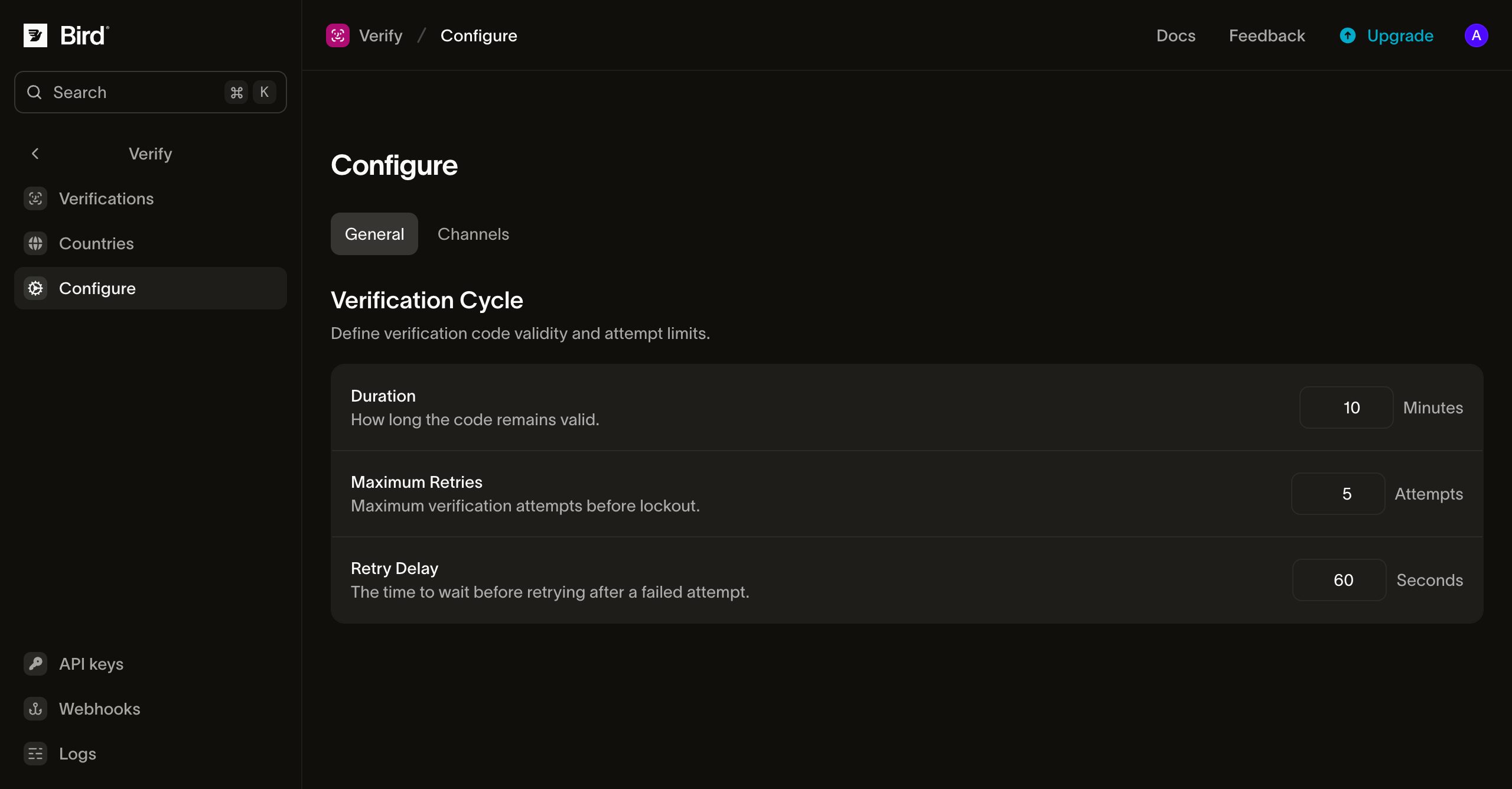
验证码长度不在此页面设置:验证码默认为 6 位纯数字,options.code_length 可在每次请求中设置 4 到 8 位。
防滥用机制
无论你如何设置,Verify 都会强制执行平台上限,防止 OTP 流量被恶意利用,不管是针对你的余额(SMS 盗刷)还是受害者的收件箱:
- 每个地址每滚动小时 5 次发送,包括创建和重新发送验证。当
to包含两个地址时,每个地址各有独立的配额。 - 每个收件人地址集每分钟 10 次校验,与验证的尝试限制独立计算。
渠道计划(而非小时上限)约束渠道切换。每次调用严格向前推进,因此一次验证在每个剩余渠道上最多发送一次。
触发上限会返回 429;请在 Retry-After 响应头指示的时间后退避重试。你的账户整体请求限制是独立的,随套餐扩展;详见请求速率限制。
安全重试
三个端点均接受 Idempotency-Key 请求头。为每个逻辑请求发送唯一值。超时或连接断开后,使用相同的幂等键重试会重放原始响应。重放不会发送另一个验证码或消耗额外的校验尝试次数,并会包含 Idempotency-Replay 响应头。幂等键格式和保留期限详见幂等性。
费用与计费
计费以每次发送的验证码为单位。每次发送按目的地的渠道费率从你的余额中扣除。重新发送或回退到其他渠道时,每次发送各产生一笔费用。Bird 自身的费用在发送处理时收取,无论验证码是否送达均不退还;在 SMS 和 WhatsApp 上,消息投递后还会产生第三方费用。免费线路和校验不收费;在计费前被拒绝的发送也不收费。余额与充值详见付款方式与余额。
Telegram 的计费时点不同。消息发出前,系统会先询问 Telegram 该号码能否接收消息;如果回答为是,则按全球统一费率收费,无法送达的号码免费并直接推进到下一个渠道,不产生费用。因此,Telegram 收费意味着消息已被接受投递,而非已送达:之后未送达的验证码仍会被收费,验证流程在回退到下一个渠道时会再次产生费用。如果你不希望产生这笔额外费用,可以在 Countries 页面将相关国家的渠道顺序中移除 Telegram。
语音按电话呼叫计费,而非按验证码计费,且不收取 Verify 费用。未接听的呼叫不收费。已接听的呼叫从接听到挂断按目的地的呼出语音费率计费,并适用该费率的最低计费时长和计费增量,另加 Bird 的呼叫处理费。两项费用均列于语音价格页面;计费时长的计算方式详见语音费用与计费。如果呼叫在验证码完整朗读前结束,即使该尝试被报告为 undelivered,已接通的时长仍会计费。
后续步骤
| 页面 | 涵盖内容 |
|---|---|
| 发送方与品牌 | 验证码消息的外观以及如何使用自有域名发送 |
| 国家/地区配置 | 按国家/地区设置的渠道顺序、启用状态和发送方覆盖 |
| 事件 | 验证生命周期与投递事件及其 webhook 载荷 |
| 幂等性 | 使用 Idempotency-Key 请求头安全重试 |
| API 参考:创建验证 | 发送端点的 schema 和错误详情 |
| API 参考:校验验证码 | 校验端点的 schema 和错误详情 |
| API 参考:推进到下一渠道 | 下一渠道端点的 schema 和错误详情 |