屏蔽列表
您的工作区拥有一个屏蔽列表:一组我们不会向其投递邮件的电子邮件地址。硬退信和垃圾邮件投诉会自动进入该列表,您也可以手动添加地址。反复向退信或举报垃圾邮件的地址发送邮件可能导致您的域名被邮箱服务商封锁,因此我们会在邮件离开平台之前阻止这些发送。
新的退订不会添加屏蔽记录。它记录的是收件人自行表明的偏好,而非投递能力事实,因此会显示在 Preferences 选项卡中。具体机制请参阅退订链接。
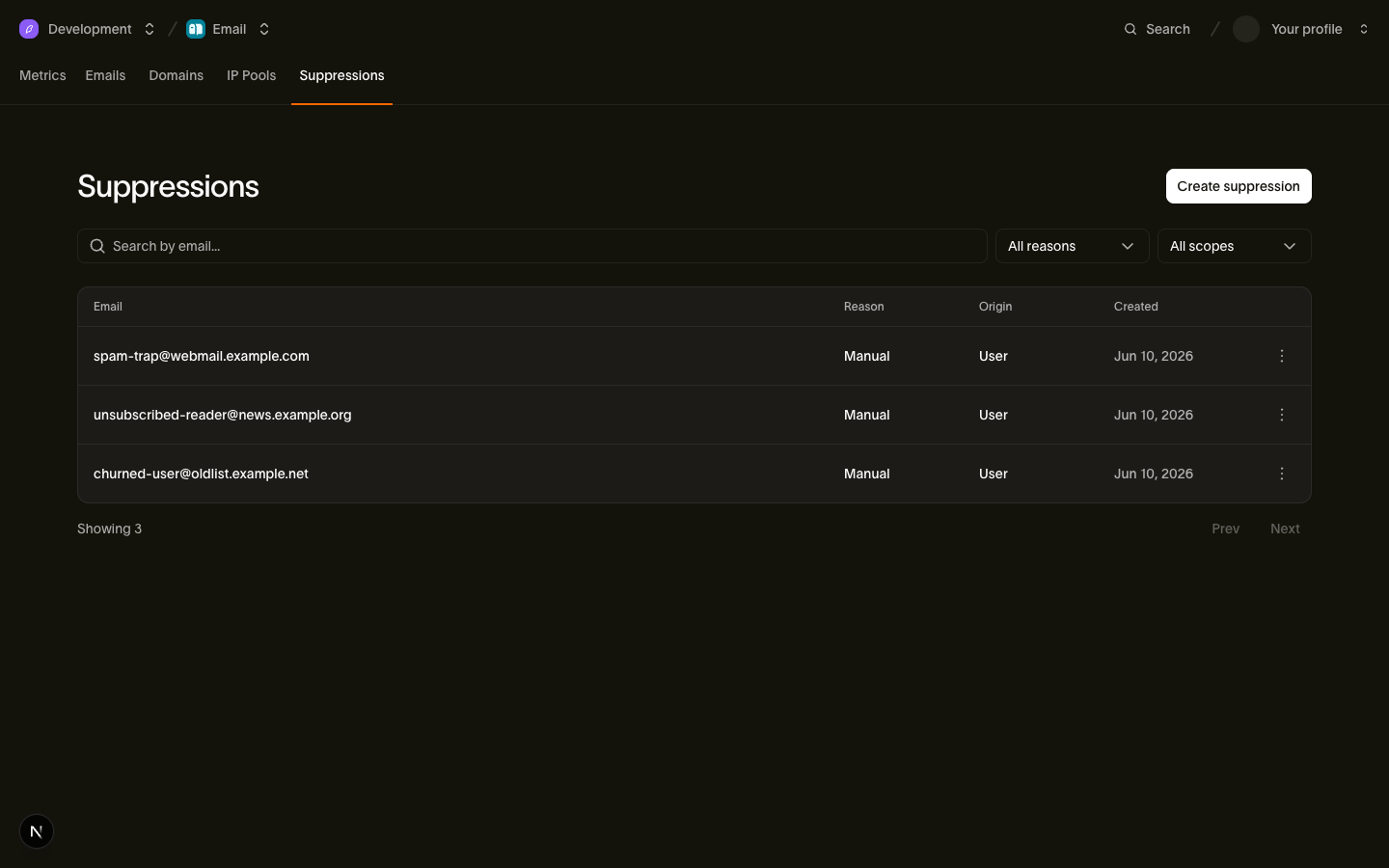
您可以在 Email > Suppressions 中管理列表,也可以通过屏蔽列表 API 或 bird email suppressions 来管理。
三种原因及其屏蔽范围
每条记录都有一个 reason 说明该地址被列入的原因,以及一个 applies_to 策略控制它屏蔽哪些类别:
| 原因 | applies_to | 营销类别 | 事务类别 |
|---|---|---|---|
hard_bounce | all | 已屏蔽 | 已屏蔽 |
complaint | non_transactional | 已屏蔽 | 已放行 |
manual | all | 已屏蔽 | 已屏蔽 |
这种区分源于每种原因的含义:
hard_bounce:该地址不存在。向任何类别发送都毫无意义,因此屏蔽所有类别。complaint:关于不想接收邮件的声明。将您的新闻邮件举报为垃圾邮件的人可能仍然需要密码重置或订单确认,因此仅屏蔽非事务性发送。manual:您或您的团队做出的刻意决定。我们不会质疑这一决定,因此手动屏蔽会阻止所有类别,包括事务性邮件。
一个地址每种原因持有一条记录,因此硬退信和之前的投诉会作为独立记录并存,只要任何屏蔽记录存在,投递就保持被阻止状态。对于无法识别的内容,我们默认关闭:如果返回的记录中包含您的集成从未见过的 applies_to,请将其视为屏蔽所有类别,这也是我们自己的处理方式。
注意:屏蔽列表 API 中的 reason: unsubscribe 已弃用。新的退订会记录偏好,而不是屏蔽记录。在旧版屏蔽记录被移除之前,已弃用的 ?reason=unsubscribe 过滤器仍会返回带有 origin: unsubscribe_link 或 origin: unsubscribe_event 的这些记录。
地址如何被自动添加
我们根据收件人信号向屏蔽列表添加记录,因此出现退信或投诉时您无需采取任何操作:
| 触发条件 | 产生的屏蔽记录 |
|---|---|
硬退信(email.bounced) | reason: hard_bounce、origin: bounce_event、applies_to: all |
带外硬退信(email.out_of_band_bounce) | reason: hard_bounce、origin: bounce_event、applies_to: all |
垃圾邮件投诉(email.complained) | reason: complaint、origin: complaint_event、applies_to: non_transactional |
退订操作不会出现在此列表中,无论是通过邮件正文中的链接还是一键按钮:它会在 Preferences 标签页中记录偏好,而不是向此列表添加一行。
只有 hard 类退信会触发屏蔽,分类表列出了哪些 bounce_class 值属于硬退信。两种看似失败的结果不会屏蔽该地址,仍可向其发送:
- 软退信和延迟投递(
email.deferred,或带有bounce_type: "soft"的email.bounced):如邮箱已满等临时性故障。我们会重试。 - 发送端拒绝:生成失败和策略拒绝是发送本身的问题,而非地址的问题。它们产生
email.rejected事件,不会创建屏蔽记录。
对于已因相同原因被屏蔽的地址,重复信号不会更改原始记录,包括其 created_at。该记录保留 source_email_id 和 source_recipient_id,它们将自动屏蔽关联回引起屏蔽的确切消息和收件人。这两个字段可以回答支持问题 "why did this person stop getting our email",在手动添加的记录中它们为 null。
每次添加(无论自动还是手动)都会向您的 webhook 端点触发一个 email_suppression.created 事件,包含 suppression_id、被屏蔽的 email、reason 和 workspace_id,这样您的系统可以镜像该列表而无需轮询:
{
  "type": "email_suppression.created",
  "timestamp": "2026-07-23T14:52:03.192524705Z",
  "data": {
    "email": "user@example.com",
    "reason": "manual",
    "suppression_id": "sup_01ky7qckqrf06r38g49b9kxdbc",
    "workspace_id": "ws_01ky7m21hjffh9s8kq76gyb1xf"
  }
}
通过 API 管理屏蔽列表
API 可添加、列出、查找和删除单条记录。地址在存储和查找之前会被转为小写,且永远不会出现在 URL 路径中,因为路径会记录在访问日志中,而电子邮件地址属于个人数据。要查找某个地址的记录,请使用 ?email= 过滤列表。
每个 SDK 在其 suppressions 资源上以类型化方法的形式提供这些操作。
添加地址
const suppression = await bird.suppressions.add({ email: "user@example.com" });
console.log(suppression.id);
suppression = client.suppressions.add(email="user@example.com")
print(suppression.id)suppression, err := client.Suppressions.Add(context.Background(), bird.SuppressionsAddParams{
Email: "user@example.com",
})
if err != nil {
log.Fatal(err)
}
fmt.Println(suppression.Id)$suppression = $bird->suppressions->add(
(new SuppressionCreate())->setEmail('user@example.com'),
);
echo $suppression->getId();bird email suppressions add --email user@example.comcurl -X POST https://us1.platform.bird.com/v1/email/suppressions \
-H "Authorization: Bearer $BIRD_API_KEY" \
-H "Content-Type: application/json" \
-d '{ "email": "user@example.com" }'手动添加的记录获得 reason: manual 和 applies_to: all,因此会屏蔽所有类别。该调用是幂等的:新屏蔽记录返回 201 Created;对于已被屏蔽(手动添加)的地址,则返回 200 OK 及现有记录,而不是返回冲突。两种情况下响应体均为屏蔽对象:
{
  "applies_to": "all",
  "created_at": "2026-07-23T14:52:03.192524705Z",
  "email": "user@example.com",
  "id": "sup_01ky7qckqrf06r38g49b9kxdbc",
  "origin": "api_key",
  "reason": "manual",
  "scope": {
    "id": "ws_01ky7m21hjffh9s8kq76gyb1xf",
    "type": "workspace"
  }
}
origin 字段记录该记录的创建方式。手动添加的记录值为 api_key 或 user,取决于调用者是通过 API 密钥还是仪表板会话进行认证。自动添加的记录值为 bounce_event 或 complaint_event,取决于触发它们的信号类型。
列出和查找
这些调用返回第一页。在 Go 中,空的第三个参数用于启动分页;传入上一页的 NextCursor 以读取下一页。
const page = await bird.suppressions.list({ limit: 25 });
console.log(page.data.length);
page = client.suppressions.list(limit=25)
print(len(page.data))page, err := client.Suppressions.ListPage(context.Background(), bird.SuppressionsListParams{Limit: 25}, "")
if err != nil {
log.Fatal(err)
}
fmt.Println(len(page.Data))$page = $bird->suppressions->list(['limit' => 25])->fetch();
echo count($page->data);bird email suppressions list --limit 25curl "https://us1.platform.bird.com/v1/email/suppressions?limit=25" \
-H "Authorization: Bearer $BIRD_API_KEY"列表使用游标分页,按最新排序,可按 reason 过滤。要检查某个地址,将其作为 email 查询参数传入:
const page = await bird.suppressions.list({ email: "user@example.com" });
console.log(page.data.length);
page = client.suppressions.list(email="user@example.com")
print(len(page.data))page, err := client.Suppressions.ListPage(context.Background(), bird.SuppressionsListParams{
Email: "user@example.com",
}, "")
if err != nil {
log.Fatal(err)
}
fmt.Println(len(page.Data))$page = $bird->suppressions->list(['email' => 'user@example.com'])->fetch();
echo count($page->data);bird email suppressions list --email user@example.comcurl "https://us1.platform.bird.com/v1/email/suppressions?email=user@example.com" \
-H "Authorization: Bearer $BIRD_API_KEY"email 过滤器按前缀进行不区分大小写的匹配:user@example.com 也会匹配 user@example.com.au。将每个返回的地址与您请求的完整地址进行比较,并遍历 next_cursor 的每一页后再判断是否存在匹配记录。一个地址可能对应多条记录。MCP 调用方可以使用 email_suppressions_check 进行精确地址查找。
拿到屏蔽 ID 后,GET /v1/email/suppressions/{suppression_id} 会返回该条记录:在 SDK 中为 suppressions.get,在 CLI 上为 bird email suppressions get <id>。
移除地址
await bird.suppressions.remove("sup_01ky7qckqrf06r38g49b9kxdbc");client.suppressions.remove("sup_01ky7qckqrf06r38g49b9kxdbc")if err := client.Suppressions.Remove(context.Background(), "sup_01ky7qckqrf06r38g49b9kxdbc"); err != nil {
log.Fatal(err)
}$bird->suppressions->remove('sup_01ky7qckqrf06r38g49b9kxdbc');bird email suppressions remove sup_01ky7qckqrf06r38g49b9kxdbc --yescurl -X DELETE https://us1.platform.bird.com/v1/email/suppressions/sup_01ky7qckqrf06r38g49b9kxdbc \
-H "Authorization: Bearer $BIRD_API_KEY"有一种原因无法通过此方式移除。complaint 记录只有已登录的仪表板用户才能移除;使用 API 密钥会收到 422 SuppressionNotRemovableByAPIKey。hard_bounce 和 manual 记录两种方式均可移除。
返回 204 No Content 并永久移除该记录。同一地址的其他记录不受影响,只要仍有记录阻止该消息类别,投递就会继续被阻止。要按地址移除记录,请分页遍历 ?email= 查找结果,仅选择完全匹配的地址,然后按 ID 逐条删除目标记录。移除 hard_bounce 记录时请慎重,因为如果地址仍然不存在,下次发送会再次退回并重新添加屏蔽。
向被屏蔽的地址发送时会发生什么
我们会在您可见的位置拒绝该收件人。收件人会获得一个 recipient_id,并以状态 rejected 出现在消息的收件人列表中。事件 API 和您的 webhook 会记录一个带有 rejection_reason: "recipient_suppressed" 的 email.rejected 事件。其余收件人正常投递。
消息本身仍会以 202 被接受,即使其所有收件人都已被屏蔽。我们在接受发送后、处理消息时才解析屏蔽,因此您现在添加的地址会在几分钟内生效,且不会阻止已在投递途中的发送。
使用沙箱进行测试
测试沙箱可确定性地测试屏蔽处理逻辑。向 suppressed@messagebird.dev 发送时,表现如同该地址已在您的屏蔽列表中:收件人会以 rejection_reason: "recipient_suppressed" 被拒绝,永远不会进入投递流程。沙箱的退回和投诉地址(bounce@messagebird.dev、complaint@messagebird.dev)会通过真实的事件管道运行其结果,但不会向您的屏蔽列表写入任何内容,因此相同的测试地址可在多次运行中反复使用。
后续步骤
- 类别:
transactional与marketing的区别,以及类别如何与屏蔽策略交互 - 退订链接:退订如何记录为收件人表明的偏好而非屏蔽
- 事件和 webhook:
email.rejected载荷以及驱动自动屏蔽的生命周期事件 - 测试沙箱:用于模拟各种投递结果的魔术地址
- API 参考文档:屏蔽列表:完整的请求和响应结构
- 当有人选择退订时会发生什么:一段视频,跟踪一个收件人从退订页面到发送被拒绝的完整过程