WhatsApp 关键词规则
Bird 内置了关键词目录,因此收件人向您的可接收入站消息的号码回复 STOP 即可退订,无需您做任何配置。START 则撤销退订。您自己创建的规则会在其适用范围内覆盖 Bird 的默认行为。
本页介绍 Bird 识别哪些关键词、入站消息如何匹配,以及如何更改回复措辞或添加关键词。Keywords 页面是仪表板中的对应功能。
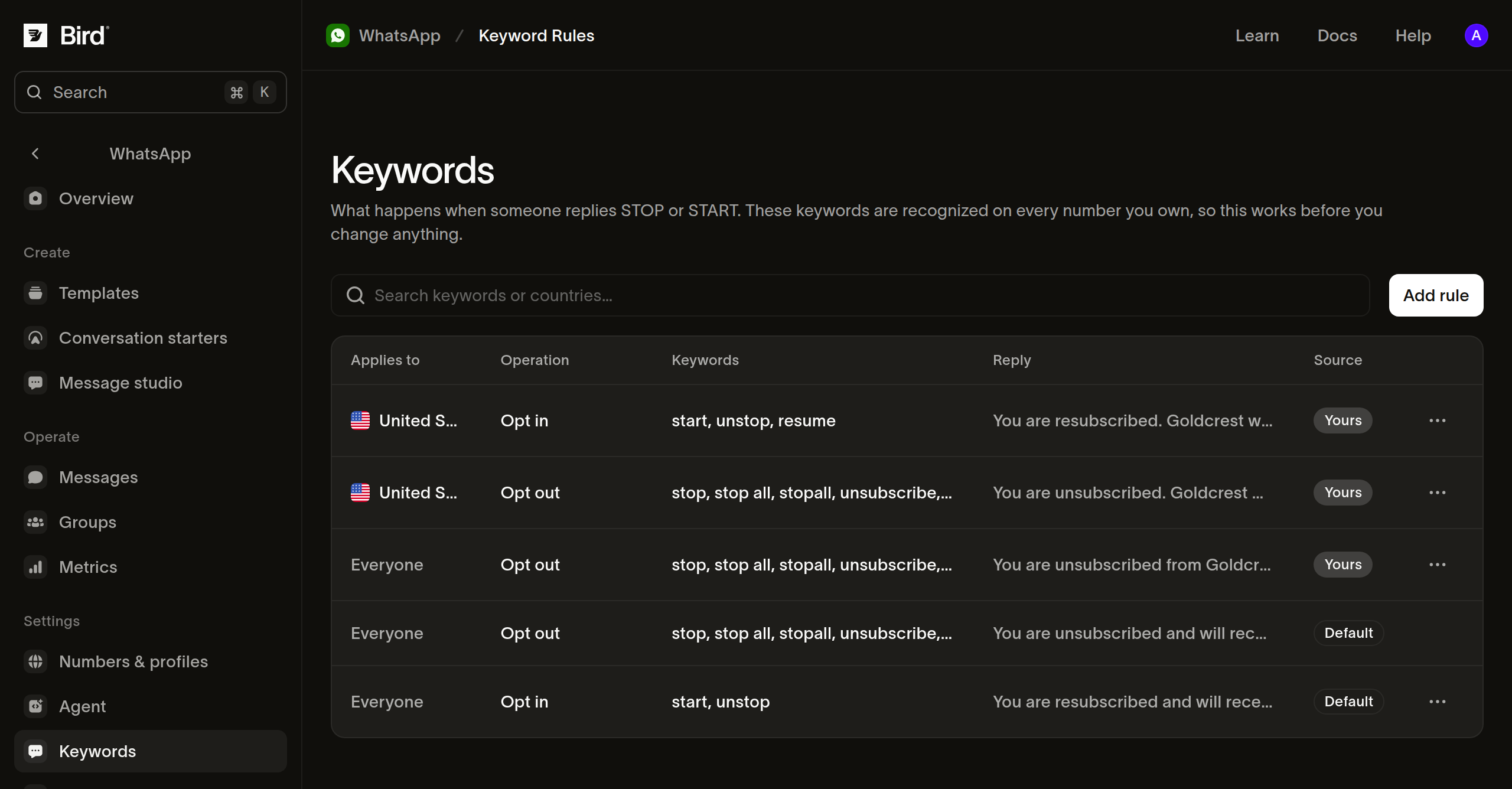
Bird 默认识别的关键词
九个词触发退订:
stop、stop all、stopall、unsubscribe、cancel、end、quit、revoke、optout
两个词撤销退订:start 和 unstop。
匹配针对整条消息而非子字符串。因为 cancel 和 end 是关键词,这一区别很重要:"cancel my 3pm delivery" 是普通消息而非撤回同意。字母大小写、重音符号、多余空格和尾部标点会被忽略,因此 Stop! 和 STOP 都能匹配。词前或词中的标点不会被忽略,因此 #stop 不会匹配。
不匹配关键词的情形
群组消息中的关键词会被跳过,因此参与者无法通过在群组中回复来退订。请在您自己的发送逻辑中处理群组成员明确表达的退订请求。
偏好设置的记录时机
分类与 whatsapp.received 事件同步执行,而非先于该事件。因此,监听该事件的集成可能会在偏好设置记录完成之前就看到 STOP 到达。如果您的处理程序在收到入站消息后触发发送操作,请重新读取收件人的记录,而非假设事件顺序。
查看生效的规则
GET /v1/whatsapp/keyword-rules 描述了您的号码收到回复后的处理方式。不加过滤时,它会返回 Bird 的目录以及您创建的所有规则。可使用 country、waba、operation 或 scope 来缩小范围:
scope=system返回 Bird 的目录,包括被您的规则覆盖的默认规则。scope=workspace返回您自己的规则。
const rules = await bird.whatsapp.keywordRules.list({ operation: "opt_out" });
for (const rule of rules.data ?? []) {
  console.log(rule.scope, rule.effective_keywords);
}
rules = client.whatsapp.keyword_rules.list(operation="opt_out")
for rule in rules.data or []:
print(rule.scope, rule.effective_keywords)rules, err := client.Whatsapp.KeywordRules.List(context.Background(), bird.WhatsappKeywordRulesListParams{
Operation: "opt_out", // omit for both operations, Bird's rules and your own
})
if err != nil {
log.Fatal(err)
}
for _, rule := range rules.Data {
fmt.Println(rule.Scope, rule.EffectiveKeywords)
}$rules = $bird->whatsapp->keywordRules->list(['operation' => 'opt_out']);
foreach ($rules->getData() ?? [] as $rule) {
echo $rule->getScope(), ' ', implode(',', $rule->getEffectiveKeywords() ?? []), PHP_EOL;
}bird whatsapp keyword-rules listcurl "https://us1.platform.bird.com/v1/whatsapp/keyword-rules?operation=opt_out" \
-H "Authorization: Bearer $BIRD_API_KEY"规则按最具体优先的顺序返回,这也是入站消息的匹配顺序。每条规则携带 effective_keywords:Bird 针对该操作和国家/地区的关键词集,加上您添加的任何关键词。
对于没有 country 的自建规则,effective_keywords 会显示 Bird 的全球关键词集,因为该规则没有指定国家/地区,而发送者的国家/地区在消息到达前是未知的。该规则实际匹配的是 Bird 针对发送者所在国家/地区的关键词集,可能是更大的集合。在规则上设置 country,即可查看这些发送者实际匹配的关键词。
country 是发送者的国家/地区,根据其本人的电话号码而非其发送目标号码推断。这是 WhatsApp 发送的国家/地区信号。通过业务范围用户 ID 标识的发送者不携带国家/地区信息,因此其消息会跳过按国家/地区限定的规则,转而匹配全球规则。
更改回复
Bird 的默认回复内容正确但较为通用。要以您自己的名义回复,请创建规则:
const rule = await bird.whatsapp.keywordRules.create({
  operation: "opt_out",
  country: "US", // the SENDER's country, from their own number
  reply: "You're off the list. ACME Courier won't message you again.",
});
// effective_keywords is Bird's set plus any of your own.
console.log(rule.id, rule.effective_keywords);
rule = client.whatsapp.keyword_rules.create(
operation="opt_out",
country="US", # the SENDER's country, from their own number
reply="You're off the list. ACME Courier won't message you again.",
)
# effective_keywords is Bird's set plus any of your own.
print(rule.id, rule.effective_keywords)rule, err := client.Whatsapp.KeywordRules.Create(context.Background(), bird.WhatsappKeywordRulesCreateParams{
Operation: "opt_out",
Country: bird.String("US"), // the SENDER's country, from their own number
Reply: bird.String("You're off the list. ACME Courier won't message you again."),
})
if err != nil {
log.Fatal(err)
}
// EffectiveKeywords is Bird's set plus any of your own.
fmt.Println(rule.Id, rule.EffectiveKeywords)$rule = $bird->whatsapp->keywordRules->create(
(new WhatsAppKeywordRuleCreate())
->setOperation('opt_out')
->setCountry('US')
->setReply("You're off the list. ACME Courier won't message you again."),
);
// getEffectiveKeywords() is Bird's set plus any of your own.
echo $rule->getId(), ' ', implode(',', $rule->getEffectiveKeywords() ?? []);bird whatsapp keyword-rules create \
--country US \
--keywords 'no more texts' \
--keywords 'remove me' \
--operation opt_out \
--reply "You're off the list. ACME Courier won't message you again." \
--waba 102290129340398curl -X POST https://us1.platform.bird.com/v1/whatsapp/keyword-rules \
-H "Authorization: Bearer $BIRD_API_KEY" \
-H "Content-Type: application/json" \
-d '{"operation":"opt_out","country":"US","reply":"You'"'"'re off the list. ACME Courier won'"'"'t message you again."}'您的规则会替换该范围内 Bird 的回复,同时保留 Bird 的关键词。您的 keywords 是在现有关键词基础上的追加而非替换,因此 Bird 以后新增的关键词会自动开始匹配,无需您做任何更改。
如果要在记录退订的同时不发送任何回复,请在创建规则时省略 reply。如果要将已有规则静默,请在下方更新操作的 JSON 请求体中将 reply 设为 null;CLI 标志无法携带 null。
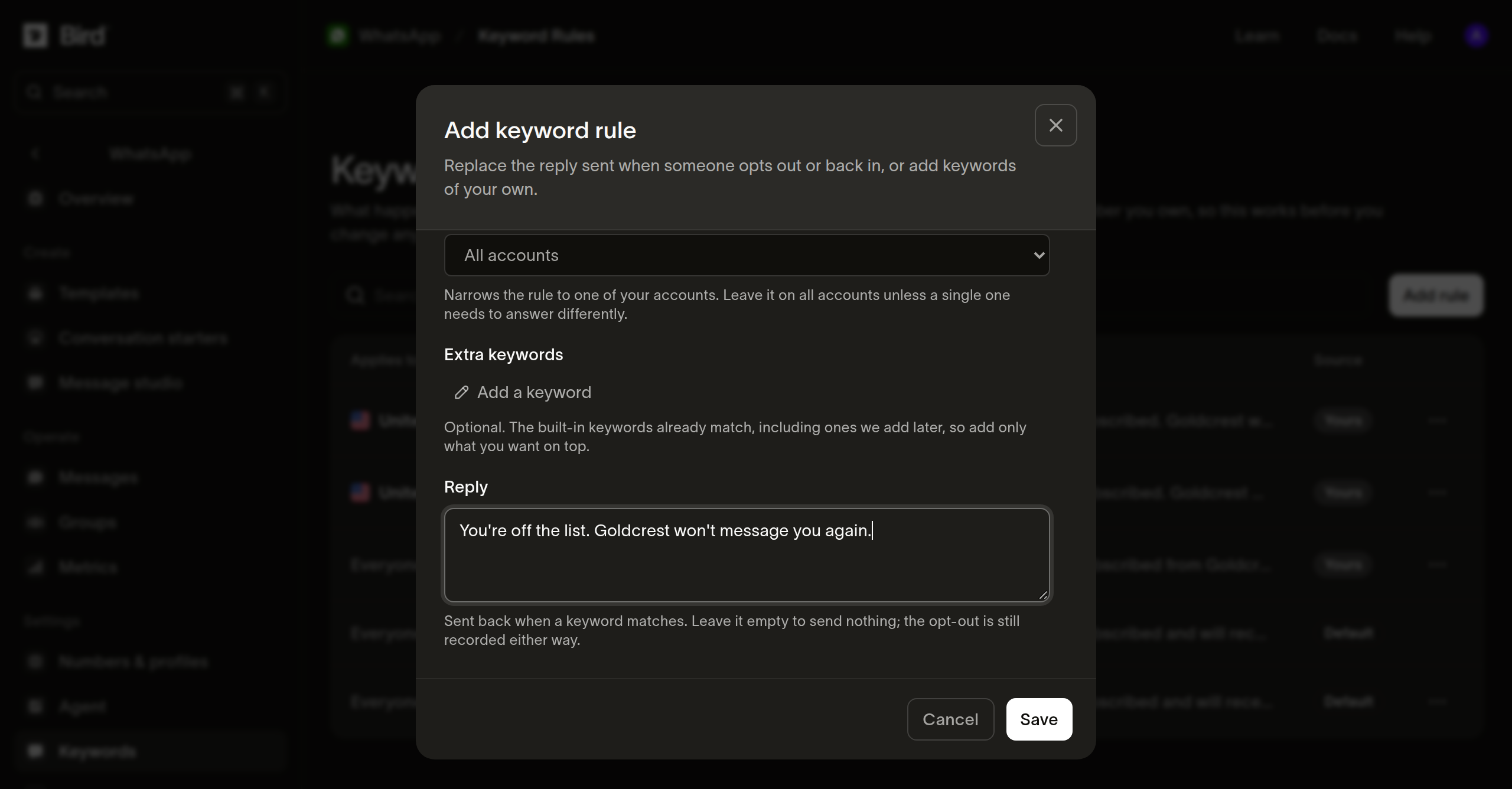
添加自定义关键词
// Omitting keywords leaves the set alone; an empty array clears your additions
// back to Bird's. reply: null switches the auto-reply off and still records
// the opt-out.
const rule = await bird.whatsapp.keywordRules.update("wkr_01m2kj8x4te9p0rr7e5w2n1abc", {
  keywords: ["no more texts", "remove me"],
});
console.log(rule.effective_keywords);
# Omitting keywords leaves the set alone; an empty list clears your additions
# back to Bird's.
rule = client.whatsapp.keyword_rules.update(
"wkr_01m2kj8x4te9p0rr7e5w2n1abc", keywords=["no more texts", "remove me"]
)
print(rule.effective_keywords)// Omitting keywords leaves the set alone; an empty slice clears your
// additions back to Bird's.
rule, err := client.Whatsapp.KeywordRules.Update(context.Background(),
"wkr_01m2kj8x4te9p0rr7e5w2n1abc", bird.WhatsappKeywordRulesUpdateParams{
Keywords: []string{"no more texts", "remove me"},
})
if err != nil {
log.Fatal(err)
}
fmt.Println(rule.EffectiveKeywords)// Omitting keywords leaves the set alone; an empty array clears your additions
// back to Bird's.
$rule = $bird->whatsapp->keywordRules->update(
'wkr_01m2kj8x4te9p0rr7e5w2n1abc',
(new WhatsAppKeywordRuleUpdate())->setKeywords(['no more texts', 'remove me']),
);
echo implode(',', $rule->getEffectiveKeywords() ?? []);bird whatsapp keyword-rules update <id> \
--keywords 'no more texts' \
--reply "You're off the list. ACME Courier won't message you again."curl -X PATCH https://us1.platform.bird.com/v1/whatsapp/keyword-rules/wkr_01m2kj8x4te9p0rr7e5w2n1abc \
-H "Authorization: Bearer $BIRD_API_KEY" \
-H "Content-Type: application/json" \
-d '{"keywords":["no more texts"]}'省略 keywords 会保留您已添加的关键词不变。发送空数组会将关键词清除,恢复为 Bird 的默认集合。
规则范围与重复
规则可通过 waba 缩小到一个 WhatsApp Business Account,通过 country 缩小到一个发送者国家/地区,也可同时指定两者,或都不指定。每个操作、国家/地区和帐户的组合只能有一条规则。对同一组合的第二次写入会返回重复错误。
Bird 会拒绝将 stop 绑定到 opt_in 的规则,无论该词来自 Bird 的目录还是您的其他规则,因此退订关键词不能被用于授予同意。
删除规则
删除您的规则会将该范围交给匹配顺序中的下一条规则,而下一条规则不一定是您创建的。匹配顺序如下:
- 您针对特定帐户和国家/地区的规则。
- 您针对特定帐户的规则。
- 您针对特定国家/地区的规则。
- Bird 针对发送者所在国家/地区的规则。
- 您的全球规则。
- Bird 的全球规则。
因此,删除您针对某个国家/地区的规则后,该范围会先交给 Bird 针对该国家/地区的规则,而非您自己的全球规则:
// The next rule in the ladder answers the scope, which is another rule of yours if you hold a less specific one; STOP never stops working.
await bird.whatsapp.keywordRules.delete("wkr_01m2kj8x4te9p0rr7e5w2n1abc");
# The next rule in the ladder answers the scope, which is another rule of yours if you hold a less specific one; STOP never stops working.
client.whatsapp.keyword_rules.delete("wkr_01m2kj8x4te9p0rr7e5w2n1abc")if err := client.Whatsapp.KeywordRules.Delete(context.Background(),
"wkr_01m2kj8x4te9p0rr7e5w2n1abc"); err != nil {
log.Fatal(err)
}// The next rule in the ladder answers the scope, which is another rule of yours if you hold a less specific one; STOP never stops working.
$bird->whatsapp->keywordRules->delete('wkr_01m2kj8x4te9p0rr7e5w2n1abc');bird whatsapp keyword-rules delete <id> --yescurl -X DELETE https://us1.platform.bird.com/v1/whatsapp/keyword-rules/wkr_01m2kj8x4te9p0rr7e5w2n1abc \
-H "Authorization: Bearer $BIRD_API_KEY"删除规则不会使 STOP 停止工作。它只是将回复措辞和关键词集恢复为匹配顺序中下一条规则的内容。