WhatsApp events
Bird records events for inbound and outbound WhatsApp messages. An outbound timeline shows what happened after a send returned 202: acceptance, handoff to WhatsApp, delivery, reading, or failure. An inbound timeline records when Bird received the message.
The event envelope
Public outbound delivery events use the standard webhook envelope: a type, a timestamp, and a type-specific data object.
代码示例
{
  "data": {
    "direction": "outbound",
    "from": { "phone_number": "+13124495569" },
    "metadata": { "session_id": "sess_4821" },
    "tags": [{ "name": "flow", "value": "login-otp" }],
    "to": { "phone_number": "+14155550100" },
    "whatsapp_id": "wam_01ky7qbvswf3fvyaw3az90391c",
    "workspace_id": "ws_01ky7m235keycbnwyajabe1a6b"
  },
  "timestamp": "2026-07-23T14:51:39.913Z",
  "type": "whatsapp.delivered"
}
Each public WhatsApp webhook payload carries whatsapp_id, workspace_id, direction, from, to, tags, and metadata. An address can include an E.164 phone_number, a Meta business-scoped user ID in bsuid, or both. tags and metadata are null when the send carried none.
The events API returns leaner timeline records with an id, type, and occurred_at timestamp. The message ID is already in the request URL.
Lifecycle events
Events appear in chronological order. An outbound message can stop at whatsapp.failed or whatsapp.rejected, and whatsapp.read appears only if the recipient opens the message. An inbound message has a single whatsapp.received timeline event.
| Event | Meaning | Public webhook |
|---|---|---|
| whatsapp.accepted | Bird accepted the send request. This is what the 202 reported. | Yes |
| whatsapp.sent | Bird handed the message to the WhatsApp network. | Yes |
| whatsapp.delivered | WhatsApp confirmed delivery to the recipient's device. | Yes |
| whatsapp.read | The recipient opened the message. | Yes |
| whatsapp.failed | WhatsApp did not deliver the message. | Yes |
| whatsapp.rejected | Bird refused the message before sending it. It was not charged. | Yes |
| whatsapp.received | Bird received an inbound message from a contact. | No |
whatsapp.delivered is also the moment Meta's share of the message price is charged, though the event does not report it: WhatsApp event payloads carry no cost. Read the message back with GET /v1/whatsapp/messages/{message_id} to see what it cost. See Cost and billing.
whatsapp.read does not change the message status. A delivered message stays delivered; the message also records the read in read_at.
The event type list is open: new types may be added over time, so treat an unrecognized value as a future event rather than an error.
Failure events
whatsapp.failed and whatsapp.rejected are terminal. A rejection means Bird stopped the message before sending it to WhatsApp, so it was not charged. Causes include a suppressed recipient, insufficient wallet balance, or a destination without a configured price. A failure means WhatsApp refused or could not deliver the message. meta_error_code contains WhatsApp's code when available.
Both events contain an error object with a stable Bird code, a human-readable description, an optional meta_error_code, and occurred_at. The object appears in API records and webhook payloads only for these event types.
Reading events from the API
GET /v1/whatsapp/messages/{message_id}/events returns the timeline in chronological order. The bounded list is not paginated. Reading events requires an API key with whatsapp:read:
const { data } = await bird.whatsapp.listEvents("wa_abc123");
for (const event of data) console.log(event.type, event.occurred_at);
events = client.whatsapp.list_events("wa_abc123")
for event in events.data:
print(event.type, event.occurred_at)package main
import (
"context"
"fmt"
"log"
"os"
bird "github.com/messagebird/bird-sdk-go"
"github.com/messagebird/bird-sdk-go/option"
)
func main() {
client, err := bird.NewClient(option.WithAPIKey(os.Getenv("BIRD_API_KEY")))
if err != nil {
log.Fatal(err)
}
events, err := client.Whatsapp.ListEvents(context.Background(), "wam_01krdgeqcxet5s7t44vh8rt9mg", bird.WhatsappListEventsParams{})
if err != nil {
log.Fatal(err)
}
for _, e := range events.Data {
fmt.Println(e.Id, e.Type)
}
}$events = $bird->whatsapp->listEvents('wamid_01krdgeqcxet5s7t44vh8rt9mg');
foreach ($events->getData() ?? [] as $event) {
echo $event->getType(), ' ', $event->getId(), "\n";
}bird whatsapp list-events <message-id>curl https://us1.platform.bird.com/v1/whatsapp/messages/wam_.../events \
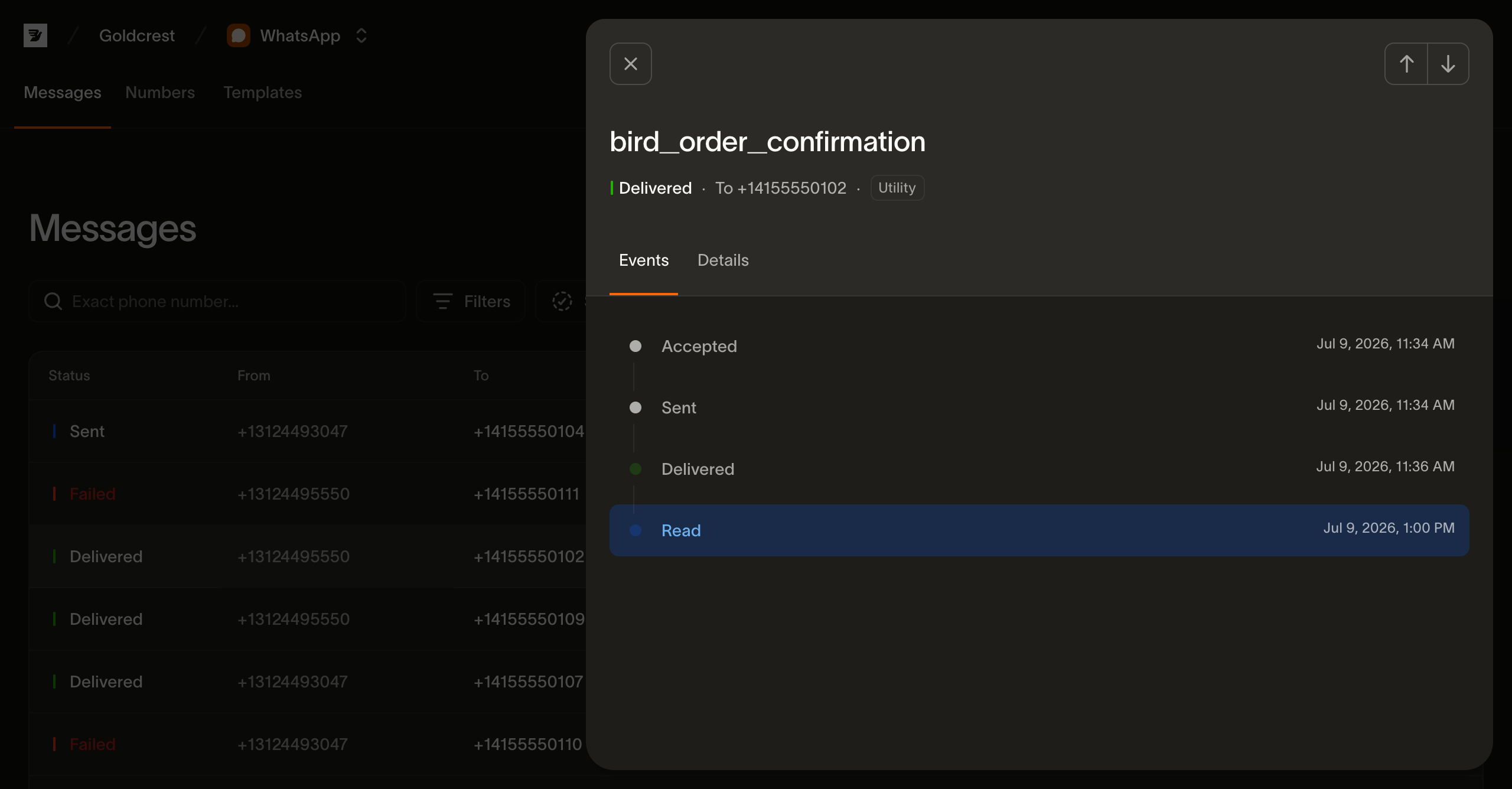
-H "Authorization: Bearer $BIRD_API_KEY"A message that was accepted, sent, delivered, and read returns four events:
代码示例
{
  "data": [
    {
      "id": "ev_01ky7q6a1fejfbvs0myn41hj41",
      "occurred_at": "2026-07-23T14:48:34.71Z",
      "type": "whatsapp.accepted"
    },
    {
      "id": "ev_01ky7q6a2denvtd6jg1vqwmg13",
      "occurred_at": "2026-07-23T14:48:35.671Z",
      "type": "whatsapp.sent"
    },
    {
      "id": "ev_01ky7q6a2zff9r2qm74mmg1g6z",
      "occurred_at": "2026-07-23T14:48:36.642Z",
      "type": "whatsapp.delivered"
    },
    {
      "id": "ev_01ky7q6c21frssf0vj8h50qysw",
      "occurred_at": "2026-07-23T14:48:38.65Z",
      "type": "whatsapp.read"
    }
  ]
}
Pass type to return one exact public event type, such as ?type=whatsapp.failed or ?type=whatsapp.read. Omit it for the full timeline.
The same timeline is what the WhatsApp log page renders when you open a message.
Webhooks
Subscribe to whatsapp.accepted, whatsapp.sent, whatsapp.delivered, whatsapp.read, whatsapp.failed, and whatsapp.rejected from the Webhooks page or the webhooks API. Bird does not expose whatsapp.received as a public webhook event. Use the message list, message timeline, or dashboard inbound metrics to monitor received messages. The Webhooks guide covers endpoints, signatures, and retries.
Next steps
- WhatsApp log: the per-message view that renders this timeline
- Sending WhatsApp messages: where a message's lifecycle begins
- Webhooks guide: endpoints, signatures, retries, and the full event catalog