Aquecimento de IP
Um novo endereço IP não tem histórico de envio. Volume alto repentino a partir desse IP pode fazer com que provedores de caixa de entrada limitem ou filtrem suas mensagens. O aquecimento aumenta o volume gradualmente para que o IP possa construir uma reputação de envio. Todo IP dedicado passa pelo aquecimento antes de lidar com o volume total. Um IP dedicado melhora a entregabilidade de e-mail? explica quando construir sua própria reputação de IP ajuda e quando o envio compartilhado é mais adequado.
A rampa
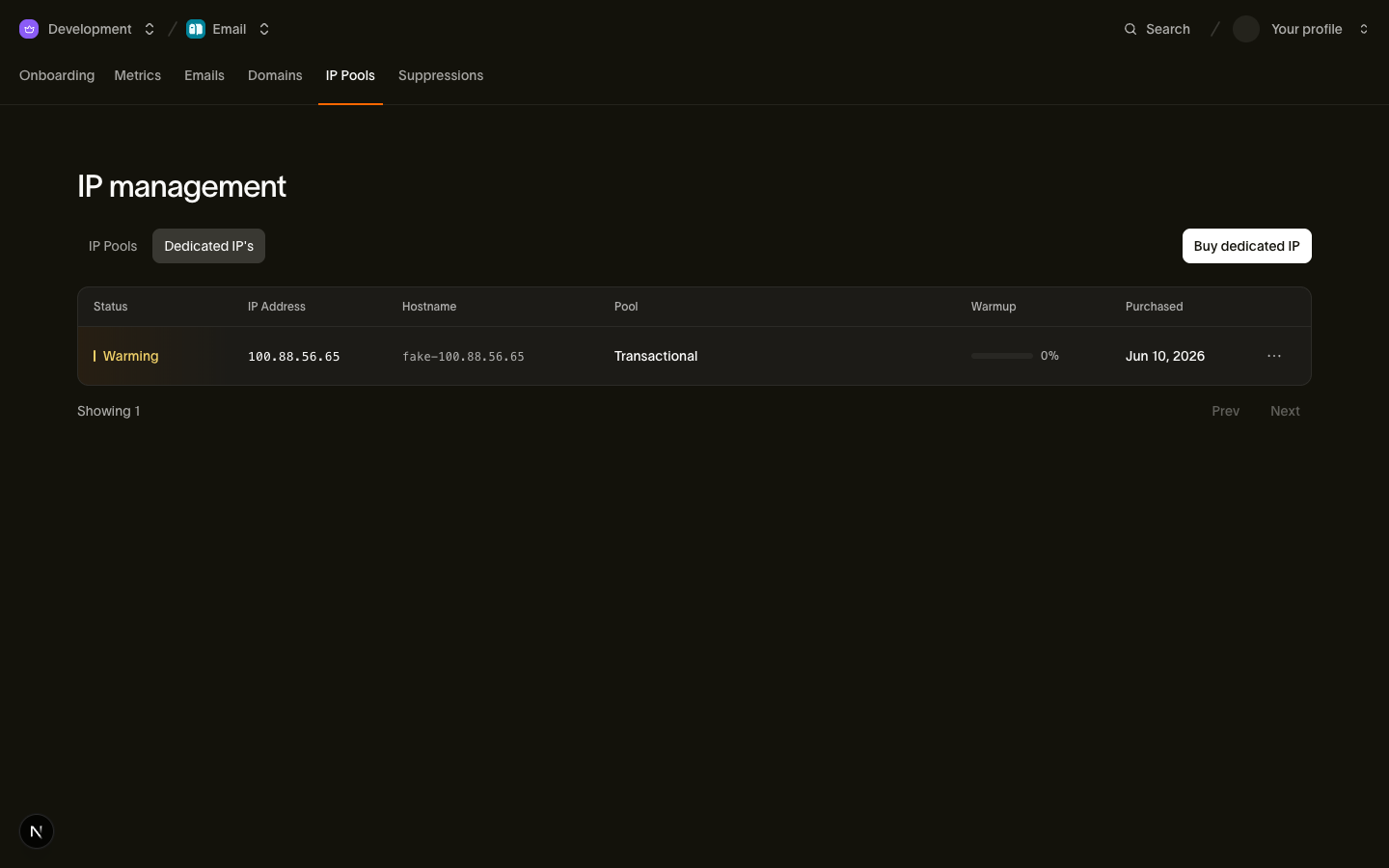
Você não gerencia o aquecimento manualmente. Todo IP dedicado recém-adquirido começa no status warming, e nós o aquecemos automaticamente em aproximadamente 30 dias. A rampa é uma série fixa de estágios: em cada estágio, o novo IP assume uma parcela maior do seu tráfego, e tudo que exceder o que ele pode lidar com segurança transborda pelo pool compartilhado. Seu e-mail continua fluindo em volume total o tempo todo; apenas a divisão entre o novo IP e a infraestrutura compartilhada muda conforme a rampa avança.
Três fatos definem a rampa:
warmup_progressé a fração concluída da rampa, de0a100. Ele avança de forma constante conforme os estágios são concluídos; espere incrementos regulares em vez de saltos.- O progresso sincroniza a cada hora. Verificamos cada IP em aquecimento na infraestrutura de envio uma vez por hora, então uma mudança pode levar até uma hora para aparecer. Consultar com mais frequência não traz benefício.
- A conclusão muda o status para
active. Quando o estágio final é atingido,warmup_progressmostra100,warmup_completed_até definido, e o IP lida com qualquer volume que seu pool enviar, sem transbordo para a infraestrutura compartilhada.
O conjunto completo de status que um IP dedicado pode reportar, incluindo cancelamento, está em IPs dedicados e pools.
Monitorando o aquecimento
Acompanhe o status e o progresso em Email > IP Pools > Dedicated IPs, ou consulte o recurso de IP com a CLI:
bird email dedicated-ips get dip_6jeq30c6f79n9st5z6002c349r{
"address": "198.51.100.22",
"created_at": "2026-06-29T13:56:39Z",
"hostname": "mta2.send.goldcrest.dev",
"id": "dip_6jeq30c6f79n9st5z6002c349r",
"ip_pool_id": "ipp_1btmn1nnkd8y6a4jckbkvvt9eh",
"organization_id": "org_01ky7m235keybaf72b0fdgfwj4",
"purchased_at": "2026-06-29T13:56:39Z",
"status": "warming",
"updated_at": "2026-07-23T13:56:39Z",
"warmup_progress": 45,
"warmup_started_at": "2026-06-29T13:56:39Z"
}Os campos de aquecimento:
warmup_progress: quanto da rampa está concluído, de0a100.warmup_started_at: quando a rampa começou, que é o momento da compra.warmup_completed_at: aparece quando o aquecimento termina e o IP transiciona paraactive. Ausente enquanto o IP ainda está em aquecimento.
Quando mudar seu padrão
A rampa protege você da curva de volume, mas duas decisões continuam nas suas mãos:
- O pool compartilhado permanece como padrão até você alterá-lo. Comprar um IP dedicado nunca redireciona seu tráfego. Envios que não especificam um pool continuam usando o pool compartilhado já aquecido, então o tráfego nunca é forçado para um IP frio. Quando estiver pronto, torne seu pool dedicado o padrão; as regras estão em IPs dedicados e pools.
- Aguarde
activeantes de mudar. Você pode direcionar tráfego para um pool cujos IPs ainda estão em aquecimento. O roteamento de transbordo garante que o e-mail ainda será entregue. Mantenha o pool compartilhado como padrão atéwarmup_completed_atser definido e então faça a troca. Nunca planeje despejar todo o seu volume em um IP recém-adquirido; a reputação que você constrói durante o aquecimento é o objetivo.
Se você opera múltiplos pools, trate cada novo IP da mesma forma: adquira-o no pool correspondente, acompanhe warmup_progress e direcione o tráfego dedicado deliberadamente quando o IP estiver active.
Próximos passos
- IPs dedicados e pools: aquisição de IPs, organização de pools e regras de pool padrão
- Entregabilidade · Email: onde o aquecimento se encaixa no modelo de reputação
Recursos relacionados
Continue com a documentação, guias e exemplos sobre este tópico.