Autenticação e chaves API
Toda solicitação programática à Bird API se autentica com uma chave API passada como bearer token. As chaves pertencem a um espaço de trabalho, carregam permissões que você pode alterar e são exibidas por completo uma única vez.
Para a distinção entre credenciais de serviço e acesso delegado, veja Chaves API e tokens OAuth.
Como as solicitações se autenticam
Envie sua chave no cabeçalho Authorization em toda solicitação. Os SDKs e o CLI recebem a chave uma vez e definem o cabeçalho para você:
import { BirdClient } from "@messagebird/sdk";

const bird = new BirdClient({ apiKey: process.env.BIRD_API_KEY! });

await bird.email.send({
  from: "hello@yourdomain.com",
  to: ["delivered@messagebird.dev"],
  subject: "Hi",
  text: "Hello.",
});
import os
from bird import Bird
client = Bird(api_key=os.environ["BIRD_API_KEY"])
client.email.send(
from_="hello@yourdomain.com",
to=["delivered@messagebird.dev"],
subject="Hi",
text="Hello.",
)client, err := bird.NewClient(option.WithAPIKey(os.Getenv("BIRD_API_KEY")))
if err != nil {
log.Fatal(err)
}
_, err = client.Email.Send(context.Background(), bird.EmailSendParams{
From: "hello@yourdomain.com",
To: []string{"delivered@messagebird.dev"},
Subject: "Hi",
Text: "Hello.",
})use MessageBird\Bird;
$bird = new Bird(getenv('BIRD_API_KEY') ?: '');
$bird->email->send(
from: 'hello@yourdomain.com',
to: ['delivered@messagebird.dev'],
subject: 'Hi',
text: 'Hello.',
);export BIRD_API_KEY="bk_us1_..."
bird email send \
--from hello@yourdomain.com \
--to delivered@messagebird.dev \
--subject Hi \
--text Hello.curl -X POST https://us1.platform.bird.com/v1/email/messages \
-H "Authorization: Bearer $BIRD_API_KEY" \
-H "Content-Type: application/json" \
-d '{ "from": "hello@yourdomain.com", "to": ["delivered@messagebird.dev"], "subject": "Hi", "text": "Hello." }'A região no prefixo da chave indica qual host chamar: chaves bk_us1_... vão para https://us1.platform.bird.com, chaves bk_eu1_... para https://eu1.platform.bird.com. Os SDKs oficiais da Bird e o CLI leem a região a partir da chave e selecionam o host para você. Uma chave enviada ao host regional errado retorna 421 (tipo misdirected_error); veja Regiões.
Uma chave ausente ou inválida retorna 401. Uma chave válida que não possui a permissão exigida pelo endpoint retorna 403. A semântica do cabeçalho e as respostas de erro estão na referência de autenticação.
Anatomia de uma chave
bk_us1_Ab3xKq9mP2wR5tY8uI1oL4n3A3aww
└┬┘└┬┘ └──────────┬──────────┘└─┬──┘
 │  │          payload      checksum
 │  └ region (routes the request)
└ Bird key prefix- Prefixo:
bk_{region}_identifica o tipo de credencial e sua região. O prefixo fixo e distintivo é o que permite que scanners de segredos reconheçam uma chave Bird no código, e o segmento de região direciona sua solicitação ao host correto. - Payload: 23 caracteres aleatórios com 136 bits de entropia.
- Checksum: os últimos 6 caracteres são um checksum do restante da chave, para que um SDK ou o API possa rejeitar imediatamente uma chave digitada incorretamente ou truncada, antes mesmo de ser consultada.
A chave completa é retornada uma única vez, na resposta que a cria. Você não pode recuperar o texto simples depois. Respostas subsequentes incluem os primeiros 15 caracteres como key_prefix, por exemplo bk_us1_Ab3xKq9m. Elas também incluem um fingerprint estável de 12 caracteres para identificar uma chave em logs e conversas com o suporte sem expor seu valor.
Se você perder uma chave, faça a rotação dela para obter um novo segredo, ou revogue-a e crie uma nova.
Criando uma chave
Crie chaves no dashboard em Platform tools > Chaves API. Uma chave é criada com um nome, um ou mais escopos e uma expiração opcional. A resposta que a cria é a única que contém o campo token (a chave completa): armazene-a no seu gerenciador de segredos imediatamente.
Você também pode criar uma sem o navegador, com bird api-keys create. A emissão de chaves exige o escopo api_keys:write, que a baseline de login somente leitura não inclui; portanto, solicite-o ao fazer login:
bird auth login --scope api_keys:write
bird api-keys create --body-file - <<'JSON'
{
  "name": "Email operations production key",
  "scopes": [{ "scope": "emails", "level": "write" }]
}
JSON
Execute bird api-keys create --example para imprimir um corpo completo para edição.
Escopos são a única coisa que uma chave não pode conceder a si mesma: api_keys:write não está disponível para chaves API, então uma chave nunca pode emitir outra chave. A emissão é executada como você, em uma sessão do dashboard ou em um grant CLI ou MCP.
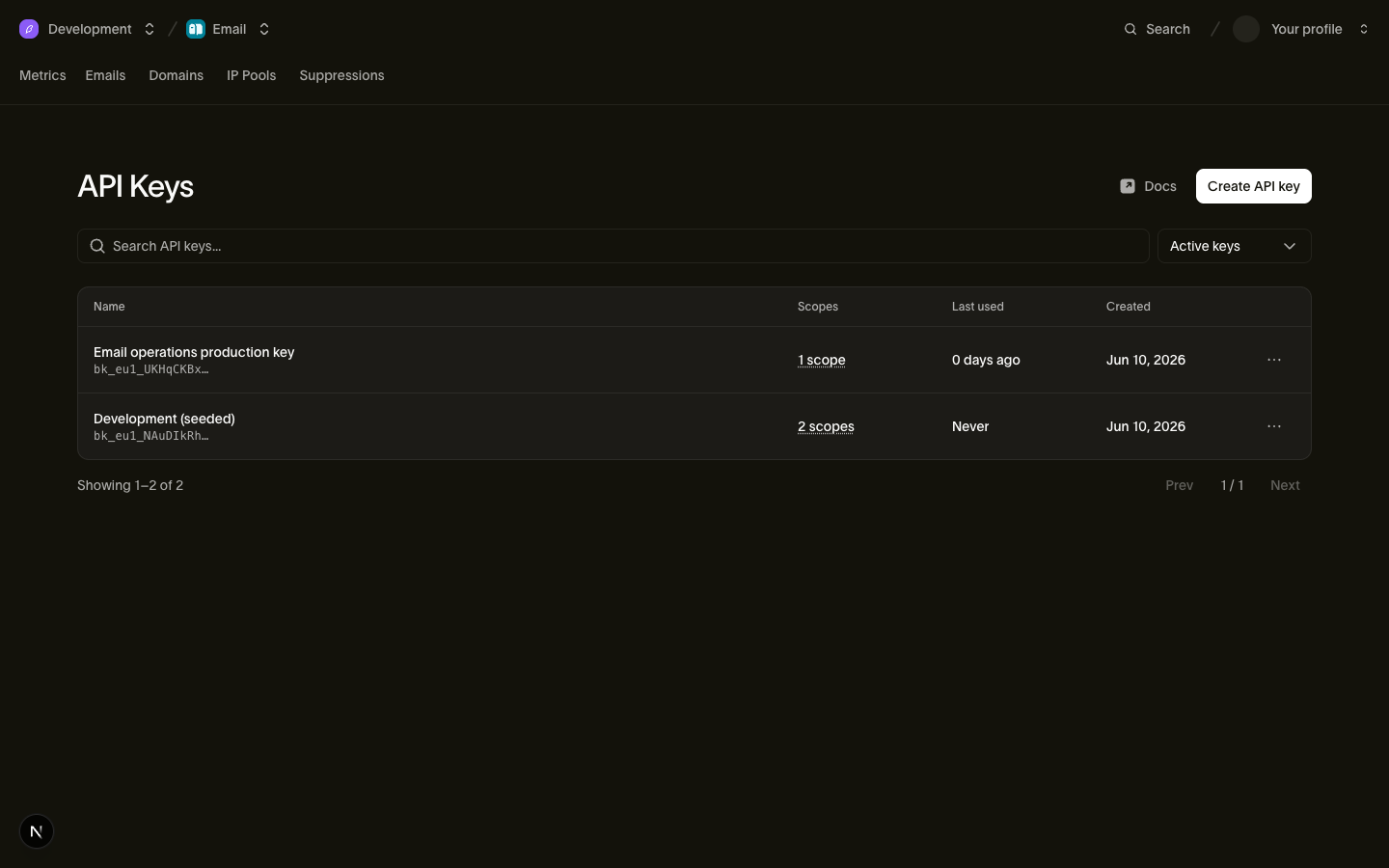
Você pode gerenciar uma chave após criá-la:
- Escopos são editáveis. A edição substitui o conjunto de permissões e mantém o mesmo segredo. Você pode conceder escopos que sua própria conta possui. Se a chave foi criada antes de poder suportar uma permissão como
voice, faça a rotação para adicionar essa permissão. Chaves revogadas e chaves já substituídas por rotação não podem ser editadas. - A expiração é fixa. Defina
expires_atquando uma chave deve parar de funcionar em um momento conhecido (contrato de um prestador, janela de migração). Após esse momento, a chave retorna401; uma chave sem expiração permanece ativa até ser revogada. - O gerenciamento de chaves fica com pessoas. Criar, editar e revogar chaves exige a permissão
api_keys:write, mantida pelos papéis de admin e developer do espaço de trabalho (veja Usuários, equipes e papéis) e nunca concedível a uma chave API em si. Uma chave vazada não pode gerar mais chaves.
A página de chaves API lista todas as chaves com seu key_prefix, escopos e data de last_used_on (precisão de dia), para que você identifique chaves obsoletas rapidamente. Chaves revogadas ficam fora da listagem, a menos que você escolha exibi-las.
Escopos e níveis
Cada escopo em uma chave é um par {scope, level}, onde level é read ou write (write inclui read). Chaves API possuem estes escopos:
| Escopo | read | write |
|---|---|---|
emails | Ler mensagens enviadas e status de entrega | Enviar e-mail |
email_management | Ler supressões, configuração de e-mail e templates | Gerenciar supressões, configuração de e-mail e templates |
email_marketing | Ler contatos, audiências e broadcasts | Gerenciar contatos, audiências e broadcasts |
domains | Ler domínios de envio e seus registros DNS | Adicionar, verificar e gerenciar domínios de envio |
sms | Ler SMS enviados e status de entrega | Enviar SMS |
sms_management | Ler remetentes, registros, supressões, respostas por palavra-chave, destinos e templates | Gerenciar remetentes, registros, supressões, respostas por palavra-chave, destinos e templates |
whatsapp | Ler mensagens WhatsApp enviadas e status | Enviar mensagens WhatsApp |
whatsapp_management | Ler templates e configurações de WhatsApp | Gerenciar templates e configurações de WhatsApp |
verify | Ler status de verificação | Enviar e verificar códigos de verificação |
realtime | Ler apps Realtime, canais e membros de canal | Criar apps e publicar eventos |
voice | Ler logs de legs e estatísticas de chamadas | Autenticar chamadas SIP e criar credenciais de sessão |
voice_management | Ler trunks, gateways, números, caller IDs e destinos | Gerenciar trunks, gateways, números, caller IDs e destinos |
mailbox | Ler caixas de correio, threads e mensagens | Enviar e responder mensagens de caixa de correio |
mailbox_management | Ler regras de recebimento e configuração de caixa de correio | Criar, atualizar e excluir caixas de correio e regras de recebimento |
assets | Ler assets e pastas | Fazer upload, atualizar e excluir assets e pastas |
workspace | Ler o nome do espaço de trabalho, ID da organização e configurações | Não disponível |
webhooks | Ler assinaturas de webhook e suas tentativas de entrega | Criar, atualizar, excluir, testar, reenviar e rotacionar o segredo de um webhook |
lookup | Não disponível | Consultar números de telefone, endereços de e-mail e correspondências de identidade |
Alterar configurações do espaço de trabalho, gerenciar membros, emitir chaves e gerenciar pools de IP deliberadamente não são concedíveis a chaves API, então são executados como uma pessoa e não como uma chave: pelo dashboard, ou pelo CLI ou MCP server em um grant que possua o escopo. Conceda o conjunto mais restrito que funcione: uma chave que apenas envia e-mail deve possuir emails:write e nada mais.
lookup não possui operações de nível de leitura: todo endpoint de consulta, incluindo a busca de um resultado existente, exige write.
Revogando uma chave
Revogue uma chave a partir da sua linha em Platform tools > Chaves API. A revogação é permanente: uma chave revogada não pode ser reativada, e seu registro é preservado para auditoria com revoked_at definido.
A revogação se propaga rápido, mas não instantaneamente. A validação de chave passa por um cache de curta duração, então uma chave recém-revogada pode continuar funcionando por alguns segundos (no máximo cinco) antes que toda solicitação com ela retorne 401.
Rotacionando uma chave
A rotação emite uma substituição para uma chave que você já possui e retorna seu token uma única vez, nessa resposta. A substituição herda o nome, os escopos e as restrições de IP de origem da chave original. Ela começa sem expiração. Rotacione uma chave a partir da sua linha em Platform tools > Chaves API, ou sem o navegador com bird api-keys rotate e a ferramenta api_keys_rotate MCP:
bird auth login --scope api_keys:write
bird api-keys rotate key_01hqz8kp3v9x2m --yes
A chave anterior continua funcionando por um período de carência, 24 horas por padrão, para que você possa implantar o novo token antes que o antigo pare. Passe grace_period: 0 (--grace-period 0 no CLI) para revogar a chave anterior imediatamente, que é o indicado para uma chave vazada: não há sobreposição, e toda solicitação que ainda a utiliza começa a falhar. Uma chave já configurada para expirar antes do período de carência mantém sua própria expiração, porque a rotação nunca estende a vida de uma chave.
Antes de automatizar a rotação de chaves, observe duas restrições. A rotação nunca transfere a expiração, então a substituta de uma chave que expirava em uma data conhecida passa a viver até ser revogada; recrie com create quando a expiração importar. Além disso, uma chave só pode ser rotacionada uma vez: uma segunda rotação da mesma chave retorna 409, então envie um Idempotency-Key e uma nova tentativa reproduz a resposta original. Sem ele, uma rotação cuja resposta você nunca recebeu criou uma chave ativa cujo token você não consegue recuperar.
Sobrepor duas chaves manualmente ainda é o caminho mais seguro quando você não consegue prever quanto tempo a troca levará, porque o período de carência é fixado no momento da rotação e não pode ser estendido depois:
- Crie uma nova chave com os mesmos escopos.
- Implante a nova chave nos seus serviços.
- Monitore o
last_used_onda chave antiga até que o tráfego tenha migrado. - Revogue a chave antiga.
As chaves pertencem ao espaço de trabalho
Uma chave API está vinculada ao seu espaço de trabalho e se autentica com a autoridade desse espaço de trabalho. As permissões pessoais do criador não a afetam. Isso tem duas consequências práticas:
- As chaves sobrevivem a saídas. Quando um funcionário sai e sua conta de usuário é removida, as chaves que ele criou continuam funcionando. Você nunca tem uma interrupção em produção porque a pessoa que clicou em "create" saiu da empresa. (A saída dela ainda é um bom motivo para rotacionar chaves às quais ela tinha acesso.)
- O alcance da chave para no espaço de trabalho. Ela nunca pode executar operações em nível de organização: cobrança, membros da organização, configurações da organização.
Como a chave está fixada ao espaço de trabalho, solicitações com uma chave não precisam de contexto adicional; veja Espaço de trabalho para saber como o espaço de trabalho e a organização acima dele dividem o que você pode acessar.
O caminho delegado: tokens OAuth para o CLI e o MCP server
Chaves API são para serviços. O Bird CLI e o Bird MCP server usam OAuth quando uma pessoa faz login. Você faz login pelo navegador, escolhe um espaço de trabalho e concede um subconjunto das suas permissões. A ferramenta então recebe um token de usuário bt_{region}_... de curta duração.
Cada token é limitado às permissões que você possui. Você pode revogar o acesso de cada ferramenta em Profile > Connected apps. As ferramentas gerenciam esses tokens para você, portanto não os copie nem os armazene em um gerenciador de segredos. Use chaves API para cargas de trabalho de servidor.
Próximos passos
- Referência de autenticação: semântica do cabeçalho da solicitação e respostas de erro
- Regiões: hosts regionais e roteamento
- Usuários, equipes e papéis: quem pode gerenciar chaves
- Espaço de trabalho: o espaço de trabalho ao qual uma chave se vincula