Remetentes e identidade visual
Todo código do Verify chega ao seu usuário como e-mail, mensagem de SMS, WhatsApp ou Telegram, ou em uma chamada de voz. Para e-mail, SMS e WhatsApp, escolha uma identidade gerenciada pela Bird, Bird Verify ou Authifly, ou use um remetente que pertence ao seu espaço de trabalho. O Telegram usa sua própria conta verificada de notificações e não tem remetente para selecionar. Uma chamada de voz também não tem remetente para selecionar; consulte De quem vêm os seus códigos.
Os exemplos nesta página mostram as versões em inglês das mensagens da Bird. O e-mail da Bird, SMS e as mensagens compartilhadas de WhatsApp estão disponíveis em 40 traduções, escolhidas por verificação a partir do número de telefone do destinatário ou do seu options.language. Seu próprio template de WhatsApp fornece seus idiomas aprovados e sua redação. Consulte Idioma da mensagem.
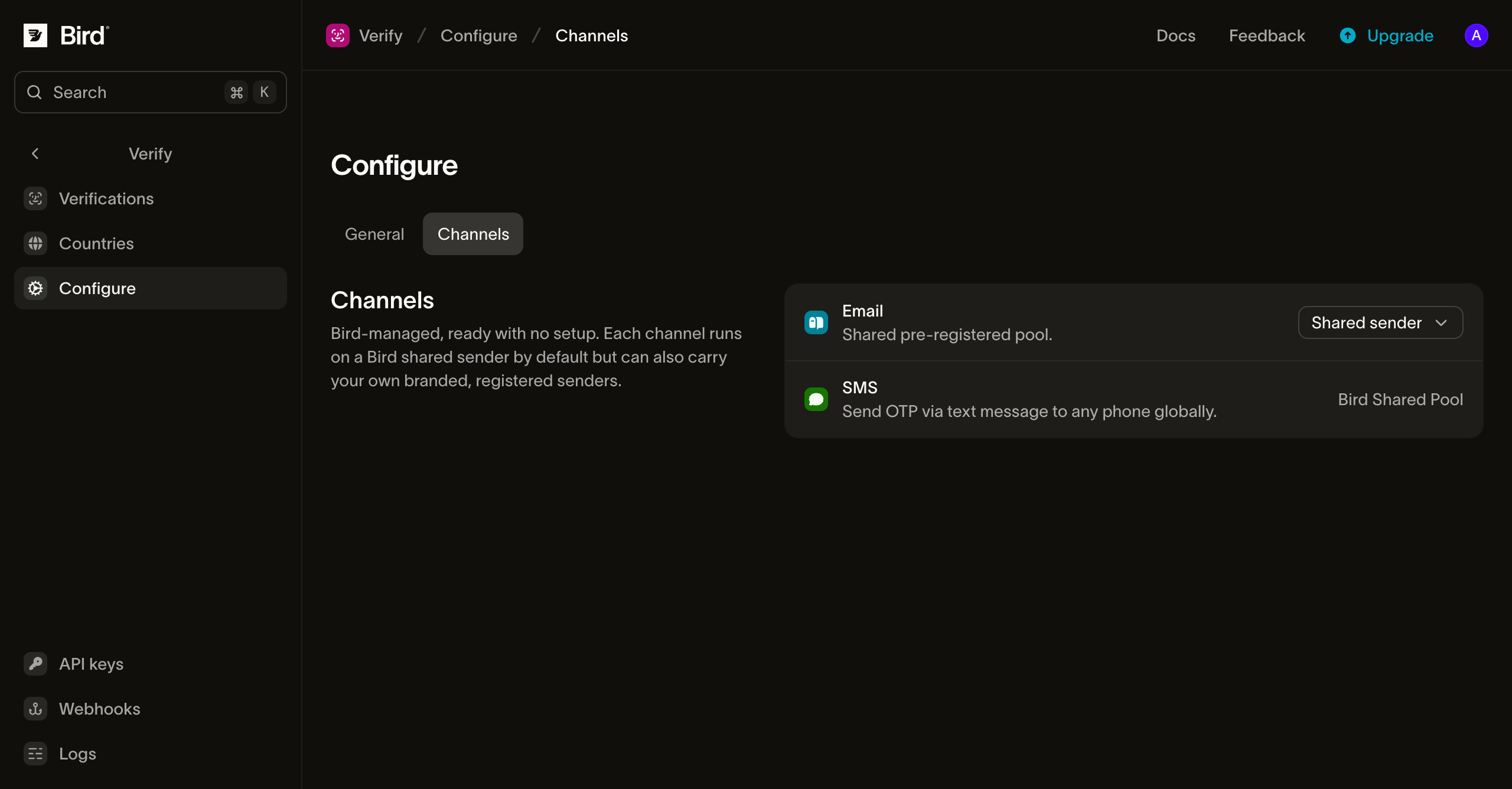
Os remetentes ficam na aba Channels da página Configure, uma linha por canal:
De quem vêm os seus códigos
E-mail, SMS e WhatsApp oferecem estas opções de remetente:
- Bird Verify é o padrão e não exige configuração. Os códigos saem sob a identidade da própria Bird.
- Authifly é a marca independente de verificação da Bird. Os códigos saem sob a Authifly, de modo que nenhum fornecedor de plataforma aparece para os seus usuários. Um destinatário que pesquisar encontra authifly.com, que explica que a Authifly entrega códigos de uso único em nome de uma empresa.
- Seu próprio remetente é um domínio de envio verificado para e-mail, um Sender ID existente do espaço de trabalho para SMS, ou um número conectado do espaço de trabalho associado a um template de autenticação aprovado para WhatsApp. Consulte Remetente de e-mail personalizado, Seu Sender ID de SMS e Seu número de WhatsApp.
Selecione um remetente por canal na aba Channels. Você também pode escolher um remetente diferente para um país na configuração por país; a escolha por país prevalece sobre o padrão do canal para destinatários naquele país.
Uma chamada de voz exibe um número de telefone da Bird como identificador de chamada, escolhido conforme o país de destino, por isso a aba Channels mostra Number selected by destination na linha Voice em vez de uma opção de remetente. A chamada diz "Your verification code is" e lê os dígitos em grupos de três, em inglês. Ela repete o código várias vezes e depois diz "Goodbye."
Trocar a identidade altera o remetente que o seu usuário vê. O código, a expiração e todas as outras configurações de verificação permanecem inalterados.
O e-mail que o seu usuário recebe
Por padrão, o e-mail com o código chega de Bird Verify <otp@verify.bird.com> com o assunto "Your verification code". Com a Authifly, chega de Authifly OTP <otp@verify.authifly.com>, com o mesmo assunto.
O corpo é um cartão único: um cabeçalho nomeando a identidade compartilhada, o código em destaque em fonte monoespaçada, a linha de expiração e um aviso. Cada identidade tem suas próprias cores. A versão em texto puro traz o mesmo conteúdo:
Your verification code is 123456.seguido pela janela de expiração com um aviso para nunca compartilhar o código e uma linha final informando que o e-mail pode ser ignorado se o código não foi solicitado.
A linha de expiração mostra o tempo de vida do código configurado no primeiro envio e a janela restante em um reenvio. O assunto e o corpo são renderizados no idioma da mensagem da verificação. Árabe e hebraico são dispostos da direita para a esquerda, com o código em si mantido da esquerda para a direita. O e-mail do OTP não inclui rastreamento de abertura ou clique porque não contém nenhum link, e pixels de rastreamento podem prejudicar a entregabilidade de e-mails transacionais.
O SMS que o seu usuário recebe
O SMS começa com o código, onde uma olhada rápida (e o preenchimento automático de código do sistema operacional) olha primeiro:
123456 is your verification code. It expires in 10 minutes. Do not share it.Quando um país permite Sender IDs alfanuméricos de marca, o código chega de Bird Verify, Authifly ou do Sender ID selecionado por você. Países que exigem um número local ou um código curto exibem esse remetente em vez disso. O texto da mensagem usa o template OTP da Bird no idioma da mensagem da verificação.
A mensagem WhatsApp que o seu usuário recebe
Com um remetente compartilhado de WhatsApp, o código chega de um número comercial gerenciado pela Bird como uma mensagem de template de autenticação: o número do Bird Verify por padrão, ou o número do Authifly quando você seleciona essa identidade. O WhatsApp define o layout desses templates de autenticação, então o corpo começa com o código e oferece um botão Copy code de toque único:
123456 is your verification code. For your security, do not share this code.Nos templates compartilhados de Bird, o código é a única variável, e a redação segue o idioma da mensagem da verificação. Mongol é a única tradução que esses templates não incluem, então esse idioma envia em inglês com um remetente compartilhado.
As duas identidades diferem de uma forma visível. Sob a Authifly, a mensagem traz um segundo botão, uma resposta com o texto "I didn't request a code", que o WhatsApp gera para modelos de autenticação. O modelo do Bird Verify tem um botão, a cópia do código. O WhatsApp controla o botão extra de ponta a ponta: um toque permanece dentro do WhatsApp, não chega a nenhum webhook e mantém a verificação em andamento. Não há chamada de API para cancelar uma verificação rejeitada; trate a resposta como um sinal na sua própria lógica antifraude.
A entrega é um envio de modelo WhatsApp comum, então o destinatário precisa ter o WhatsApp naquele número; quando não tem, ou a mensagem não pode ser entregue, a verificação avança para o próximo canal.
Seu Sender ID de SMS
Para enviar mensagens de texto com seu próprio remetente, adicione um Sender ID no mesmo espaço de trabalho e conclua qualquer registro que os países de destino exijam. Em Configure > Channels, abra o menu de remetente de SMS, selecione Your SMS Sender IDs e escolha um da lista. O menu tem um link para Manage Sender IDs caso você precise adicionar um. Você também pode escolher um Sender ID para um único país na página Countries.
Um Sender ID de SMS precisa ser suportado e registrado para o país do destinatário e permitido para mensagens de autenticação. Se o padrão da sua configuração falhar em uma dessas verificações, o Verify tenta novamente com o remetente Bird Verify para aquele destino. Outras falhas, incluindo erros de cobrança ou de provedor, não trocam o remetente. Um Sender ID selecionado especificamente para um país nunca recebe esse fallback de remetente; se ele não conseguir enviar para lá, o Verify tenta o próximo canal no plano de verificação.
Seu número de WhatsApp
Para enviar a partir do seu próprio número de WhatsApp, conecte o número ao mesmo espaço de trabalho e tenha um template de autenticação aprovado na WhatsApp Business Account correspondente. Em Configure > Channels, abra o menu de remetente de WhatsApp, selecione Your WhatsApp numbers, depois escolha o número e um template de autenticação aprovado existente. Os menus de número e template redirecionam para suas páginas de gerenciamento. Você também pode escolher um par diferente para um país na página Countries.
O Verify insere o código de verificação no template selecionado. Os idiomas aprovados e a política de idioma do template determinam a redação e quais solicitações ele pode enviar. Se não houver um idioma enviável para uma verificação, a tentativa de WhatsApp falha e o Verify tenta o próximo canal. O Verify nunca cria nem submete um template por você.
Se o template tiver um rodapé Code expiration (minutes), iguale-o ao Duration na página Configure do Verify. O Verify envia apenas o código de verificação e não atualiza nem verifica o rodapé do template. Uma divergência pode informar aos destinatários o prazo de expiração errado. O rodapé aceita de 1 a 90 minutos inteiros; outras durações do Verify não conseguem corresponder exatamente.
A mensagem do Telegram que o seu usuário recebe
No Telegram, o código chega da própria conta verificada de notificações do Telegram. O Telegram controla a conta, o layout da mensagem e a redação, então o canal não tem remetente para selecionar, e nem Bird nem a sua organização aparece como remetente:
123456 is your verification code.O número de telefone do destinatário precisa estar registrado no Telegram. É verificado se o número pode receber uma mensagem do Telegram antes do envio, e quando a resposta é não, a verificação avança para o próximo canal sem que uma mensagem seja enviada.
Remetente de e-mail personalizado
Você pode substituir o remetente de e-mail compartilhado por um endereço no seu próprio domínio, para que os códigos cheguem de verify@yourdomain.com em vez de um endereço gerenciado pela Bird. O pré-requisito é um domínio de envio verificado no mesmo espaço de trabalho: o Verify não envia a partir de um domínio que você não tenha comprovado ser seu.
Na aba Channels, abra o controle de remetente da linha Email, selecione Custom sender, escolha uma parte local (a parte antes do @) e um dos seus domínios verificados, e salve. Selecionar Bird Verify (default) ou Authifly volta para uma identidade compartilhada a qualquer momento. Você também pode fixar um remetente diferente para um país na configuração por país; a escolha por país prevalece sobre esse padrão para destinatários naquele país.
Duas coisas para saber antes de trocar:
- O corpo deixa de mencionar uma identidade. O corpo de uma identidade compartilhada informa ao leitor que Bird Verify ou Authifly nunca pedirá o código. Enviar a partir do seu próprio domínio remove esse nome em vez de substituí-lo, porque seus destinatários não têm relação com nenhum dos dois: o cabeçalho exibe "Verification" e o aviso passa a ser "Don't share it with anyone." O assunto e o layout do código permanecem inalterados, o texto ainda é renderizado no idioma da mensagem da verificação, e você não pode personalizar o template.
- O domínio precisa continuar verificado. Um domínio fixado por uma configuração ativa não pode ser excluído, mas um domínio cujo DNS regredir deixa de conseguir enviar. Os envios a partir dele passam a falhar, e a entrega avança para o próximo canal da verificação em vez de reverter silenciosamente para uma identidade compartilhada. Corrija o domínio ou mude o canal de volta para uma identidade compartilhada.
Próximos passos
| Página | O que aborda |
|---|---|
| Domínios de envio | Registrar e verificar o domínio necessário para um remetente personalizado |
| Configuração por país | Fixar remetentes e ordem de canais por país |
| Envio de verificações | As chamadas de envio e verificação e as configurações de verificação |
Recursos relacionados
Continue com a documentação, guias e exemplos sobre este tópico.