Cobrança e uso
A cobrança tem escopo de organização: seu plano, carteira e fluxo de faturas pertencem à organização. Esta página explica como a cobrança influencia uma integração: como o uso é medido, como consultar a situação atual e como o seu plano afeta os limites operacionais. Para operações de conta (detalhes de preços, métodos de pagamento, impostos), consulte a Base de conhecimento: Planos e preços e Uso, gastos e faturas.
O faturamento é gerenciado por pessoas, não por integrações. Toda operação de faturamento exige o escopo org:billing, um escopo de função organizacional que não pode ser concedido a uma chave API de espaço de trabalho, então nenhuma chave bk_* consegue ler o consumo, recarregar a carteira ou alterar um plano. Owners e billing admins fazem isso na seção Billing and payments do dashboard; veja Usuários, equipes e funções para saber quem possui a função. Os catálogos de planos, produtos e preços são a exceção: não exigem autenticação, publicam os preços neste site, e os endpoints CLI e MCP podem ler o catálogo de planos diretamente. Este guia, portanto, explica o que o faturamento faz com a sua integração e nomeia a página do dashboard que mostra cada número. Essas páginas (Overview, Usage, Invoices, Spend e Settings) são cobertas nos artigos da Knowledge base linkados ao longo do texto.
Planos e níveis
Sua organização assina um único plano. Sua assinatura atual, upgrades e cancelamento ficam na página Billing overview. Cada plano carrega um tier (free, startup, growth ou enterprise), e o tier é o que a sua integração sente operacionalmente:
- Volume de envio incluído. Cada plano inclui uma franquia mensal de envios de e-mail, medida por destinatário: uma mensagem para três destinatários consome três. Nos planos pagos, envios além da franquia são medidos como excedente até um teto rígido; acima do teto, os envios são rejeitados com um erro de limite até o período ser reiniciado. O plano Free não tem excedente: ele para nos seus limites mensal e diário. Franquias, limites e o teto de excedente estão em Planos e preços.
- Limites de requisições dependem da política. Uma substituição ativa por organização tem precedência sobre o valor do seu plano. Se o plano não tiver um valor para essa política, o padrão se aplica. Um plano ou substituição pode aumentar ou diminuir uma taxa, então fazer upgrade não garante limites mais altos para cada operação. Antes de fazer upgrade por capacidade, entre em contato com o suporte informando a chave da política e a cota efetiva do cabeçalho de resposta
RateLimit-Policy, o plano que você está considerando e o tráfego esperado. Pergunte qual limite se aplicaria após a mudança. Veja como o seu limite é resolvido. - Limites de recursos. Limites como quantos domínios de envio, pools de IP e IPs dedicados sua organização pode ter são definidos por plano e ajustáveis por organização. Se você atingir um deles, entre em contato com o suporte em vez de tentar contornar.
Upgrades são aplicados imediatamente, tornando a nova franquia completa disponível para o restante do período atual. Downgrades e cancelamentos entram em vigor no final do período de cobrança atual. Veja Alterações de plano e renovações para a sequência de falha de pagamento e outras regras de prazo. Projete integrações para tratar erros quando uma conta exceder sua franquia.
Medição de uso
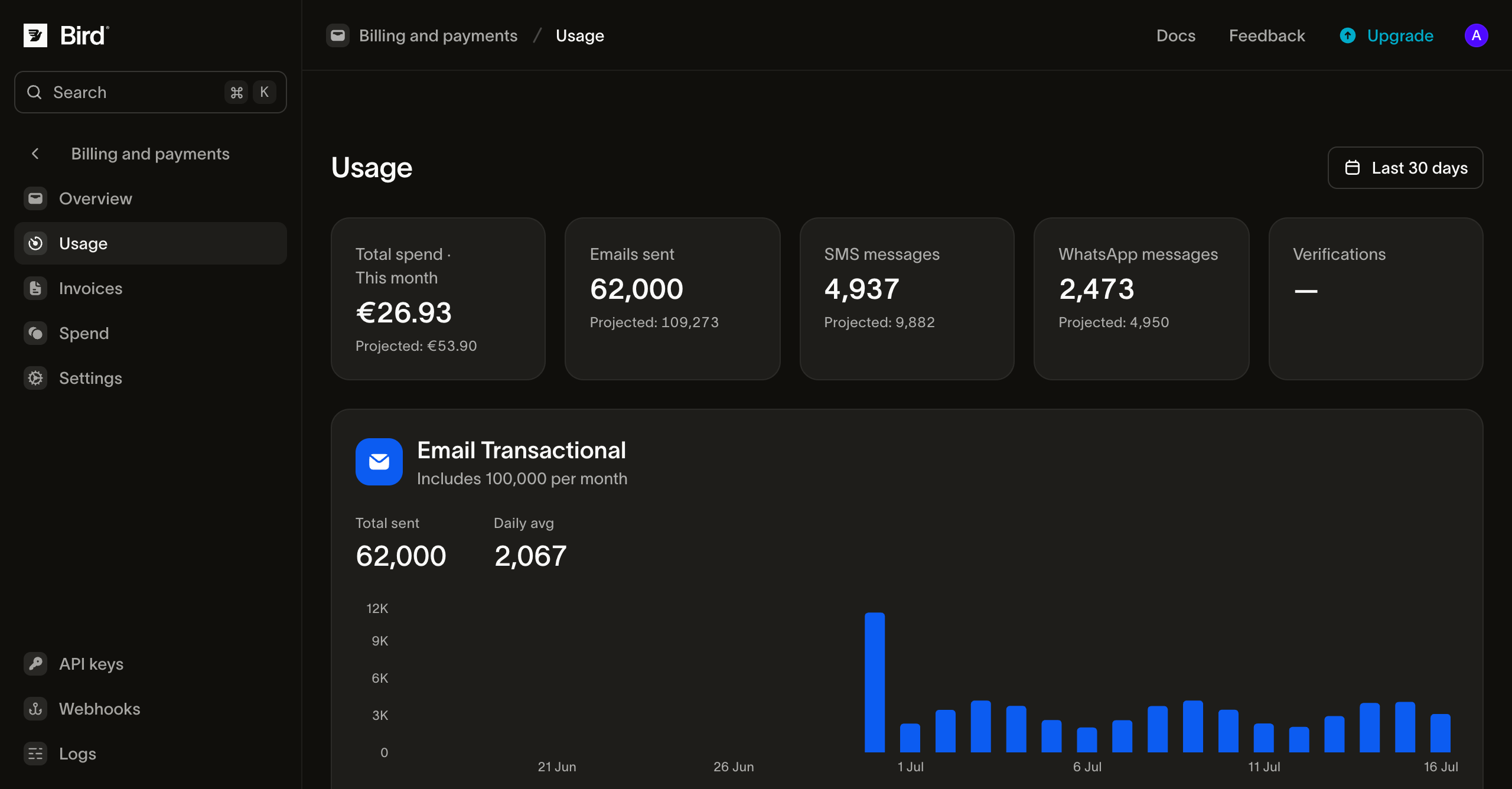
Todo envio é medido contra o período de faturamento atual da sua organização. A página Usage do dashboard mostra o panorama em tempo real de cada produto, dentro da janela em que aquele produto é medido: o período do plano para e-mail com franquia, o mês calendário para pay-as-you-go. Produtos cobram de duas formas, e a diferença é o que a sua integração sente:
- Produtos com franquia (metered) possuem uma cota inclusa no seu plano (envios de e-mail). A página mostra quanto da cota você já consumiu e quanto já ultrapassou, para que você veja o excedente se formando antes de ser cobrado.
- Produtos pay-as-you-go são cobrados por uso conforme uma tabela de preços (SMS, WhatsApp). Uma mensagem pode debitar a carteira duas vezes: a taxa própria de Bird quando o envio é processado, e uma taxa de terceiros (sobretaxa da operadora em SMS, participação da Meta em WhatsApp) quando a mensagem é entregue. Leia a divisão por mensagem a partir de
costna mensagem SMS ou WhatsApp:transaction_amounté a cobrança de Bird epassthrough_amounté a taxa de terceiros.
A página cobre todo produto com assinatura ou uso no período atual e exibe gráficos com a divisão por dia, por país e por domínio de envio para qualquer um deles.
A carteira
Cada organização tem uma carteira: um saldo pré-pago compartilhado por onde toda cobrança passa. Renovações de plano, excedente e envios pay-as-you-go debitam a carteira; um cartão salvo existe para abastecê-la (recargas, recarga automática e cobertura de renovação que o saldo não comporta). A página Spend do dashboard é o extrato completo de créditos e cobranças, de modo que toda movimentação da carteira fica registrada em um só lugar, e cada recarga liquidada gera um recibo permanente que você pode baixar como PDF na mesma seção.
Operacionalmente, a carteira é uma dependência do envio pay-as-you-go: envios SMS e WhatsApp são rejeitados quando o saldo não pode cobri-los. SMS é recusado no API com um 402; um envio WhatsApp é aceito e depois rejeitado quando Bird tenta cobrá-lo. Uma taxa no momento da entrega que o saldo não pode cobrir é ignorada em vez de rejeitada, então a mensagem ainda chega ao destinatário. Para volume transacional, configure recarga automática e um alerta de saldo baixo na página Billing overview, ou monitore e alerte pelo seu lado. Métodos de pagamento e carteira cobre ambos os controles do dashboard. Avisos de saldo baixo e notificações de falha de pagamento vão para os owners da organização. E-mails de fatura vão para a lista de notificações de faturamento da organização, quando configurada, e recaem para o owner da organização caso contrário. Configure essa lista em Settings > Organization. Use um alias de equipe monitorado para que e-mails de faturamento não dependam da caixa de entrada de uma única pessoa.
Faturas
Faturas são emitidas por organização, uma por mês calendário, e listadas na página Invoices do dashboard, onde você pode abrir uma para ver seus itens ou baixá-la como PDF. As faturas refletem a mesma medição que a página Usage mostra: a cobrança recorrente do seu plano mais qualquer excedente com franquia e gasto pay-as-you-go do período. Para saber como as faturas são estruturadas, seus status e prazos de pagamento, veja Uso, gastos e faturas na Knowledge base.
Próximos passos
- Limitação de requisições: valores padrão de política, valores do plano, substituições por organização e cabeçalhos de resposta
- Planos e preços: o que cada plano inclui, excedente e preços pay-as-you-go
- Alterações de plano e renovações: timing de upgrade/cancelamento e a sequência de falha de pagamento
- Usuários, equipes e funções: quem pode gerenciar o faturamento (
org:billing)
Recursos relacionados
Continue com a documentação, guias e exemplos sobre este tópico.