Webhooks e eventos
Quando algo acontece no seu espaço de trabalho (um e-mail é entregue, um destinatário retorna como bounce, uma mensagem WhatsApp é lida), Bird envia via POST um evento JSON assinado para cada endpoint de webhook inscrito naquele tipo de evento. Bird segue a especificação Standard Webhooks para headers, assinatura e estrutura do payload, então se você já verifica webhooks de outra plataforma Standard Webhooks, o mesmo código de verificação funciona aqui sem alterações.
Para uma visão geral de endpoints de webhook e entrega, veja O que é um webhook?.
Criar um endpoint
Registre um endpoint no dashboard em Developers > Webhooks, ou pelo terminal com o bird CLI:
bird webhooks create --url https://example.com/webhooks/bird \
  --events email.delivered,email.bounced,email.complained \
  --description "Production delivery + bounce notifications"
O gerenciamento de endpoints requer o escopo webhooks. Sessões do dashboard e o login do CLI o carregam por meio do seu papel de usuário, e chaves API também podem contê-lo: conceda webhooks:read para inspecionar endpoints e tentativas de entrega, ou webhooks:write para gerenciá-los. As operações subjacentes começam em POST /v1/webhooks.
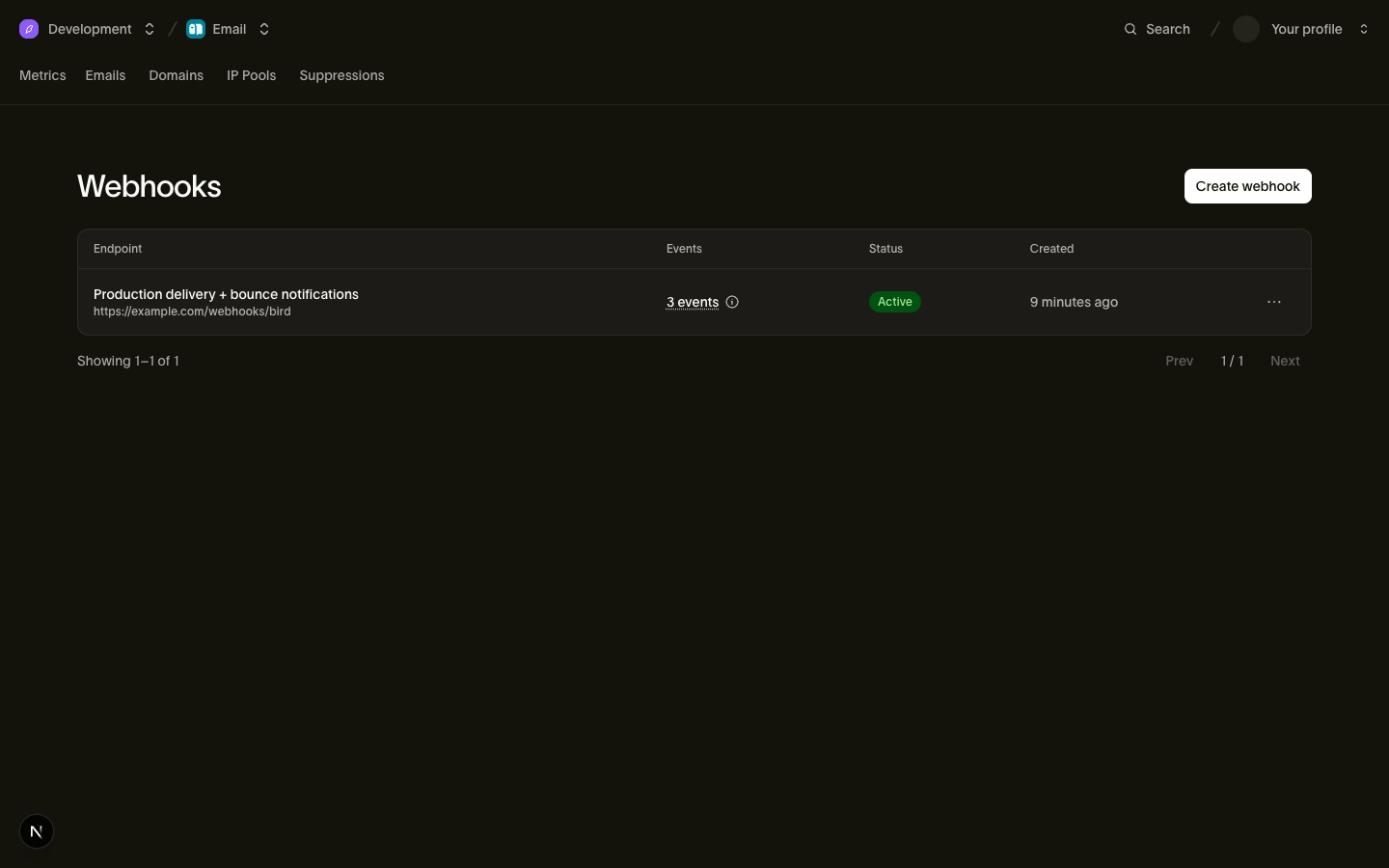
As URLs dos endpoints devem ser HTTPS, ter no máximo 2048 caracteres e ser publicamente acessíveis. URLs em endereços privados, de loopback, link-local ou de outra forma internos são rejeitadas com um 422 quando você cria ou atualiza o endpoint. As entregas se originam da infraestrutura de entrega de Bird fora da sua rede.
O array events lista até 100 tipos do catálogo de eventos. Um endpoint recebe apenas os tipos que ele lista. Use PATCH /v1/webhooks/{webhook_id} para substituir a lista completa para entregas futuras. Para receber todos os eventos, inscreva-se em todos os tipos: um tipo fora do catálogo é recusado com um 422, incluindo um curinga como sms.*. Inscrições existentes não se expandem quando novos tipos ficam disponíveis.
A resposta de criação inclui o secret de assinatura do endpoint (prefixado com whsec_) exatamente uma vez. Armazene-o no seu gerenciador de segredos imediatamente; ele não pode ser recuperado novamente, e se você perdê-lo, faça a rotação.
{
  "id": "whk_01ky7q639cfh99xb7ysy2x2gzj",
  "url": "https://example.com/webhooks/bird",
  "events": ["email.delivered", "email.bounced", "email.complained"],
  "description": "Production delivery + bounce notifications",
  "status": "active",
  "secret": "whsec_c+dgRBsFELJ9mR4tu2cyhK0gTMMkqntv",
  "created_at": "2026-07-23T14:48:29.740Z",
  "updated_at": "2026-07-23T14:48:29.740Z"
}
Endpoints suportam CRUD completo: listar, obter, atualizar e excluir. Excluir um endpoint interrompe todas as entregas para ele, incluindo tentativas de reenvio de entregas anteriores com falha, e não pode ser desfeito; para interromper entregas temporariamente, defina status como paused. Um espaço de trabalho pode registrar múltiplos endpoints, cada um com sua própria URL, filtro de eventos e segredo.
Enviar eventos para uma ferramenta no-code ou uma plataforma de agentes
Qualquer receptor que aceite um POST HTTPS funciona como um endpoint simples, incluindo um "Catch Hook" do Zapier, um webhook personalizado do Make ou um nó Webhook do n8n. Crie o gatilho nessa ferramenta, copie a URL e registre-a como descrito acima. No n8n, use a URL de produção do workflow: a URL de teste só escuta enquanto o editor está aguardando um evento de teste.
Para que o Claude Managed Agents ou o Grok Bot respondam às mensagens que você recebe, siga Encaminhe mensagens ao seu agente de IA. Um cliente MCP como o ChatGPT pode assinar eventos por conta própria através de Eventos MCP. Para avaliar mensagens recebidas antes que um agente atue sobre elas, veja Superagent.
Antes de criar um endpoint simples, filtre GET /v1/webhooks por url para encontrar um que uma configuração anterior tenha criado, e altere-o com PATCH /v1/webhooks/{webhook_id} em vez de criar um segundo. Vários endpoints podem compartilhar uma URL, então verifique a descrição e os eventos de uma correspondência antes de alterá-la. O filtro apenas encontra correspondências, não impede duplicatas:
bird webhooks list --url https://hooks.zapier.com/hooks/catch/123/abc/
bird webhooks update whk_01krdgeqcxet5s7t44vh8rt9mg --events sms.received,whatsapp.received
Em seguida, envie um evento de teste para confirmar que o receptor o aceita.
Configurar com um agente de IA
O bird CLI e o servidor MCP carregam um procedimento webhooks.setup que guia um agente por esse fluxo: o que perguntar a você (a URL do receptor, os eventos, quaisquer credenciais), encontrar um endpoint existente, criar um e enviar um evento de teste antes de reportar sucesso. Peça ao seu agente para "send Bird's inbound SMS to my Zapier hook" e ele segue os mesmos passos.
Verificar assinaturas
Cada entrega carrega três headers:
| Header | Valor |
|---|---|
webhook-id | Identifica a entrega do evento. Tentativas de reenvio e replays reutilizam o mesmo valor. |
webhook-timestamp | Timestamp Unix (segundos) desta tentativa de entrega |
webhook-signature | v1,<base64 HMAC-SHA256>, possivelmente várias assinaturas delimitadas por espaço |
A assinatura é um HMAC-SHA256 sobre a string {webhook-id}.{webhook-timestamp}.{raw request body}, usando como chave o segredo do seu endpoint (remova o prefixo whsec_ e decodifique o restante em base64 para obter os bytes da chave). Seu handler deve verificar a assinatura, rejeitar entregas cujo webhook-timestamp tenha mais de 5 minutos e deduplicar por webhook-id: Bird entrega pelo menos uma vez, então a mesma entrega pode chegar mais de uma vez.
Com a Bird SDK, as verificações de assinatura e timestamp são uma única chamada; a deduplicação fica no seu handler:
// Pass the RAW request body; set the secret via new BirdClient({ webhooks: { secret } }).
const event = bird.webhooks.unwrap(rawBody, headers);
console.log(event.type); // discriminated union: narrow on event.type
# Pass the RAW request body (bytes) and the request headers.
event = client.webhooks.unwrap(request.body, request.headers)
if event.root.type == "email.delivered":
print(event.root.data.email_id)package main
import (
"fmt"
"io"
"log"
"net/http"
"os"
bird "github.com/messagebird/bird-sdk-go"
"github.com/messagebird/bird-sdk-go/option"
)
func main() {
client, err := bird.NewClient(
option.WithAPIKey(os.Getenv("BIRD_API_KEY")),
option.WithWebhookSecret(os.Getenv("BIRD_WEBHOOK_SECRET")),
)
if err != nil {
log.Fatal(err)
}
http.HandleFunc("/webhooks/bird", func(w http.ResponseWriter, r *http.Request) {
body, _ := io.ReadAll(r.Body)
event, err := client.Webhooks.Unwrap(body, r.Header)
if err != nil {
http.Error(w, "invalid signature", http.StatusBadRequest)
return
}
w.WriteHeader(http.StatusNoContent) // ack fast, then process
payload, _ := event.AsAny()
switch p := payload.(type) {
case bird.EmailDeliveredEvent:
fmt.Println("delivered:", p.Data.EmailId, p.Data.Recipient)
case bird.EmailBouncedEvent:
fmt.Println("bounced:", p.Type)
}
})
}// Pass the raw request body because parsing changes the bytes used to compute
// the signature.
$rawBody = file_get_contents('php://input') ?: '';
try {
$event = $bird->webhooks->unwrap($rawBody, getallheaders());
// $event is the decoded payload as an array; branch on $event['type'].
echo $event['type'];
} catch (WebhookVerificationError) {
http_response_code(400); // bad signature, stale timestamp, or missing/malformed headers
}Rejeitar uma entrega com 400, como os exemplos acima fazem, não descarta o evento: nós o reenviamos conforme o cronograma abaixo. Isso é proposital, e é o que você quer. A causa mais comum de uma verificação com falha é um segredo que seu handler ainda não tem, durante uma rotação ou um deploy com problema, então a janela de reenvio é sua chance de corrigir o segredo e ainda receber o evento. Retorne 2xx somente quando quiser descartar a entrega definitivamente.
Qualquer biblioteca de referência Standard Webhooks também funciona. Se você verificar manualmente, a receita é:
import { createHmac, timingSafeEqual } from "node:crypto";

function verify(rawBody: string, headers: Record<string, string>, secret: string): boolean {
  const id = headers["webhook-id"];
  const timestamp = headers["webhook-timestamp"];
  if (Math.abs(Date.now() / 1000 - Number(timestamp)) > 300) return false; // 5-minute tolerance

  const key = Buffer.from(secret.slice("whsec_".length), "base64");
  const expected = createHmac("sha256", key)
    .update(`${id}.${timestamp}.${rawBody}`)
    .digest("base64");

  // During secret rotation, the header can contain several signatures. Accept any match.
  return headers["webhook-signature"].split(" ").some((part) => {
    const sig = Buffer.from(part.replace(/^v1,/, ""), "base64");
    return (
      sig.length === Buffer.byteLength(expected, "base64") &&
      timingSafeEqual(sig, Buffer.from(expected, "base64"))
    );
  });
}
Sempre compute o HMAC sobre os bytes brutos do corpo da requisição. Fazer o parsing e re-serializar o JSON altera espaços em branco ou a ordem das chaves e quebra a assinatura.
Semântica de entrega
Cada entrega é um evento por POST HTTP com Content-Type: application/json, sem agrupamento. Seu endpoint tem 15 segundos para responder; qualquer status 2xx conta como sucesso, e qualquer outra coisa (incluindo redirecionamentos 3xx e timeouts) conta como falha. Toda falha segue o mesmo cronograma de reenvio. O status que você retorna muda o que aparece no log de tentativas de entrega, não se reenviamos: não existe código de status que interrompa a entrega antecipadamente. Responda rapidamente e processe de forma assíncrona: enfileire o evento e retorne 200 antes de fazer o trabalho real.
Após a primeira tentativa, entregas com falha são reenviadas neste cronograma, com ±20% de jitter para que os reenvios não se sincronizem:
| Reenvio | Atraso após a tentativa anterior |
|---|---|
| 1 | 5 segundos |
| 2 | 5 minutos |
| 3 | 30 minutos |
| 4 | 2 horas |
| 5 | 5 horas |
| 6 | 10 horas |
| 7 | 10 horas |
São oito tentativas ao longo de aproximadamente 27,5 horas. Um 429 ou timeout eleva qualquer atraso programado inferior a 60 segundos para 60 segundos, o que na prática afeta apenas a primeira retentativa: após o jitter, ela chega de 48 a 72 segundos depois. Um cabeçalho Retry-After em uma resposta com falha pode prolongar a próxima espera. Aceitamos o cabeçalho como delay-seconds ou uma data HTTP. Um atraso solicitado maior que o programado o substitui, limitado ao dobro do atraso programado (após qualquer elevação para 60 segundos); um menor é ignorado, então o cabeçalho nunca antecipa uma retentativa. O jitter é aplicado por cima. Cada retentativa carrega o mesmo webhook-id, e é isso que faz a deduplicação funcionar. Após a última retentativa, a entrega falha permanentemente; o replay a recupera.
As entregas não são ordenadas. Um email.delivered pode chegar antes do email.accepted para a mesma mensagem, especialmente quando há reenvios envolvidos. Ordene pelo campo timestamp dentro do payload do evento, nunca pela ordem de chegada.
Opere seus endpoints
Envios de teste
POST /v1/webhooks/{webhook_id}/test envia um evento sintético assinado ao seu endpoint e retorna o resultado de forma síncrona: se o endpoint o aceitou, o status HTTP que retornou e a latência de ida e volta. O corpo do teste é um stub JSON mínimo contendo apenas o type do evento, assinado exatamente como uma entrega real; ele não espelha o payload de um evento real. Passe {"event_type": "email.delivered"} para escolher qualquer tipo do catálogo, inscrito ou não, ou omita o corpo para usar o primeiro tipo de evento inscrito do endpoint.
Seu endpoint tem 10 segundos para responder. Um endpoint inacessível produz status: failed no corpo da resposta, enquanto a própria solicitação é bem-sucedida. Use esse resultado para depurar conectividade. Envios de teste vão direto ao seu endpoint: funcionam em um endpoint pausado e não são registrados no log de tentativas de entrega. Um 412 significa que o endpoint ainda não pode ser testado porque não tem um segredo de assinatura válido ou um tipo de evento inscrito.
Para testes de ponta a ponta com fluxos de eventos reais, envie para os endereços de sandbox: envios de sandbox emitem eventos de webhook reais pelo caminho normal de entrega, que é a melhor forma de exercitar seu handler antes de ir para produção.
Reenviando entregas com falha
POST /v1/webhooks/{webhook_id}/replay enfileira a reentrega de entregas que falharam. Eventos que o endpoint já recebeu com sucesso são ignorados, então um replay nunca entrega em duplicata; um evento reentregue carrega seu webhook-id original, então sua verificação de deduplicação cobre replays também. Apenas tentativas com falha são reenviadas: um evento que nunca foi enviado ao seu endpoint não tem tentativa com falha, então um replay não o recupera.
Passe timestamps since/until para delimitar a janela (padrão: as últimas 24 horas até o momento da solicitação). Ambos os limites são inclusivos e selecionam pelo momento em que a entrega foi tentada, não pelo momento em que o evento ocorreu, então uma retentativa que ficou um dia atrás do evento cai na janela pela hora em que foi tentada. O replay lê o log de tentativas de entrega, que retém três dias, então esse é o histórico mais antigo que ele alcança: um since anterior amplia a janela sem recuperar nada mais antigo. Um replay cobre no máximo os 10.000 eventos mais antigos na janela.
A solicitação retorna 202 e os eventos são reentregues de forma assíncrona. Uma reentrega recebe uma tentativa, não o cronograma de reenvio acima. A tentativa é registrada e o trabalho é concluído independentemente de o endpoint ter aceito ou não, então um replay em um endpoint que ainda está com problema custa uma solicitação por evento em vez de oito; corrija o endpoint e faça o replay novamente. Essas falhas não afetam a saúde do endpoint: um replay não pode empurrar um endpoint para degraded nem pausá-lo automaticamente. Uma reentrega que seu endpoint aceita limpa ambos.
Faça o replay de um endpoint paused e a solicitação ainda retorna 202, mas nada é reentregue. Reative-o primeiro, como Pausa automática e reativação descreve.
Replays são limitados a 20 por organização por dia UTC; além disso, a solicitação retorna um 429 (WebhookReplayQuotaExceeded). A resposta não inclui contagem ou ID de tarefa. Acompanhe os resultados com GET /v1/webhooks/{webhook_id}/attempts, que lista tentativas de entrega recentes da mais nova para a mais antiga com códigos de status e latência. Cada solicitação HTTP tem sua própria entrada, então um evento reenviado aparece uma vez por tentativa, e uma reentrega aparece como mais uma.
Rotação do segredo de assinatura
POST /v1/webhooks/{webhook_id}/rotate-secret gera um novo segredo e o retorna uma vez. Pelas próximas 24 horas, Bird assina cada entrega com ambos os segredos. O header webhook-signature contém as assinaturas delimitadas por espaço (v1,<old> v1,<new>), permitindo que você implante o novo segredo durante a sobreposição. Bibliotecas Standard Webhooks tentam todas as assinaturas automaticamente. Após 24 horas, o segredo antigo para de assinar. Um endpoint mantém no máximo 5 segredos válidos simultaneamente, então rotacionar repetidamente dentro da janela de sobreposição falha com WebhookTooManySecrets até que um segredo mais antigo expire.
Pausa automática e reativação
O status do endpoint é active, degraded ou paused. Falhas recentes de entrega marcam um endpoint como degraded como aviso de saúde; continuamos entregando e reenviando. Um endpoint que falha continuamente por cerca de cinco dias é automaticamente paused e toda entrega é interrompida; uma entrega bem-sucedida durante esse período reinicia o contador. Um endpoint pausado nunca retoma por conta própria. Reative-o com PATCH /v1/webhooks/{webhook_id} e {"status": "active"} (ou pela página Webhooks no dashboard), depois faça o replay para reenviar as tentativas que falharam antes da pausa. Reative primeiro: um replay solicitado enquanto o endpoint ainda está pausado não reenvia nada. Eventos que chegaram enquanto ele estava pausado nunca foram enviados, então um replay não os recupera.
Qualquer uma dessas ações retorna um endpoint degraded para active:
| O que limpa | Por quê |
|---|---|
| Uma entrega é bem-sucedida | O endpoint aceitou um evento novamente. |
Alteração da url do endpoint | As falhas registradas descrevem um destino que você não usa mais. |
Reativação de um endpoint paused | Ele está voltando ao serviço, então as falhas antigas não se aplicam mais. |
Um envio de teste retornando 2xx | Você demonstrou que o endpoint está acessível. |
Editar a descrição de um endpoint ou seus tipos de evento inscritos não diz nada sobre acessibilidade, então mantém degraded no lugar, assim como um envio de teste que falha.
Enviamos um e-mail aos proprietários da organização quando um endpoint entra em degraded pela primeira vez, uma vez por episódio e não a cada entrega com falha. Uma degradação posterior após uma recuperação dispara outro e-mail, sujeito a um cooldown de 24 horas: enviamos no máximo um e-mail de degradação por endpoint a cada 24 horas, para que um endpoint que alterne entre active e degraded não inunde a caixa de entrada. Alterar a url do endpoint reinicia o cooldown, então a primeira degradação em uma nova URL pode enviar um e-mail mesmo dentro de 24 horas após o último.
Catálogo de eventos
Os payloads de eventos contêm fatos compactos, com escopo de destinatário, para correlação com o seu sistema. Eles não contêm o recurso completo. Se você precisar de mais contexto, busque o recurso pelo seu ID. Os tipos de evento seguem a nomenclatura resource.action e são agrupados por produto; a página de eventos de cada produto traz os campos de payload por evento:
- Eventos de e-mail: o ciclo de vida de entrega (
email.acceptedatéemail.deliveredouemail.bounced), engajamento (email.opened,email.clicked), cancelamentos de inscrição e e-mail de entrada - Eventos SMS: o ciclo de vida da mensagem de
sms.acceptedaté um status terminal - Webhooks de WhatsApp:
whatsapp.acceptedatéwhatsapp.delivered,whatsapp.read,whatsapp.failed,whatsapp.rejected,whatsapp.receivedpara uma mensagem recebida,whatsapp.reactedquando um usuário reage a uma das suas, ewhatsapp.group.join_request_createdewhatsapp.group.join_request_revokedquando alguém solicita entrada em um grupo que exige aprovação ou retira a solicitação - Eventos Verify: o ciclo de vida de verificação (
verify.verification.created,verify.verification.verified) e a entrega de cada tentativa de código de verificação (verify.attempt.sent,verify.attempt.delivered,verify.attempt.undelivered) - Eventos de preferência: o registro de consentimento multicanal:
preference.granted,preference.revokedepreference.deleted
Todo corpo de entrega é o envelope aninhado Standard Webhooks com type, timestamp e um objeto data específico do tipo. O header webhook-id carrega a identidade do evento. O timestamp do envelope registra quando o evento ocorreu. O header webhook-timestamp registra a tentativa de entrega atual e muda a cada reenvio.
{
  "type": "email.delivered",
  "timestamp": "2026-06-10T14:30:00Z",
  "data": {
    "email_id": "em_01krdgeqcxet5s7t44vh8rt9mg",
    "recipient_id": "er_01krdgeqcxet5s7t44vh8rt9mg",
    "workspace_id": "ws_01krdgeqcxet5s7t44vh8rt9mg",
    "recipient": "user@example.com",
    "recipient_role": "to",
    "tags": [{ "name": "category", "value": "welcome" }],
    "metadata": { "order_id": "ord_123" },
    "broadcast_id": null
  }
}
O data de cada evento de e-mail inclui email_id, recipient_id, workspace_id, o endereço recipient e seu recipient_role do envelope. Também inclui tags e metadata da solicitação de envio, ou null quando não fornecidos. Também carrega broadcast_id, nomeando o broadcast do qual o envio fez parte, ou null quando não havia broadcast por trás. Em email.unsubscribed e email.list_unsubscribed, null não descarta a existência de um broadcast; eventos de e-mail explica por quê. Tipos de evento adicionam seus próprios campos a essa base. Cada variante tem um conjunto de campos estável: campos são obrigatórios por padrão, e sua presença depende apenas do tipo de evento.
Nomes de eventos nunca são renomeados, e novos tipos são adicionados conforme os produtos são lançados, então escreva seu handler para ignorar tipos que ele não reconhece.
Eventos de preferência
Preferências declaradas (as concessões de consentimento e opt-outs descritas no guia de cada canal: email, SMS, WhatsApp) abrangem canais, então seus eventos nomeiam o canal no payload em vez de no tipo. preference.granted dispara quando uma concessão de consentimento entra em vigor, preference.revoked quando um opt-out entra em vigor, e preference.deleted quando uma declaração registrada é removida e sua chave volta a não ter registro. Um evento significa que o registro atual da chave mudou: uma declaração que repete o registro atual não dispara nada, e uma recusada por estar fora de ordem também não. O timestamp do envelope é quando a declaração entrou em vigor, que para uma declaração com data retroativa é quando ela foi feita, não quando chegou a Bird.
Todo payload carrega a chave de preferência completa: channel, handle, sender_scope e topic_id, com os campos de escopo presentes-com-null quando não restringem. Junto à chave estão o coverage da declaração, o preference_id, o transition_id da entrada de histórico que a escrita adicionou e o contact_id cujo handle correspondeu quando a declaração foi registrada, ou null:
{
  "type": "preference.revoked",
  "timestamp": "2026-08-25T14:52:03.192524705Z",
  "data": {
    "preference_id": "prf_01krdgeqcxet5s7t44vh8rt9mg",
    "transition_id": "prt_01krdgeqcxet5s7t44vh8rt9mg",
    "channel": "sms",
    "handle": "+15550001234",
    "sender_scope": null,
    "topic_id": null,
    "coverage": "non_transactional",
    "contact_id": null
  }
}
Próximos passos
- Referência API de webhooks: documentação completa de endpoints e schemas
- Eventos de e-mail: campos de payload por evento
- Testes e sandbox: envios de sandbox geram entregas reais de webhook, ideal para testar handlers
Recursos relacionados
Continue com a documentação, guias e exemplos sobre este tópico.