Mulai dari template sequence suara
Peringatan: Sequence suara masih dalam tahap pratinjau. Langkah, data masukan, dan format definisi sequence dapat berubah dengan cara yang merusak sequence dan permintaan API yang sudah ada.
Template sequence menyediakan langkah-langkah yang terhubung dan skenario contoh untuk tugas panggilan. Buka Sequence templates untuk melihat template yang tersedia di workspace Anda.
Membuat draf memerlukan akses tulis Voice management.
Pilih alur awal
| Template | Gunakan untuk |
|---|---|
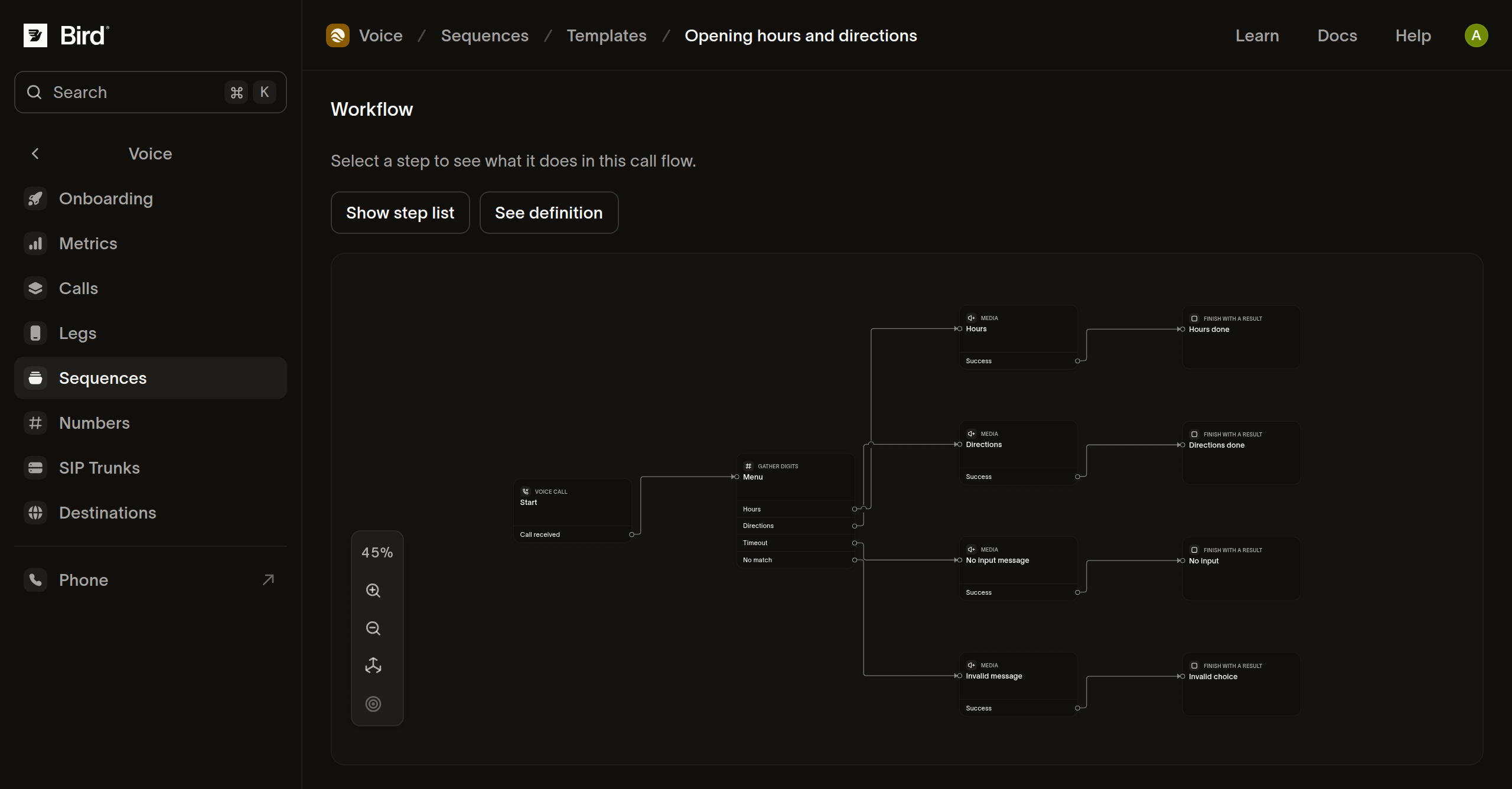
| Jam operasional dan petunjuk arah | Menawarkan menu keypad dengan pesan informasi serta jalur terpisah untuk keheningan dan input tidak cocok. |
| Routing dukungan dan voicemail | Menghubungi nomor dukungan Anda atau merekam pesan dengan durasi tetap. |
| Pengingat hanya-ucapan | Mengucapkan pengingat menggunakan data yang diberikan saat panggilan dimulai. |
- Buka template dan baca prasyaratnya.
- Pilih langkah-langkah untuk memeriksa pengaturan dan koneksinya.
- Baca kartu Example scenarios dan bandingkan jalur yang diharapkan serta hasil langkah hipotetisnya.
Skenario template mensimulasikan hasil. Skenario ini tidak memverifikasi bahwa tujuan dapat menerima panggilan, ucapan tersedia, atau rekaman dapat disimpan.
Konfigurasikan salinan Anda
- Pilih Use template.
- Masukkan nama dan ganti nilai pengaturan, termasuk tujuan dukungan atau pesan yang diucapkan.
- Pilih Create draft.
- Tinjau langkah-langkah yang dihasilkan di editor dan lengkapi kolom yang belum selesai.
Salinan Anda independen dari template. Pengeditan selanjutnya tidak mengubah sequence lain. Skenario pertama template mengisi input Preview pada draf. Tinjau nilai hipotetis tersebut dan tambahkan hasil untuk jalur lain sebelum mengevaluasinya. Sampel tidak pernah dijalankan sebagai respons nyata; periksa pengaturan langkah yang tersimpan sebelum memanggil penerima sungguhan.
Template pengingat memerlukan data masukan dari aplikasi pemanggil. Membuatnya tidak menjadwalkan panggilan. Gunakan Create Call saat aplikasi Anda siap menjalankan alur yang telah dipublikasikan.
Periksa jalur sebelum pengujian
Pratinjau jalur utama dan alternatif yang relevan. Untuk routing dukungan, periksa Support does not answer serta Support call completes. Template voicemail merekam selama durasi tetap; template ini tidak mendeteksi keheningan atau meminta transkripsi.
Jika pemilih sumber daya tidak memiliki nilai yang memenuhi syarat, periksa workspace yang dipilih, kesiapan sumber daya, dan izin Anda. Menyimpan konfigurasi yang belum selesai tidak menjamin bahwa publikasi atau panggilan sungguhan akan berhasil.