Supresi
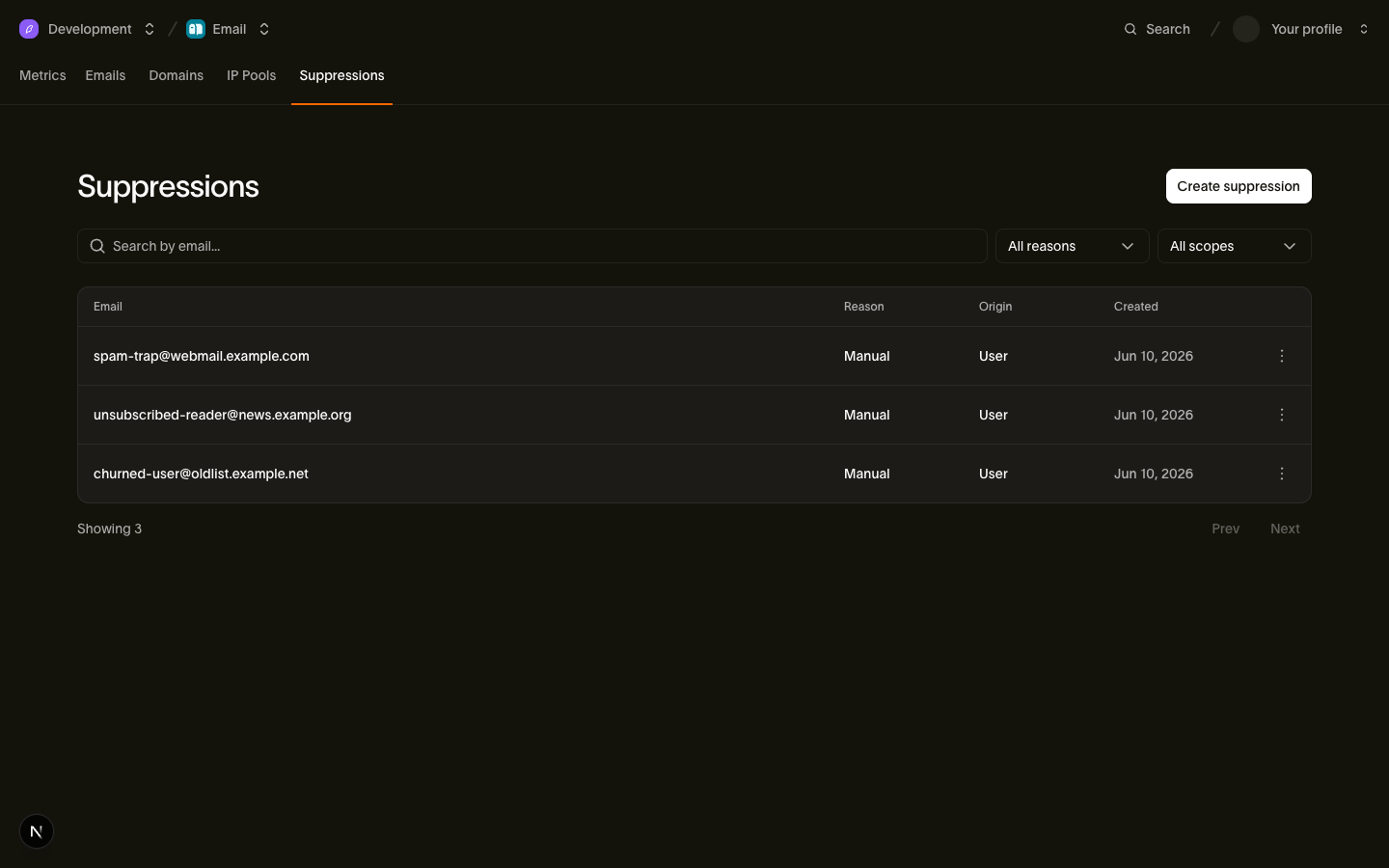
Workspace Anda memiliki daftar supresi: kumpulan alamat email yang tidak kami kirimi pesan. Hard bounce dan laporan spam otomatis masuk ke daftar ini, dan Anda juga bisa menambahkan alamat secara manual. Mengirim berulang kali ke alamat yang bounce atau melaporkan spam dapat membuat domain Anda diblokir oleh penyedia kotak masuk, jadi kami menghentikan pengiriman tersebut sebelum keluar dari platform.
Unsubscribe baru tidak menambahkan catatan supresi. Unsubscribe mencatat preferensi yang dinyatakan penerima, bukan fakta keterkiriman, sehingga disimpan di tab Preferences. Lihat Tautan unsubscribe untuk cara kerjanya.
Kelola daftar ini di Email > Suppressions, melalui supresi API, atau dengan bird email suppressions.
Tiga alasan dan apa yang diblokir
Setiap record memiliki reason yang menjelaskan mengapa alamat tersebut terdaftar, dan kebijakan applies_to yang mengatur kategori mana yang diblokir:
| Alasan | applies_to | Kategori marketing | Kategori transaksional |
|---|---|---|---|
hard_bounce | all | Diblokir | Diblokir |
complaint | non_transactional | Diblokir | Diizinkan |
manual | all | Diblokir | Diblokir |
Pembagian ini mengikuti arti dari masing-masing alasan:
hard_bounce: alamat tidak ada. Mengirim ke alamat ini tidak berguna di kategori mana pun, jadi semua pengiriman diblokir.complaint: pernyataan tentang email yang tidak diinginkan. Seseorang yang melaporkan newsletter Anda sebagai spam mungkin masih membutuhkan reset kata sandi atau konfirmasi pesanan, jadi hanya pengiriman non-transaksional yang diblokir.manual: keputusan yang dibuat secara sengaja oleh Anda atau tim Anda. Kami tidak mempertanyakan keputusan itu, jadi supresi manual memblokir setiap kategori, termasuk transaksional.
Satu alamat dapat memiliki satu record per alasan, sehingga hard bounce dan laporan spam sebelumnya berdampingan sebagai record terpisah, dan pengiriman tetap diblokir selama record pemblokir mana pun masih ada. Kami menerapkan prinsip gagal-tertutup untuk apa pun yang tidak dikenali: jika sebuah record memiliki applies_to yang belum pernah ditemui integrasi Anda, perlakukan sebagai memblokir setiap kategori, karena begitulah kami memperlakukannya.
Catatan: reason: unsubscribe sudah tidak digunakan lagi (deprecated) pada supresi API. Unsubscribe baru mencatat preferensi, bukan supresi. Filter ?reason=unsubscribe yang sudah deprecated masih mengembalikan record supresi lama dengan origin: unsubscribe_link atau origin: unsubscribe_event sampai record tersebut dihapus.
Cara alamat ditambahkan secara otomatis
Kami menambahkan supresi sebagai respons terhadap sinyal penerima, jadi bounce atau laporan spam tidak memerlukan tindakan dari Anda:
| Pemicu | Supresi yang dihasilkan |
|---|---|
Hard bounce (email.bounced) | reason: hard_bounce, origin: bounce_event, applies_to: all |
Hard bounce out-of-band (email.out_of_band_bounce) | reason: hard_bounce, origin: bounce_event, applies_to: all |
Laporan spam (email.complained) | reason: complaint, origin: complaint_event, applies_to: non_transactional |
Berhenti berlangganan, baik melalui tautan di badan email maupun tombol satu klik, tidak muncul di sini: tindakan tersebut mencatat preferensi di tab Preferences alih-alih menambahkan baris ke daftar ini.
Hanya bounce kelas hard yang menghasilkan supresi, dan tabel klasifikasi menunjukkan nilai bounce_class mana yang termasuk hard. Dua hasil yang tampak seperti kegagalan tetap membiarkan alamat dapat dikirim:
- Soft bounce dan deferral (
email.deferred, atauemail.bounceddenganbounce_type: "soft"): kegagalan sementara seperti kotak masuk penuh. Kami mencoba lagi. - Penolakan sisi pengirim: kegagalan pembuatan dan penolakan kebijakan adalah masalah pada pengiriman, bukan pada alamat. Hal ini menghasilkan event
email.rejecteddan tidak ada supresi.
Sinyal berulang untuk alamat yang sudah disupresi dengan alasan yang sama tidak mengubah record asli, termasuk created_at-nya. Record menyimpan source_email_id dan source_recipient_id, yang menghubungkan supresi otomatis kembali ke pesan dan penerima yang menyebabkannya. Kedua field tersebut menjawab pertanyaan dukungan "why did this person stop getting our email", dan bernilai null pada penambahan manual.
Setiap penambahan, otomatis maupun manual, memicu event email_suppression.created ke endpoint webhook Anda dengan suppression_id, email yang disupresi, reason, dan workspace_id, sehingga sistem Anda dapat mencerminkan daftar tanpa polling:
{
  "type": "email_suppression.created",
  "timestamp": "2026-07-23T14:52:03.192524705Z",
  "data": {
    "email": "user@example.com",
    "reason": "manual",
    "suppression_id": "sup_01ky7qckqrf06r38g49b9kxdbc",
    "workspace_id": "ws_01ky7m21hjffh9s8kq76gyb1xf"
  }
}
Mengelola supresi melalui API
API menambahkan, mencantumkan, mencari, dan menghapus record satu per satu. Alamat diubah ke huruf kecil sebelum disimpan dan dicari, dan tidak pernah muncul di path URL, karena path masuk ke log akses dan alamat email adalah data pribadi. Untuk menemukan record suatu alamat, filter daftar dengan ?email=.
Setiap SDK menyediakan operasi ini sebagai method bertipe pada resource suppressions.
Tambahkan alamat
const suppression = await bird.suppressions.add({ email: "user@example.com" });
console.log(suppression.id);
suppression = client.suppressions.add(email="user@example.com")
print(suppression.id)suppression, err := client.Suppressions.Add(context.Background(), bird.SuppressionsAddParams{
Email: "user@example.com",
})
if err != nil {
log.Fatal(err)
}
fmt.Println(suppression.Id)$suppression = $bird->suppressions->add(
(new SuppressionCreate())->setEmail('user@example.com'),
);
echo $suppression->getId();bird email suppressions add --email user@example.comcurl -X POST https://us1.platform.bird.com/v1/email/suppressions \
-H "Authorization: Bearer $BIRD_API_KEY" \
-H "Content-Type: application/json" \
-d '{ "email": "user@example.com" }'Penambahan manual mendapatkan reason: manual dan applies_to: all, sehingga memblokir setiap kategori. Panggilan ini idempoten: supresi baru mengembalikan 201 Created, dan alamat yang sudah disupresi secara manual mengembalikan 200 OK dengan record yang sudah ada, bukan konflik. Bagaimanapun hasilnya, body berisi objek supresi:
{
  "applies_to": "all",
  "created_at": "2026-07-23T14:52:03.192524705Z",
  "email": "user@example.com",
  "id": "sup_01ky7qckqrf06r38g49b9kxdbc",
  "origin": "api_key",
  "reason": "manual",
  "scope": {
    "id": "ws_01ky7m21hjffh9s8kq76gyb1xf",
    "type": "workspace"
  }
}
Field origin mencatat bagaimana record tersebut dibuat. Penambahan manual mendapatkan api_key atau user, tergantung apakah pemanggil melakukan autentikasi dengan kunci API atau sesi dashboard. Penambahan otomatis mendapatkan bounce_event atau complaint_event, tergantung sinyal mana yang membuatnya.
Daftar dan pencarian
Panggilan ini mengembalikan halaman pertama. Di Go, argumen ketiga yang kosong memulai paginasi; teruskan NextCursor dari halaman sebelumnya untuk membaca halaman berikutnya.
const page = await bird.suppressions.list({ limit: 25 });
console.log(page.data.length);
page = client.suppressions.list(limit=25)
print(len(page.data))page, err := client.Suppressions.ListPage(context.Background(), bird.SuppressionsListParams{Limit: 25}, "")
if err != nil {
log.Fatal(err)
}
fmt.Println(len(page.Data))$page = $bird->suppressions->list(['limit' => 25])->fetch();
echo count($page->data);bird email suppressions list --limit 25curl "https://us1.platform.bird.com/v1/email/suppressions?limit=25" \
-H "Authorization: Bearer $BIRD_API_KEY"Daftar ini menggunakan paginasi kursor, terbaru lebih dulu, dan dapat difilter berdasarkan reason. Untuk memeriksa satu alamat, kirimkan sebagai parameter kueri email:
const page = await bird.suppressions.list({ email: "user@example.com" });
console.log(page.data.length);
page = client.suppressions.list(email="user@example.com")
print(len(page.data))page, err := client.Suppressions.ListPage(context.Background(), bird.SuppressionsListParams{
Email: "user@example.com",
}, "")
if err != nil {
log.Fatal(err)
}
fmt.Println(len(page.Data))$page = $bird->suppressions->list(['email' => 'user@example.com'])->fetch();
echo count($page->data);bird email suppressions list --email user@example.comcurl "https://us1.platform.bird.com/v1/email/suppressions?email=user@example.com" \
-H "Authorization: Bearer $BIRD_API_KEY"Filter email mencocokkan awalan tanpa membedakan huruf besar-kecil: user@example.com juga mencocokkan user@example.com.au. Bandingkan setiap alamat yang dikembalikan dengan alamat lengkap yang Anda minta, dan ikuti next_cursor di setiap halaman sebelum memutuskan apakah record yang cocok ada. Beberapa record dapat berlaku untuk satu alamat. Pemanggil MCP dapat menggunakan email_suppressions_check untuk pencarian alamat persis ini.
Setelah Anda memiliki ID supresi, GET /v1/email/suppressions/{suppression_id} mengembalikan satu record tersebut: suppressions.get di SDK, atau bird email suppressions get <id> pada CLI.
Hapus alamat
await bird.suppressions.remove("sup_01ky7qckqrf06r38g49b9kxdbc");client.suppressions.remove("sup_01ky7qckqrf06r38g49b9kxdbc")if err := client.Suppressions.Remove(context.Background(), "sup_01ky7qckqrf06r38g49b9kxdbc"); err != nil {
log.Fatal(err)
}$bird->suppressions->remove('sup_01ky7qckqrf06r38g49b9kxdbc');bird email suppressions remove sup_01ky7qckqrf06r38g49b9kxdbc --yescurl -X DELETE https://us1.platform.bird.com/v1/email/suppressions/sup_01ky7qckqrf06r38g49b9kxdbc \
-H "Authorization: Bearer $BIRD_API_KEY"Satu alasan tidak dapat dihapus dengan cara ini. Record complaint hanya dapat dihapus oleh pengguna dashboard yang sudah masuk; kunci API mendapat 422 SuppressionNotRemovableByAPIKey. Record hard_bounce dan manual dapat dihapus dengan cara mana pun.
Mengembalikan 204 No Content dan menghapus record tersebut secara permanen. Record lain untuk alamat yang sama tetap ada, dan pengiriman tetap diblokir selama record yang tersisa memblokir kategori pesan. Untuk menghapus record berdasarkan alamat, lakukan paginasi pada pencarian ?email=, pilih hanya kecocokan alamat lengkap, dan hapus setiap record yang dimaksud berdasarkan ID. Berhati-hatilah saat menghapus record hard_bounce, karena alamat yang masih tidak ada akan bounce pada pengiriman berikutnya dan disupresi kembali secara otomatis.
Apa yang terjadi saat Anda mengirim ke alamat yang disupresi
Kami menolak penerima di tempat yang dapat Anda lihat. Penerima mendapat recipient_id dan muncul di daftar penerima pesan dengan status rejected. Event API dan webhook Anda mencatat event email.rejected dengan rejection_reason: "recipient_suppressed". Penerima lainnya dikirimi pesan secara normal.
Pesan itu sendiri tetap diterima dengan 202, bahkan ketika semua penerimanya disupresi. Kami menyelesaikan supresi setelah menerima pengiriman, saat kami memproses pesan, sehingga alamat yang Anda tambahkan sekarang berlaku dalam beberapa menit dan tidak pernah menghentikan pengiriman yang sudah berjalan.
Pengujian dengan sandbox
Sandbox pengujian menguji penanganan supresi secara deterministik. Mengirim ke suppressed@messagebird.dev berperilaku seolah-olah alamat tersebut ada di daftar Anda: penerima ditolak dengan rejection_reason: "recipient_suppressed" dan tidak pernah sampai ke pengiriman. Alamat bounce dan complaint sandbox (bounce@messagebird.dev, complaint@messagebird.dev) menjalankan hasilnya melalui pipeline event nyata tanpa menulis apa pun ke daftar supresi Anda, sehingga alamat pengujian yang sama tetap dapat digunakan kembali di setiap percobaan.
Langkah selanjutnya
- Kategori:
transactionalversusmarketing, dan bagaimana kategori berinteraksi dengan kebijakan supresi - Tautan unsubscribe: bagaimana opt-out mencatat preferensi yang dinyatakan, bukan supresi
- Event dan webhook: payload
email.rejecteddan event siklus hidup yang mendorong supresi otomatis - Sandbox pengujian: alamat khusus untuk menyimulasikan setiap hasil pengiriman
- Referensi API: Supresi: skema request dan response lengkap
- Apa yang terjadi ketika seseorang berhenti berlangganan: video yang mengikuti satu penerima dari halaman unsubscribe hingga pengiriman yang ditolak
Sumber daya terkait
Lanjutkan dengan dokumentasi, panduan, dan contoh untuk topik ini.