Billing & penggunaan
Billing berskala organisasi: paket produk, wallet, dan aliran invoice Anda milik organisasi. Halaman ini membahas bagaimana billing memengaruhi integrasi: bagaimana penggunaan diukur, cara membaca gambaran terkini, dan bagaimana paket Anda memengaruhi batas operasional. Untuk operasi akun (detail harga, metode pembayaran, pajak), lihat Knowledge base: Paket & harga dan Penggunaan, pengeluaran & invoice.
Billing dikelola oleh orang, bukan oleh integrasi. Setiap operasi billing dibatasi oleh scope org:billing, yaitu scope peran organisasi yang tidak dapat diberikan ke kunci API workspace, sehingga tidak ada kunci bk_* yang dapat membaca penggunaan, mengisi ulang wallet, atau mengubah paket. Owner dan admin billing melakukan pekerjaan tersebut di bagian Billing and payments pada dashboard; lihat Users, teams & roles untuk mengetahui siapa yang memegang peran tersebut. Katalog paket, produk, dan harga adalah pengecualian: katalog ini tidak memerlukan autentikasi, mempublikasikan harga di situs ini, dan CLI serta MCP dapat membaca katalog paket secara langsung. Oleh karena itu, panduan ini menjelaskan dampak billing terhadap integrasi Anda, dan menyebutkan halaman dashboard yang menampilkan setiap angka. Halaman-halaman tersebut (Overview, Usage, Invoices, Spend, dan Settings) dibahas dalam artikel Knowledge base yang ditautkan di sepanjang halaman ini.
Paket dan tier
Setiap produk memiliki paketnya sendiri yang dipilih secara terpisah: satu organisasi dapat memiliki paket SMS berbayar, paket Realtime, dan paket Email Free sekaligus, sementara Voice tetap bayar-sesuai-pemakaian. Setiap paket memiliki tier (misalnya free, startup, growth, atau scale) dan salah satu dari dua perilaku finansial. Paket pendanaan menambahkan setoran bulanan ke wallet bersama dan menagih penggunaan sejak pengiriman pertama; paket kapasitas membeli penggunaan yang disertakan dan tidak menambahkan apa pun ke wallet. Paket & harga menjelaskan keduanya, dan Billing overview menampilkan paket aktif organisasi Anda.
Paket inilah yang memengaruhi integrasi Anda secara operasional:
- Batas laju naik seiring tier. Setiap paket menetapkan nilai untuk kebijakan produknya, seperti
sms_sendatauwhatsapp_send, dan tier yang lebih tinggi menetapkan nilai yang lebih tinggi. Tanpa paket, nilai default kebijakan yang berlaku. Override organisasi yang aktif diutamakan di atas semua paket. Lihat cara batas Anda ditentukan. - Kuota naik seiring tier. Paket menetapkan jumlah seperti panggilan Voice serentak, koneksi Realtime, domain pengirim, dedicated IP, dan endpoint webhook. Saat kuota tercapai, resource, panggilan, atau koneksi baru ditolak dengan error tersendiri; error ini berbeda dari respons batas laju
429. - Jatah penggunaan berakhir di batas paket. Paket Email Free berhenti di batas bulanan dan hariannya, dan paket Realtime berhenti di batas koneksi dan batas pesan hariannya. Paket Email berbayar tidak memiliki jatah yang disertakan: setiap pengiriman ditagih dari wallet.
Untuk membaca nilai yang dipublikasikan untuk paket apa pun tanpa autentikasi, tampilkan daftar katalog paket dengan bird billing plans list --commercial-product sms. Setiap paket mengembalikan financial_behavior, rate_limits, dan quotas miliknya. Tabel perbandingan di halaman harga setiap produk menampilkan nilai tersebut di samping nilai default bayar-sesuai-pemakaian, jadi bandingkan keduanya di sana sebelum melakukan upgrade untuk menambah kapasitas.
Upgrade berlaku setelah pembayarannya berhasil, sehingga batas baru tersedia di tengah periode tanpa mengubah tanggal perpanjangan. Downgrade dan pembatalan berlaku di akhir periode berjalan, dan perpanjangan yang tidak dibayar mengembalikan produk tersebut ke paket gratis atau batas bayar-sesuai-pemakaian. Lihat Perubahan paket & perpanjangan untuk aturan waktunya. Rancang integrasi agar dapat menangani error batas saat paket berubah atau jatah penggunaan habis.
Pengukuran penggunaan
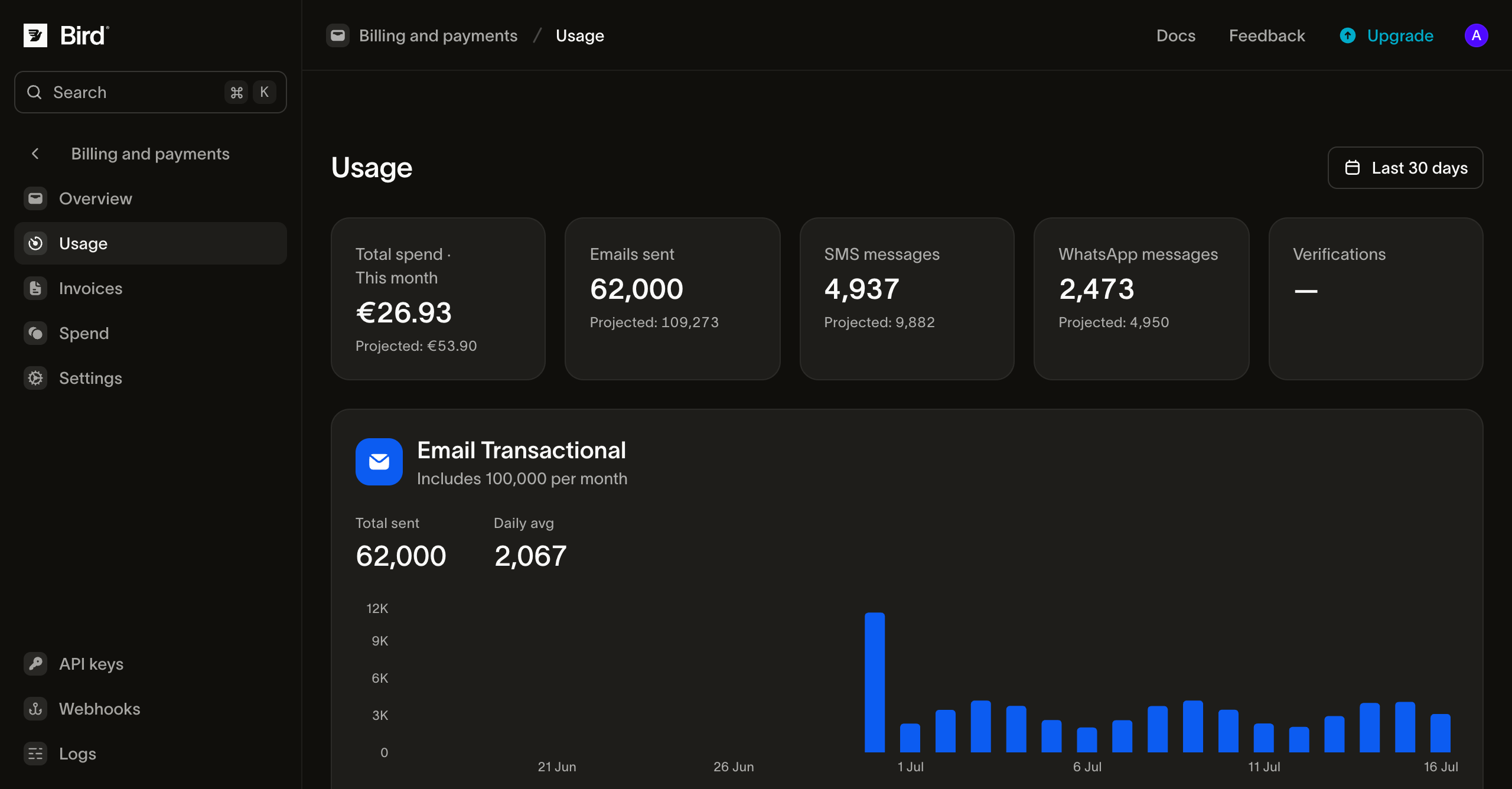
Setiap pengiriman diukur terhadap periode billing aktif organisasi Anda. Halaman Usage di dashboard menampilkan gambaran langsung untuk setiap produk, dalam jendela waktu pengukuran produk tersebut: periode paket untuk email terukur, bulan kalender untuk bayar-sesuai-pemakaian. Produk ditagih dengan salah satu dari dua cara, dan perbedaannya terasa pada integrasi Anda:
- Produk terukur menghitung penggunaan terhadap jatah yang disertakan dalam paket (pengiriman email pada paket Email Free atau paket Email lama). Halaman ini menampilkan berapa banyak jatah yang telah Anda gunakan dan, pada paket lama yang memiliki overage, seberapa jauh Anda melampauinya.
- Produk bayar-sesuai-pemakaian ditagih per penggunaan berdasarkan kartu tarif (SMS, WhatsApp, Voice, dan email pada paket Email berbayar), dengan tarif paket jika paket memilikinya. Satu pesan dapat mendebit wallet dua kali: biaya Bird sendiri saat pengiriman diproses, dan biaya pihak ketiga (surcharge operator pada SMS, bagian Meta pada WhatsApp) saat pesan terkirim. Baca rincian biaya per pesan dari
costpada pesan SMS atau WhatsApp:transaction_amountadalah biaya Bird danpassthrough_amountadalah biaya pihak ketiga.
Halaman ini mencakup setiap produk yang memiliki langganan atau penggunaan dalam periode berjalan, dan menampilkan grafik pemecahan per hari, per negara, dan per domain pengirim untuk setiap produk.
Wallet
Setiap organisasi memiliki wallet: saldo prabayar bersama yang dilalui oleh tagihan penggunaan. Pengiriman bayar-sesuai-pemakaian, langganan add-on, dan perpanjangan paket Email lama mendebit wallet. Paket funding mengisinya: setiap setoran bulanan yang dibayar ditambahkan secara penuh dan dapat digunakan untuk produk apa pun. Kartu tersimpan juga mengisinya melalui top-up dan auto top-up, serta membayar perpanjangan paket secara langsung. Halaman Spend di dashboard adalah buku besar lengkap kredit dan tagihan, sehingga setiap pergerakan wallet tercatat di satu tempat, dan setiap pembayaran top-up yang telah diselesaikan menghasilkan tanda terima permanen yang dapat Anda unduh sebagai PDF dari bagian yang sama.
Secara operasional, wallet adalah dependensi pengiriman bayar-sesuai-pemakaian: pengiriman SMS dan WhatsApp ditolak jika saldo tidak dapat menutupinya. SMS ditolak di API dengan 402; pengiriman WhatsApp diterima lalu ditolak setelah Bird mencoba menagihnya. Biaya saat pengiriman yang tidak dapat ditanggung saldo akan dilewati alih-alih ditolak, sehingga pesan tetap sampai ke penerima. Untuk volume transaksional, konfigurasikan auto top-up dan peringatan saldo rendah di Billing overview, atau pantau dan buat peringatan dari sisi Anda. Payment methods and wallet membahas kedua kontrol dashboard tersebut. Peringatan saldo rendah dan pemberitahuan kegagalan pembayaran dikirim ke owner organisasi. Email invoice dikirim ke daftar notifikasi billing organisasi jika sudah diatur, dan dialihkan ke owner organisasi jika belum. Atur daftar tersebut di Settings > Organization. Gunakan alias tim yang terpantau agar email billing tidak bergantung pada kotak masuk satu orang.
Invoice
Invoice diterbitkan per organisasi, satu per bulan kalender, dan tercantum di halaman Invoices pada dashboard, tempat Anda dapat membuka invoice untuk melihat rincian pos atau mengunduhnya sebagai PDF. Invoice mencerminkan pengukuran yang sama dengan yang ditampilkan halaman Usage: biaya paket kapasitas, tagihan paket lama beserta kelebihan pemakaian, dan pengeluaran bayar-sesuai-pemakaian untuk periode tersebut. Setoran paket pendanaan adalah top-up wallet dengan tanda terimanya sendiri; penggunaan yang dibayar dari setoran itu muncul di invoice. Untuk struktur invoice, status, dan waktu pembayaran, lihat Penggunaan, pengeluaran & invoice di Knowledge base.
Langkah selanjutnya
- Rate limits: default kebijakan, nilai paket, override organisasi, dan header respons
- Plans & pricing: paket pendanaan dan kapasitas, apa yang ditingkatkan oleh setiap tier, dan harga bayar-sesuai-pemakaian
- Plan changes & renewals: waktu upgrade/pembatalan dan alur kegagalan pembayaran
- Users, teams & roles: siapa yang dapat mengelola billing (
org:billing)