Ricezione email
Le email ricevute sono disponibili in Email > Emails > Receiving, tramite la API inbound-messages e nei webhook email.received. Scegli tra due metodi di configurazione in base all'indirizzo su cui vuoi ricevere la posta.
- Un indirizzo di inoltro è una casella che generiamo per te, come
mfzxq2lom5uxi3lb@eu1.inbound.bird.com(@us1.inbound.bird.comnella regione US). Nessun dominio, nessun DNS: punti una regola di inoltro di una casella esistente verso quell'indirizzo e noi riceviamo ogni messaggio inoltrato. - La ricezione sul tuo dominio pubblica record MX per un sottodominio che controlli (ad esempio
inbound.acme.com), dopodiché la posta inviata a qualsiasi indirizzo di quel sottodominio arriva come messaggio in entrata.
Inizia con un indirizzo di inoltro se vuoi provare la ricezione o inoltrare la posta di una casella di supporto esistente. Configura la ricezione sul dominio quando vuoi che la posta arrivi direttamente al tuo dominio.
Indirizzi di inoltro
In Email > Domains > Forwarding, seleziona Add forwarding address e inserisci un nome come Support inbox. Generiamo un indirizzo fisso e casuale. Puoi rinominare l'etichetta in seguito. Eliminare un indirizzo di inoltro interrompe la posta verso quell'indirizzo senza influire sugli altri.
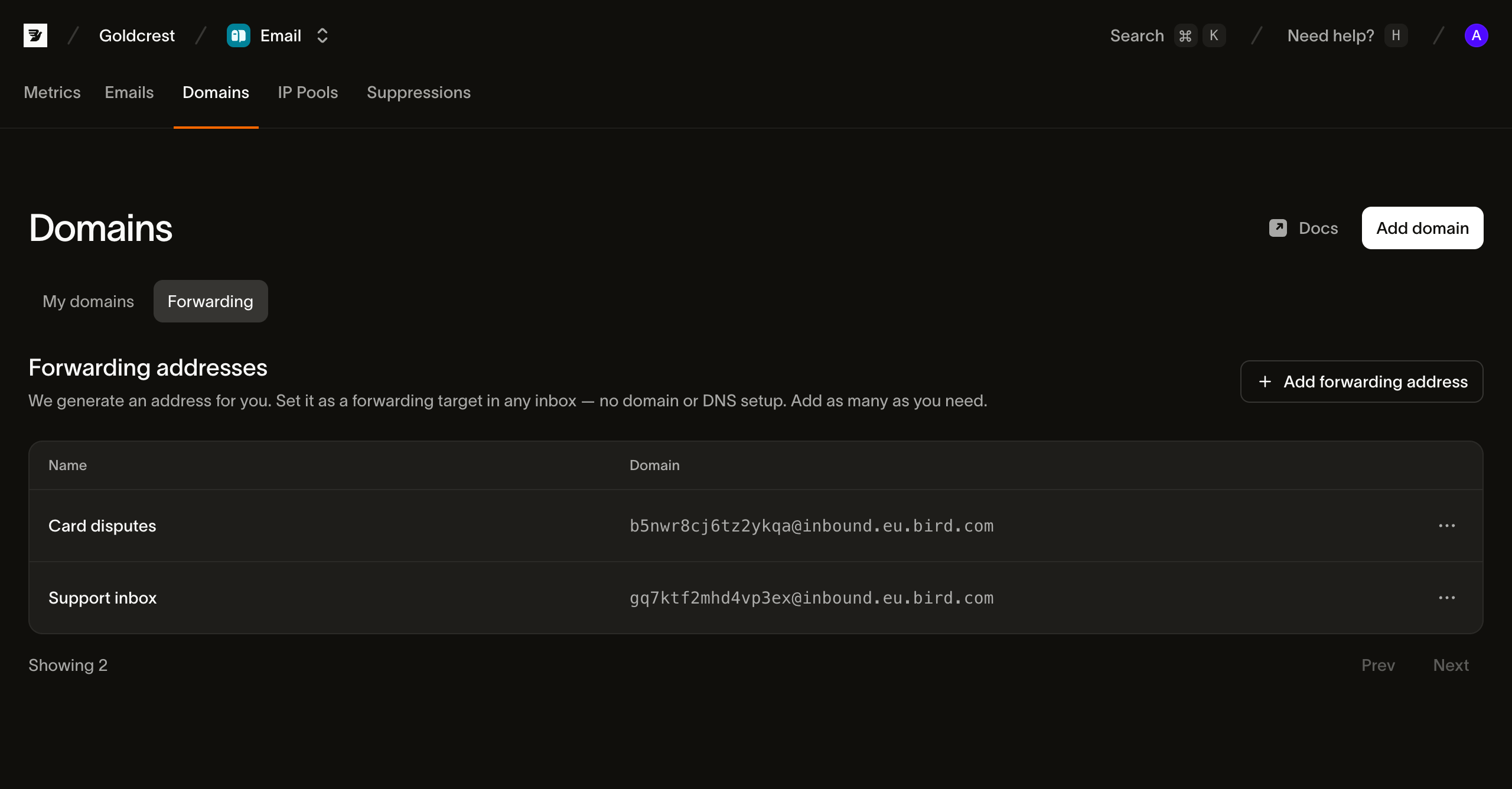
Da codice, POST /v1/email/inbound-addresses fa la stessa cosa (CLI: bird email inbound-addresses create). La risposta contiene l'address generato, il suo id e la tua etichetta.
Imposta poi quell'indirizzo come destinazione di inoltro nel sistema in cui risiede la posta: una regola di inoltro Gmail o Google Workspace, una regola Outlook o l'impostazione di inoltro del tuo helpdesk. Riceviamo tutto ciò che viene inoltrato, lo analizziamo e lo archiviamo come messaggio in entrata.
Ricezione sul tuo dominio
La ricezione sul dominio è una funzionalità di un dominio di invio, quindi il dominio deve essere registrato e verificato tramite DKIM. Usa un sottodominio dedicato (inbound.acme.com), mai l'apex: la ricezione viene abilitata sulla registrazione del dominio stesso, e record MX sull'apex intercetterebbero la posta aziendale.
Apri Email > Domains, poi seleziona il tuo dominio. In Receiving (Optional), attiva la ricezione e pubblica i record MX elencati. Non puoi abilitare la ricezione finché DKIM non è verificato. Anche un dominio che già riceve posta per un'altra organizzazione non è disponibile.
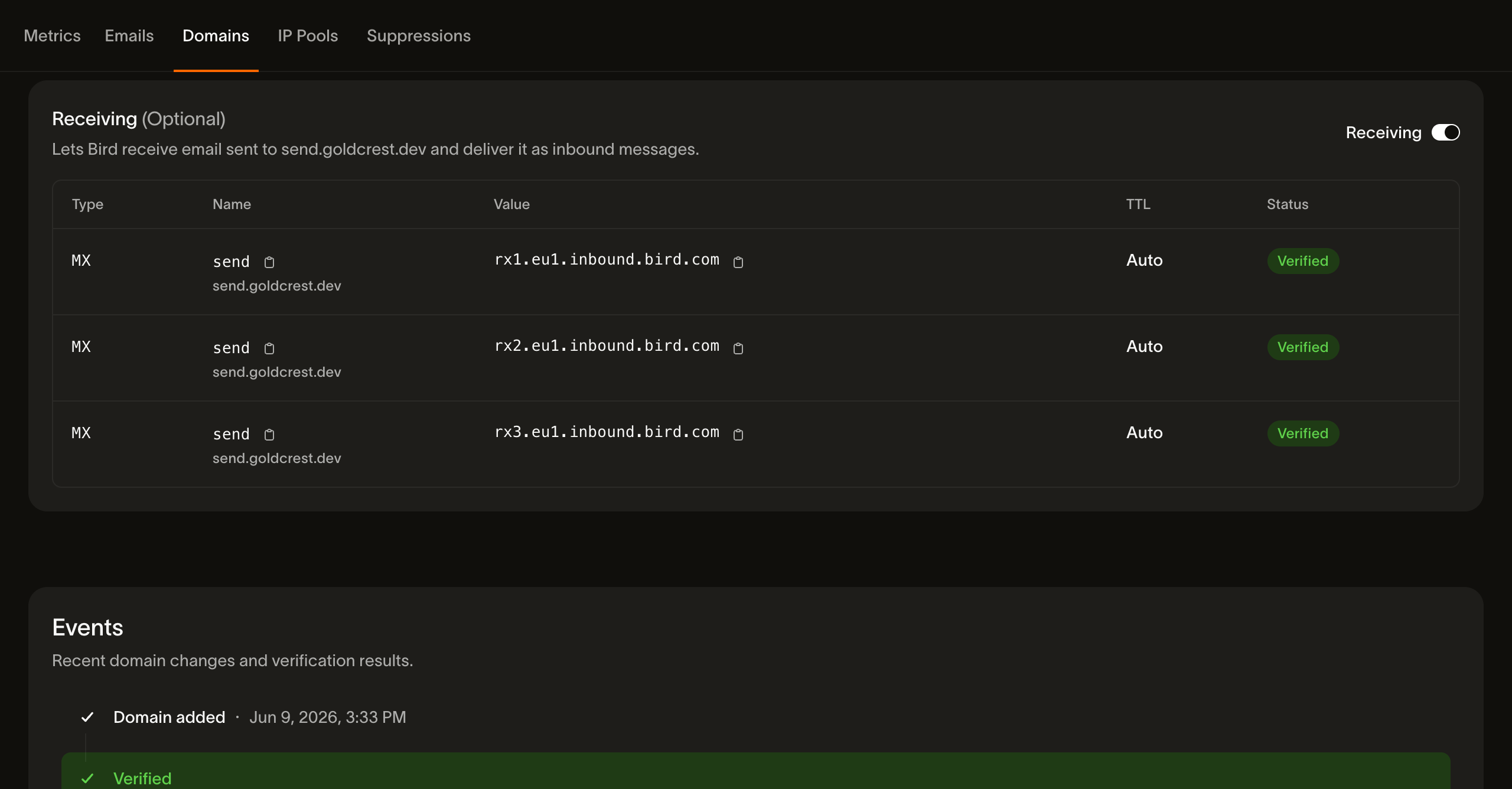
Una volta abilitato, lo stato di ricezione segue lo stesso ciclo dei record di invio: pending mentre verifichiamo i record MX nel DNS, poi verified quando risolvono correttamente. Da quel momento, la posta inviata a qualsiasi local-part del dominio (support@, orders@, qualunque cosa) viene consegnata come messaggio in entrata. Disattivando il toggle si interrompe la consegna della posta in entrata. I record MX restano elencati sul dominio come riferimento, con il loro stato di nuovo su pending.
Dimensione dei messaggi in entrata
Bird supporta messaggi in entrata fino a 20 MB, allegati inclusi, su ogni dominio di ricezione in ogni regione. I messaggi più grandi sono al di fuori del limite supportato, anche se il server mittente riceve una risposta di accettazione SMTP. Non fare affidamento sulla loro consegna.
Un messaggio sovradimensionato può essere rifiutato durante la transazione SMTP con 552 5.3.4 message size limit exceeded. Il server mittente riceve questo rifiuto e può notificarlo al suo mittente. Bird non tronca mai un messaggio per rispettare un limite di dimensione.
Leggere ciò che ricevi
La scheda Receiving elenca i messaggi ricevuti dal più recente, con mittente, destinatario, oggetto e ora di ricezione. Cerca per indirizzo mittente esatto o filtra per data. Seleziona una riga per aprire le viste Rendered, Text, Details e Raw. L'intestazione mostra i risultati SPF, DKIM e DMARC registrati all'arrivo del messaggio.
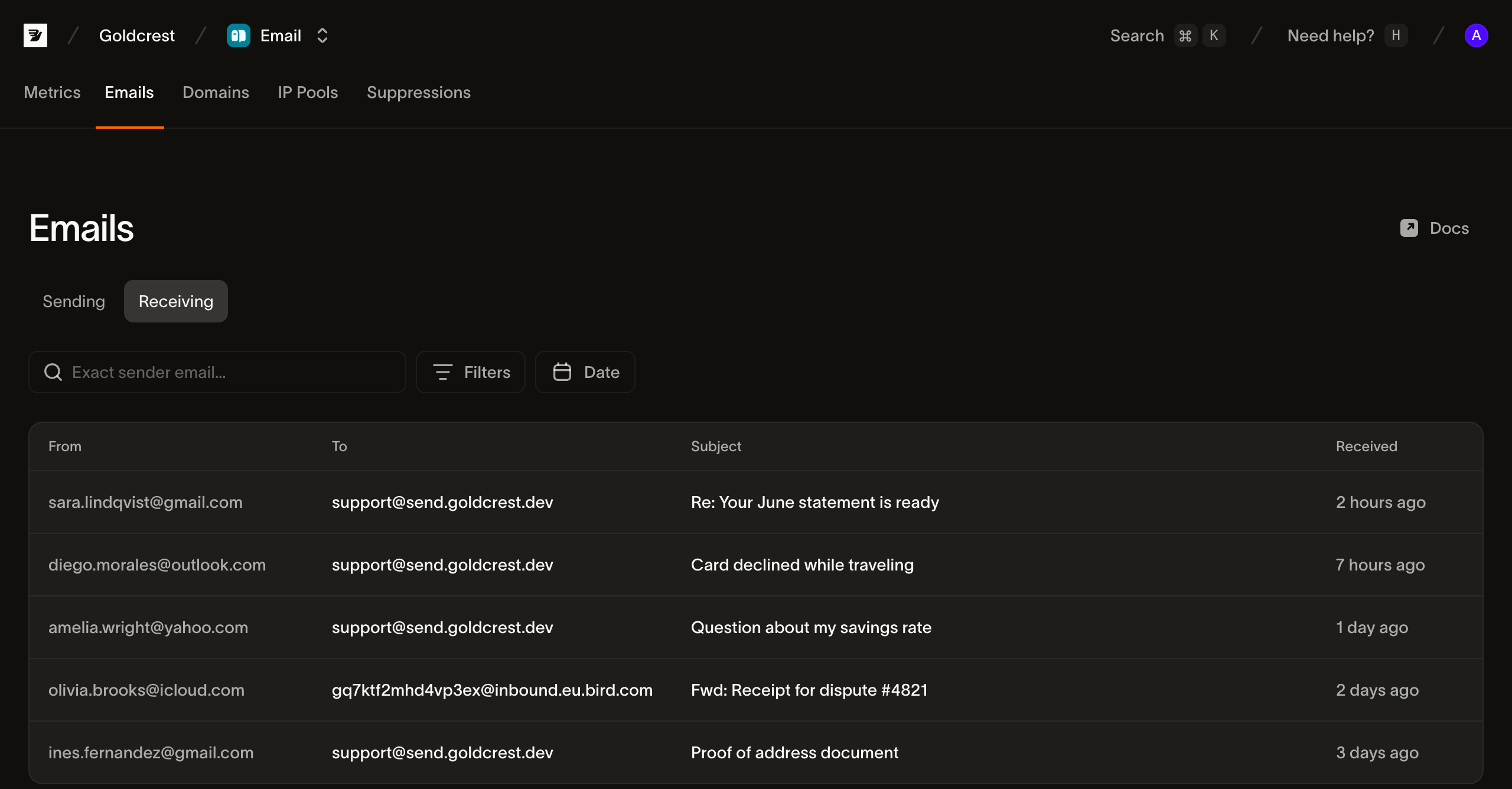
Le email ricevute vengono conservate per 30 giorni.
Gli stessi dati sono disponibili tramite la API (CLI: bird email inbound-messages):
GET /v1/email/inbound-messageselenca i messaggi, filtrabili per mittente, indirizzo in entrata e ora di ricezione.GET /v1/email/inbound-messages/{id}restituisce i metadati analizzati di un messaggio: indirizzamento, oggetto, riferimenti di threading, risultati di autenticazione e metadati degli allegati.GET /v1/email/inbound-messages/{id}/bodyrestituisce il corpo HTML e in testo semplice.GET /v1/email/inbound-messages/{id}/attachmentselenca gli allegati; ciascuno può essere scaricato singolarmente.GET /v1/email/inbound-messages/{id}/rawrestituisce il messaggio originale esattamente come ricevuto, in formato RFC 5322 (MIME).
Reagire alla posta ricevuta: il webhook email.received
Per elaborare la posta in arrivo (smistare richieste di supporto, acquisire risposte, attivare un agente), sottoscrivi un endpoint webhook all'evento email.received. L'evento viene emesso dopo la ricezione e il parsing di ciascun messaggio. Il payload include l'inbound_message_id, il mittente dall'header From del messaggio, i destinatari, l'oggetto e il riferimento in_reply_to. Include inoltre un verdetto complessivo authentication (pass, fail o unknown) e i risultati individuali SPF, DKIM e DMARC; Uso dei risultati di autenticazione spiega quali di essi sono popolati. Queste informazioni permettono smistamento e triage senza una chiamata aggiuntiva. Quando servono il corpo o gli allegati, recuperali con la API inbound-messages usando l'inbound_message_id dell'evento. Il messaggio viene salvato prima dell'invio dell'evento, quindi quell'id è risolvibile non appena l'evento ti raggiunge: recupera /raw o /body direttamente dal tuo handler, senza attese e senza polling.
Uso dei risultati di autenticazione
SPF e DKIM vengono verificati quando un messaggio raggiunge Bird. Gli header aggiunti dal mittente, come il proprio Authentication-Results, non modificano questi risultati.
I campi spf_pass e dkim_pass possono essere true, false o null. null indica che non è stato registrato alcun risultato, anche quando un controllo non è stato completato. Una firma DKIM valida rende dkim_pass true anche se un'altra firma sul messaggio fallisce. I campi non espongono token di risultato dettagliati, domini di firma o selettori.
I risultati DMARC non sono ancora disponibili. Fino a quel momento, dmarc_pass e spam_score sono sempre null, e authentication, che segue dmarc_pass, è sempre unknown. Non basare lo smistamento su dmarc_pass === true o authentication === "pass": nessun messaggio soddisfa alcuna delle due condizioni.
Per controllare lo smistamento automatico ora, richiedi dkim_pass === true o spf_pass === true e tratta false, null e i valori mancanti come non verificati. I pass SPF e DKIM non confermano che il dominio di firma o di invio corrisponda al dominio nell'header visibile From. Usali per filtrare la posta non autenticata, non come prova dell'identità del mittente.
DMARC verifica l'allineamento con il dominio nell'header From del messaggio. Il campo from in email.received contiene quell'indirizzo dell'header, con il mittente analizzato dal relay e poi il mittente dell'envelope come fallback quando l'header non è leggibile. In email_mailbox.message_received, from contiene il mittente dell'envelope, che può essere un indirizzo di bounce diverso. Per lo smistamento in casella basato sul mittente visibile, recupera i metadati del messaggio ricevuto usando l'message_id dell'evento. Un pass DMARC autentica un dominio; non stabilisce che una determinata persona abbia inviato il messaggio.
Passaggi successivi
- Domini di invio: registra e verifica il dominio su cui vuoi ricevere.
- Webhook: endpoint, firme e tentativi di ripetizione per
email.received. - Superagent: valuta la posta ricevuta prima che un agente la gestisca.
- Log email: il lato invio della pagina Emails.
Risorse correlate
Continua con la documentazione, le guide e gli esempi per questo argomento.