Plantillas de SMS
Una plantilla es un mensaje reutilizable que envías por referencia, proporcionando valores como un código de verificación de un solo uso o un número de pedido. Las plantillas de sistema integradas de Bird cubren mensajes de autenticación y transaccionales. La creación de plantillas de espacio de trabajo está en API preview; el dashboard sigue mostrando el catálogo integrado.
Una plantilla proporciona la categoría de mensaje utilizada en las verificaciones de cumplimiento del destino. Las plantillas integradas también seleccionan el remitente para el destino, así que omites from. Las plantillas de espacio de trabajo requieren tu propio remitente, igual que un envío de texto libre.
Explorar plantillas en el dashboard
La página Templates en SMS lista las plantillas integradas. Busca por nombre o filtra por estado y categoría.
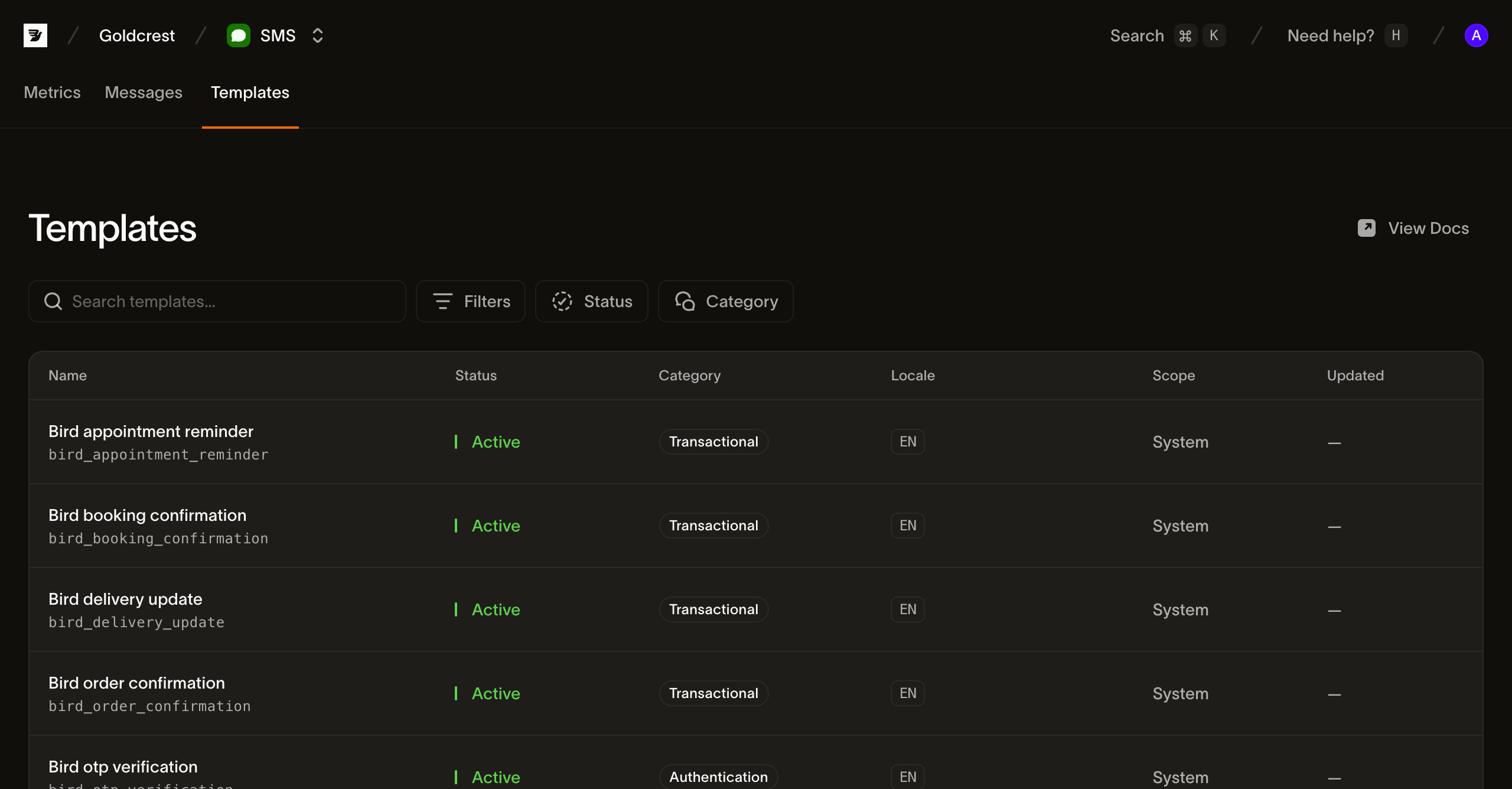
Cada fila muestra los campos que necesitas para elegir y enviar una plantilla:
- Name: el nombre para mostrar de la plantilla y su
slug(por ejemplobird_order_confirmation). El slug es el identificador que pasas al enviar; se fija en la creación. - Status: las plantillas integradas están en Active y listas para enviar. Las plantillas de espacio de trabajo están en Draft hasta que se publican, luego pasan a Active. Trata el campo de estado compartido como un conjunto abierto.
- Category: la clasificación de contenido (
transactional,marketingoauthentication) aplicada a los mensajes enviados desde la plantilla. - Language: los idiomas en los que la plantilla está disponible, como etiquetas BCP 47. Los primeros se muestran como chips con un indicador de desbordamiento
+Ncuando una plantilla está localizada en muchos idiomas. - Scope: System para las plantillas integradas de Bird. Workspace identifica las plantillas de espacio de trabajo que creas a través del API preview.
- Updated: cuándo cambió la plantilla por última vez. Las plantillas integradas no muestran fecha.
Qué contiene una plantilla
Junto con su nombre, categoría e idiomas, cada plantilla define las variables que completa en el momento del envío. Una variable tiene un key, type, un flag required y un constraint legible. Las plantillas integradas tienen slots tipados; las plantillas de espacio de trabajo infieren slots genéricos text y aceptan valores de parámetro escalares. Una variable sensitive se reemplaza en el contenido almacenado del mensaje. Las colas de transporte siguen llevando el texto necesario para la entrega. Proporciona cada variable requerida y ninguna clave no declarada.
Una plantilla está disponible en uno o más idiomas, y su default_language es lo que recibe un envío cuando no especifica ninguno. Si pides un idioma en el que la plantilla no está disponible, Bird recurre primero a una forma más amplia del mismo idioma y luego al idioma predeterminado, porque las plantillas SMS establecen on_missing_language como fallback de forma predeterminada. Las plantillas integradas usan language_source_required: false. Las plantillas de espacio de trabajo pueden exigir un idioma o establecer on_missing_language: fail; esas políticas toman efecto de inmediato, mientras que los cambios de contenido e idioma predeterminado toman efecto con la publicación.
Listar plantillas desde la API
GET /v1/sms/templates devuelve una página paginada por cursor con resúmenes de plantillas. Sigue next_cursor usando starting_after hasta que sea null; una página no es el catálogo completo. Leer plantillas requiere una clave API con el scope sms_management, que es distinto del scope sms que usa un envío. Filtra por scope, category, status o language, o busca con q:
for await (const tpl of bird.smsTemplates.list({ scope: "system" })) {
  console.log(tpl.id, tpl.slug);
}
for template in client.sms_templates.list(scope="system"):
print(template.id, template.slug)for tpl, err := range client.SmsTemplates.List(context.Background(), bird.SMSTemplateListParams{
Scope: "system",
}) {
if err != nil {
log.Fatal(err)
}
fmt.Println(tpl.Id, *tpl.Slug)
}foreach ($bird->smsTemplates->list(['scope' => 'system']) as $template) {
echo $template->getId(), ' ', $template->getSlug(), "\n";
}bird sms templates listcurl "https://eu1.platform.bird.com/v1/sms/templates?category=authentication" \
-H "Authorization: Bearer bk_eu1_..."Los resúmenes de plantillas contienen identidad, categoría, estado, idiomas disponibles y referencias a versiones borrador/publicada. Omiten el texto fuente y las variables. Obtén una plantilla por slug o ID con GET /v1/sms/templates/{template_ref}. Usa su draft_version_id para inspeccionar el contenido editable del espacio de trabajo, o su live_version_id para inspeccionar lo que usan los envíos. Una plantilla de espacio de trabajo nueva no tiene versión publicada hasta la publicación.
Lee la versión seleccionada a través de GET /v1/sms/templates/{template_ref}/versions/{version_id}. La respuesta contiene variables y un mapa de contenido indexado por idioma. Para obtener un solo idioma, añade /languages/{language}. El filtro language de la lista coincide con contenido publicado; los idiomas solo en borrador no coinciden.
Las plantillas integradas exponen una sola versión de solo lectura. Su ID estable identifica la entrada del catálogo; su hash de contenido distingue actualizaciones del fuente. Las versiones publicadas de espacio de trabajo preservan un historial inmutable. Las listas de versiones también usan paginación por cursor y omiten el texto fuente.
Creación de plantillas de espacio de trabajo en API preview
Usa una clave API con acceso de escritura sms_management. Envía solicitudes JSON al host regional API de tu clave, con Authorization: Bearer <API_KEY> y Content-Type: application/json. Asigna a cada mutación su propio Idempotency-Key; reutiliza esa clave solo cuando reintentes la misma solicitud.
- Crea la plantilla con
POST /v1/sms/templatesy{"slug":"order-shipped","category":"transactional"}. La respuesta201contieneidydraft_version_id; la plantilla comienza con un borrador en inglés vacío. Guarda ambos ID para las siguientes llamadas. - Guarda el texto con
PUT /v1/sms/templates/{id}/versions/{draft_version_id}/languages/eny{"text":"Your order {{ order_number }} has shipped."}. La respuesta200incluyedraft_revision. - Publica con
POST /v1/sms/templates/{id}/versions/{draft_version_id}/submit, pasando esa revisión como{"expected_revision":1}(reemplaza1con el valor devuelto). Una respuesta200convalid: trueidentifica la versión publicada. Un422indica contenido de borrador no válido; corrige los problemas de idioma devueltos y envía de nuevo con una nueva clave de idempotencia.
La publicación requiere texto no vacío y las mismas variables en todos los idiomas. Toma efecto de forma sincrónica, sin aprobación del proveedor. El API también admite vista previa, duplicación, restablecimiento del borrador al contenido publicado y reversión a una versión publicada. La edición desde el dashboard no está disponible.
Lee la revisión actual antes de actualizar la configuración de la plantilla o revertir. Los guardados de idioma también pueden incluir un guard de revisión; un guard obsoleto devuelve 409. La vista previa usa la versión y los parámetros seleccionados para reportar texto renderizado, idioma resuelto, codificación y cantidad de segmentos antes de enviar.
Envío con una plantilla
Establece el objeto template del envío en lugar de text. Omite category y media_urls: las plantillas son solo de texto, así que un envío con ambos se rechaza con 422. Para la plantilla integrada de abajo, omite también from. Una plantilla de espacio de trabajo requiere from y debe tener una versión publicada.
Una plantilla integrada de autenticación también selecciona la marca de remitente compartida: bird_otp_verification_ttl usa Authifly, mientras que bird_otp_verification_ttl_bird_verify usa Bird Verify. El destino determina si el remitente aparece como nombre de marca, código corto o número de teléfono.
Envía una plantilla integrada:
await bird.sms.send({
  to: "+14155550100",
  template: { slug: "bird_otp_verification", parameters: { code: "123456" } },
});client.sms.send(
to="+14155550100",
template="bird_otp_verification",
parameters={"code": "123456"},
)msg, err := client.Sms.Send(context.Background(), bird.SmsSendParams{
To: "+14155550100",
Template: "bird_otp_verification",
Parameters: map[string]any{"code": "123456"},
})
if err != nil {
log.Fatal(err)
}
fmt.Println(msg.Id)$message = $bird->sms->send(
to: '+14155550100',
template: 'bird_otp_verification',
parameters: ['code' => '123456'],
);
echo $message->getId(), ' ', $message->getStatus();bird sms send \
--parameters '{"code":"123456"}' \
--template bird_otp_verification \
--to +14155550100curl -X POST "https://eu1.platform.bird.com/v1/sms/messages" \
-H "Authorization: Bearer bk_eu1_..." \
-H "Content-Type: application/json" \
-d '{
"to": "+14155550100",
"template": {
"slug": "bird_otp_verification_ttl",
"language": "en",
"parameters": { "code": "481920", "ttl": "10" }
}
}'slug es el handle de la plantilla en el catálogo (puedes identificar una plantilla por su id en su lugar). language selecciona el cuerpo localizado; omítelo para el idioma predeterminado de la plantilla. parameters proporciona un valor para cada variable de la plantilla, indexado por nombre de variable. Una variable requerida faltante, una clave no declarada, un valor que no coincide con la restricción de su variable o un objeto parameters de más de 16 KB serializado se rechaza con un 422.
Las dos plantillas de verificación también aceptan los valores opcionales bound_domain y bound_embedded_domain, que terminan el mensaje con una línea como @login.example.com #481920 para que los navegadores ofrezcan el código solo en ese sitio. Cada uno es un nombre de dominio en minúsculas, como login.example.com. bound_embedded_domain nombra un iframe de origen cruzado y solo se aplica junto con bound_domain, que entonces nombra la página que lo incrusta. Verify rellena ambos a partir del sitio web de una verificación, y la línea adicional puede añadir un segmento. Un bound_app_hash opcional, un hash de app Android de 11 caracteres como FA+9qCX9VSu, sustituye el mensaje por uno corto que termina con el hash en su propia línea, para SMS Retriever API de Google. Omite la línea de dominio, de modo que el mensaje no supera el límite de 140 bytes de API.
La respuesta 202 incluye el from seleccionado, la categoría de la plantilla, los ID de plantilla y versión, el hash del fuente y los idiomas solicitados/resueltos. El texto de mensajes de autenticación se devuelve como **REDACTED**. Los mensajes aceptados conservan el contenido renderizado y la versión seleccionada aunque luego publiques, reviertas o elimines la plantilla.
Todo lo demás del envío (el destinatario, etiquetas, metadatos, la lista de destinos permitidos y el modelo asíncrono 202) funciona exactamente igual que en un envío de texto libre.
Próximos pasos
- Envío de SMS: añade el campo
templatea un payload de envío. - Log de SMS: encuentra un mensaje enviado y sigue su ciclo de vida.
- Events: recibe los eventos de entrega de cada mensaje.
- Envía un SMS con una plantilla: un video que envía una de las plantillas preaprobadas desde una terminal
Recursos relacionados
Continúa con la documentación, guías y ejemplos de este tema.