Enviar verificaciones
Verificar a un usuario requiere dos llamadas. POST /v1/verify/verifications envía un código de verificación a una dirección de correo electrónico o un número de teléfono. POST /v1/verify/verifications/check envía el valor que introdujo el usuario e informa si coincidió. Bird genera el código, no lo devuelve en una respuesta API, y aplica los límites de expiración e intentos.
Enviar un código
La solicitud válida más pequeña es un destinatario to:
const verification = await bird.verify.verifications.create({
  to: { phone_number: "+15551234567" },
});
console.log(verification.id, verification.status);
verification = client.verify.verifications.create(to={"phone_number": "+15551234567"})
print(verification.id, verification.status)verification, err := client.Verify.Verifications.Create(context.Background(), bird.VerifyVerificationsCreateParams{
To: bird.VerificationTo{PhoneNumber: bird.String("+15551234567")},
})
if err != nil {
log.Fatal(err)
}
fmt.Println(verification.Id, *verification.Status)$verification = $bird->verify->verifications->create(
(new VerificationCreateRequest())->setTo((new VerificationTo())->setPhoneNumber('+15551234567')),
);
echo $verification->getId(), ' ', $verification->getStatus();bird verify verifications create --body-file - <<'JSON'
{
"to": {
"phone_number": "+15551234567"
},
"metadata": {
"correlation_id": "signup-7f3a"
}
}
JSONcurl -X POST https://us1.platform.bird.com/v1/verify/verifications \
-H "Authorization: Bearer bk_us1_..." \
-H "Content-Type: application/json" \
-d '{
"to": { "phone_number": "+15551234567" }
}'Usa tu host regional (https://us1.platform.bird.com o https://eu1.platform.bird.com) con una clave bk_{region}_... correspondiente.
Destinatario
to identifica al destinatario con un email, un phone_number en formato E.164, o ambos. Una dirección de correo electrónico habilita la entrega por correo electrónico. Un número de teléfono se resuelve en los canales disponibles en su país de destino, en el orden definido por la configuración por país. La mayoría de los países intentan WhatsApp antes que SMS, mientras que algunos intentan SMS primero; Telegram va después de ambos en el orden de respaldo de la plataforma. Solo se usa una llamada de voz en los países donde activaste la voz. Cuando proporcionas ambas direcciones, un intento fallido puede pasar a otro canal disponible.
Opciones
options sobrescribe la configuración solo para esta solicitud:
code_length: longitud del código de verificación para esta verificación, de 4 a 8 dígitos, sobrescribiendo el valor predeterminado.channels: reordena o reduce los canales de entrega para esta solicitud. Indica los nombres de canal (sms,whatsapp,email,telegram,voice) en el orden en que deben intentarse; un canal que omitas no se usa, y un nombre que no esté en el plan resuelto del destinatario se ignora. No puedes añadir un canal de esta forma, solo recortar o reordenar lo que el destinatario y la configuración por país ya permiten. Si la lista no deja ningún canal utilizable, la solicitud falla con422.language: una etiqueta BCP 47 comofropt-BRque selecciona qué traducción integrada usa el mensaje con el código. Si la omites, el idioma sigue el número de teléfono del destinatario; consulta Idioma del mensaje.
Metadatos
metadata es un objeto de forma libre que se devuelve en cada lectura; úsalo para llevar tu propio ID de usuario o referencia de sesión. Las opciones de remitente y la configuración de verificación no van en la solicitud: provienen de la configuración de tu espacio de trabajo, gestionada en el dashboard (consulta Configuración de verificación).
La respuesta
{
  "id": "vrf_01ky7q1fdze3695yvyz7z9nm3a",
  "status": "pending",
  "reason": null,
  "to": { "phone_number": "+15551234567" },
  "channels": [{ "channel": "whatsapp" }, { "channel": "sms" }],
  "last_channel": "whatsapp",
  "expires_at": "2026-07-23T14:55:58Z",
  "verified_at": null,
  "created_at": "2026-07-23T14:45:58Z",
  "updated_at": "2026-07-23T14:45:58Z"
}
channels es el plan de entrega ordenado al que resolvió esta verificación (un destinatario telefónico lista sus canales telefónicos en orden de intento), y last_channel es adónde fue el código más reciente. expires_at es cuándo la verificación caduca si no llega un código correcto; los reenvíos no lo extienden.
Idioma del mensaje
Los mensajes de SMS, correo electrónico y WhatsApp compartido de Bird incluyen 40 traducciones integradas. Un remitente WhatsApp personalizado usa los idiomas aprobados de su plantilla de autenticación seleccionada. Telegram redacta su propio mensaje y una llamada de voz lee el código en inglés, por lo que esta configuración no tiene efecto en ninguno de los dos.
Sin options.language, el idioma proviene del número de teléfono del destinatario. Un número francés recibe francés y un número japonés recibe japonés, sin que lo solicites. Una verificación sin número de teléfono envía en inglés, al igual que una cuyo país no tiene traducción.
Establece options.language para elegir tú mismo, por ejemplo para coincidir con el idioma que tu usuario seleccionó en tu app en lugar del país de su número:
{
  "to": { "phone_number": "+15551234567" },
  "options": { "language": "es" }
}
Una etiqueta sin traducción integrada propia recurre a su idioma base y luego al inglés: en-GB envía en inglés, pt-BR envía en portugués. Solo se rechaza una etiqueta con formato incorrecto, con 422. Estas son las traducciones integradas que puedes solicitar, todas disponibles en SMS y correo electrónico, y todas excepto mongol en el remitente WhatsApp compartido de Bird:
| Idioma | Etiqueta |
|---|---|
| Árabe | ar |
| Búlgaro | bg |
| Chino (simplificado) | zh |
| Chino (tradicional) | zh-TW |
| Croata | hr |
| Checo | cs |
| Danés | da |
| Neerlandés | nl |
| Inglés | en |
| Finés | fi |
| Francés | fr |
| Alemán | de |
| Griego | el |
| Hebreo | he |
| Hindi | hi |
| Húngaro | hu |
| Indonesio | id |
| Italiano | it |
| Japonés | ja |
| Coreano | ko |
| Letón | lv |
| Lituano | lt |
| Macedonio | mk |
| Malayo | ms |
| Mongol | mn |
| Noruego | no |
| Noruego bokmål | nb-NO |
| Polaco | pl |
| Portugués | pt |
| Rumano | ro |
| Ruso | ru |
| Serbio | sr |
| Eslovaco | sk |
| Esloveno | sl |
| Español | es |
| Sueco | sv |
| Tailandés | th |
| Turco | tr |
| Ucraniano | uk |
| Vietnamita | vi |
La referencia de create-verification es la lista oficial.
El idioma queda fijo cuando se crea la verificación, así que un reenvío o un cambio a otro canal llega en el mismo idioma que el primer mensaje. Llamar a create de nuevo para el mismo destinatario con un language diferente reutiliza la verificación en curso y no la modifica.
La traducción que usó un envío puede diferir de la etiqueta que enviaste si se recurrió a un idioma alternativo. Abre la verificación en la página Verifications para confirmarlo: cada intento muestra el idioma renderizado como una etiqueta Template. El remitente WhatsApp compartido de Bird no tiene plantilla de mongol (mn), así que envía en inglés para ese idioma mientras que SMS y el correo electrónico mantienen el mongol. Tu propia plantilla de WhatsApp sigue sus idiomas aprobados y su política de idioma; un idioma que no puede enviar puede hacer fallar el intento de WhatsApp.
Puedes seleccionar un idioma por solicitud, pero no puedes enviar el texto del mensaje con esa solicitud. Un remitente WhatsApp personalizado usa el texto de la plantilla de autenticación seleccionada. Remitentes y marca muestra las opciones de remitente y el texto del mensaje de Bird.
Comprobar el código
Envía lo que el usuario escribió a POST /v1/verify/verifications/check, identificado por el mismo destinatario; no necesitas un ID de verificación. Proporciona exactamente el conjunto de to con el que creaste la verificación: una creada con ambas direcciones no se encuentra con una sola.
const result = await bird.verify.verifications.check({
  to: { phone_number: "+15551234567" },
  code: "123456",
});
console.log(result.success);
result = client.verify.verifications.check(
to={"phone_number": "+15551234567"}, code="123456"
)
print(result.success)result, err := client.Verify.Verifications.Check(context.Background(), bird.VerifyVerificationsCheckParams{
To: bird.VerificationTo{PhoneNumber: bird.String("+15551234567")},
Code: "123456",
})
if err != nil {
log.Fatal(err)
}
fmt.Println(*result.Success)$result = $bird->verify->verifications->check(
(new VerificationCheckRequest())
->setTo((new VerificationTo())->setPhoneNumber('+15551234567'))
->setCode('123456'),
);
echo $result->getSuccess() ? 'verified' : 'failed';bird verify verifications check 123456 --phone-number +15551234567curl -X POST https://us1.platform.bird.com/v1/verify/verifications/check \
-H "Authorization: Bearer bk_us1_..." \
-H "Content-Type: application/json" \
-d '{
"to": { "phone_number": "+15551234567" },
"code": "123456"
}'La respuesta indica si coincidió:
{
  "success": false,
  "reason": "incorrect_code",
  "attempts_remaining": 4,
  "verification": {
    "id": "vrf_01ky7q1fdze3695yvyz7z9nm3a",
    "status": "pending",
    "reason": null,
    "to": { "phone_number": "+15551234567" },
    "channels": [{ "channel": "whatsapp" }, { "channel": "sms" }],
    "last_channel": "whatsapp",
    "expires_at": "2026-07-23T14:55:58Z",
    "verified_at": null,
    "created_at": "2026-07-23T14:45:58Z",
    "updated_at": "2026-07-23T14:46:38Z"
  }
}
Maneja estos dos comportamientos de respuesta:
- Un código incorrecto devuelve
200. Tratasuccess: falsecon unreason(incorrect_code,expired,attempts_exhausted) como una respuesta normal.attempts_remainingte indica cuántos intentos quedan. Reserva el manejo de errores para fallos de la solicitud. - Una verificación final no se puede comprobar de nuevo. Después de que una verificación alcanza cualquier estado final, las comprobaciones posteriores devuelven
404. Almacena el primer resultado definitivo en lugar de comprobar otra vez.
Si el usuario pidió un código nuevo, llama al endpoint de creación otra vez con el mismo destinatario: la verificación en curso se reutiliza en lugar de reemplazarse. Una vez que ha pasado el tiempo de espera de reenvío (60 segundos por defecto), se envía un código nuevo; dentro del tiempo de espera, la llamada devuelve la verificación activa sin enviar de nuevo. Cada código enviado para la verificación activa sigue siendo válido hasta que se resuelve o expira, así que el usuario puede introducir cualquiera que haya llegado.
Enviar el código por otro canal
Cuando el usuario informa que no llegó ningún código, POST /v1/verify/verifications/next-channel avanza la verificación al siguiente canal en su plan y envía un código nuevo allí. Este es el endpoint detrás de un botón "I didn't receive my code": tu app decide cambiar de canal en lugar de esperar una señal de estado de entrega.
Identifícalo con el mismo destinatario con el que creaste la verificación, igual que en una comprobación:
const verification = await bird.verify.verifications.nextChannel({
  to: { phone_number: "+15551234567" },
});
console.log(verification.last_channel);
verification = client.verify.verifications.next_channel(
to={"phone_number": "+15551234567"}
)
print(verification.last_channel)verification, err := client.Verify.Verifications.NextChannel(context.Background(), bird.VerifyVerificationsNextChannelParams{
To: bird.VerificationTo{PhoneNumber: bird.String("+15551234567")},
})
if err != nil {
log.Fatal(err)
}
if verification.LastChannel != nil {
fmt.Println(*verification.LastChannel)
}$verification = $bird->verify->verifications->nextChannel(
(new VerificationNextChannelRequest())->setTo((new VerificationTo())->setPhoneNumber('+15551234567')),
);
echo $verification->getLastChannel();bird verify verifications next-channel --phone-number +15551234567curl -X POST "https://{region}.platform.bird.com/v1/verify/verifications/next-channel" \
-H "Authorization: Bearer $TOKEN" \
-H "Content-Type: application/json" \
-d '{
"to": {
"phone_number": "+15551234567"
}
}'La respuesta es la verificación, con last_channel indicando el canal al que fue el nuevo código. Cada código ya enviado sigue siendo válido, así que un mensaje que llegue tarde aún puede comprobarse.
Dos cosas lo diferencian de un reenvío:
- El tiempo de espera de reenvío no aplica. Un cambio de canal deliberado es un acto diferente a pedir el mismo canal otra vez, así que el envío sale de inmediato.
- Solo el canal avanza. La expiración, el presupuesto de intentos y el ID de verificación permanecen como estaban.
Usa un reenvío cuando el usuario quiera otro intento en un canal que funciona, y este endpoint cuando el canal en sí parece ser el problema. Un número de teléfono cuyo plan es WhatsApp y luego SMS avanza a SMS; un destinatario con un solo canal utilizable no tiene adónde avanzar.
Cuatro respuestas requieren manejo en lugar de un simple reintento:
| Estado | Qué ocurrió | Qué hacer |
|---|---|---|
404 | No hay verificación en curso para ese destinatario | Crea una |
422 NoNextChannel | El plan no tiene más canales a los que avanzar | Reenvía en el canal actual llamando a create de nuevo |
422 NoAvailableChannel | Todos los canales restantes fallaron al enviar | Muestra el fallo al usuario; la verificación no se puede entregar |
429 | Los envíos de la cuenta se están solicitando demasiado rápido | Espera el período indicado en el encabezado Retry-After |
Cada código que envía este endpoint se factura como cualquier otro envío de Verify; consulta Costo y facturación.
Estados
Una verificación está en pending hasta que se resuelve en un estado final, con reason indicando el motivo:
| Estado | Significado | Razón |
|---|---|---|
verified | Un código correcto llegó a tiempo | ninguna |
failed | Demasiados intentos incorrectos, o el plan de entrega terminó con fallos que indican que no se envió ningún código de verificación | attempts_exhausted, undeliverable |
expired | La ventana expiró antes de recibir un código correcto | ttl_elapsed |
reason es un enum abierto. Conserva un valor no reconocido en lugar de tratar la respuesta como inválida.
Un rebote, rechazo del operador o tiempo de espera de entrega agotado pueden dejar la sesión pendiente porque el destinatario aún puede tener un código válido. El agotamiento del plan de entrega por sí solo no significa que la sesión haya fallado. Consulta Eventos de Verify para conocer las condiciones de fallo.
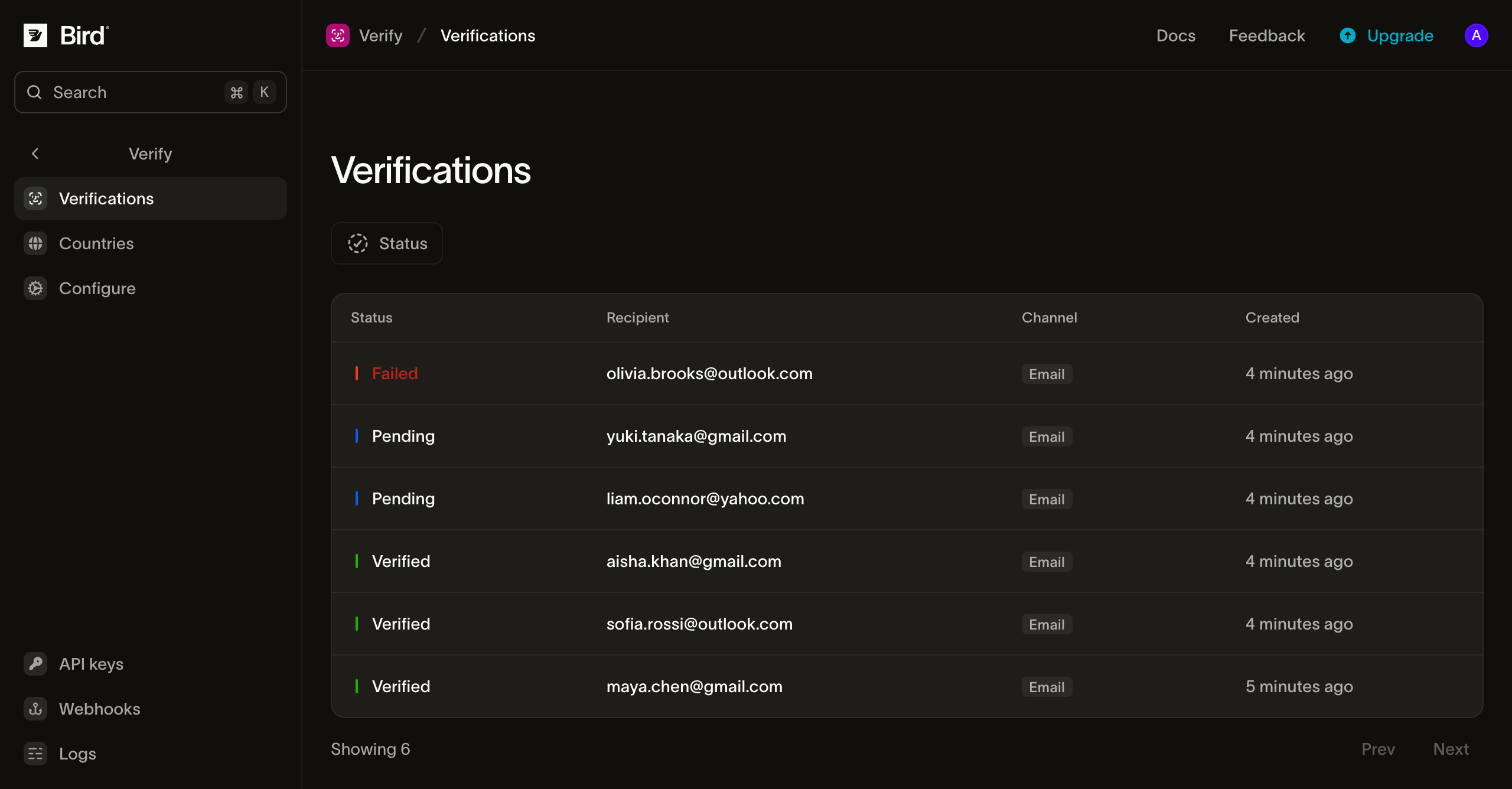
Seguimiento de verificaciones en el dashboard
La página Verifications lista todas las verificaciones que creó el espacio de trabajo, filtrable por estado. Cada fila muestra el destinatario, el plan de canales, el último canal, los tiempos de expiración y verificación, y los metadatos. El código generado no se muestra.
Configuración de verificación
La página Configure establece el ciclo de verificación del espacio de trabajo. Cada campo muestra el valor efectivo: tu valor personalizado si lo configuraste, o el valor predeterminado de la plataforma de Bird.
- Duration: cuánto tiempo un código permanece válido. Predeterminado 10 minutos; de 1 minuto a 999 minutos.
- Maximum Retries: cuántos intentos de comprobación antes de que la verificación falle con
attempts_exhausted. Predeterminado 5; de 1 a 10. - Retry Delay: el tiempo de espera antes de que se pueda enviar un nuevo código al mismo destinatario. Predeterminado 60 segundos; de 0 a 3600.
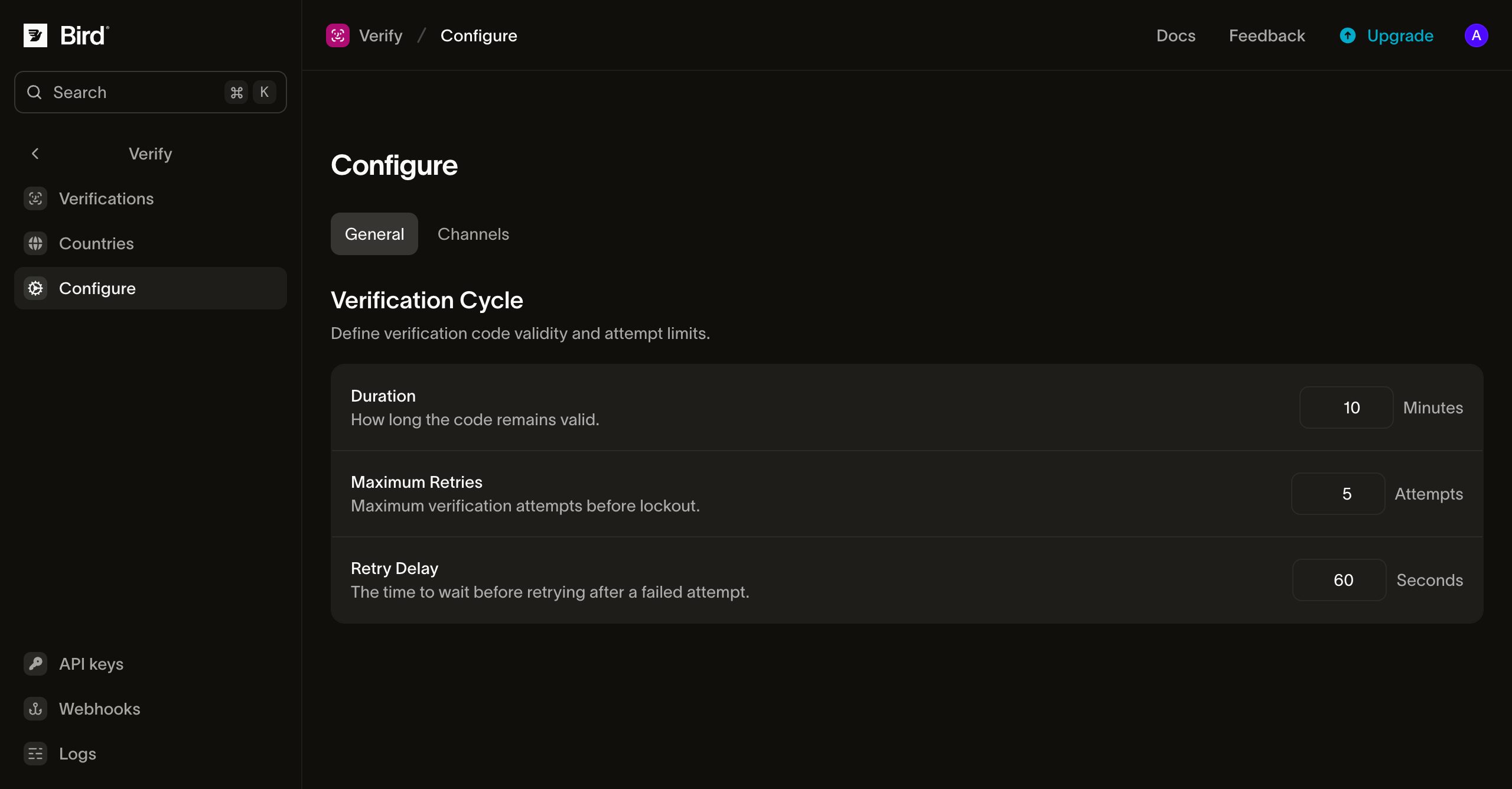
La longitud del código no es un campo en esta página: los códigos son de 6 dígitos numéricos por defecto, y options.code_length establece de 4 a 8 dígitos por solicitud.
Protecciones contra abuso
Independientemente de tus ajustes, Verify aplica límites de plataforma para evitar que el tráfico de OTP se use como arma, ya sea contra tu saldo (bombeo de SMS) o contra la bandeja de entrada de una víctima:
- 5 envíos por dirección por hora continua, contando tanto verificaciones nuevas como reenvíos. Cuando
tocontiene ambas direcciones, cada una tiene su propio presupuesto. - 10 comprobaciones por conjunto de direcciones del destinatario por minuto, además del límite de intentos de la verificación.
El plan de canales, no el límite por hora, determina los cambios de canal. Cada llamada avanza estrictamente hacia adelante, por lo que una verificación envía como máximo una vez por cada canal restante.
Alcanzar un límite devuelve 429; espera y reintenta después del período indicado en el encabezado Retry-After. Los límites generales de solicitudes de tu cuenta son independientes y se escalan según tu plan; consulta Límites de solicitudes.
Reintentar de forma segura
Los tres endpoints aceptan el encabezado Idempotency-Key. Envía un valor único por cada solicitud lógica. Después de un tiempo de espera agotado o una conexión interrumpida, reintentar con la misma clave reproduce la respuesta original. Una reproducción no envía otro código ni consume otro intento de comprobación, e incluye un encabezado Idempotency-Replay. Consulta idempotencia para el formato de clave y su retención.
Costes y facturación
Se factura cada código enviado. Cada código enviado se cobra a tu saldo según la tarifa del canal para el destino. Un reenvío o un respaldo a otro canal añade un cargo por envío. La tarifa propia de Bird se cobra mientras se procesa el envío y se mantiene tanto si el código llega como si no; en SMS y WhatsApp se añade una tarifa de terceros cuando el mensaje se entrega. Las rutas gratuitas y las comprobaciones no tienen coste; un envío rechazado antes de la facturación no se cobra. Métodos de pago y saldo explica el saldo y las recargas.
Telegram factura en un punto diferente del envío. Antes de que un mensaje salga, se consulta a Telegram si el número puede recibirlo; el cargo se aplica cuando la respuesta es sí, a una tarifa fija mundial, y un número que no se puede alcanzar es gratuito y avanza al siguiente canal sin cobro. Un cargo de Telegram significa que el mensaje fue aceptado para entrega, no que llegó: un código que luego no se entrega sigue cobrado, y la verificación paga de nuevo por el canal al que recurre. Si no quieres ese segundo cargo, retira Telegram del orden de canales para esos países en la página Countries.
La voz se factura como una llamada telefónica, no por código, y no lleva tarifa de Verify. Una llamada que no se contesta no tiene coste. Una llamada contestada se cobra desde que se contesta hasta que se cuelga, según la tarifa de voz saliente del destino, con el tiempo mínimo facturable y los incrementos de esa tarifa, más la tarifa de gestión de llamadas de Bird. Ambas aparecen en la página de precios de voz; consulta Costes y facturación de voz para saber cómo se calcula el tiempo facturable. Una llamada que termina antes de que se lea el código completo se cobra igualmente por el tiempo que estuvo conectada, aunque el intento se notifique como undelivered.
Próximos pasos
| Página | Qué trata |
|---|---|
| Remitentes y marca | Cómo se ven los mensajes con el código y cómo enviar desde tu propio dominio |
| Configuración por país | Orden de canales por país, habilitación y anulaciones de remitente |
| Eventos | El ciclo de vida de la verificación y los eventos de entrega, y sus payloads de webhook |
| Idempotencia | Reintentos seguros con el encabezado Idempotency-Key |
| Referencia de API: crear una verificación | Esquema del endpoint de envío y detalles de errores |
| Referencia de API: comprobar un código | Esquema del endpoint de comprobación y detalles de errores |
| Referencia de API: avanzar al siguiente canal | Esquema del endpoint de siguiente canal y detalles de errores |
Recursos relacionados
Continúa con la documentación, guías y ejemplos de este tema.