WhatsApp message lifecycle events
Bird records events for inbound and outbound WhatsApp messages. An outbound timeline shows what happened after a send returned 202: acceptance, handoff to WhatsApp, delivery, reading, or failure. An inbound timeline records when Bird received the message.
This page covers reading that timeline through the API. To have Bird push each event to your endpoint as it happens, see message lifecycle webhooks. Reactions have their own history, covered in Reaction events.
Lifecycle events
Events appear in chronological order. An outbound message can stop at whatsapp.failed or whatsapp.rejected, and its whatsapp.read event appears only if the recipient opens the message. An inbound timeline starts with whatsapp.received and can record whatsapp.read after your workspace marks the message as read.
| Event | Meaning |
|---|---|
| whatsapp.accepted | Bird accepted the send request. This is what the 202 reported. |
| whatsapp.sent | Bird handed the message to the WhatsApp network. |
| whatsapp.delivered | WhatsApp confirmed delivery to the recipient's device. |
| whatsapp.read | The recipient opened the message. |
| whatsapp.failed | The message was not delivered. error.code says what stopped it. |
| whatsapp.rejected | Bird refused the message before sending it. It was not charged. |
| whatsapp.received | Bird received an inbound message from a contact. |
Applicable delivered or read callbacks can trigger Meta’s share of the price. WhatsApp event payloads carry no cost. Read the message back with GET /v1/whatsapp/messages/{message_id} to see what it cost. See Cost and billing.
Marking an inbound message as read records whatsapp.read in its timeline but does not emit a read acknowledgement webhook. The inbound message keeps its received status and records read_at after WhatsApp accepts the acknowledgement.
whatsapp.read does not change the message status. A delivered message stays delivered; the message also records the read in read_at.
whatsapp.delivered can be skipped entirely. When the recipient already has the chat open on their device, Meta reports the read without ever reporting a delivery, so the timeline reads whatsapp.accepted → whatsapp.sent → whatsapp.read with no whatsapp.delivered in between. Treat read as proof of delivery: a consumer that waits for delivered before considering the message landed will hang on exactly the recipients who saw it fastest, and one that computes a delivery rate from delivered alone under-reports it. The message status stays sent in this case, since only a delivery receipt advances it.
A read-only callback can still trigger the applicable Meta fee. Bird uses one fee identity across the delivered and read paths; the missing delivery event does not imply a free Meta component. See Cost and billing.
The event type list is open: new types may be added over time, so treat an unrecognized value as a future event rather than an error.
Failure events
whatsapp.failed and whatsapp.rejected are terminal. A rejection means Bird stopped the message before sending it to WhatsApp, so it was not charged. Causes include a suppressed or opted-out recipient, insufficient wallet balance, or a destination without a configured price. A failure means the message was not delivered, and error.code says who decided that. Most codes carry WhatsApp's verdict, mapped from the code it reported. internal_error is the exception: it records a missing usable sender credential or exhausted processing retries. An uncertain transport attempt does not prove Meta never received the request. meta_error_code contains WhatsApp's code when available, and an internal_error failure has none by construction.
Both events contain an error object with a stable Bird code, a human-readable description, an optional meta_error_code, and occurred_at. The object appears in API records and webhook payloads only for these event types.
Reading events from the API
GET /v1/whatsapp/messages/{message_id}/events returns the timeline in chronological order. The bounded list is not paginated. Reading events requires an API key with whatsapp:read:
const { data } = await bird.whatsapp.listEvents("wa_abc123");
for (const event of data) console.log(event.type, event.occurred_at);
events = client.whatsapp.list_events("wa_abc123")
for event in events.data:
print(event.type, event.occurred_at)events, err := client.Whatsapp.ListEvents(context.Background(), "wam_01krdgeqcxet5s7t44vh8rt9mg", bird.WhatsappListEventsParams{})
if err != nil {
log.Fatal(err)
}
for _, e := range events.Data {
fmt.Println(e.Id, e.Type)
}$events = $bird->whatsapp->listEvents('wamid_01krdgeqcxet5s7t44vh8rt9mg');
foreach ($events->getData() ?? [] as $event) {
echo $event->getType(), ' ', $event->getId(), "\n";
}bird whatsapp list-events <message-id>curl https://us1.platform.bird.com/v1/whatsapp/messages/wam_.../events \
-H "Authorization: Bearer $BIRD_API_KEY"A message that was accepted, sent, delivered, and read returns four events:
Przykład kodu
{
  "data": [
    {
      "id": "ev_01ky7q6a1fejfbvs0myn41hj41",
      "occurred_at": "2026-07-23T14:48:34.71Z",
      "type": "whatsapp.accepted"
    },
    {
      "id": "ev_01ky7q6a2denvtd6jg1vqwmg13",
      "occurred_at": "2026-07-23T14:48:35.671Z",
      "type": "whatsapp.sent"
    },
    {
      "id": "ev_01ky7q6a2zff9r2qm74mmg1g6z",
      "occurred_at": "2026-07-23T14:48:36.642Z",
      "type": "whatsapp.delivered"
    },
    {
      "id": "ev_01ky7q6c21frssf0vj8h50qysw",
      "occurred_at": "2026-07-23T14:48:38.65Z",
      "type": "whatsapp.read"
    }
  ]
}
Pass type to return one exact public event type, such as ?type=whatsapp.failed or ?type=whatsapp.read. Omit it for the full timeline.
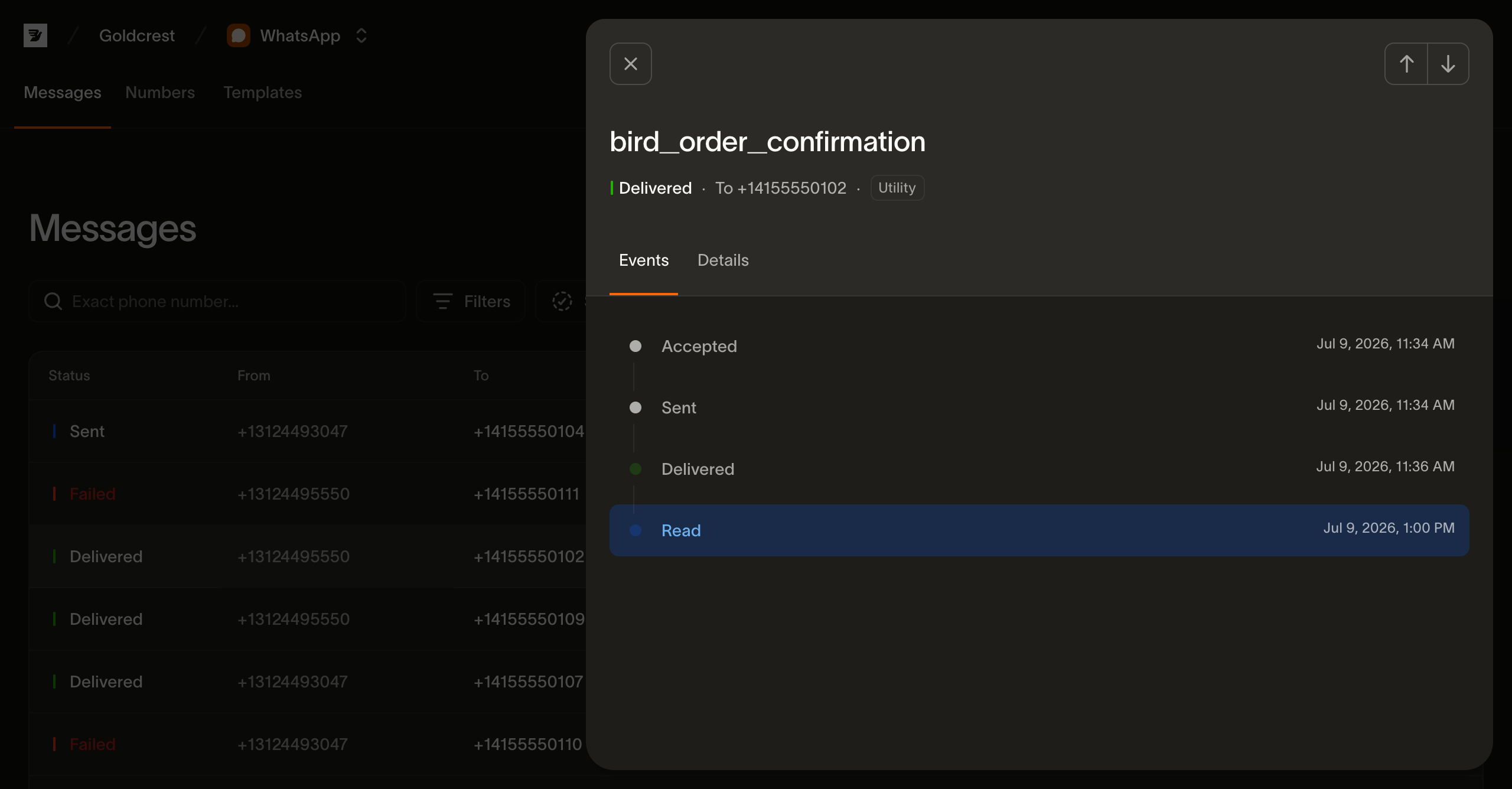
The same timeline is what the WhatsApp log page renders when you open a message.
Next steps
- Message lifecycle webhooks: receive each event as it happens
- Reaction events: read the current reactions and the reaction log
- Mark message as read: acknowledge an inbound message and show typing
- WhatsApp log: the per-message view that renders this timeline
- Sending WhatsApp messages: where a message's lifecycle begins
Powiązane zasoby
Kontynuuj z dokumentacją, przewodnikami i przykładami dotyczącymi tego tematu. Zasoby są w języku angielskim.
Obejrzyj przewodnikConnecting WhatsApp to Bird: from buying a number to a live channelZrozum koncepcjęWhat is the 24-hour customer service window on WhatsApp?Użyj narzędziaWhatsApp message builderPoznaj możliwościWhatsApp
Wypróbuj ćwiczenie i uzyskaj brief wdrożeniowy