Números de teléfono de WhatsApp
Un mensaje de WhatsApp sale desde uno de dos tipos de número: uno que Bird opera en tu nombre, o uno que tu propio espacio de trabajo posee. El que tengas determina qué puedes enviar y si el envío identifica al remitente.
La página Numbers muestra ambos. El campo from en la respuesta de envío y el registro de mensajes identifica el número que usó un mensaje dado.
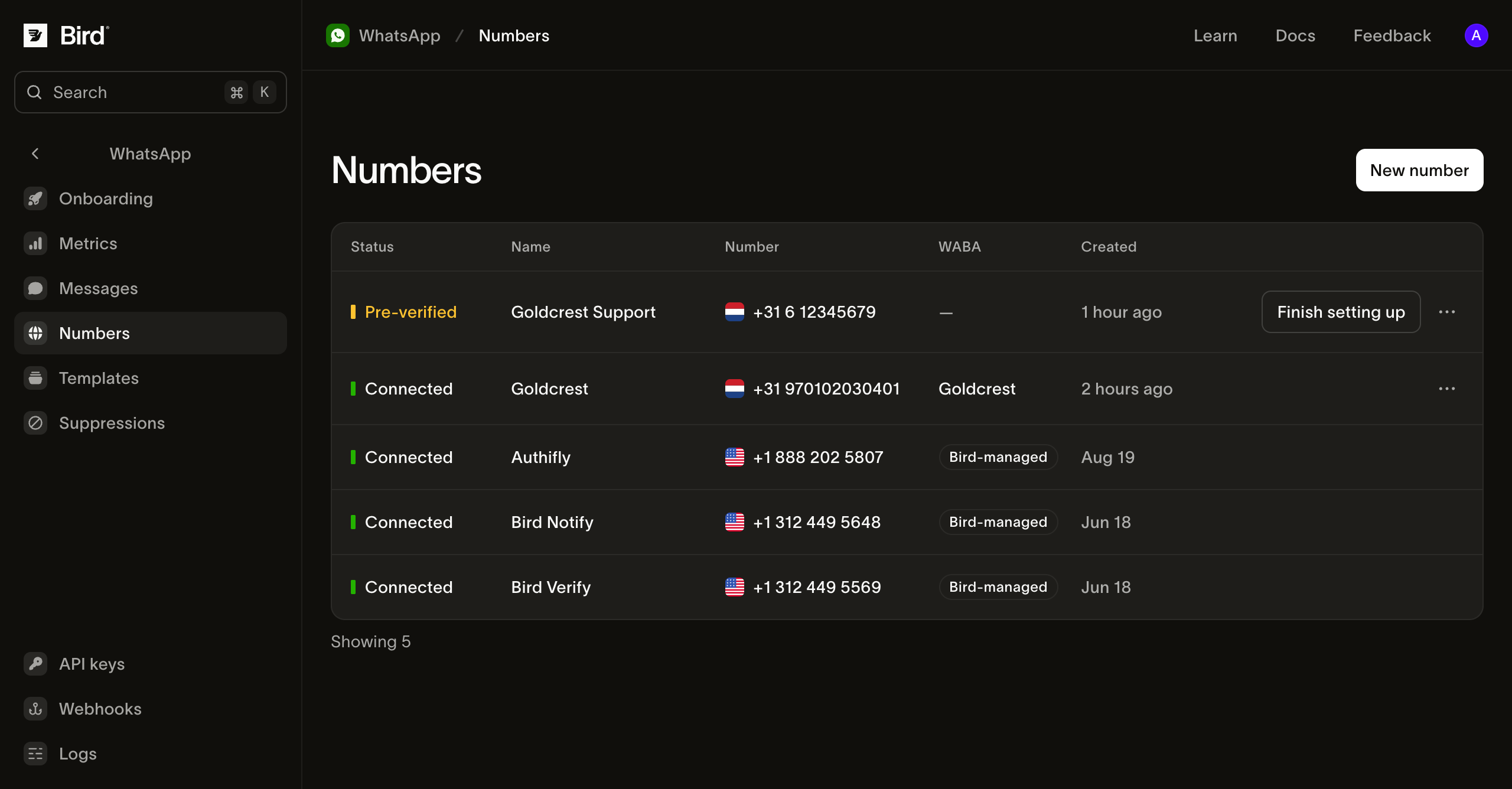
Números gestionados por Bird
Los números propios de Bird no requieren configuración e incluyen las plantillas preaprobadas cuyos slugs comienzan con bird_. Bird selecciona uno según la categoría de la plantilla y tu región: las plantillas de authentication usan un número dedicado de autenticación; las de utility, un número de notificaciones. Por eso un envío con plantilla gestionada no tiene campo from, y establecer uno se rechaza.
Estos números usan infraestructura de envío gestionada por Bird, así que el remitente que ve tu destinatario es el de Bird, no el tuyo, y no pueden enviar contenido libre. Aparecen marcados como Bird-managed en la columna WABA.
Tu propio número
Conectar un número propio es lo que desbloquea el envío como tu propia marca: tus propias plantillas y contenido libre dentro de una ventana de atención al cliente abierta. Cada envío desde él indica el número en from.
Lo conectas desde la página Numbers, en el popup de Embedded Signup de Meta. Hay dos caminos, y difieren en quién lee el código de verificación que Meta envía al número:
- Tengo mi propio número. Recibes el código de Meta por SMS o llamada de voz y lo escribes tú en la ventana de Embedded Signup. Elige una ruta de migración admitida o, si cumples los requisitos, de coexistencia con Business app antes de cambiar un registro existente, y establece un Phone registration PIN solo si el número ya tiene uno en WhatsApp.
- Un número que tu espacio de trabajo tiene en Bird. Selecciónalo de la lista Number. Bird recibe el código y completa la verificación de Meta por ti, así que el número llega preverificado y solo lo seleccionas en la ventana de Embedded Signup.
Verificación en un número que Bird tiene
Elegir un número que tiene tu espacio de trabajo inicia la verificación antes de que se abra el popup de Embedded Signup. Bird pide a Meta que envíe un mensaje de texto al número y luego lee el código en tu nombre.
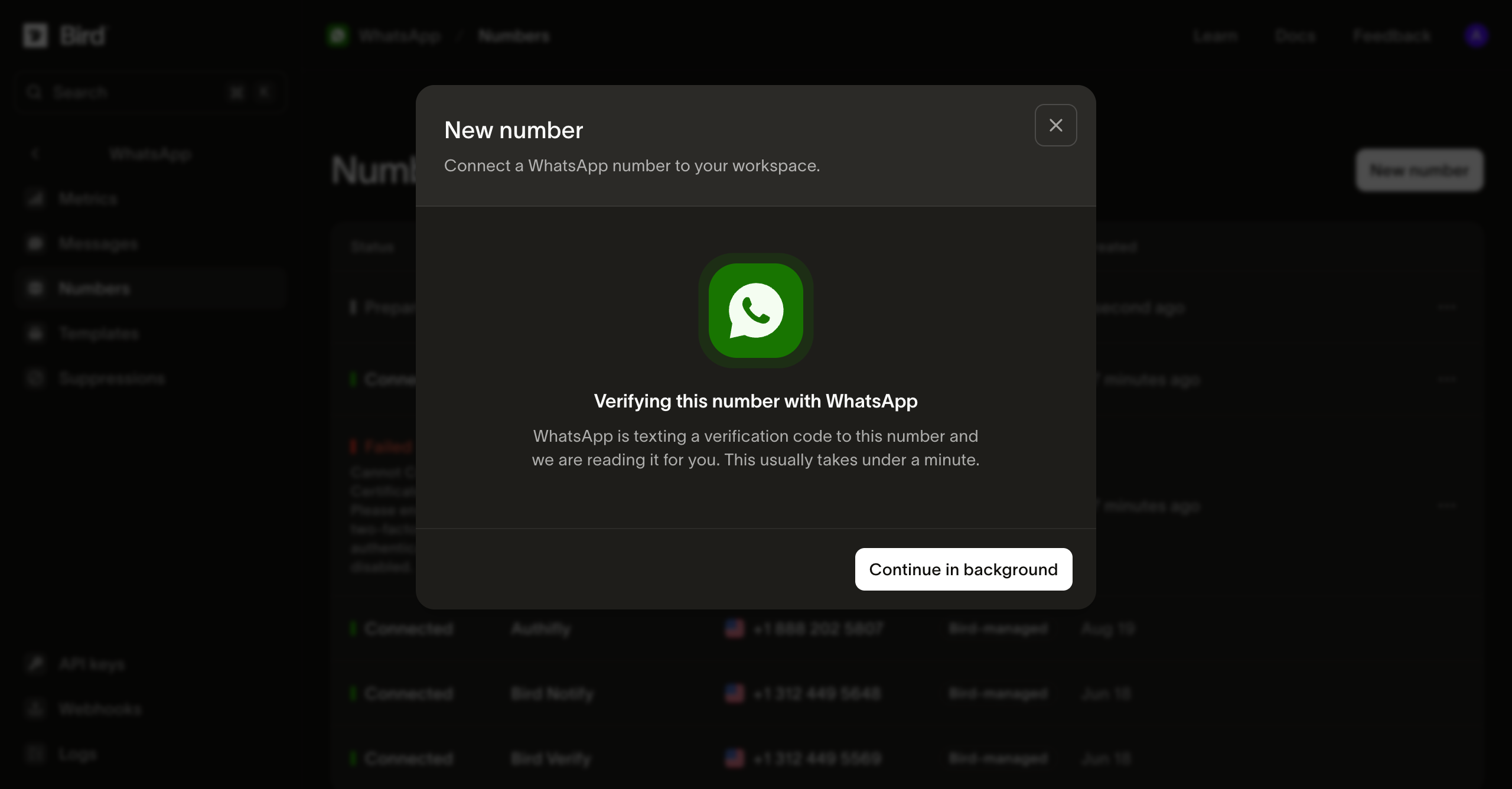
Normalmente tarda menos de un minuto. No tienes que esperar en el diálogo: Continue in background lo cierra y la fila en la página Numbers muestra el mismo progreso.
Una vez que el código se lee, el número queda verificado con Meta y esperando a que termines en Embedded Signup. Finish setting up abre el popup de Meta, donde seleccionas el número y la cuenta de negocio a la que debe unirse.
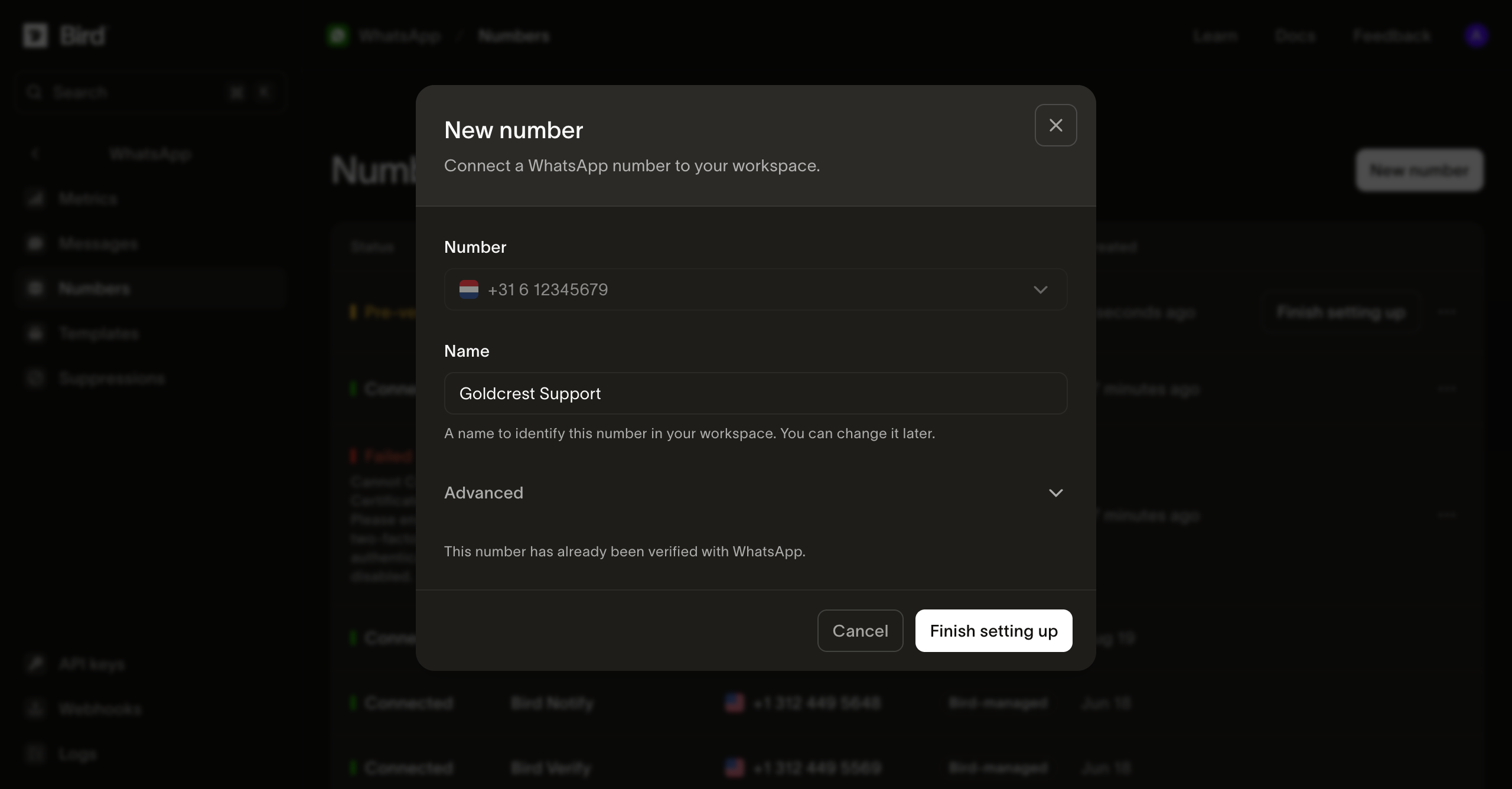
Qué significa el estado de un número
Un número pasa por varios estados antes de poder enviar, y la columna Status indica en cuál se encuentra:
| Estado | Qué significa |
|---|---|
| Preparing | Bird está completando la verificación de Meta para un número que tu espacio de trabajo tiene. |
| Pre-verified | Bird completó la verificación de Meta. Termina el número en Embedded Signup. |
| Pending | Embedded Signup terminó y Bird está registrando el número con Meta. |
| Connected | El número puede enviar. |
| Failed | La configuración se detuvo. La fila indica el motivo. |
Cualquiera de los dos caminos puede fallar a mitad del proceso, en la verificación de Meta o en el popup. Cómo recuperarte depende del motivo que indica la fila.
Si la fila muestra verification_code_not_received o verification_rate_limited, abre el número y selecciona Try again en lugar de desconectarlo. Por qué falla la preverificación y cuándo reintentar explica cuándo el botón está disponible y qué hacer si el reintento también falla.
Para cualquier otro motivo, desconecta ese número desde las acciones de su fila y conéctalo de nuevo: la fila fallida mantiene el número reclamado, así que un segundo intento sin eliminarlo se rechaza.
¿Puedo enviar WhatsApp sin comprar un número de teléfono? recorre la elección.
Qué muestra un número conectado
La página de un número muestra lo que WhatsApp le permite hacer, más una sección Activity que cubre cómo ha estado enviando.
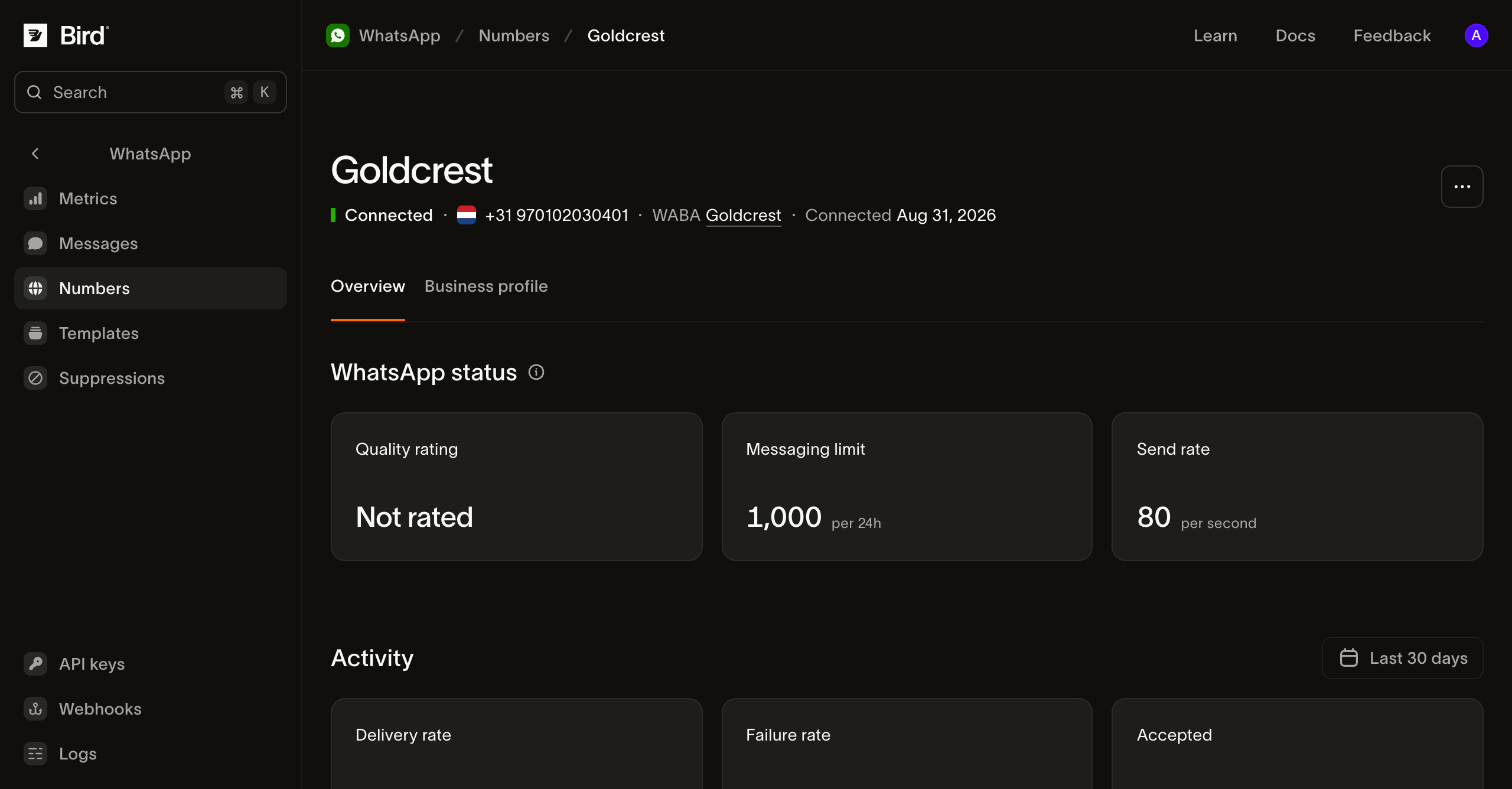
Quality rating, Messaging limit y Send rate son valores de WhatsApp, no de Bird. El límite de mensajería es la cantidad de conversaciones iniciadas por el negocio que WhatsApp permite en 24 horas, y sube a medida que el número envía bien. Quality rating muestra Not rated hasta que WhatsApp tenga suficiente historial de entrega para calificarlo.
La pestaña Business profile contiene lo que los destinatarios ven de ti en WhatsApp: el nombre visible, la descripción, la dirección y la foto de perfil.
La cuenta de negocio detrás de un número
Todo número conectado pertenece a una WhatsApp Business Account, y la columna WABA enlaza a ella. Su ficha muestra las revisiones de Meta sobre el negocio en sí, no sobre el número.
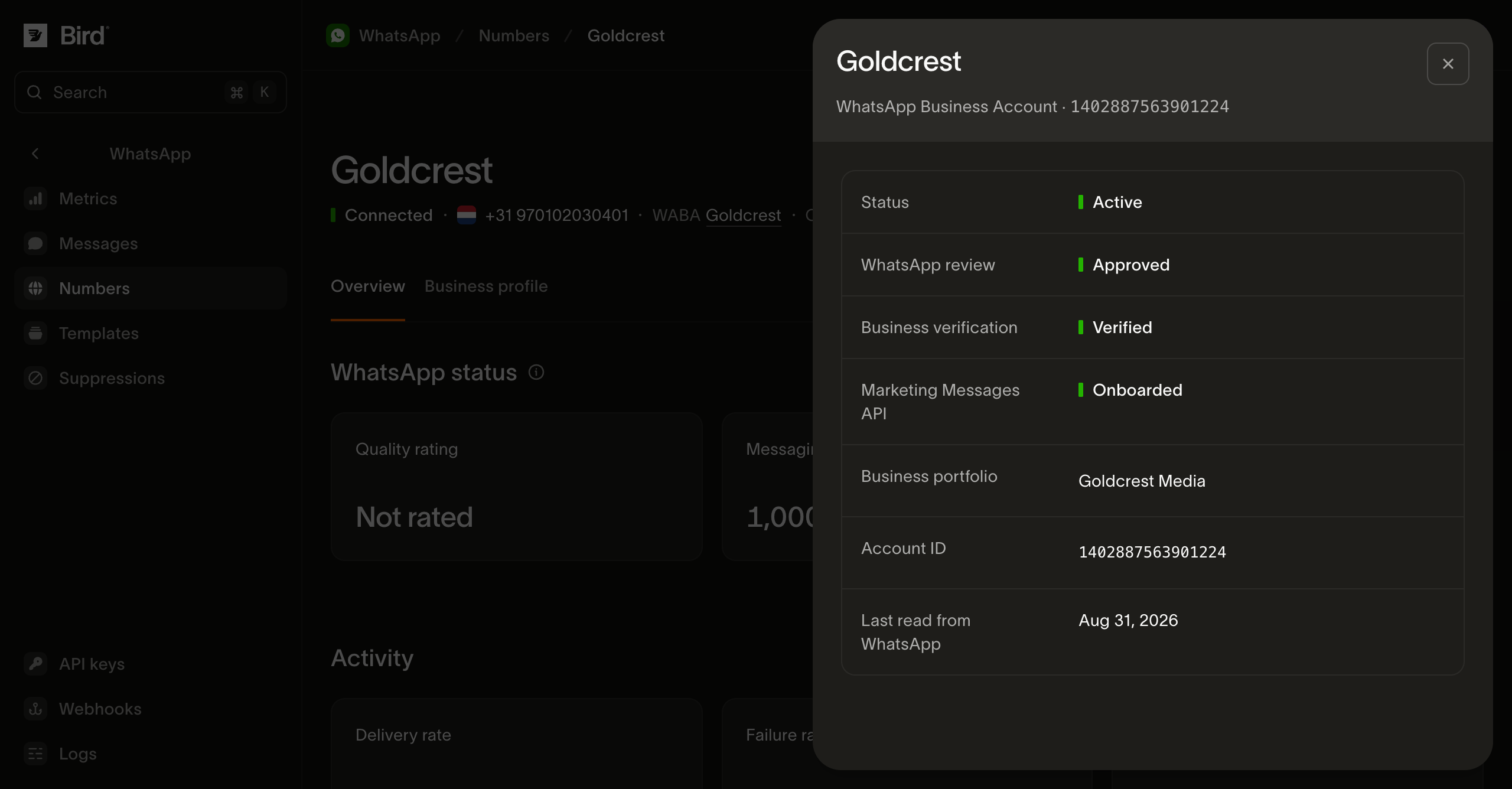
Estos estados determinan lo que la cuenta puede hacer. Business verification en particular determina las plantillas de autenticación: un negocio no verificado no puede crear una. Marketing Messages API muestra Onboarded una vez que Meta ha aceptado la cuenta. Los envíos de marketing no esperan a eso. El onboarding habilita las optimizaciones de entrega de Meta y un encabezado gif, que falla con WhatsApp en una cuenta no incorporada. Un espacio de trabajo puede tener varias cuentas de negocio, cada una con varios números. Lee los veredictos de la cuenta que posee el remitente previsto; una cuenta conectada tiene un espacio de trabajo y un propietario regional específicos.
Bird lee estos datos de Meta según un calendario y no de forma continua, así que Last read from WhatsApp fecha los veredictos que aparecen encima.
Lee tus números desde la API
Todo lo que el dashboard muestra arriba se puede leer a través de la API y desde los SDK. Las lecturas requieren una clave API con acceso de lectura a whatsapp_management.
GET /v1/whatsapp/numbers devuelve tus remitentes como una página con cursor. Cada uno incluye el estado que WhatsApp reporta, así que esta es la llamada que te indica qué valores de from puede usar un envío.
GET /v1/whatsapp/numbers/{id} lee un número, con la misma calificación de calidad, límite de mensajería y nivel de rendimiento que muestra la página de detalle. GET /v1/whatsapp/numbers/{id}/profile lee el perfil de negocio detrás de la pestaña Business profile, incluyendo description, address y websites.
GET /v1/whatsapp/numbers/{id}/events devuelve cómo un número llegó a su estado actual, del más reciente al más antiguo: cuándo se añadió, cada cambio de estado y cada decisión de límite de mensajería, calificación de calidad y nombre visible. Cada evento incluye type, summary y created_at. type es un enum abierto, así que trata un valor que no reconozcas como un tipo de evento futuro en lugar de un error.
GET /v1/whatsapp/business-accounts y GET /v1/whatsapp/business-accounts/{id} leen los estados de cuenta que esta página describe arriba: account_review_status, business_verification_status y marketing_messages_onboarding_status. Un número reporta su cuenta en su propio campo waba, que contiene el ID de cuenta de Meta en lugar de un ID de Bird.
Dos detalles que conviene saber antes de construir sobre estas lecturas. meta_synced_at fecha los campos reportados por WhatsApp, coincidiendo con Last read from WhatsApp en el dashboard, y está ausente en un número que Bird opera en tu nombre. Un número en proceso de registro se puede leer: status reporta preparing y awaiting_signup, next indica qué hacer con ese estado, y finish_setup_url contiene el enlace que lo finaliza, para que puedas consultar el progreso y entregar a una persona el último paso. El único campo que se retiene es meta_preverified_id, el id propio de WhatsApp para un número que estamos preparando, que permanece en el dashboard.
Conectar, renombrar y desconectar un número no forman parte de la API pública ni de los SDK. Están disponibles en el dashboard y en la CLI (bird whatsapp numbers create|update|delete y bird whatsapp numbers profile update). Solo un paso requiere navegador: una nueva conexión finaliza en la pantalla de consentimiento de Meta, por eso create te entrega una finish_setup_url en lugar de completarse por sí sola.
Mensajes entrantes
Los mensajes entrantes llegan a tu espacio de trabajo solo en tus propios números. Bird los registra en el registro de WhatsApp, y la pestaña Inbound en la página Metrics reporta el volumen recibido por número. Cada uno también abre la ventana de 24 horas que el contenido libre necesita. Los números gestionados por Bird no reciben mensajes para tu espacio de trabajo.
Próximos pasos
- Enviar mensajes de WhatsApp: la llamada de envío que usan estos números y cuándo se requiere from
- Plantillas de WhatsApp: el catálogo gestionado y tus propias plantillas
- La ventana de atención al cliente de WhatsApp: cuándo se puede entregar contenido libre
- Registro de WhatsApp: consulta con qué número se envió un mensaje
- Conectar WhatsApp a Bird: desde comprar un número hasta un canal en producción: un video que recorre el mismo camino en el dashboard
for await (const number of bird.whatsapp.numbers.list({ limit: 25 })) {
  console.log(number.id, number.phone_number, number.status);
}
for number in client.whatsapp.numbers.list(limit=25):
print(number.id, number.phone_number, number.status)for number, err := range client.Whatsapp.Numbers.List(ctx, bird.WhatsappNumbersListParams{Limit: 25}) {
if err != nil {
log.Fatal(err)
}
fmt.Println(number.Id, number.PhoneNumber, number.Status)
}foreach ($bird->whatsapp->numbers->list() as $number) {
echo $number->getId(), ' ', $number->getPhoneNumber(), ' ', $number->getStatus(), PHP_EOL;
}curl -sS "https://us1.platform.bird.com/v1/whatsapp/numbers?limit=25" \
-H "Authorization: Bearer $BIRD_API_KEY"Recursos relacionados
Continúa con la documentación, guías y ejemplos sobre este tema. Los recursos están en inglés.