WhatsApp events
Bird records events for inbound and outbound WhatsApp messages. An outbound timeline shows what happened after a send returned 202: acceptance, handoff to WhatsApp, delivery, reading, or failure. An inbound timeline records when Bird received the message.
The event envelope
Public outbound delivery events use the standard webhook envelope: a type, a timestamp, and a type-specific data object.
Ejemplo de código
{
  "data": {
    "direction": "outbound",
    "from": { "phone_number": "+13124495569" },
    "metadata": { "session_id": "sess_4821" },
    "tags": [{ "name": "flow", "value": "login-otp" }],
    "to": { "phone_number": "+14155550100" },
    "whatsapp_id": "wam_01ky7qbvswf3fvyaw3az90391c",
    "workspace_id": "ws_01ky7m235keycbnwyajabe1a6b"
  },
  "timestamp": "2026-07-23T14:51:39.913Z",
  "type": "whatsapp.delivered"
}
Each public WhatsApp webhook payload for a message carries whatsapp_id, workspace_id, direction, from, to, tags, and metadata. whatsapp.reacted is the exception, because a reaction is an annotation on a message rather than a message of its own; Reactions below gives its shape. An address can include an E.164 phone_number, a Meta business-scoped user ID in bsuid, or both. A message received from a WhatsApp user also carries the profile they publish, in username and display_name. tags and metadata are null when the send carried none. A message sent in reply also carries in_reply_to_message_id on every outbound event in its timeline, from whatsapp.accepted through whatsapp.read, whatsapp.failed, or whatsapp.rejected, naming the message it answers.
The events API returns leaner timeline records with an id, type, and occurred_at timestamp. The message ID is already in the request URL.
Lifecycle events
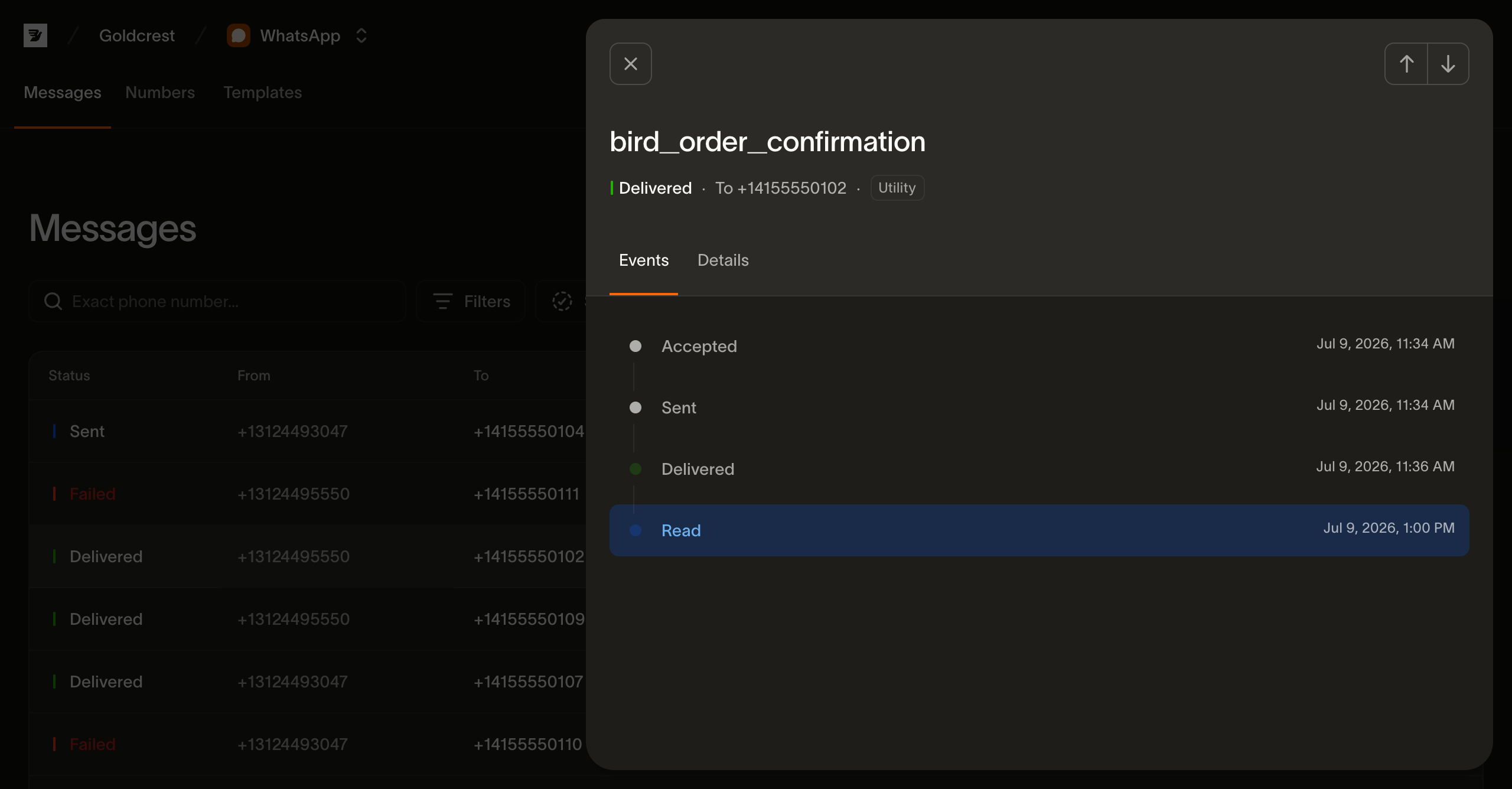
Events appear in chronological order. An outbound message can stop at whatsapp.failed or whatsapp.rejected, and whatsapp.read appears only if the recipient opens the message. An inbound message has a single whatsapp.received timeline event.
| Event | Meaning |
|---|---|
| whatsapp.accepted | Bird accepted the send request. This is what the 202 reported. |
| whatsapp.sent | Bird handed the message to the WhatsApp network. |
| whatsapp.delivered | WhatsApp confirmed delivery to the recipient's device. |
| whatsapp.read | The recipient opened the message. |
| whatsapp.failed | The message was not delivered. error.code says what stopped it. |
| whatsapp.rejected | Bird refused the message before sending it. It was not charged. |
| whatsapp.received | Bird received an inbound message from a contact. |
whatsapp.delivered is also the moment Meta's share of the message price is charged, though the event does not report it: WhatsApp event payloads carry no cost. Read the message back with GET /v1/whatsapp/messages/{message_id} to see what it cost. See Cost and billing.
whatsapp.read does not change the message status. A delivered message stays delivered; the message also records the read in read_at.
whatsapp.delivered can be skipped entirely. When the recipient already has the chat open on their device, Meta reports the read without ever reporting a delivery, so the timeline reads whatsapp.accepted → whatsapp.sent → whatsapp.read with no whatsapp.delivered in between. Treat read as proof of delivery: a consumer that waits for delivered before considering the message landed will hang on exactly the recipients who saw it fastest, and one that computes a delivery rate from delivered alone under-reports it. The message status stays sent in this case, since only a delivery receipt advances it.
The skip has a billing consequence too: Meta's share of the price is charged off the delivered receipt, so a message read this way carries no passthrough_amount. See Cost and billing.
The event type list is open: new types may be added over time, so treat an unrecognized value as a future event rather than an error.
Failure events
whatsapp.failed and whatsapp.rejected are terminal. A rejection means Bird stopped the message before sending it to WhatsApp, so it was not charged. Causes include a suppressed or opted-out recipient, insufficient wallet balance, or a destination without a configured price. A failure means the message was not delivered, and error.code says who decided that. Most codes carry WhatsApp's verdict, mapped from the code it reported. internal_error is the exception: it means the message never reached WhatsApp at all, either because the sending number held no usable credential, or because Bird retried the send until it gave up. meta_error_code contains WhatsApp's code when available, and an internal_error failure has none by construction.
Both events contain an error object with a stable Bird code, a human-readable description, an optional meta_error_code, and occurred_at. The object appears in API records and webhook payloads only for these event types.
Suppression events
Beyond the per-message lifecycle, one event reports a change to the workspace's suppression list: whatsapp_suppression.created fires when a suppression opens. The payload carries the suppression_id, the suppressed address in E.164 format, the waba the block is limited to (null when it covers the whole workspace, whichever account sends), the reason, and the workspace_id, so your own system can see new blocks without polling. Only openings fire an event: ending a suppression does not yet, so re-read the list before treating a mirrored block as still standing:
Ejemplo de código
{
  "type": "whatsapp_suppression.created",
  "timestamp": "2026-08-25T14:52:03.192524705Z",
  "data": {
    "suppression_id": "was_01krdgeqcxet5s7t44vh8rt9mg",
    "address": "+14155550100",
    "waba": null,
    "reason": "manual",
    "workspace_id": "ws_01ky7m21hjffh9s8kq76gyb1xf"
  }
}
An opt-out the recipient stated themselves is a preference rather than a suppression, and fires preference.revoked instead.
Reading events from the API
GET /v1/whatsapp/messages/{message_id}/events returns the timeline in chronological order. The bounded list is not paginated. Reading events requires an API key with whatsapp:read:
const { data } = await bird.whatsapp.listEvents("wa_abc123");
for (const event of data) console.log(event.type, event.occurred_at);
events = client.whatsapp.list_events("wa_abc123")
for event in events.data:
print(event.type, event.occurred_at)events, err := client.Whatsapp.ListEvents(context.Background(), "wam_01krdgeqcxet5s7t44vh8rt9mg", bird.WhatsappListEventsParams{})
if err != nil {
log.Fatal(err)
}
for _, e := range events.Data {
fmt.Println(e.Id, e.Type)
}$events = $bird->whatsapp->listEvents('wamid_01krdgeqcxet5s7t44vh8rt9mg');
foreach ($events->getData() ?? [] as $event) {
echo $event->getType(), ' ', $event->getId(), "\n";
}bird whatsapp list-events <message-id>{
"name": "whatsapp_list_events",
"arguments": {
"message_id": "<message-id>"
}
}curl https://us1.platform.bird.com/v1/whatsapp/messages/wam_.../events \
-H "Authorization: Bearer $BIRD_API_KEY"A message that was accepted, sent, delivered, and read returns four events:
Ejemplo de código
{
  "data": [
    {
      "id": "ev_01ky7q6a1fejfbvs0myn41hj41",
      "occurred_at": "2026-07-23T14:48:34.71Z",
      "type": "whatsapp.accepted"
    },
    {
      "id": "ev_01ky7q6a2denvtd6jg1vqwmg13",
      "occurred_at": "2026-07-23T14:48:35.671Z",
      "type": "whatsapp.sent"
    },
    {
      "id": "ev_01ky7q6a2zff9r2qm74mmg1g6z",
      "occurred_at": "2026-07-23T14:48:36.642Z",
      "type": "whatsapp.delivered"
    },
    {
      "id": "ev_01ky7q6c21frssf0vj8h50qysw",
      "occurred_at": "2026-07-23T14:48:38.65Z",
      "type": "whatsapp.read"
    }
  ]
}
Pass type to return one exact public event type, such as ?type=whatsapp.failed or ?type=whatsapp.read. Omit it for the full timeline.
The same timeline is what the WhatsApp log page renders when you open a message.
Webhooks
Subscribe to whatsapp.accepted, whatsapp.sent, whatsapp.delivered, whatsapp.read, whatsapp.failed, whatsapp.rejected, whatsapp.received, and whatsapp.reacted from the Webhooks page or the webhooks API. The Webhooks guide covers endpoints, signatures, and retries.
whatsapp.received carries the message's content on top of the envelope above, so an endpoint can act on an inbound message without reading it back. A tap on an interactive message arrives as interactive_reply, and in_reply_to_message_id names the message it answers:
Ejemplo de código
{
  "data": {
    "direction": "inbound",
    "from": {
      "display_name": "Alex Rivera",
      "phone_number": "+14155550100",
      "username": "alexr"
    },
    "in_reply_to_message_id": "wam_01ky7qbvswf3fvyaw3az90391c",
    "interactive_reply": {
      "list": {
        "description": "Next day to 2 days",
        "slug": "priority_express",
        "text": "Priority Mail Express"
      },
      "type": "list"
    },
    "metadata": null,
    "tags": null,
    "to": { "phone_number": "+13124495569" },
    "whatsapp_id": "wam_01ky8b3xq4gd7pmzn2ka51f7te",
    "workspace_id": "ws_01ky7m235keycbnwyajabe1a6b"
  },
  "timestamp": "2026-07-23T14:52:04.118Z",
  "type": "whatsapp.received"
}
The other content arms follow the same one-of-these shape: text, image, video, audio, sticker, document, location, contact_cards, and unsupported for a kind the API does not model. GET /v1/whatsapp/messages/{message_id} documents each one.
Reactions
whatsapp.reacted fires when a WhatsApp user reacts to one of your messages. It is the one WhatsApp event that is not part of a message's delivery timeline: it does not appear in GET /v1/whatsapp/messages/{message_id}/events, and there is nothing to filter it by there.
whatsapp_id names the message that was reacted to, not the reaction, and emoji is the change the user made. A user who reacts, changes their emoji, then takes the reaction back produces three events on that one message. WhatsApp sends no removal between the first two, so a change arrives as a single event carrying the new emoji.
Ejemplo de código
{
  "data": {
    "emoji": "👍",
    "from": { "phone_number": "+14155550100" },
    "to": { "phone_number": "+13124495569" },
    "whatsapp_id": "wam_01ky8b3xq4gd7pmzn2ka51f7te",
    "workspace_id": "ws_01ky7m235keycbnwyajabe1a6b"
  },
  "timestamp": "2026-07-23T14:52:11.000Z",
  "type": "whatsapp.reacted"
}
WhatsApp reports the reaction time to the second, so two of those three events can share one timestamp. Sorting them by it will not order them, and neither will delivery order, which retries make unreliable. Act on the reaction each event carries, as the change it describes. Do not reconstruct the sequence from the events or treat the last one to arrive as the message's standing reaction, because neither the timestamps nor the arrival order support it. Read the message back for the reactions that stand: GET /v1/whatsapp/messages/{message_id} returns one entry per sender in reactions, and the message's reaction log has every change.
emoji is present and null when the user took their reaction back, so a null is the removal itself rather than a missing value. The emoji is delivered exactly as WhatsApp sent it and is not normalized, so ❤ and ❤️ reach you as different strings.
Next steps
- WhatsApp log: the per-message view that renders this timeline
- Sending WhatsApp messages: where a message's lifecycle begins
- Webhooks guide: endpoints, signatures, retries, and the full event catalog
Recursos relacionados
Continúa con la documentación, guías y ejemplos sobre este tema. Los recursos están en inglés.
Ver la guíaConnecting WhatsApp to Bird: from buying a number to a live channelComprender el conceptoWhat is the 24-hour customer service window on WhatsApp?Usar la herramientaWhatsApp message builderExplorar la funcionalidadWhatsApp
Prueba el ejercicio y obtén un resumen de implementación