WhatsApp log
The Messages page in the Bird dashboard is your workspace's record of every WhatsApp message it has sent: every send made through POST /v1/whatsapp/messages lands here, newest first. Use it to confirm a message went out, see where it is in the delivery lifecycle, and read which template produced it. For a tour of where this page sits in the dashboard, see the dashboard tour.
The message list
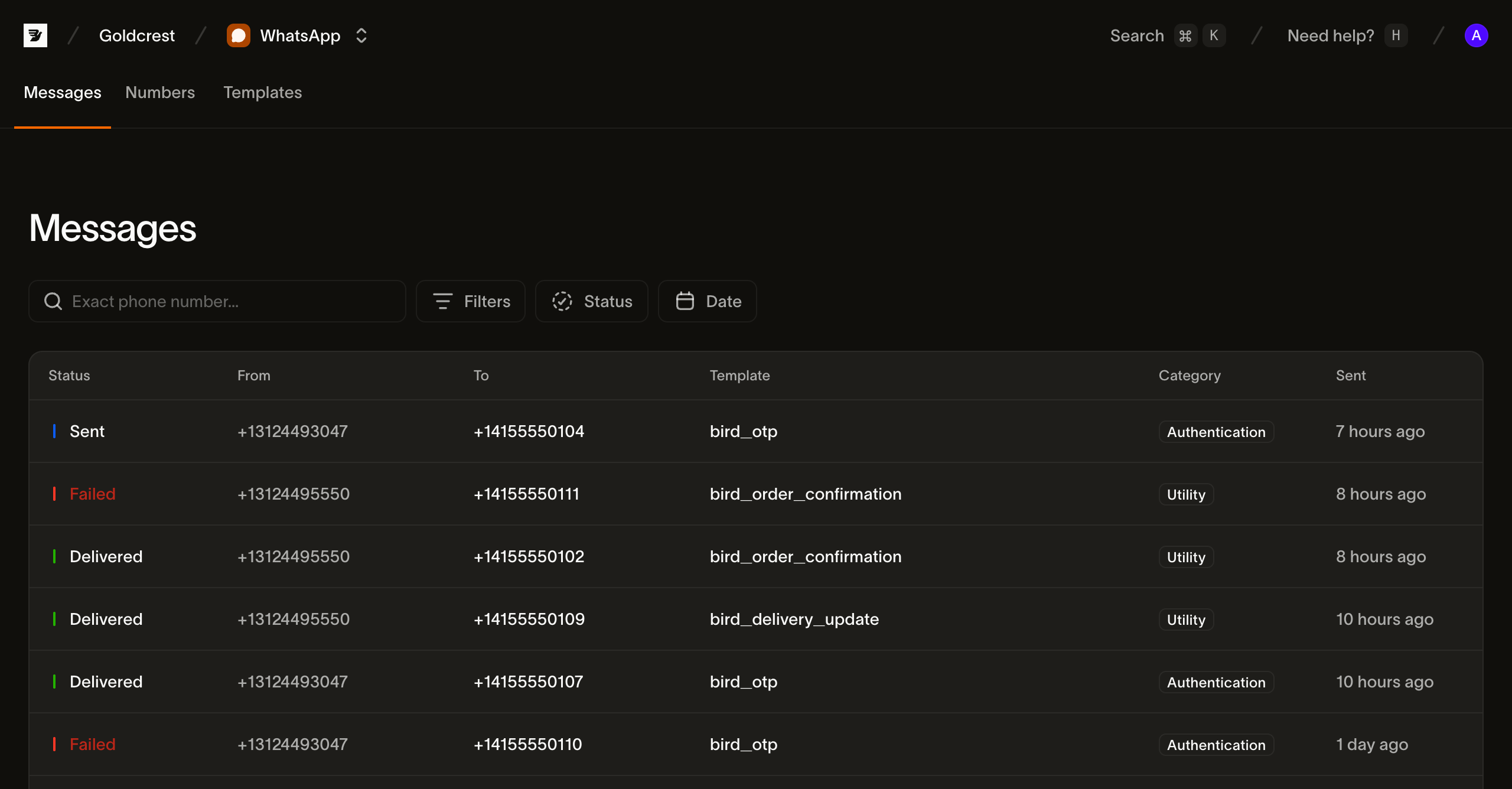
Each row is one message. The columns are:
| Column | What it shows |
|---|---|
| Status | The message's current status (see Statuses), as a colored dot |
| From | The WhatsApp sender number the message was sent from |
| To | The recipient's number |
| Template | The template the message was sent from (click the row to open the message) |
| Category | The template's category |
| Sent | When the send was accepted, as a relative time (hover for the exact timestamp) |
The list is paginated, 25 messages per page; use Prev and Next to move between pages.
Searching and filtering
A message log fills up fast, so the page leads with a recipient search and two filters. They combine: a status filter plus a date range narrows to messages matching both.
Search by recipient. The search box matches an exact recipient number in E.164 format. Type the full number you sent to, such as +14155550100, to find every message addressed to it. The search matches the whole value rather than any substring of it.
Status. Filter to one or more statuses. Status is multi-select, so you can, say, show everything still in flight by selecting Accepted and Sent together. The options are Accepted, Sent, Delivered, Failed, Rejected, and Received.
Date. Filter by when the message was sent: pick a preset (last 3, 7, or 30 days) or choose a custom range from the calendar.
When a filter combination matches nothing, the page shows a no-results state with a Clear filters action to reset back to the full list.
Statuses
A message's status is where it currently sits in the lifecycle. A message walks from accepted toward a terminal receipt.
| Status | Meaning |
|---|---|
| Accepted | We admitted the message and are preparing to hand it to WhatsApp |
| Sent | Handed to WhatsApp; awaiting a delivery receipt |
| Delivered | WhatsApp confirmed delivery to the recipient |
| Failed | Bird submitted the message and WhatsApp would not deliver it |
| Rejected | Bird refused the message before sending it. It was not sent and you were not charged |
| Scheduled | Queued to send at a future time; applies once send-later scheduling is available |
| Canceled | A scheduled message canceled before sending; applies once scheduling is available |
| Received | An inbound message; applies once receiving is available |
A message is rejected when the recipient is on your workspace's suppression list, the wallet could not cover the send, or the destination has no configured price. A read receipt is not a status: when a recipient reads a delivered message, Bird records a read_at timestamp and a whatsapp.read event on the message, and the delivery status stays delivered.
Inspecting a message
Click any row to open the message. Its header shows the template that produced it, the current status, the recipient, and the category badge, above two tabs:
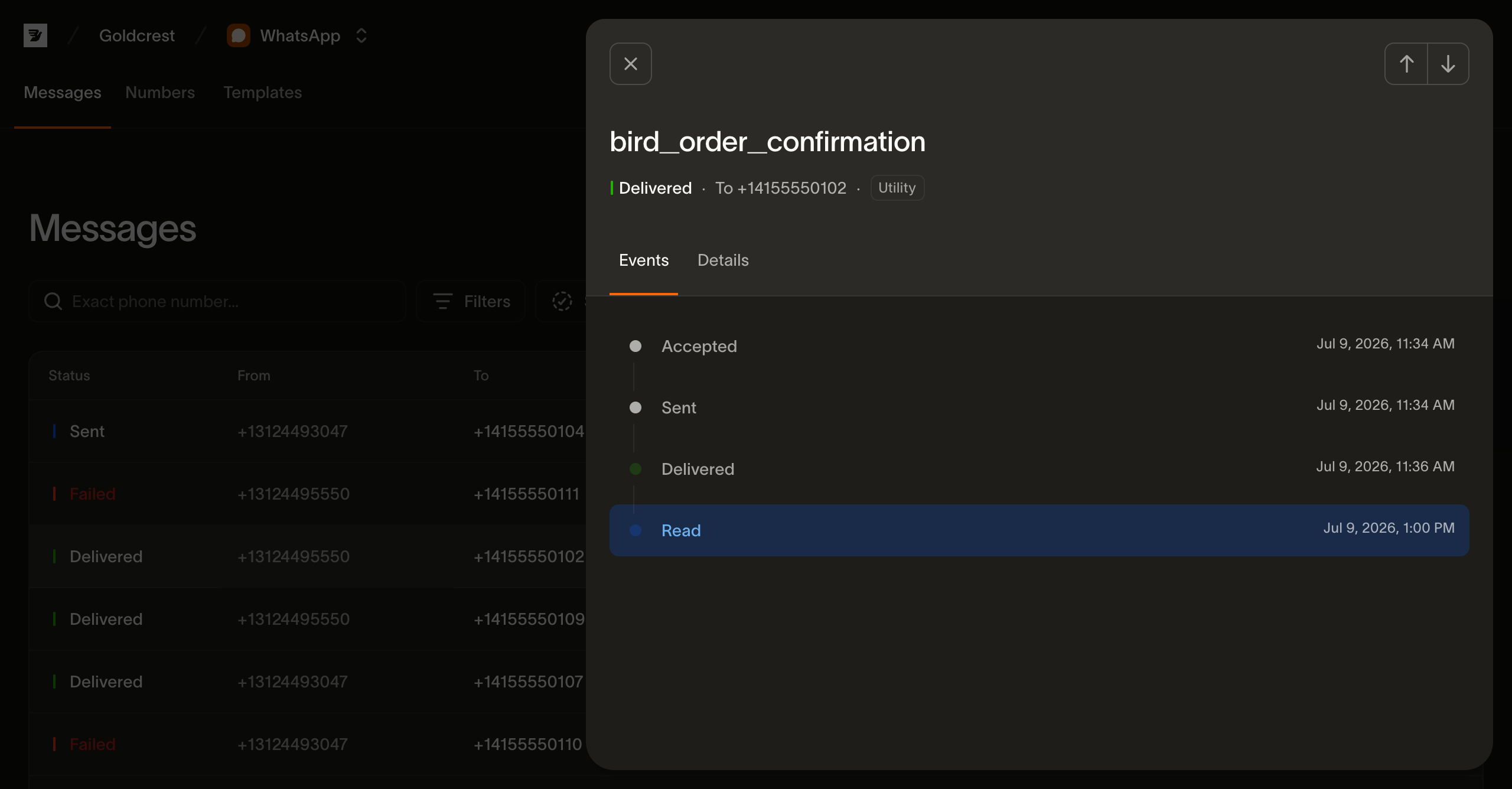
- Events: a timeline of everything that happened to the message, in order, each with its timestamp. It runs Accepted, Sent, Delivered, then the read receipt if the recipient read it, or a failure or rejection with its error description. This is the same stream you can read with GET /v1/whatsapp/messages/{message_id}/events.
- Details: the message's metadata. It holds the ID (with a copy button), the sender and recipient numbers, the template's slug, language, and category, and the sent, delivered, and read timestamps. It also holds the error description on a message that didn't arrive, plus any tags and metadata the send carried.
The same log over the API
Everything on this page reads from GET /v1/whatsapp/messages and its per-message sub-resources. The list takes the same filters the page exposes and more: status, an exact phone_number, a tag, and a created_after/created_before window. The timeline behind the Events tab is GET /v1/whatsapp/messages/{message_id}/events; WhatsApp events covers reading it programmatically.
Next steps
- Sending WhatsApp messages: the send payload behind every row
- WhatsApp events: the per-message lifecycle stream behind the timeline
- WhatsApp metrics: the aggregate view across every message here
- WhatsApp pricing: what a message costs, by destination and category