Sending verifications
Verifying a user takes two calls. POST /v1/verify/verifications sends a passcode to an email address or phone number. POST /v1/verify/verifications/check submits the value the user entered and reports whether it matched. Bird generates the code, does not return it in an API response, and enforces expiry and attempt limits.
Send a code
The smallest valid request is a to recipient:
const verification = await bird.verify.verifications.create({
  to: { phone_number: "+15551234567" },
});
console.log(verification.id, verification.status);
verification = client.verify.verifications.create(to={"phone_number": "+15551234567"})
print(verification.id, verification.status)verification, err := client.Verify.Verifications.Create(context.Background(), bird.VerifyVerificationsCreateParams{
To: bird.VerificationTo{PhoneNumber: bird.String("+15551234567")},
})
if err != nil {
log.Fatal(err)
}
fmt.Println(verification.Id, *verification.Status)$verification = $bird->verify->verifications->create(
(new VerificationCreateRequest())->setTo((new VerificationTo())->setPhoneNumber('+15551234567')),
);
echo $verification->getId(), ' ', $verification->getStatus();bird verify verifications create --body-file - <<'JSON'
{
"metadata": {
"correlation_id": "signup-7f3a"
},
"to": {
"phone_number": "+15551234567"
}
}
JSONcurl -X POST https://us1.platform.bird.com/v1/verify/verifications \
-H "Authorization: Bearer bk_us1_..." \
-H "Content-Type: application/json" \
-d '{
"to": { "phone_number": "+15551234567" }
}'Use your regional host (https://us1.platform.bird.com or https://eu1.platform.bird.com) with a matching bk_{region}_... key.
Recipient
to identifies the recipient with an email, a phone_number in E.164 format, or both. An email address enables email delivery. A phone number resolves to the channels available in its destination country, in the order set by country configuration. Most countries try WhatsApp before SMS, while some try SMS first; Telegram follows both in the platform fallback order. When you supply both addresses, a failed attempt can advance to another available channel.
Options
options overrides settings for this request only:
- code_length: passcode length for this verification, 4 to 8 digits, overriding the default.
- channels: reorder or narrow the delivery channels for this request. List channel names (sms, whatsapp, email, telegram) in the order to try them; a channel you omit is not used, and a name not in the recipient's resolved plan is ignored. You can't add a channel this way, only trim or reorder what the recipient and country configuration already allow, and a list that leaves no usable channel fails the request with 422.
Metadata
metadata is a free-form object returned on every read; use it to carry your own user ID or session reference. Sender choices and the verification settings don't ride on the request: they come from your workspace's configuration, managed in the dashboard (see Verification settings).
The response
Code example
{
  "id": "vrf_01ky7q1fdze3695yvyz7z9nm3a",
  "status": "pending",
  "reason": null,
  "to": { "phone_number": "+15551234567" },
  "channels": [{ "channel": "whatsapp" }, { "channel": "sms" }],
  "last_channel": "whatsapp",
  "expires_at": "2026-07-23T14:55:58Z",
  "verified_at": null,
  "created_at": "2026-07-23T14:45:58Z",
  "updated_at": "2026-07-23T14:45:58Z"
}
channels is the ordered delivery plan this verification resolved to (a phone recipient lists its phone channels in attempt order), and last_channel is where the most recent code went. expires_at is when the verification lapses if no correct code arrives; resends don't extend it.
Check the code
Submit whatever the user typed to POST /v1/verify/verifications/check, keyed by the same recipient; no verification ID needed. Supply exactly the to set you created the verification with: one created with both addresses isn't found by either address alone.
const result = await bird.verify.verifications.check({
  to: { phone_number: "+15551234567" },
  code: "123456",
});
console.log(result.success);
result = client.verify.verifications.check(
to={"phone_number": "+15551234567"}, code="123456"
)
print(result.success)result, err := client.Verify.Verifications.Check(context.Background(), bird.VerifyVerificationsCheckParams{
To: bird.VerificationTo{PhoneNumber: bird.String("+15551234567")},
Code: "123456",
})
if err != nil {
log.Fatal(err)
}
fmt.Println(*result.Success)$result = $bird->verify->verifications->check(
(new VerificationCheckRequest())
->setTo((new VerificationTo())->setPhoneNumber('+15551234567'))
->setCode('123456'),
);
echo $result->getSuccess() ? 'verified' : 'failed';bird verify verifications check 123456 --phone-number +15551234567curl -X POST https://us1.platform.bird.com/v1/verify/verifications/check \
-H "Authorization: Bearer bk_us1_..." \
-H "Content-Type: application/json" \
-d '{
"to": { "phone_number": "+15551234567" },
"code": "123456"
}'The response says whether it matched:
Code example
{
  "success": false,
  "reason": "incorrect_code",
  "attempts_remaining": 4,
  "verification": {
    "id": "vrf_01ky7q1fdze3695yvyz7z9nm3a",
    "status": "pending",
    "reason": null,
    "to": { "phone_number": "+15551234567" },
    "channels": [{ "channel": "whatsapp" }, { "channel": "sms" }],
    "last_channel": "whatsapp",
    "expires_at": "2026-07-23T14:55:58Z",
    "verified_at": null,
    "created_at": "2026-07-23T14:45:58Z",
    "updated_at": "2026-07-23T14:46:38Z"
  }
}
Handle these two response behaviors:
- A wrong code returns 200. Treat success: false with a reason (incorrect_code, expired, attempts_exhausted) as a normal answer. attempts_remaining tells you how many tries are left. Reserve error handling for request failures.
- A final verification cannot be checked again. After a verification reaches any final state, further checks return 404. Store the first definitive result instead of checking again.
If the user asked for a new code, call the create endpoint again with the same recipient: the in-progress verification is reused rather than replaced. Once the resend cooldown has elapsed (60 seconds by default) a fresh code goes out; within the cooldown the call returns the live verification without sending again. Every code sent for the live verification stays valid until it resolves or expires, so the user can enter whichever one arrived.
Send the code on another channel
When the user reports that no code arrived at all, POST /v1/verify/verifications/next-channel advances the verification to the next channel in its plan and sends a fresh code there. This is the endpoint behind an "I didn't receive my code" button: your app decides to move channels rather than wait for a delivery-status signal.
Key it by the same recipient you created the verification with, as with a check:
const verification = await bird.verify.verifications.nextChannel({
  to: { phone_number: "+15551234567" },
});
console.log(verification.last_channel);
verification = client.verify.verifications.next_channel(
to={"phone_number": "+15551234567"}
)
print(verification.last_channel)verification, err := client.Verify.Verifications.NextChannel(context.Background(), bird.VerifyVerificationsNextChannelParams{
To: bird.VerificationTo{PhoneNumber: bird.String("+15551234567")},
})
if err != nil {
log.Fatal(err)
}
if verification.LastChannel != nil {
fmt.Println(*verification.LastChannel)
}$verification = $bird->verify->verifications->nextChannel(
(new VerificationNextChannelRequest())->setTo((new VerificationTo())->setPhoneNumber('+15551234567')),
);
echo $verification->getLastChannel();bird verify verifications next-channel --phone-number +15551234567curl -X POST "https://{region}.platform.bird.com/v1/verify/verifications/next-channel" \
-H "Authorization: Bearer $TOKEN" \
-H "Content-Type: application/json" \
-d '{
"to": {
"phone_number": "+15551234567"
}
}'The response is the verification, with last_channel naming the channel the new code went to. Every code already sent stays valid, so a message that arrives late can still be checked.
Two things separate this from a resend:
- The resend cooldown does not apply. A deliberate channel switch is a different act from asking for the same channel again, so the send goes out immediately.
- Only the channel moves forward. The expiry, attempt budget, and verification ID stay as they were.
Reach for a resend when the user wants another try on a channel that works, and for this endpoint when the channel itself looks like the problem. A phone number whose plan is WhatsApp then SMS advances to SMS; a recipient with only one usable channel has nowhere to go.
Four responses need handling rather than a plain retry:
| Status | What happened | What to do |
|---|---|---|
| 404 | No verification is in progress for that recipient | Create one |
| 422 NoNextChannel | The plan has no further channel to advance to | Resend on the current channel by calling create again |
| 422 NoAvailableChannel | Every remaining channel failed to send | Surface the failure to the user; the verification cannot be delivered |
| 429 | Sends for the account are being requested too quickly | Back off for the period in the Retry-After header |
Each code this endpoint sends is billed like any other Verify send; see Cost and billing.
Statuses
A verification is pending until it resolves into a final state, with reason saying why:
| Status | Meaning | Reason |
|---|---|---|
| verified | A correct code arrived in time | none |
| failed | Too many incorrect attempts | attempts_exhausted |
| expired | The window elapsed before a correct code | ttl_elapsed |
reason is an open enum. Preserve an unrecognized value instead of treating the response as invalid.
Track verifications in the dashboard
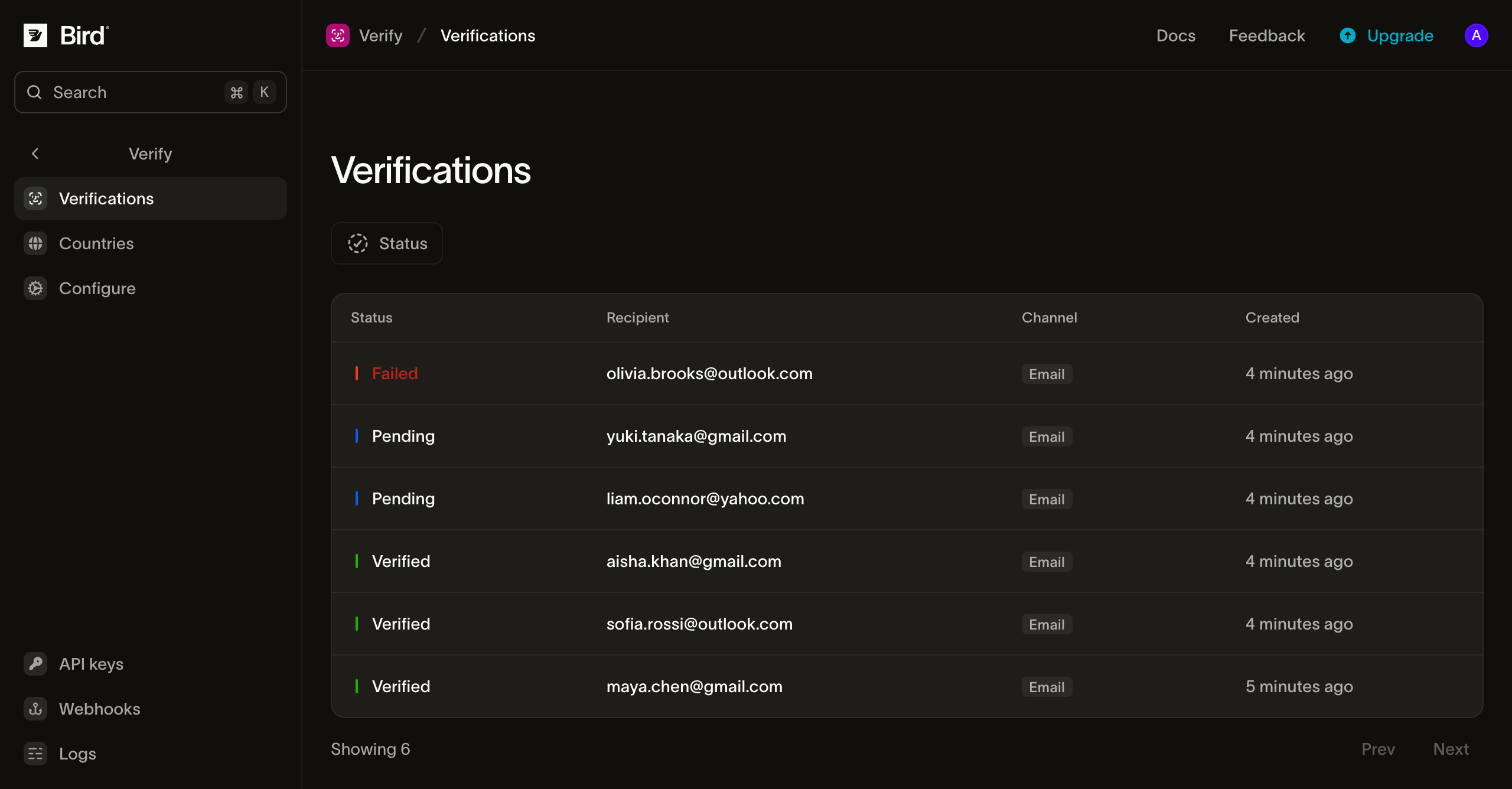
The Verifications page lists every verification the workspace created, filterable by status. Each row opens the recipient, channel plan, last channel, expiry and verification times, and metadata. The generated code is not shown.
Verification settings
The Configure page sets the workspace's verification cycle. Each field shows the effective value: your override where you've set one, otherwise Bird's platform default.
- Duration: how long a code remains valid. Default 10 minutes; 1 minute to 999 minutes.
- Maximum Retries: how many check attempts before the verification fails with attempts_exhausted. Default 5; 1 to 10.
- Retry Delay: the cooldown before a new code can be sent to the same recipient. Default 60 seconds; 0 to 3600.
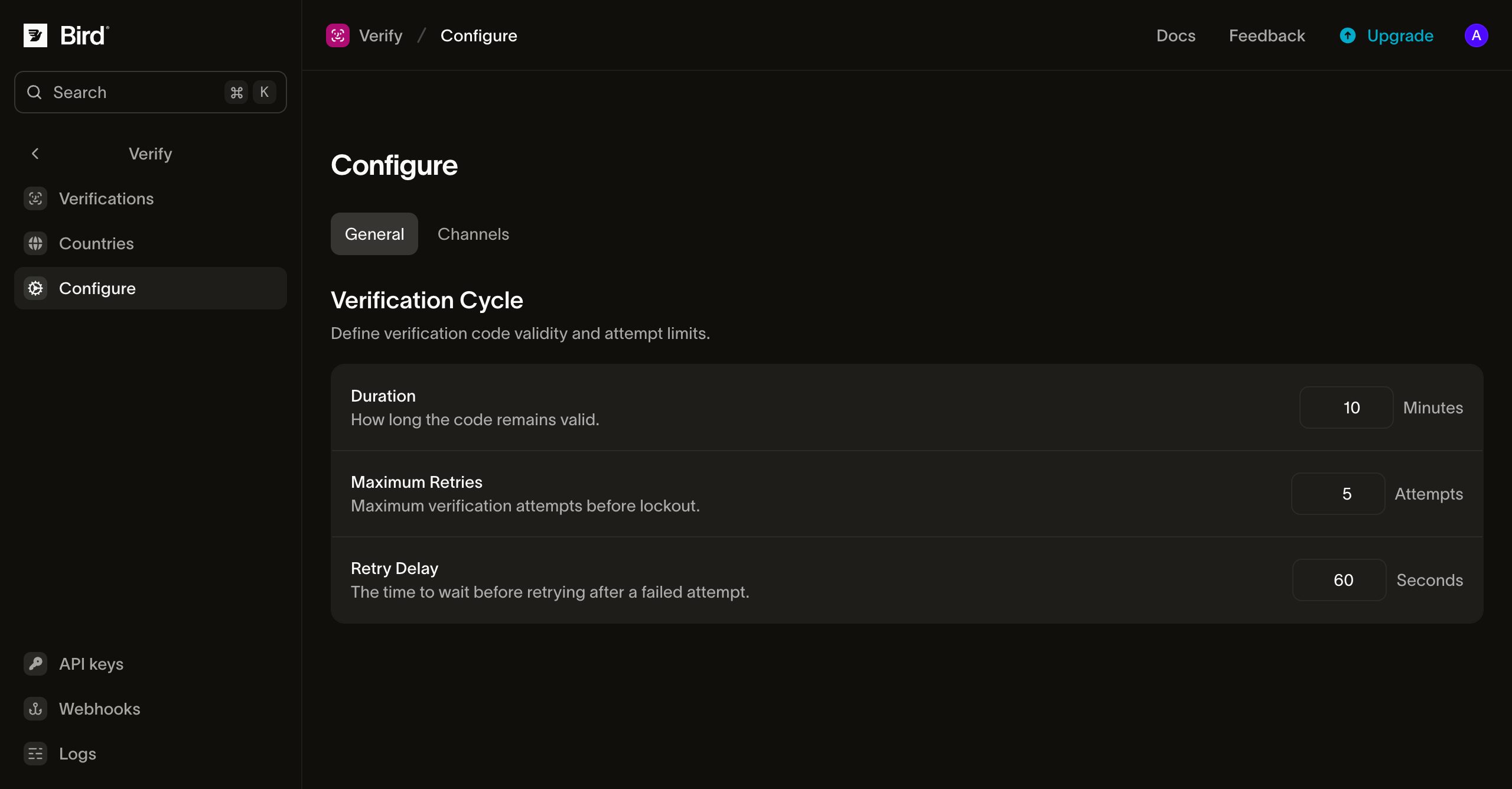
Code length isn't a field on this page: codes default to 6 digits, numeric, and options.code_length sets 4 to 8 digits per request.
Abuse guardrails
Independent of your settings, Verify enforces platform caps to keep OTP traffic from being weaponized, whether against your wallet (SMS pumping) or against a victim's inbox:
- 5 sends per address per rolling hour, across starting and resending verifications. When to contains both addresses, each has its own budget.
- 10 checks per recipient address set per minute, in addition to the verification's attempt limit.
The channel plan, rather than the hourly cap, bounds channel changes. Each call advances strictly forward, so one verification sends at most once per remaining channel.
Hitting a cap returns 429; back off and retry after the period in the Retry-After header. Your account's overall request limits are separate and plan-scaled; see Rate limits.
Retrying safely
All three endpoints accept the Idempotency-Key header. Send a unique value per logical request. After a timeout or dropped connection, retrying with the same key replays the original response. A replay does not send another code or consume another check attempt, and includes an Idempotency-Replay header. See idempotency for key format and retention.
Cost and billing
Billing applies to each code sent. Each code sent is charged to your wallet at the channel's rate for the destination. A resend or fallback to another channel adds one charge per send. Bird's own fee is taken while the send is processed and stands whether or not the code arrives; on SMS and WhatsApp a third-party fee follows when the message is delivered. Free routes and checks cost nothing; a send rejected before billing is not charged. Payment methods and wallet covers balance and top-ups.
Next steps
| Page | What it covers |
|---|---|
| Senders and branding | What the code messages look like and how to send from your own domain |
| Country configuration | Per-country channel order, enablement, and sender overrides |
| Events | The verification lifecycle and delivery events, and their webhook payloads |
| Idempotency | Safe retries with the Idempotency-Key header |
| API reference: create a verification | Send-endpoint schema and error details |
| API reference: check a code | Check-endpoint schema and error details |
| API reference: advance to the next channel | Next-channel schema and error details |