Billing & usage
Billing is organization-scoped: your product plans, wallet, and invoice stream belong to the organization. This page covers how billing shapes an integration: how usage is metered, how to read the current picture, and how your plans affect operational limits. For account operations (pricing details, payment methods, tax), see the Knowledge base: Plans & pricing and Usage, spend & invoices.
Billing is managed by people, not by integrations. Every billing operation is gated by the org:billing scope, an organization-role scope that cannot be granted to a workspace API key, so no bk_* key can read usage, top up the wallet, or change a plan. Owners and billing admins do that work in the Billing and payments section of the dashboard; see Users, teams & roles for who holds the role. The plan, product, and price catalogs are the exception: they need no authentication, they publish the pricing on this site, and the CLI and MCP can read the plan catalog directly. This guide therefore explains what billing does to your integration, and names the dashboard page that shows each number. Those pages (Overview, Usage, Invoices, Spend, and Settings) are covered in the Knowledge base articles linked throughout.
Plans and tiers
Each product has its own plan, chosen independently: an organization can hold a paid SMS plan, a Realtime plan, and the Email Free plan at the same time, and leave Voice on pay-as-you-go. Each plan carries a tier (such as free, startup, growth, or scale) and one of two financial behaviors. A funding plan adds a monthly deposit to the shared wallet and charges usage from the first send; a capacity plan buys included usage and adds nothing to the wallet. Plans & pricing explains both, and the Billing overview lists your organization's current plans.
The plan is what your integration feels operationally:
- Rate limits rise with the tier. Each plan sets values for its product's policies, such as
sms_sendorwhatsapp_send, and higher tiers set higher values. Without a plan, the policy default applies. An active organization override takes precedence over every plan. See how your limit is resolved. - Quotas rise with the tier. Plans set counts such as Voice concurrent calls, Realtime connections, sending domains, dedicated IPs, and webhook endpoints. Reaching a quota refuses the new resource, call, or connection with its own error; it is separate from a
429rate-limit response. - Allowances end at the plan's limits. The Email Free plan stops at its monthly and daily caps, and a Realtime plan stops at its connection and daily message limits. Paid Email plans have no included allowance: every send is charged from the wallet.
To read the published values for any plan without authentication, list the plan catalog with bird billing plans list --commercial-product sms. Each plan returns its financial_behavior, rate_limits, and quotas. The comparison table on each product's pricing page shows those values beside the pay-as-you-go defaults, so compare the two there before upgrading for capacity.
Upgrades apply once their payment succeeds, so the new limits arrive mid-period without a renewal-date change. Downgrades and cancellations take effect at the end of the current period, and an unpaid renewal returns that product to its free plan or pay-as-you-go limits. See Plan changes & renewals for the timing rules. Design integrations to handle limit errors when a plan changes or an allowance runs out.
Usage metering
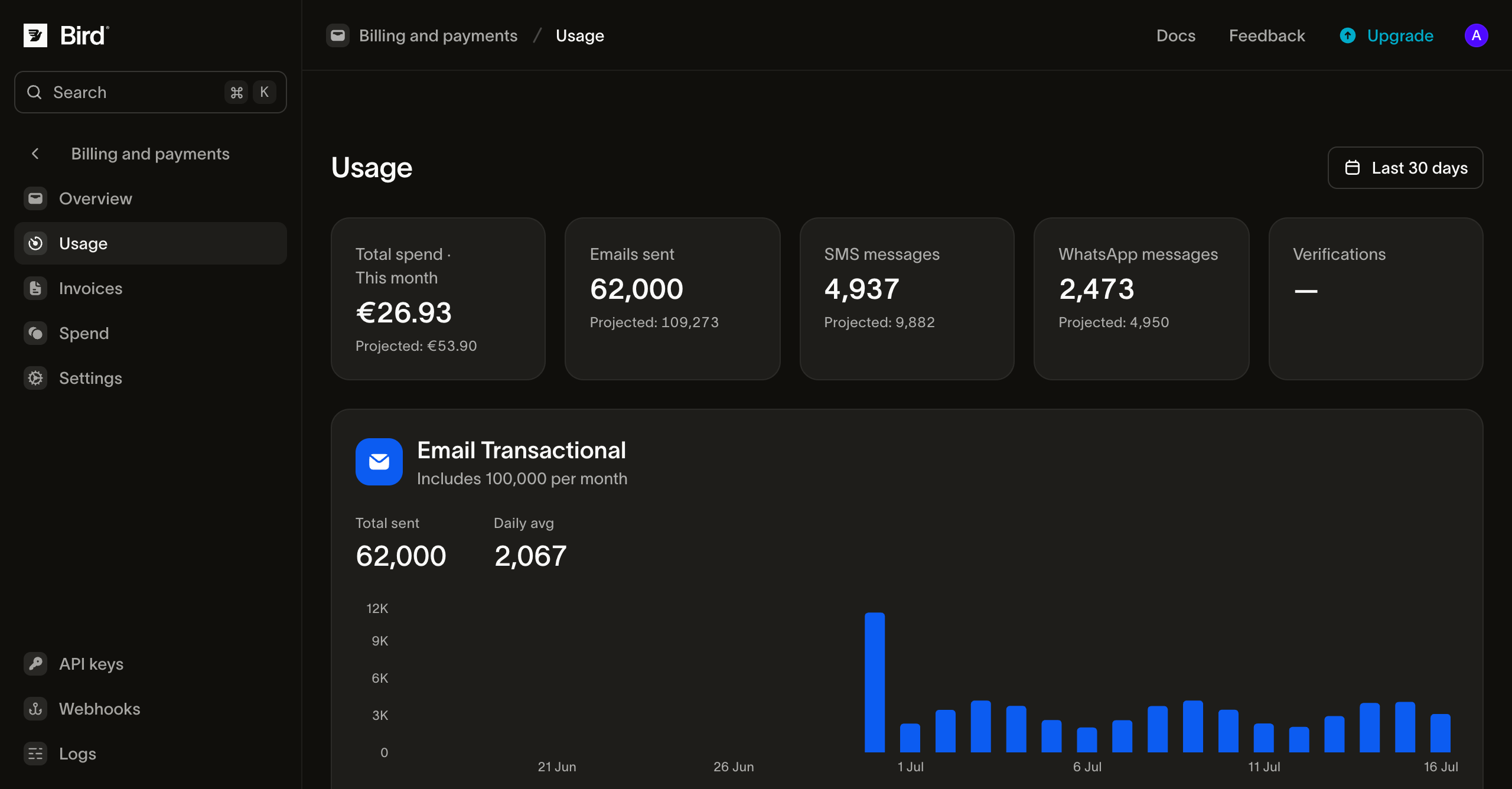
Every send is metered against your organization's current billing period. The dashboard's Usage page shows the live picture for each product, over the window that product is measured on: the plan period for metered email, the calendar month for pay-as-you-go. Products bill one of two ways, and the difference is what your integration feels:
- Metered products count usage against a plan's included allowance (email sends on the Email Free plan or a legacy Email plan). The page shows how much of the allowance you have consumed and, on a legacy plan with overage, how far past it you are.
- Pay-as-you-go products are billed per use against a rate card (SMS, WhatsApp, Voice, and email on a paid Email plan), at the plan's rate where the plan has one. A message can draw on the wallet twice: Bird's own fee when the send is processed, and a third-party fee (a carrier surcharge on SMS, Meta's share on WhatsApp) when the message is delivered. Read the split per message from
coston the SMS or WhatsApp message:transaction_amountis Bird's charge andpassthrough_amountthe third-party fee.
The page covers every product with a subscription or usage in the current period, and charts the per-day, per-country, and per-sending-domain splits for any one of them.
The wallet
Each organization has a wallet: a shared prepaid balance that usage charges flow through. Pay-as-you-go sends, add-on subscriptions, and legacy Email plan renewals debit the wallet. Funding plans fill it: each paid monthly deposit is added in full and can pay for any product. A saved card also fills it through top-ups and auto top-up, and pays plan renewals directly. The dashboard's Spend page is the full ledger of credits and charges, so every wallet movement is accounted for in one place, and each top-up payment that settles produces a durable receipt you can download as a PDF from the same section.
Operationally, the wallet is a dependency of pay-as-you-go sending: SMS and WhatsApp sends are rejected when the balance can't cover them. SMS is refused at the API with a 402; a WhatsApp send is accepted and then rejected once Bird tries to charge it. Email on a paid Email plan is charged shortly after it is sent, so the balance can briefly go below zero; once the wallet has no balance or credit left, new email is refused with a 402 until you add funds. A delivery-time fee the balance cannot cover is skipped rather than rejected, so the message still reaches its recipient. For transactional volume, configure auto top-up and a low-balance alert on the Billing overview, or monitor and alert on your side. Payment methods and wallet covers both dashboard controls. Low-balance warnings, payment-failure notices, and invoice emails go to the organization's billing notification list when one is set, and to every organization owner otherwise. In an organization with one workspace, set that list under Settings > Notifications; the dashboard does not yet show it for an organization with several workspaces. Use a monitored team alias for it so billing mail does not depend on one person's inbox.
Invoices
Invoices are issued per organization, one per calendar month, and listed on the dashboard's Invoices page, where you can open one for its line items or download it as a PDF. Invoices reflect the same metering the Usage page shows: capacity plan fees, legacy plan charges and overage, and pay-as-you-go spend for the period. A funding plan's deposit is a wallet top-up with its own receipt; the usage it pays for appears on the invoice. For how invoices are structured, statuses, and payment timing, see Usage, spend & invoices in the Knowledge base.
Next steps
- Rate limits: policy defaults, plan values, organization overrides, and response headers
- Plans & pricing: funding and capacity plans, what each tier raises, and pay-as-you-go pricing
- Plan changes & renewals: upgrade/cancel timing and the failed-payment sequence
- Users, teams & roles: who can manage billing (
org:billing)