Verification settings
The General tab of the Configure page sets how every verification in your workspace behaves. It controls how long a code stays valid, how many wrong attempts end a verification, how soon a new code can be sent, and which website the code belongs to.
Each field shows the effective value: your override where you've set one, otherwise Bird's platform default. A field saves when you leave it. Duration, Maximum Retries, and Website are fixed when a verification is created, so a change to them applies to new verifications. A Retry Delay change applies to the next create call, including for a verification already in progress.
Changing a setting needs the verify_management permission at write level, which the admin and developer roles include. The analyst role can view the page. See Users, teams & roles.
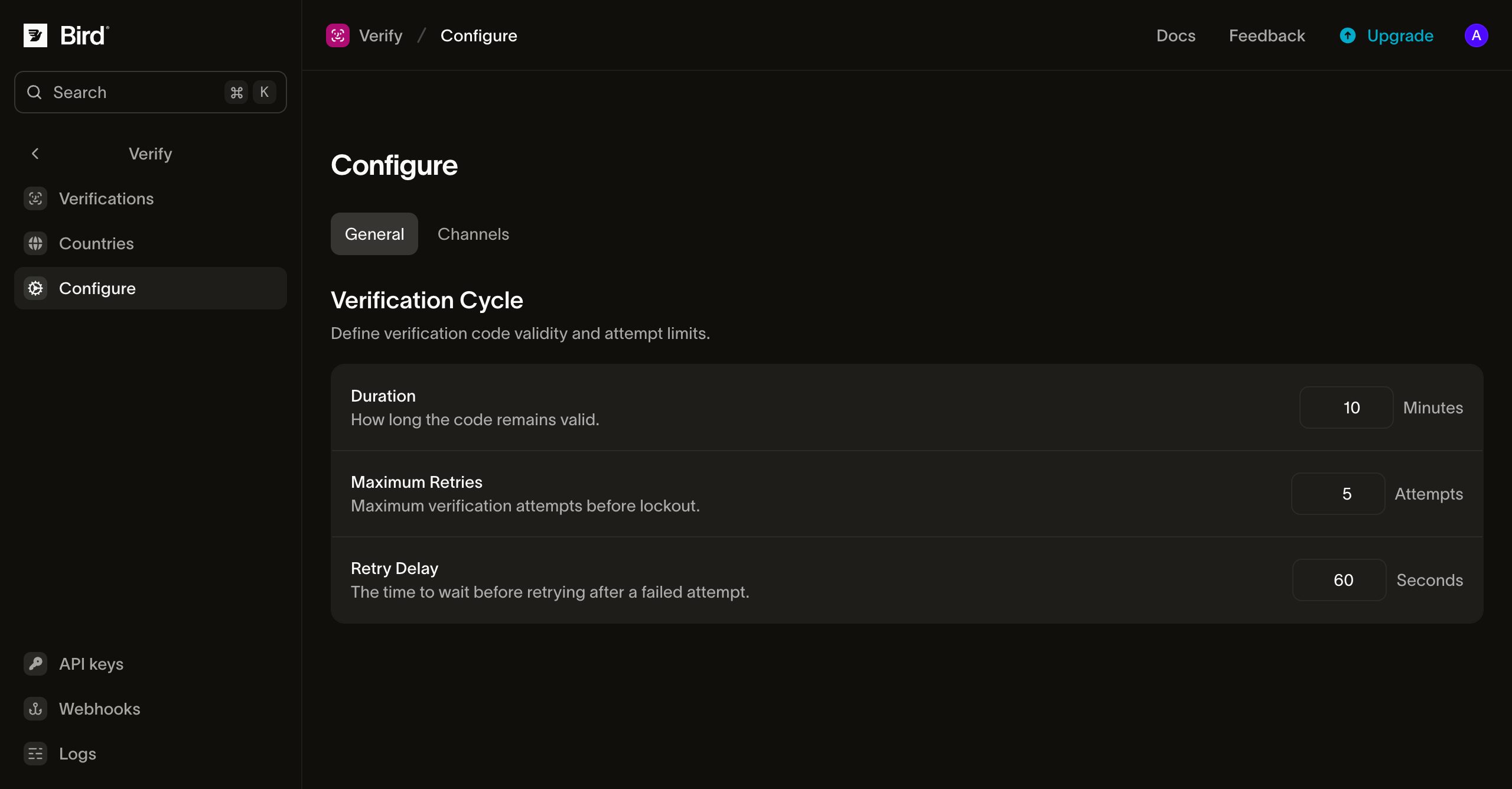
Verification cycle
| Setting | What it controls | Default | Range |
|---|---|---|---|
| Duration | How long a verification stays open. A check after this window returns reason expired, and the verification ends with reason ttl_elapsed. | 10 minutes | 1 to 999 minutes |
| Maximum Retries | How many incorrect codes end a verification. The last one fails it with reason attempts_exhausted. | 5 | 1 to 10 |
| Retry Delay | The resend cooldown: the minimum wait before another code is sent to the same recipient. | 60 seconds | 0 to 3600 seconds |
- Duration starts when the verification is created. A resend or a switch to another channel sends a new code but keeps the original expiry, so a late resend does not extend the window. Keep it at 10 minutes or less for authentication flows; Best practices explains why.
- Maximum Retries counts wrong codes across every code sent for the verification, so a resend does not reset it. A check with a wrong code that leaves the verification pending reports the tries left in
attempts_remaining. - Retry Delay applies when you call create again for the same recipient. Within the cooldown, the call returns the live verification without sending a new code. Send the code on another channel is exempt, because a channel switch is a different request from asking for the same channel again. Set it to 0 to send a new code on every create call, within the per-recipient limits in Abuse guardrails.
Code length isn't on this page. Codes are six numeric digits by default, and options.code_length sets 4 to 8 digits for one verification; see Options.
Autofill
Website names the site where your users enter their codes, such as https://login.example.com. With a website set, browsers can offer the code on that site and no other, which saves the user from copying it. Leave it empty to send codes that name no website.
Write the website as https:// followed by its lowercase domain, with no port, path, or trailing slash. An internationalized domain uses its xn-- form, for example https://xn--bcher-kva.example for bücher.example. Any other form is rejected, and the message names the form to enter when one exists. Use the exact site that shows the code field: a form on login.example.com needs https://login.example.com, not https://example.com.
Once a verification has a website, Verify adds it to the code messages:
- SMS: the message ends with a line such as
@login.example.com #123456. Mark your code input withautocomplete="one-time-code"so Safari and other browsers offer the code, and call the WebOTP API from the page if you want the browser to fill it without a tap. The extra line can add an SMS segment: in many languages that need Unicode encoding, such as Arabic, Greek, or Russian, a bound code takes two segments instead of one, which doubles its SMS charge, and a long domain can do the same in other languages. - Email: the message carries an
OTP-Tokenheader with the code and the website, as defined by the OTP-Token Internet-Draft, revision 01. Mail apps are only starting to read this header, so treat it as an addition to the code in the message.
The website is fixed when a verification is created. A resend, a fallback to another channel, or another create call for the same recipient keeps it.
Bind a code per request
A request can name its own website with options.autofill_origin, which replaces Website for that verification. Use it when one workspace serves several sites.
When the code field sits in a cross-origin iframe, such as a payment form embedded in a shop's checkout, set options.autofill_origin to the iframe's website and options.autofill_top_level_origin to the page in the browser tab. The SMS line then names both sites, as in @shop.example #123456 @pay.example, which can add a segment in any language. Chrome autofills that form when the page embeds the iframe directly and grants it allow="otp-credentials". Email sends no OTP-Token header for these verifications, because the header can name one website. The request is rejected with 422 when the top-level website is malformed, when no website is set in the request or on this page, or when it equals that website.
Registered SMS senders
If you send SMS from your own registered sender, such as a US 10DLC campaign, add a sample message that ends with the bound line to the campaign before you set a website. Carriers can filter a message that differs from the campaign's registered samples.
Troubleshooting
- The website is rejected. The value isn't in the required form. Enter the form the message suggests, for example
https://example.comforhttps://Example.com/. - The browser doesn't offer the code. Check that the website matches the page's address exactly, including any subdomain, and that the code input has
autocomplete="one-time-code". For an iframe, check that the request sets both websites and that the embedding page grantsallow="otp-credentials". Autofill also depends on the browser: Chrome reads the SMS line through WebOTP and Safari through its code autofill, while Firefox doesn't support WebOTP (browser support). - A code expired before the user entered it. Look at the attempt timing in the Verify log before raising Duration. A slow delivery path is usually the cause, and a longer window weakens the code.
Next steps
- Sending verifications: create and check verifications, including per-request options.
- Destinations: choose the channels and their order for each destination country.
- Senders and branding: see the messages Verify sends and pick the sender for each channel.
Related resources
Continue with the documentation, guides and examples for this topic.