SMS templates
A template is a reusable message you send by reference, supplying values such as a one-time passcode or order number. Bird's built-in system templates cover authentication and transactional messages. Workspace template authoring is in API preview; the dashboard continues to show the built-in catalog.
A template supplies the message category used for destination compliance checks. Built-in templates also select the sender for the destination, so you omit from. Workspace templates require your own sender, as a free-text send does.
Browsing templates in the dashboard
The Templates page under SMS lists the built-in templates. Search by name or filter by status and category.
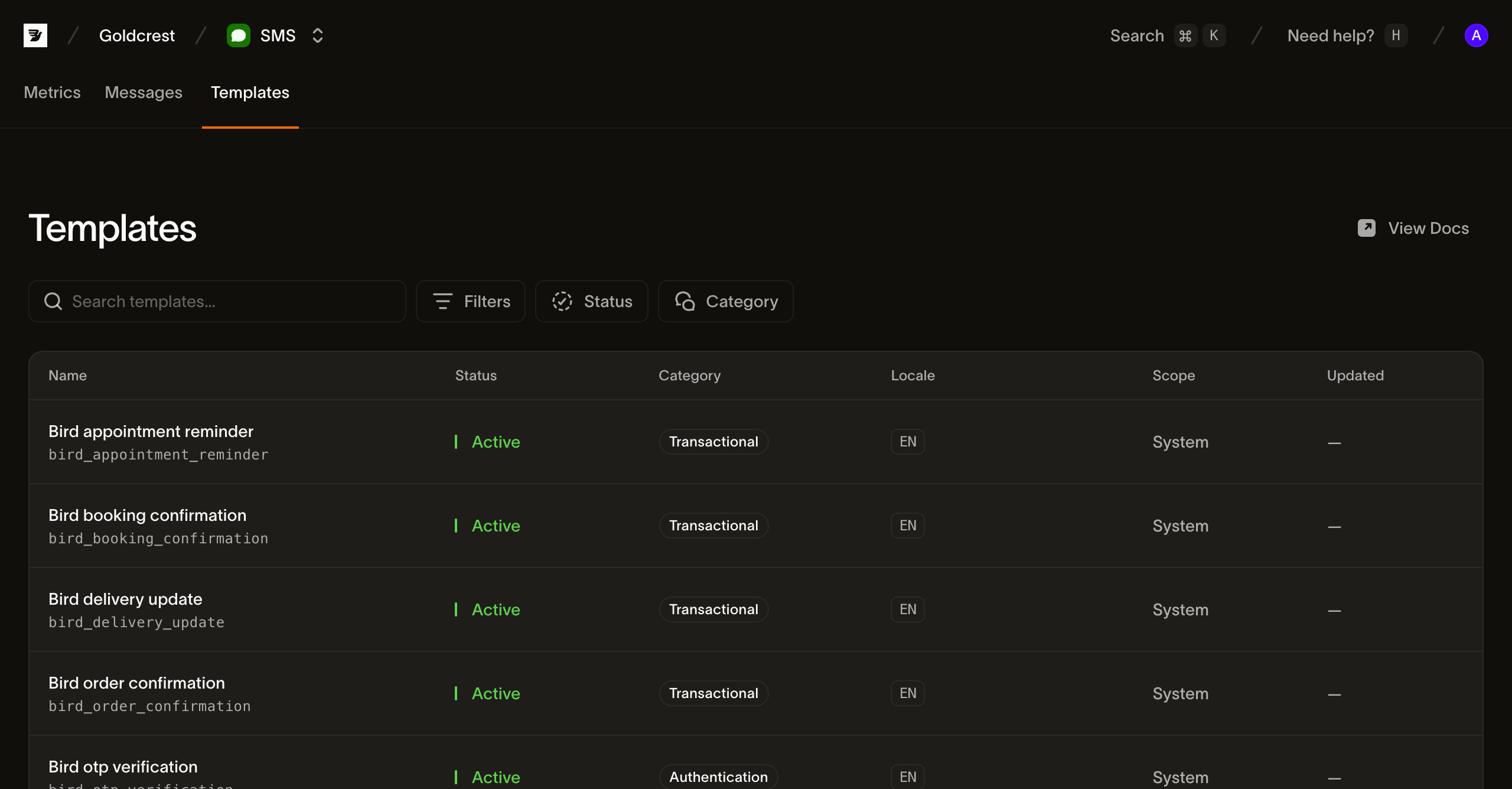
Each row shows the fields you need to pick and send a template:
- Name: the template's display name and its
slug(for examplebird_order_confirmation). The slug is the handle you pass when sending; it's fixed at creation. - Status: built-in templates are Active and ready to send. Workspace templates are Draft until published, then Active. Treat the shared status field as an open set.
- Category: the content classification (
transactional,marketing, orauthentication) applied to messages sent from the template. - Language: the languages the template is stocked in, as BCP 47 tags. The first few are shown as chips with a
+Noverflow when a template is localized into many languages. - Scope: System for Bird's built-in templates. Workspace identifies templates you author through the API preview.
- Updated: when the template last changed. Built-in templates show no date.
What's in a template
Alongside its name, category, and languages, each template defines the variables it fills at send time. A variable has a key, type, required flag, and a human-readable constraint. Built-in templates have typed slots; workspace templates infer generic text slots and accept scalar parameter values. A sensitive variable is replaced in stored message content. Transport queues still carry the text needed for delivery. Supply every required variable and no undeclared keys.
A template is stocked in one or more languages, and its default_language is what a send gets when it names none. Ask for a language the template isn't stocked in and Bird falls back: first to a broader form of the same language, then to the default language, because SMS templates default on_missing_language to fallback. Built-in templates use language_source_required: false. Workspace templates can require a language or set on_missing_language: fail; those policies take effect immediately, while content and default-language changes take effect on publication.
Listing templates from the API
GET /v1/sms/templates returns a cursor-paginated page of template summaries. Follow next_cursor using starting_after until it is null; a page is not the whole catalog. Reading templates needs an API key with the sms_management scope, which is separate from the sms scope a send uses. Filter by scope, category, status, or language, or search with q:
for await (const tpl of bird.smsTemplates.list({ scope: "system" })) {
  console.log(tpl.id, tpl.slug);
}
for template in client.sms_templates.list(scope="system"):
print(template.id, template.slug)for tpl, err := range client.SmsTemplates.List(context.Background(), bird.SMSTemplateListParams{
Scope: "system",
}) {
if err != nil {
log.Fatal(err)
}
fmt.Println(tpl.Id, *tpl.Slug)
}foreach ($bird->smsTemplates->list(['scope' => 'system']) as $template) {
echo $template->getId(), ' ', $template->getSlug(), "\n";
}bird sms templates listcurl "https://eu1.platform.bird.com/v1/sms/templates?category=authentication" \
-H "Authorization: Bearer bk_eu1_..."Template summaries contain identity, category, status, available languages, and draft/live version references. They omit source text and variables. Fetch a template by slug or ID with GET /v1/sms/templates/{template_ref}. Use its draft_version_id to inspect editable workspace content, or its live_version_id to inspect what sends use. A new workspace template has no live version until publication.
Read the selected version through GET /v1/sms/templates/{template_ref}/versions/{version_id}. The response contains variables and a language-keyed content map. To fetch one language, append /languages/{language}. The list's language filter matches published content; draft-only languages do not match.
Built-in templates expose one read-only version. Its stable ID identifies the catalog entry; its content hash distinguishes source updates. Published workspace versions preserve immutable history. Version lists also use cursor pagination and omit source text.
Workspace authoring in API preview
Use an API key with sms_management write access. Send JSON requests to your key's regional API host, with Authorization: Bearer <API_KEY> and Content-Type: application/json. Give each mutation its own Idempotency-Key; reuse that key only when retrying the same request.
- Create the template with
POST /v1/sms/templatesand{"slug":"order-shipped","category":"transactional"}. The201response containsidanddraft_version_id; the template starts with a blank English draft. Save both IDs for the next calls. - Save text with
PUT /v1/sms/templates/{id}/versions/{draft_version_id}/languages/enand{"text":"Your order {{ order_number }} has shipped."}. The200response includesdraft_revision. - Publish with
POST /v1/sms/templates/{id}/versions/{draft_version_id}/submit, passing that revision as{"expected_revision":1}(replace1with the returned value). A200response withvalid: trueidentifies the published version. A422reports invalid draft content; fix the returned language problems and submit again with a new idempotency key.
Publication requires nonempty text and the same variables in every language. It takes effect synchronously, without provider approval. The API also supports preview, duplication, resetting the draft to live content, and rollback to a published version. Dashboard editing is not available.
Read the current revision before updating template settings or rolling back. Language saves can also include a revision guard; a stale guard returns 409. Preview uses the selected version and parameters to report rendered text, resolved language, encoding, and segment count before sending.
Sending with a template
Set the send's template object instead of text. Omit category. For the built-in template below, omit from too. A workspace template requires from and must have a published version.
A built-in authentication template also selects the shared sender brand: bird_otp_verification_ttl uses Authifly, while bird_otp_verification_ttl_bird_verify uses Bird Verify. The destination determines whether the sender appears as a brand name, short code, or phone number.
Send a built-in template:
await bird.sms.send({
  to: "+14155550100",
  template: { slug: "bird_otp_verification", parameters: { code: "123456" } },
});client.sms.send(
to="+14155550100",
template="bird_otp_verification",
parameters={"code": "123456"},
)msg, err := client.Sms.Send(context.Background(), bird.SmsSendParams{
To: "+14155550100",
Template: "bird_otp_verification",
Parameters: map[string]any{"code": "123456"},
})
if err != nil {
log.Fatal(err)
}
fmt.Println(msg.Id)$message = $bird->sms->send(
to: '+14155550100',
template: 'bird_otp_verification',
parameters: ['code' => '123456'],
);
echo $message->getId(), ' ', $message->getStatus();bird sms send \
--parameters '{"code":"123456"}' \
--template bird_otp_verification \
--to +14155550100curl -X POST "https://eu1.platform.bird.com/v1/sms/messages" \
-H "Authorization: Bearer bk_eu1_..." \
-H "Content-Type: application/json" \
-d '{
"to": "+14155550100",
"template": {
"slug": "bird_otp_verification_ttl",
"language": "en",
"parameters": { "code": "481920", "ttl": "10" }
}
}'slug is the template's handle from the catalog (you can identify a template by its id instead). language selects the localized body; omit it for the template's default language. parameters supplies a value for each of the template's variables, keyed by variable name. A missing required variable, an undeclared key, a value that doesn't match its variable's constraint, or a parameters object over 16 KB serialized is rejected with a 422.
The 202 response includes the selected from, template category, template and version IDs, source hash, and requested/resolved languages. Authentication message text is returned as **REDACTED**. Accepted messages retain the rendered content and selected version even if you later publish, roll back, or delete the template.
Everything else about the send (the recipient, tags, metadata, the destination allowlist, and the async 202 model) works exactly as it does for a free-text send.
Next steps
- Sending SMS: add the
templatefield to a send payload. - SMS log: find a sent message and follow its lifecycle.
- Events: receive each message's delivery events.
- Sending an SMS with a template: a video that sends one of the pre-approved templates from a terminal
Related resources
Continue with the documentation, guides and examples for this topic.