SMS templates
A template is a pre-registered message body you send by reference instead of inlining the text on every call. It carries its own category and a set of typed variable slots, so a send only supplies the values that change (an OTP code, an order number) and Bird assembles the final message. The catalog is Bird's built-in system templates: a fixed set covering common authentication and transactional messages. Authoring your own workspace templates is not yet available.
Compared with a free-text send, a template send settles two decisions up front: the message category comes from the template, so the classification that per-country compliance rules key on is decided by the template rather than by each caller, and Bird selects the sender for the destination, so you don't pass from.
Browsing templates in the dashboard
The Templates page, under SMS, lists every template available to your workspace. Search by name and filter by status or category to find one.
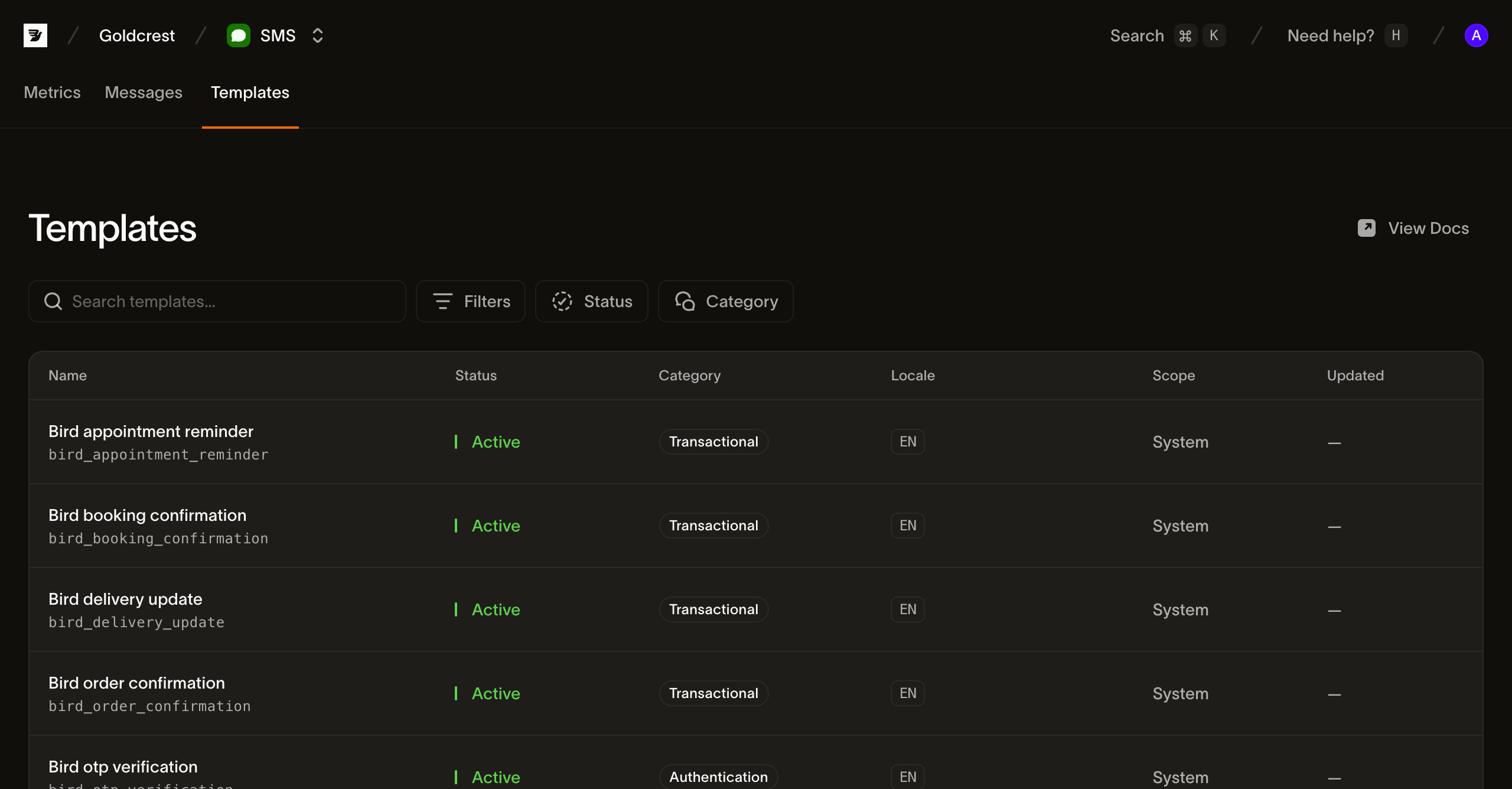
Each row shows the fields you need to pick and send a template:
- Name: the template's display name, with its slug (for example bird_order_confirmation) shown below it. The slug is the handle you pass when sending; it's fixed at creation.
- Status: the template's lifecycle state, rolled up across its languages. Active means at least one language is live, so the template can be sent, which is what every built-in system template reads. Draft has never had content go live, Pending is awaiting review, Rejected was reviewed and refused, and Inactive has nothing live and nothing in review.
- Category: the content classification (transactional, marketing, authentication, or service) applied to every message sent from the template.
- Language: the languages the template is stocked in, as BCP 47 tags. The first few are shown as chips with a +N overflow when a template is localized into many languages.
- Scope: System for Bird's built-in templates, Workspace for templates your own workspace authors.
- Updated: when the template last changed. Built-in templates show no date.
What's in a template
Alongside its name, category, and languages, each template defines the variables it fills in at send time. A variable is a typed slot with a key (the name you supply a value under), a type, a required flag, and a human-readable constraint describing the accepted values; a variable can also be marked sensitive, which keeps its value out of storage. When you send, you supply a value for every required variable and no undeclared keys.
A template is stocked in one or more languages, and its default_language is what a send gets when it names none. Ask for a language the template isn't stocked in and Bird falls back: first to a broader form of the same language, then to the default language, because SMS templates default on_missing_language to fallback. A template can instead require every send to name a language explicitly, with language_source_required.
Listing templates from the API
GET /v1/sms/templates returns the catalog in full; it is small and not paginated. Reading templates needs an API key with the sms_management scope, which is separate from the sms scope a send uses. Filter by scope, category, or language to narrow it:
const { data } = await bird.smsTemplates.list({ scope: "system" });
for (const tpl of data) console.log(tpl.id, tpl.slug);
templates = client.sms_templates.list(scope="system")
for template in templates.data:
print(template.id, template.slug)package main
import (
"context"
"fmt"
"log"
"os"
bird "github.com/messagebird/bird-sdk-go"
"github.com/messagebird/bird-sdk-go/option"
)
func main() {
client, err := bird.NewClient(option.WithAPIKey(os.Getenv("BIRD_API_KEY")))
if err != nil {
log.Fatal(err)
}
list, err := client.SmsTemplates.List(context.Background(), bird.SMSTemplateListParams{
Scope: "system",
})
if err != nil {
log.Fatal(err)
}
for _, tpl := range list.Data {
fmt.Println(tpl.Id, *tpl.Slug)
}
}$templates = $bird->smsTemplates->list(['scope' => 'system']);
foreach ($templates->getData() ?? [] as $template) {
echo $template->getId(), ' ', $template->getSlug(), "\n";
}bird sms templates listcurl "https://eu1.platform.bird.com/v1/sms/templates?category=authentication" \
-H "Authorization: Bearer bk_eu1_..."Each template in the response carries its slug (the reference you send by), scope, category, status, default_language, available_languages, languages (each language's own state), on_missing_language, language_source_required, the variables it expects, and a body preview of the default-language text with the variable placeholders inline. A built-in template's live_version_id is null: Bird ships it ready to send rather than versioning it. Fetch a single template by its slug or id with GET /v1/sms/templates/{template_ref} to read its variables before a send.
Sending with a template
Set the send's template object instead of text. Because the template decides the message and its sender, text, category, from, and media_urls are not accepted alongside it:
await bird.sms.send({
  to: "+14155550100",
  template: { slug: "bird_otp_verification", parameters: { code: "123456" } },
});client.sms.send(
to="+15551234567",
template="bird_otp_verification",
parameters={"code": "123456"},
)msg, err := client.Sms.Send(context.Background(), bird.SmsSendParams{
To: "+15551234567",
Template: "bird_otp_verification",
Parameters: map[string]any{"code": "123456"},
})
if err != nil {
log.Fatal(err)
}
fmt.Println(msg.Id)$message = $bird->sms->send(
to: '+15551234567',
template: 'bird_otp_verification',
parameters: ['code' => '123456'],
);
echo $message->getId(), ' ', $message->getStatus();bird sms send \
--to +15551234567 \
--template bird_otp_verification \
--parameters '{"code":"123456"}'curl -X POST "https://eu1.platform.bird.com/v1/sms/messages" \
-H "Authorization: Bearer bk_eu1_..." \
-H "Content-Type: application/json" \
-d '{
"to": "+15551234567",
"template": {
"slug": "bird_otp_verification_ttl",
"language": "en",
"parameters": { "code": "481920", "ttl": "10" }
}
}'slug is the template's handle from the catalog (you can identify a template by its id instead). language selects the localized body; omit it for the template's default language. parameters supplies a value for each of the template's variables, keyed by variable name. A missing required variable, an undeclared key, a value that doesn't match its variable's constraint, or a parameters object over 16 KB serialized is rejected with a 422.
The 202 response shows what the template resolved to: the rendered body in text, the template's category, and the sender Bird selected in from:
Code example
{
  "id": "sms_01ky7qc2nmf1s8fe22xd4qdvre",
  "direction": "outbound",
  "status": "accepted",
  "to": "+15551234567",
  "from": "Authifly",
  "text": "123456 is your verification code. Do not share it.",
  "category": "authentication",
  "segments": { "count": 1, "encoding": "GSM_7BIT", "characters": 50 },
  "cost": null,
  "carrier": null,
  "mcc_mnc": null,
  "sent_at": null,
  "delivered_at": null,
  "created_at": "2026-07-23T14:51:45.716Z"
}
Everything else about the send (the recipient, tags, metadata, the destination allowlist, and the async 202 model) works exactly as it does for a free-text send.
Next steps
- Sending SMS: the full send payload that the template field slots into
- SMS log: find a sent message and follow its lifecycle
- Events: the webhook events that report each message's delivery