Gmail और Yahoo की प्रेषक आवश्यकताएँ
Gmail और Yahoo ने 2024 में बल्क प्रेषकों के लिए नई आवश्यकताएँ लागू कीं। Gmail उन प्रेषकों को बल्क प्रेषक मानता है जो एक दिन में Gmail खातों को लगभग 5,000 या अधिक संदेश भेजते हैं, जबकि Yahoo अपने अलग मात्रा मानदंड लागू करता है। फ़िल्टरिंग और अस्वीकृति कम करने के लिए किसी भी मात्रा पर इन आवश्यकताओं का पालन करें।
आवश्यकता 1: अपने मेल को प्रमाणित करें
बल्क प्रेषकों को SPF और DKIM से प्रमाणीकरण करना होगा और एक DMARC रिकॉर्ड प्रकाशित करना होगा। प्रमाणीकरण संरेखित भी होना चाहिए, यानी वह उसी डोमेन के नाम पर पास होना चाहिए जो आपके प्राप्तकर्ताओं को From पते में दिखता है।
क्या करें: अपने भेजने वाले डोमेन का सत्यापन करें। इसके DNS रिकॉर्ड DKIM साइनिंग, DMARC और SPF के लिए एक संरेखित रिटर्न पाथ कॉन्फ़िगर करते हैं। आपको डोमेन एपेक्स पर SPF रिकॉर्ड जोड़ने की आवश्यकता नहीं है। भेजने वाले डोमेन की गाइड देखें। टेस्ट भेजने के बाद ईमेल लॉग में डिलीवरी की पुष्टि करें और प्राप्त संदेश के प्रमाणीकरण परिणाम जाँचने के लिए ईमेल हेडर विश्लेषक का उपयोग करें। यदि आपके पास रिकॉर्ड नहीं है, तो DMARC नीति जनरेटर एक रिकॉर्ड बना सकता है।
आवश्यकता 2: एक-क्लिक अनसब्सक्राइब
मार्केटिंग और प्रचार मेल के संदेश हेडर में एक-क्लिक अनसब्सक्राइब विकल्प होना चाहिए (तकनीकी मानक RFC 8058 है)। यही वह "Unsubscribe" लिंक है जिसे मेल क्लाइंट प्रेषक के नाम के पास दिखाते हैं। ऑप्ट-आउट अनुरोधों को दो दिनों के भीतर लागू करना होगा।
Bird क्या करता है: मार्केटिंग डिफ़ॉल्ट श्रेणी है। Bird मार्केटिंग संदेशों में एक-क्लिक List-Unsubscribe हेडर और एक दिखाई देने वाला HTML अनसब्सक्राइब लिंक जोड़ता है। अनसब्सक्राइब होते ही उस पते पर आगे के मार्केटिंग मेल तुरंत सप्रेस किए जाते हैं।
आवश्यकता 3: शिकायतें 0.3% से कम रखें
अपनी स्पैम-शिकायत दर 0.3% से कम रखें, और 0.1% से कम का लक्ष्य रखें। 0.3% की दर का अर्थ है हर 1,000 डिलीवर किए गए संदेशों पर लगभग तीन शिकायतें।
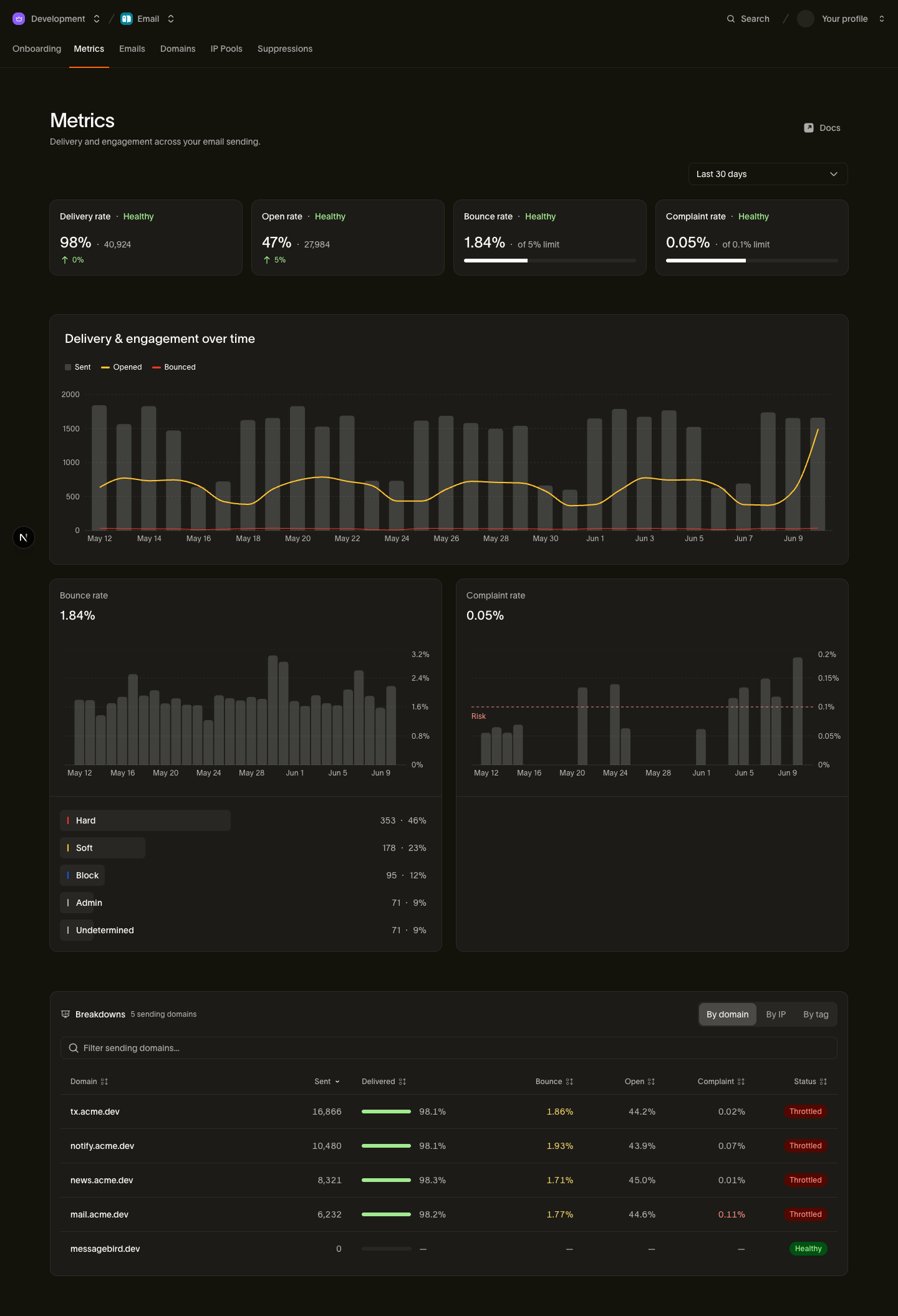
कहाँ देखें: Metrics पेज समय के साथ शिकायत दर को ट्रैक करता है। किसी पते से शिकायत आने पर उस पते पर आगे के मार्केटिंग संदेश सप्रेस किए जाते हैं। प्रतिक्रिया के चरणों के लिए प्रेषक प्रतिष्ठा की निगरानी और अनुमति से जुड़ी आवश्यकताओं के लिए ईमेल सहमति देखें।
चेकलिस्ट
| आवश्यकता | Bird में चरण |
|---|---|
| SPF, DKIM और संरेखित DMARC | अपना सेंडिंग डोमेन सत्यापित करें: DNS रिकॉर्ड पूरे ऑथेंटिकेशन को कवर करते हैं |
| वन-क्लिक अनसब्सक्राइब (RFC 8058) | मार्केटिंग संदेशों (डिफ़ॉल्ट) में अपने आप जुड़ता है, साथ में संदेश के भीतर एक दिखने वाला लिंक भी होता है |
| शिकायत दर 0.3% से कम | Metrics पेज पर नज़र रखें; केवल सहमति देने वाले प्राप्तकर्ताओं को भेजें और निष्क्रिय प्राप्तकर्ताओं को सूची से हटाएँ |
प्रदाता यह भी माँगते हैं कि भेजने वाले IP पर मान्य फ़ॉरवर्ड और रिवर्स DNS हो और संदेशों का फ़ॉर्मैट मानकों के अनुरूप हो। Bird इन इंफ्रास्ट्रक्चर आवश्यकताओं को संभालता है। अपने डोमेन को ऑथेंटिकेट करना, सहमति बनाए रखना और शिकायत दर कम रखना आपकी ज़िम्मेदारी बनी रहती है।
अगले कदम
- भेजने वाले डोमेन: डोमेन सत्यापन और DNS रिकॉर्ड के लिए डेवलपर गाइड
- ईमेल सहमति: मेल भेजने की अनुमति पाना और उसे बनाए रखना
- प्रेषक प्रतिष्ठा की निगरानी: अपनी शिकायत दर पर नज़र रखना और उसमें अचानक बढ़ोतरी होने पर कार्रवाई करना
संबंधित संसाधन
इस विषय के लिए दस्तावेज़, गाइड और उदाहरणों के साथ आगे बढ़ें।