Delivery delays and retries
If a message has not arrived, its recipient timeline shows whether Bird is still trying to deliver it. This page explains deferrals, retries, and delivery status.
How delivery works
Bird hands your email to the recipient's mail server, such as Gmail, Outlook, or a company mail server. That server can respond in three ways:
- It accepts the message and takes responsibility for delivering it to the mailbox.
- It defers the message and asks Bird to try again later. A full mailbox, an unavailable server, or greylisting can cause a deferral.
- It refuses the message permanently. This is a hard bounce, covered in Why did my email bounce?.
Bird retries deferred messages automatically. A message can be deferred more than once before the receiving server accepts it.
What the statuses mean
As a message moves through this process, each recipient's status tells you where things stand:
- Accepted / queued: Bird has your message and is preparing it for delivery. This is the starting state of every send.
- Deferred / retrying: Bird attempted delivery and the receiving server asked it to try again later. Bird continues retrying until the message is delivered or the retry window ends.
- Delivered: the receiving server accepted the message and took responsibility for it.
Delivered means the recipient's mail server accepted the message. It does not reveal whether the provider placed the message in the inbox, a promotions tab, or the spam folder. If the message is delivered but not visible, investigate deliverability rather than delivery delay.
A delay is not a failure
A message in the deferred or retrying state has not failed. Do not resend it while Bird is retrying because the recipient may receive a duplicate. If the retry window ends without delivery, the recipient status changes to bounced and includes the receiving server's response.
Transient delays are a normal part of email delivery. Greylisting or an unavailable receiving server can make them longer.
Where to watch a message's progress
Open the message details in the dashboard. Each recipient has a timeline showing when Bird accepted and queued the message, each attempt or deferral, the receiving server's response, and the final outcome.
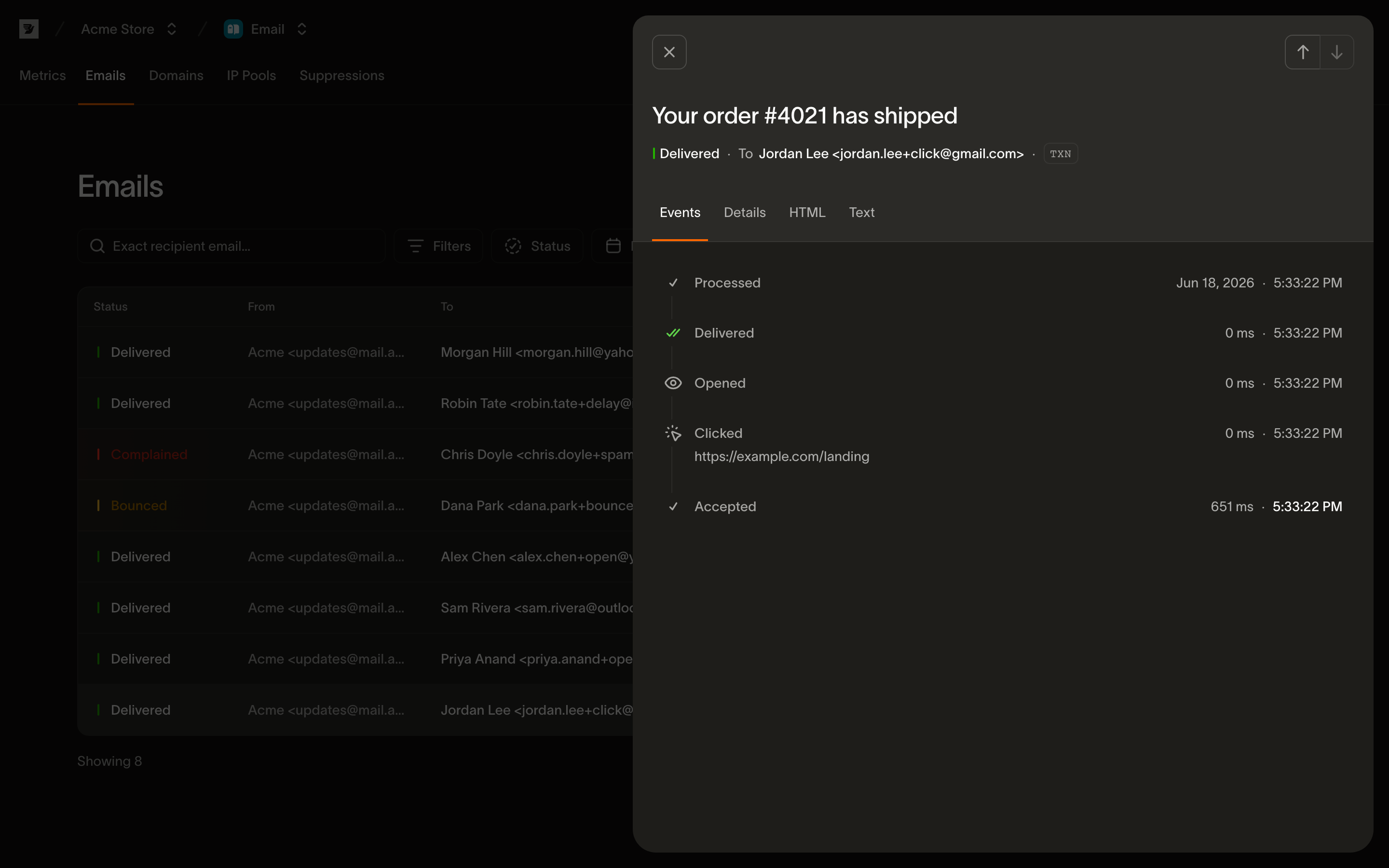
If you'd rather be notified than watch, your systems can receive these same per-recipient events as webhooks: the events developer guide documents the full event vocabulary, including the deferred and delivered events this page describes.
Next steps
- Why did my email bounce?: what happens when retries run out, and hard vs soft bounces
- Email events: the developer guide to every event in a recipient's timeline
Related resources
Continue with the documentation, guides and examples for this topic.