Add DNS records · GoDaddy
When you add a sending domain to Bird, the domain's detail page in the Bird dashboard lists every DNS record to publish, each with a copyable host and value. Keep that page open in one tab and GoDaddy in another. Copy each value from Bird instead of typing it.
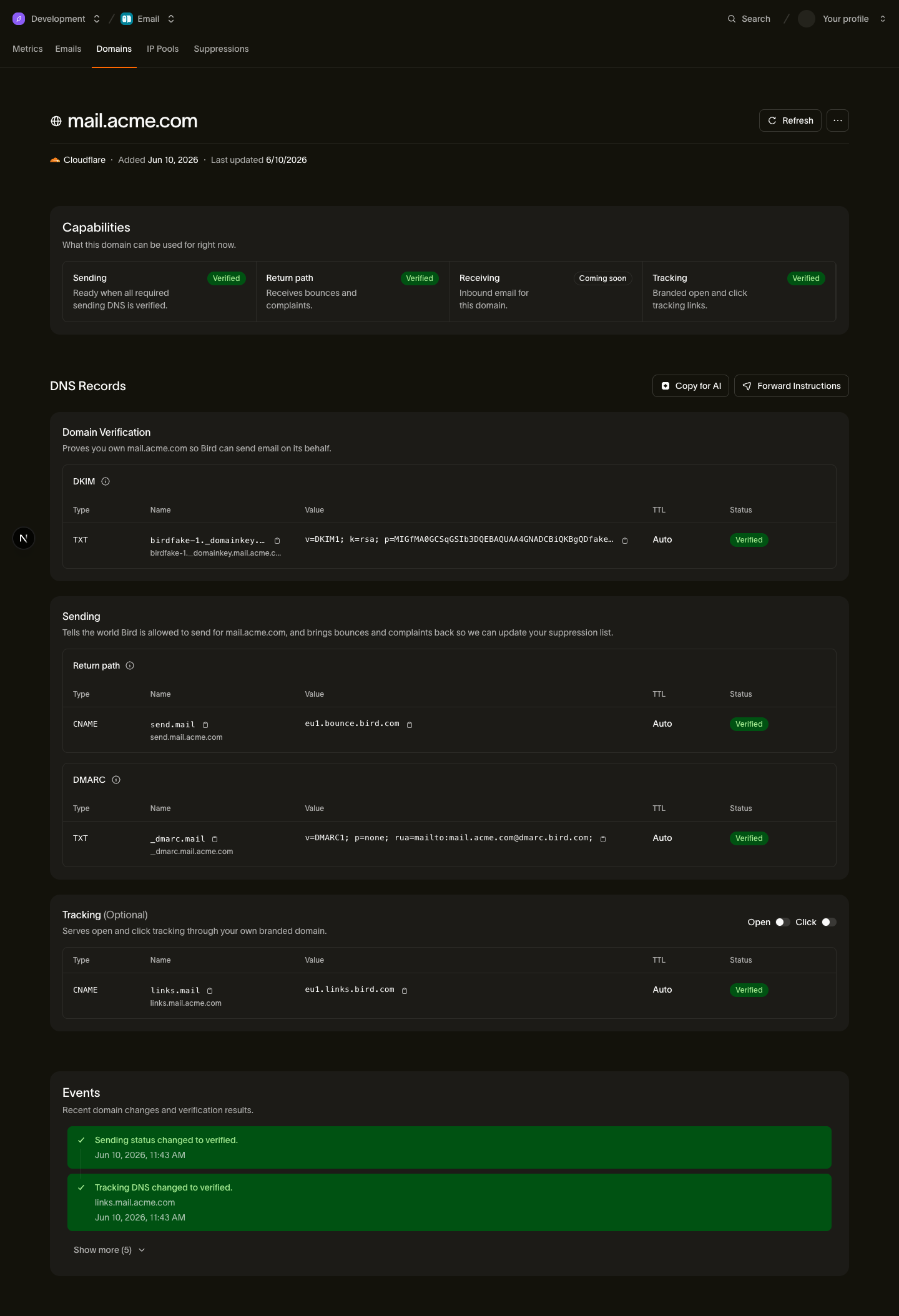
The records you'll add
| Type | Host | Value (copy from Bird) |
|---|---|---|
| TXT | <selector>._domainkey.example.com | Your DKIM key |
| CNAME | send.example.com | <region>.bounce.bird.com |
| TXT | _dmarc.example.com | Your DMARC policy |
| CNAME | links.example.com (optional) | <region>.links.bird.com |
The tracking CNAME (links) is optional and enables branded open and click tracking. It is not required for sending.
Add the records in GoDaddy
- Log in to GoDaddy and open Domain Portfolio.
- Select your domain to open Domain Settings, then select DNS.
- Click Add New Record.
- For the DKIM record, set Type to TXT and enter the host's subdomain part in Name, such as
<selector>._domainkey. Paste the DKIM value from Bird into Value, then set TTL to 600 seconds (the lowest option). GoDaddy caps how much text a single TXT value accepts: if it rejects the paste, run the value through the DNS record splitter to create accepted chunks. Click Save. - Click Add New Record again. For the return-path record: set Type to CNAME, enter
sendin Name, paste the target from Bird (for example<region>.bounce.bird.com) into Value, and set TTL to 600 seconds. Click Save. - Click Add New Record again. For the DMARC record: set Type to TXT, enter
_dmarcin Name, paste the DMARC value from Bird into Value, and set TTL to 600 seconds. Click Save. - If you want branded tracking, add the optional tracking record the same way as step 5: Type CNAME, Name
links, Value<region>.links.bird.com. Click Save.
GoDaddy-specific gotchas
- The Name field is relative to your domain. Enter
sendbecause GoDaddy appends the domain for you. Entering the full name publishessend.example.com.example.com. Use@only when a record belongs at the domain root (none of Bird's records do). - Pick a short TTL. A shorter value makes future corrections visible sooner.
- Remove conflicting "Parked" records. Domains that have never hosted anything often carry GoDaddy's parking records. Delete an existing record at the same name before adding a CNAME, especially at
sendorlinks. DNS does not allow a CNAME to coexist with another record at the same name.
After you publish
Bird checks your DNS automatically. You can also open the domain details in Bird and select Refresh. If the domain remains pending, see Verification delays.
Next steps
Related resources
Continue with the documentation, guides and examples for this topic.