Domain verification delays
You added the DNS records, but your domain still shows as unverified. DNS changes can take time to propagate, and Bird keeps checking automatically. Use this checklist to distinguish normal propagation from an incorrect record.
DNS changes take time to propagate
When you add or edit a DNS record, resolvers may keep serving an older answer until the record's TTL (time to live) expires. Depending on your provider and TTL settings, propagation can take from a few minutes to 24–48 hours.
A domain can remain unverified until Bird can resolve the new records.
Bird keeps checking your domain
We check your domain when you register it and continue re-checking automatically on a backoff and recurring schedule; see Sending domains for the verification schedule. The domain verifies when a check finds all required records.
After fixing a record, open it from the Domains page and select Refresh for a current result.
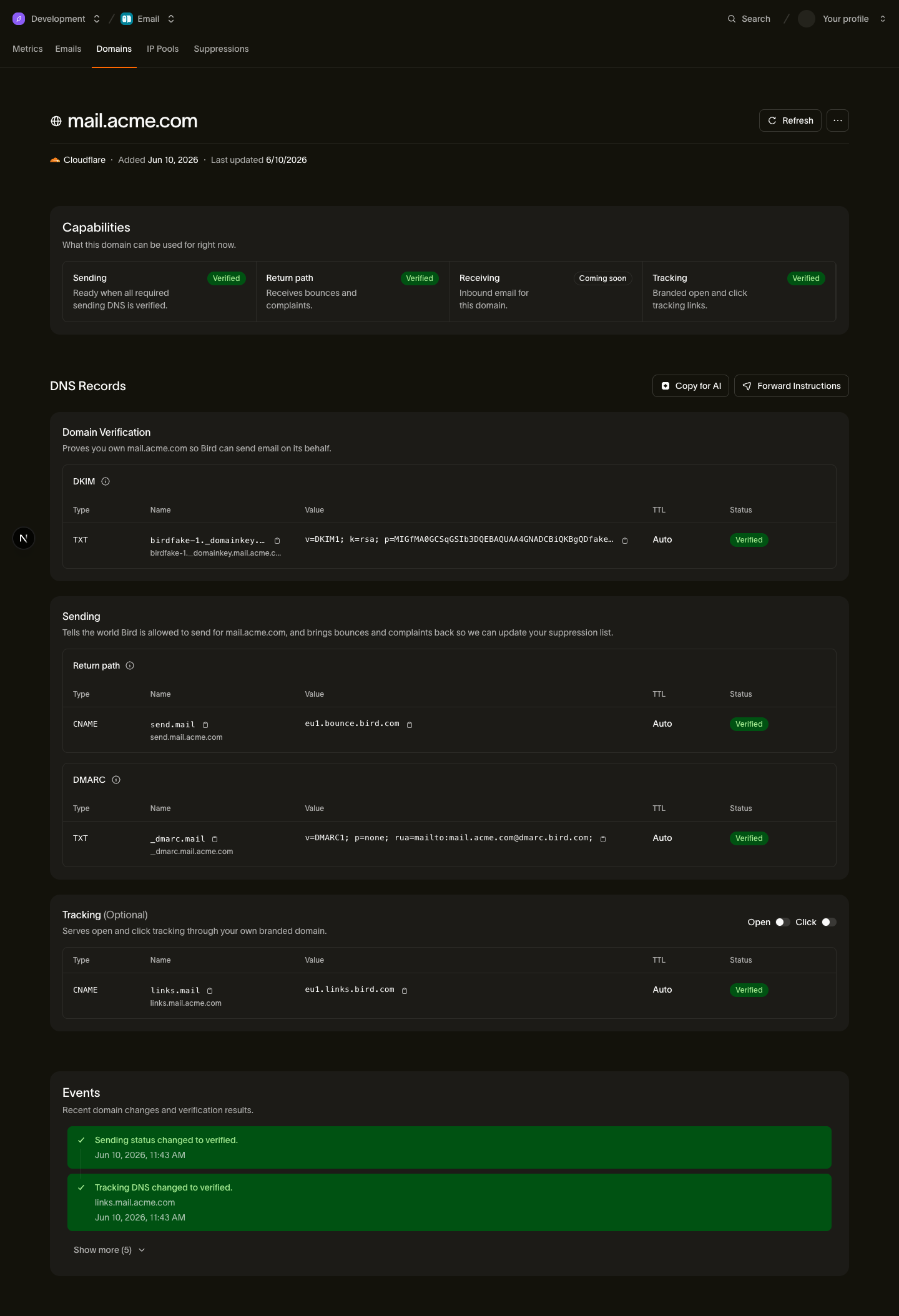
The domain page shows each record's individual status, so you can see exactly which record is still outstanding rather than guessing.
Check a domain that remains unverified
If a record still has not verified after a day, work through these checks:
1. Check for a duplicated domain in the host name
Many DNS providers append your domain to the host field. If we ask for send.example.com and your provider appends example.com, enter only send. Otherwise, the provider may publish send.example.com.example.com. Use a public DNS lookup to confirm the published name. If the provider truncates a long DKIM value, use the DNS record splitter to create quoted chunks.
2. Lower the TTL
If your records have a high TTL, old cached answers remain available longer. Lowering the TTL to a short value, such as 5 minutes, makes future changes propagate faster. It does not speed up a change already cached under the previous TTL.
3. Edit the authoritative name servers
DNS records must be published on the name servers authoritative for your domain. Check the name servers at your registrar or with a WHOIS lookup, then confirm that you added the records at that provider.
4. Confirm all required records exist
Verifying ownership and being ready to send are checked separately, and sending requires three records:
- The DKIM TXT record
- The return-path CNAME record
- A DMARC TXT record
The DMARC check is deliberately lenient: any valid DMARC record covering your sending domain is enough, and a record on your parent (registered) domain counts. So if example.com already has a DMARC record, send.example.com is covered: you don't need to add another one. If none exists anywhere, a minimal monitoring-only policy is all we require. See DKIM, SPF, and DMARC for what each record does and how to pick values.
A note on domains that were verified and then flipped back
We continue checking verified domains automatically. After the first failed check, the affected record remains verified with a warning during a grace window before its status changes to failed and sending stops; see Sending domains for the grace-period details. A successful check clears the warning.
If public DNS matches the values shown in the dashboard and Refresh still reports a failure after propagation, select Help > Contact Support. Include the domain, failed record, and status shown on the domain page.
Next steps
- Sending domains: the full developer guide to registration, records, and the verification lifecycle
- DKIM, SPF, and DMARC: what each record does
- Per-provider DNS walkthroughs: step-by-step instructions for Cloudflare, Route 53, GoDaddy, and more
Related resources
Continue with the documentation, guides and examples for this topic.