Add DNS records · Namecheap
When you add a sending domain to Bird, the domain's detail page in the Bird dashboard lists every DNS record to publish, each with a copyable host and value. Keep that page open in one tab and Namecheap in another. Copy each value from Bird instead of typing it.
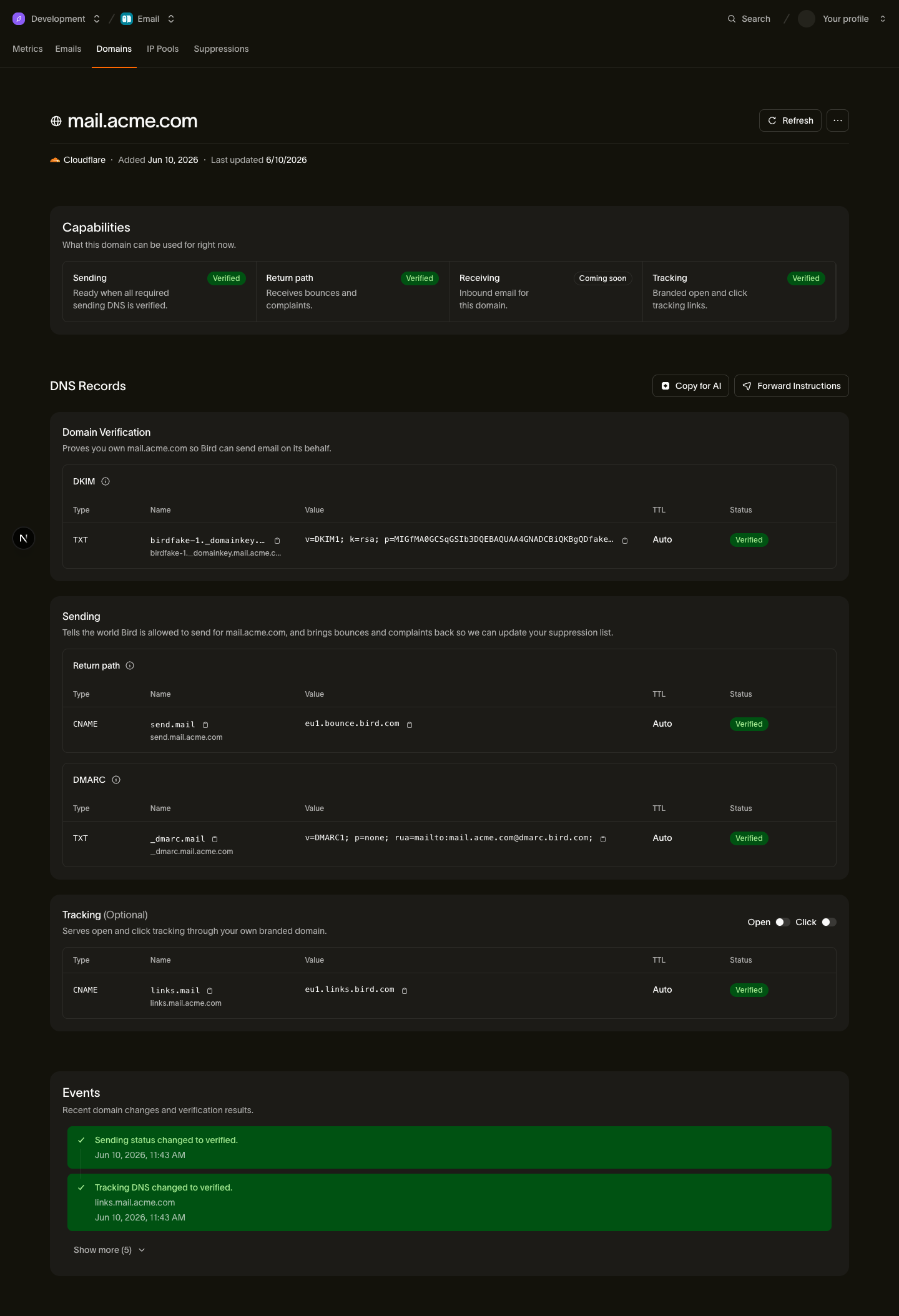
The records you'll add
| Type | Host | Value (copy from Bird) |
|---|---|---|
| TXT | <selector>._domainkey.example.com | Your DKIM key |
| CNAME | send.example.com | <region>.bounce.bird.com |
| TXT | _dmarc.example.com | Your DMARC policy |
| CNAME | links.example.com (optional) | <region>.links.bird.com |
The tracking CNAME (links) is optional and enables branded open and click tracking. It is not required for sending.
Add the records in Namecheap
- Log in to Namecheap and open Domain List.
- Click Manage next to your domain, then open the Advanced DNS tab.
- Under Host Records, click Add New Record.
- For the DKIM record, choose TXT Record and enter the host's subdomain part in Host, such as
<selector>._domainkey. Paste the DKIM value from Bird into Value, then leave TTL on Automatic. If Namecheap won't take the full value in one field, the DNS record splitter breaks it into chunks that fit. Click the checkmark to save. - Click Add New Record again. For the return-path record: choose CNAME Record, enter
sendin Host, paste the target from Bird (for example<region>.bounce.bird.com) into Value, and save. - Click Add New Record again. For the DMARC record: choose TXT Record, enter
_dmarcin Host, paste the DMARC value from Bird into Value, and save. - If you want branded tracking, add the optional tracking record the same way as step 5: CNAME Record, Host
links, Value<region>.links.bird.com, and save.
Namecheap-specific gotchas
- Host is the subdomain only. Type
sendbecause Namecheap appends your domain. Use@only for records at the domain root; Bird's records do not use it. - "Automatic" TTL is 30 minutes. Namecheap's default TTL means a corrected record can take up to half an hour to be seen; if you want faster turnaround on fixes, pick a shorter TTL from the dropdown before saving.
- Advanced DNS only works on Namecheap BasicDNS. The Host Records table only takes effect when the domain's Nameservers setting (on the Domain tab) is Namecheap BasicDNS. If the domain points at custom nameservers, such as Cloudflare or your web host, add the records at that provider instead; anything you enter here is ignored.
After you publish
Bird checks your DNS automatically. You can also open the domain details in Bird and select Refresh. If the domain remains pending, see Verification delays.
Next steps
Related resources
Continue with the documentation, guides and examples for this topic.