Abrechnung & Nutzung
Die Abrechnung ist organisationsbezogen: Ihre Produktpläne, Ihr Wallet und Ihr Rechnungsstrom gehören zur Organisation. Diese Seite beschreibt, wie die Abrechnung eine Integration beeinflusst: wie Nutzung gemessen wird, wie Sie den aktuellen Stand ablesen und wie Ihre Pläne die operativen Limits beeinflussen. Informationen zur Kontoverwaltung (Preisdetails, Zahlungsmethoden, Steuern) finden Sie in der Knowledge Base: Pläne & Preise und Nutzung, Ausgaben & Rechnungen.
Die Abrechnung verwalten Personen, nicht Integrationen. Jede Abrechnungsoperation erfordert den Scope org:billing, einen Scope für Organisationsrollen, der keinem Workspace-API-Key gewährt werden kann. Kein bk_*-Key kann also Nutzungsdaten lesen, das Wallet aufladen oder einen Plan ändern. Inhaber und Abrechnungsadmins erledigen das im Abschnitt Billing and payments des Dashboards; unter Benutzer, Teams & Rollen sehen Sie, wer die Rolle hat. Die Plan-, Produkt- und Preiskataloge sind die Ausnahme: Sie benötigen keine Authentifizierung, liefern die Preise auf dieser Website, und CLI und MCP können den Plankatalog direkt lesen. Diese Anleitung erklärt daher, wie sich die Abrechnung auf Ihre Integration auswirkt, und nennt die Dashboard-Seite, die jede Kennzahl zeigt. Diese Seiten (Overview, Usage, Invoices, Spend und Settings) werden in den jeweils verlinkten Knowledge-Base-Artikeln behandelt.
Pläne und Stufen
Jedes Produkt hat einen eigenen, unabhängig gewählten Plan: Eine Organisation kann gleichzeitig einen kostenpflichtigen SMS-Plan, einen Realtime-Plan und den Email-Free-Plan haben und Voice weiterhin per Pay-as-you-go nutzen. Jeder Plan hat eine Stufe (etwa free, startup, growth oder scale) und eines von zwei finanziellen Verhalten. Ein Funding-Plan zahlt monatlich einen Betrag in das gemeinsame Wallet ein und berechnet die Nutzung ab dem ersten Versand; ein Capacity-Plan kauft enthaltene Nutzung und zahlt nichts in das Wallet ein. Pläne & Preise erklärt beide Varianten, und die Billing overview listet die aktuellen Pläne Ihrer Organisation auf.
Der Plan bestimmt, was Ihre Integration operativ spürt:
- Rate Limits steigen mit der Stufe. Jeder Plan legt Werte für die Policies seines Produkts fest, etwa
sms_sendoderwhatsapp_send, und höhere Stufen legen höhere Werte fest. Ohne Plan gilt der Standardwert der Policy. Ein aktiver Override der Organisation hat Vorrang vor jedem Plan. Siehe So wird Ihr Limit aufgelöst. - Kontingente steigen mit der Stufe. Pläne legen Anzahlen fest, etwa gleichzeitige Voice-Anrufe, Realtime-Verbindungen, Sendedomains, dedizierte IPs und Webhook-Endpunkte. Ist ein Kontingent erreicht, wird die neue Ressource, der neue Anruf oder die neue Verbindung mit einem eigenen Fehler abgelehnt; dieser Fehler ist unabhängig von einer
429-Rate-Limit-Antwort. - Enthaltene Kontingente enden an den Grenzen des Plans. Der Email-Free-Plan stoppt bei seinen monatlichen und täglichen Obergrenzen, und ein Realtime-Plan stoppt bei seinen Grenzen für Verbindungen und tägliche Nachrichten. Kostenpflichtige Email-Pläne enthalten kein Kontingent: Jeder Versand wird aus dem Wallet bezahlt.
Um die veröffentlichten Werte eines Plans ohne Authentifizierung abzurufen, listen Sie den Plankatalog mit bird billing plans list --commercial-product sms auf. Jeder Plan liefert seine Werte financial_behavior, rate_limits und quotas. Die Vergleichstabelle auf der Preisseite jedes Produkts zeigt diese Werte neben den Pay-as-you-go-Standardwerten. Vergleichen Sie beide dort, bevor Sie für mehr Kapazität upgraden.
Upgrades gelten, sobald ihre Zahlung erfolgreich ist. Die neuen Limits stehen also mitten in der Periode bereit, ohne dass sich das Verlängerungsdatum ändert. Downgrades und Kündigungen werden am Ende der laufenden Periode wirksam, und bei einer unbezahlten Verlängerung fällt das Produkt auf seinen Free-Plan oder seine Pay-as-you-go-Limits zurück. Die Regeln zum Zeitpunkt finden Sie unter Planänderungen & Verlängerungen. Gestalten Sie Integrationen so, dass sie Limit-Fehler verarbeiten, wenn sich ein Plan ändert oder ein Kontingent aufgebraucht ist.
Nutzungsmessung
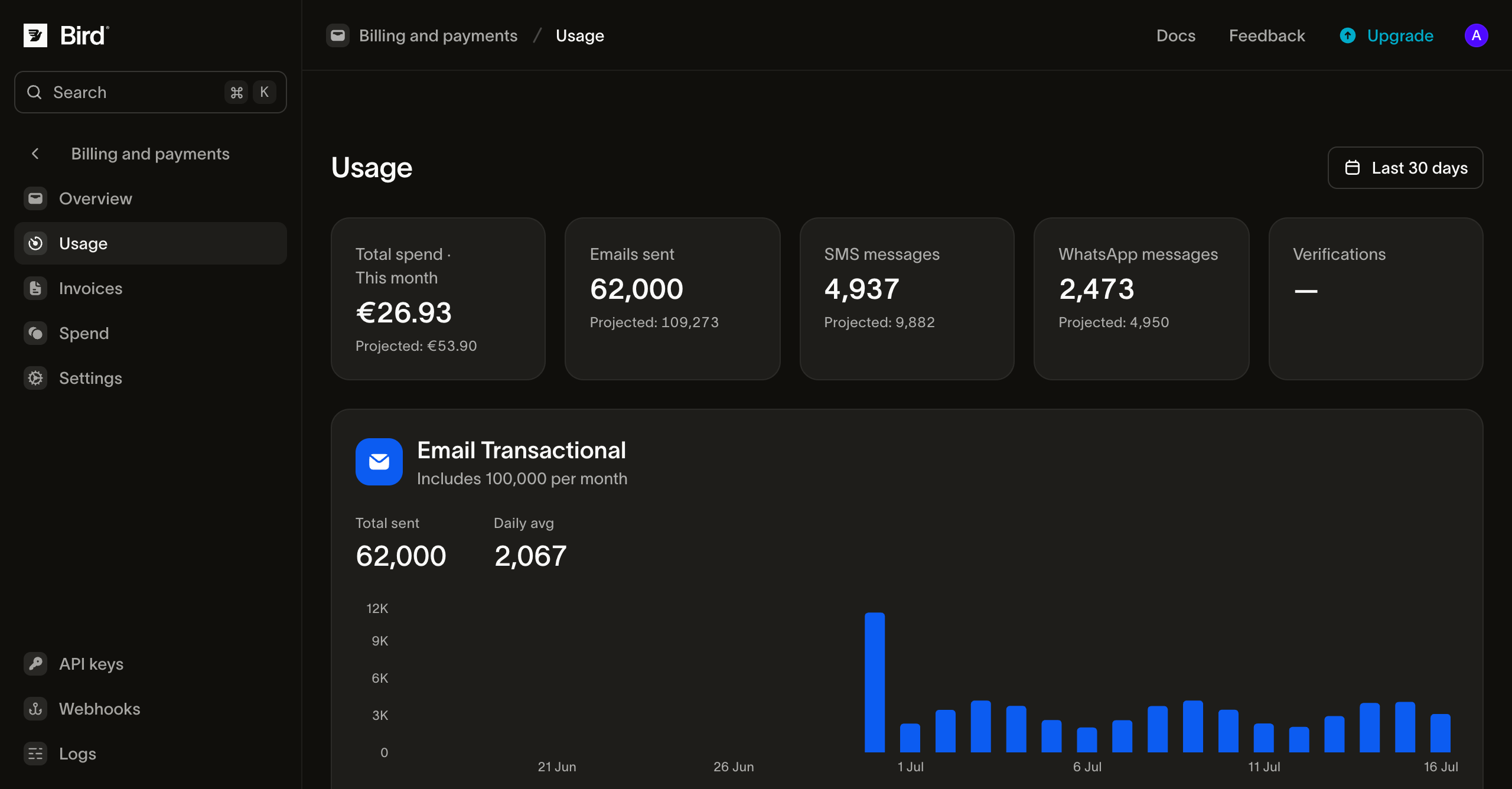
Jeder Versand wird gegen die aktuelle Abrechnungsperiode Ihrer Organisation gemessen. Die Usage-Seite des Dashboards zeigt das Echtzeitbild für jedes Produkt, über das Zeitfenster, in dem das Produkt gemessen wird: die Planperiode für volumenbasierte E-Mails, der Kalendermonat für Pay-as-you-go. Produkte werden auf eine von zwei Arten abgerechnet, und der Unterschied wirkt sich auf Ihre Integration aus:
- Volumenbasierte Produkte zählen die Nutzung gegen ein im Plan enthaltenes Kontingent (E-Mail-Versand im Email-Free-Plan oder in einem älteren Email-Plan). Die Seite zeigt, wie viel des Kontingents Sie verbraucht haben, und bei einem älteren Plan mit Überschreitung, wie weit Sie darüber hinaus sind.
- Pay-as-you-go-Produkte werden pro Nutzung nach einer Preisliste abgerechnet (SMS, WhatsApp, Voice und E-Mail in einem kostenpflichtigen Email-Plan), zum Tarif des Plans, sofern der Plan einen hat. Eine Nachricht kann das Wallet zweimal belasten: mit der eigenen Gebühr von Bird bei der Verarbeitung des Versands und mit einer Drittanbietergebühr (ein Carrier-Zuschlag bei SMS, Metas Anteil bei WhatsApp) bei der Zustellung. Lesen Sie die Aufteilung pro Nachricht aus
costder SMS- oder WhatsApp-Nachricht:transaction_amountist die Gebühr von Bird undpassthrough_amountdie Drittanbietergebühr.
Die Seite deckt jedes Produkt mit einem Abonnement oder Nutzung in der aktuellen Periode ab und zeigt die Aufschlüsselung pro Tag, pro Land und pro Sendedomain für jedes einzelne davon.
Das Wallet
Jede Organisation hat ein Wallet: ein gemeinsames Prepaid-Guthaben, über das Nutzungsgebühren laufen. Pay-as-you-go-Versand, Add-on-Abonnements und Verlängerungen älterer Email-Pläne belasten das Wallet. Funding-Pläne füllen es: Jede bezahlte monatliche Einzahlung wird vollständig gutgeschrieben und kann jedes Produkt bezahlen. Auch eine hinterlegte Karte füllt es über manuelle und automatische Aufladungen und bezahlt Planverlängerungen direkt. Die Spend-Seite des Dashboards ist das vollständige Hauptbuch aller Gutschriften und Belastungen, sodass jede Wallet-Bewegung an einem Ort erfasst ist. Jede abgeschlossene Aufladungszahlung erzeugt einen dauerhaften Beleg, den Sie im selben Bereich als PDF herunterladen können.
Operativ ist das Wallet eine Voraussetzung für Pay-as-you-go-Versand: SMS- und WhatsApp-Versand wird abgelehnt, wenn das Guthaben nicht ausreicht. SMS wird an der API mit einem 402 abgewiesen; ein WhatsApp-Versand wird zunächst angenommen und dann abgelehnt, sobald Bird versucht, ihn zu belasten. Eine Zustellgebühr, die das Guthaben nicht decken kann, wird übersprungen statt abgelehnt, sodass die Nachricht den Empfänger trotzdem erreicht. Konfigurieren Sie für transaktionales Volumen die automatische Aufladung und einen Alarm bei niedrigem Guthaben auf der Billing overview, oder überwachen Sie das Guthaben auf Ihrer Seite und lösen Sie dort Alarme aus. Zahlungsmethoden und Wallet beschreibt beide Dashboard-Einstellungen. Warnungen bei niedrigem Guthaben und Benachrichtigungen über fehlgeschlagene Zahlungen gehen an die Organisationsinhaber. Rechnungs-E-Mails gehen an die Abrechnungs-Benachrichtigungsliste der Organisation, sofern eine eingerichtet ist, andernfalls an den Organisationsinhaber. Legen Sie diese Liste unter Settings > Organization fest. Verwenden Sie dafür einen überwachten Team-Alias, damit Abrechnungs-E-Mails nicht vom Postfach einer einzelnen Person abhängen.
Rechnungen
Rechnungen werden pro Organisation ausgestellt, eine pro Kalendermonat, und auf der Invoices-Seite des Dashboards aufgelistet. Dort können Sie eine Rechnung öffnen, um die Einzelposten einzusehen, oder sie als PDF herunterladen. Rechnungen spiegeln dieselbe Messung wider, die die Usage-Seite zeigt: Gebühren für Kapazitätspläne, Gebühren und Überschreitungen bei Legacy-Plänen sowie Pay-as-you-go-Ausgaben für die Periode. Die Einzahlung eines Finanzierungsplans ist eine Wallet-Aufladung mit eigenem Beleg; die damit bezahlte Nutzung erscheint auf der Rechnung. Informationen zum Aufbau, zu Statuswerten und zum Zahlungszeitpunkt finden Sie unter Usage, spend & invoices in der Knowledge Base.
Nächste Schritte
- Rate Limits: Richtlinien-Standardwerte, Planwerte, Organisations-Overrides und Response-Header
- Plans & pricing: Finanzierungs- und Kapazitätspläne, was jede Stufe erhöht, und Pay-as-you-go-Preise
- Planänderungen & Verlängerungen: Zeitpunkt für Upgrade/Kündigung und die Abfolge bei fehlgeschlagener Zahlung
- Benutzer, Teams & Rollen: wer die Abrechnung verwalten kann (
org:billing)