Authentifizierung & API-Keys
Workspace-API-Keys authentifizieren Anfragen an die Bird API als Bearer-Tokens. Sie gehören zu einem Workspace, tragen Berechtigungen, die Sie ändern können, und werden nur ein einziges Mal vollständig angezeigt.
Zum Unterschied zwischen Service-Credentials und delegiertem Zugriff siehe API-Keys und OAuth-Tokens.
Wie sich Anfragen authentifizieren
Übergeben Sie Ihren Key bei jeder Anfrage im Authorization-Header. Die SDKs und die CLI übernehmen den Key einmalig und setzen den Header für Sie:
import { BirdClient } from "@messagebird/sdk";

const bird = new BirdClient({ apiKey: process.env.BIRD_API_KEY! });

await bird.email.send({
  from: "hello@yourdomain.com",
  to: ["delivered@messagebird.dev"],
  subject: "Hi",
  text: "Hello.",
});
import os
from bird import Bird
client = Bird(api_key=os.environ["BIRD_API_KEY"])
client.email.send(
from_="hello@yourdomain.com",
to=["delivered@messagebird.dev"],
subject="Hi",
text="Hello.",
)client, err := bird.NewClient(option.WithAPIKey(os.Getenv("BIRD_API_KEY")))
if err != nil {
log.Fatal(err)
}
_, err = client.Email.Send(context.Background(), bird.EmailSendParams{
From: "hello@yourdomain.com",
To: []string{"delivered@messagebird.dev"},
Subject: "Hi",
Text: "Hello.",
})use MessageBird\Bird;
$bird = new Bird(getenv('BIRD_API_KEY') ?: '');
$bird->email->send(
from: 'hello@yourdomain.com',
to: ['delivered@messagebird.dev'],
subject: 'Hi',
text: 'Hello.',
);export BIRD_API_KEY="bk_us1_..."
bird email send \
--from hello@yourdomain.com \
--to delivered@messagebird.dev \
--subject Hi \
--text Hello.curl -X POST https://us1.platform.bird.com/v1/email/messages \
-H "Authorization: Bearer $BIRD_API_KEY" \
-H "Content-Type: application/json" \
-d '{ "from": "hello@yourdomain.com", "to": ["delivered@messagebird.dev"], "subject": "Hi", "text": "Hello." }'Die Region im Key-Präfix verrät Ihnen, welchen Host Sie aufrufen müssen: bk_us1_...-Keys gehen an https://us1.platform.bird.com, bk_eu1_...-Keys an https://eu1.platform.bird.com. Offizielle Bird-SDKs und die CLI lesen die Region aus dem Key und wählen den Host für Sie. Ein Key, der an den falschen regionalen Host gesendet wird, gibt 421 zurück (Typ misdirected_error); siehe Regionen.
Ein fehlender oder ungültiger Key gibt 401 zurück. Ein gültiger Key, dem die vom Endpunkt benötigte Berechtigung fehlt, gibt 403 zurück. Header-Semantik und Fehlerantworten finden Sie in der Authentifizierungsreferenz.
Aufbau eines Keys
bk_us1_Ab3xKq9mP2wR5tY8uI1oL4n3A3aww
└┬┘└┬┘ └──────────┬──────────┘└─┬──┘
 │  │          payload      checksum
 │  └ region (routes the request)
└ Bird key prefix- Präfix:
bk_{region}_benennt den Credential-Typ und seine Region. Das feste, unverwechselbare Präfix ermöglicht es Secret-Scannern, einen Bird-Key im Code zu erkennen, und das Region-Segment leitet Ihre Anfrage an den richtigen Host. - Payload: 23 zufällige Zeichen mit 136 Bit Entropie.
- Prüfsumme: Die letzten 6 Zeichen sind eine Prüfsumme des restlichen Keys. So kann ein SDK oder die API einen falsch eingegebenen oder abgeschnittenen Key sofort ablehnen, bevor er überhaupt nachgeschlagen wird.
Der vollständige Key wird einmal zurückgegeben, in der Antwort, die ihn erstellt. Sie können den Klartext später nicht abrufen. Nachfolgende Antworten enthalten die ersten 15 Zeichen als key_prefix, zum Beispiel bk_us1_Ab3xKq9m. Sie enthalten außerdem eine stabile 12-stellige fingerprint, um einen Key in Logs und Support-Gesprächen zuzuordnen, ohne seinen Wert offenzulegen.
Wenn Sie einen Key verlieren, rotieren Sie ihn für ein neues Secret oder widerrufen Sie ihn und erstellen einen neuen.
Einen Key erstellen
Erstellen Sie Keys im Dashboard unter Platform tools > API-Keys. Ein Key wird mit einem Namen, einem oder mehreren Scopes und einem optionalen Ablaufdatum erstellt. Die Antwort, die ihn erstellt, ist die einzige, die jemals das token-Feld (den vollständigen Key) enthält: Speichern Sie ihn sofort in Ihrem Secret-Manager.
Sie können einen Key auch ohne Browser erstellen, mit bird api-keys create. Die Key-Ausstellung benötigt den api_keys:write-Scope, den die schreibgeschützte Login-Baseline nicht umfasst. Fordern Sie ihn deshalb bei der Anmeldung an:
bird auth login --scope api_keys:write
bird api-keys create --body-file - <<'JSON'
{
  "name": "Email operations production key",
  "scopes": [{ "scope": "emails", "level": "write" }]
}
JSON
Führen Sie bird api-keys create --example aus, um einen vollständigen Body zum Bearbeiten auszugeben.
Scopes sind das Einzige, was ein Key sich nicht selbst gewähren kann: api_keys:write steht API-Keys nicht zur Verfügung, sodass ein Key niemals einen anderen Key ausstellen kann. Die Ausstellung läuft als Sie, in einer Dashboard-Sitzung oder über einen CLI- oder MCP-Grant.
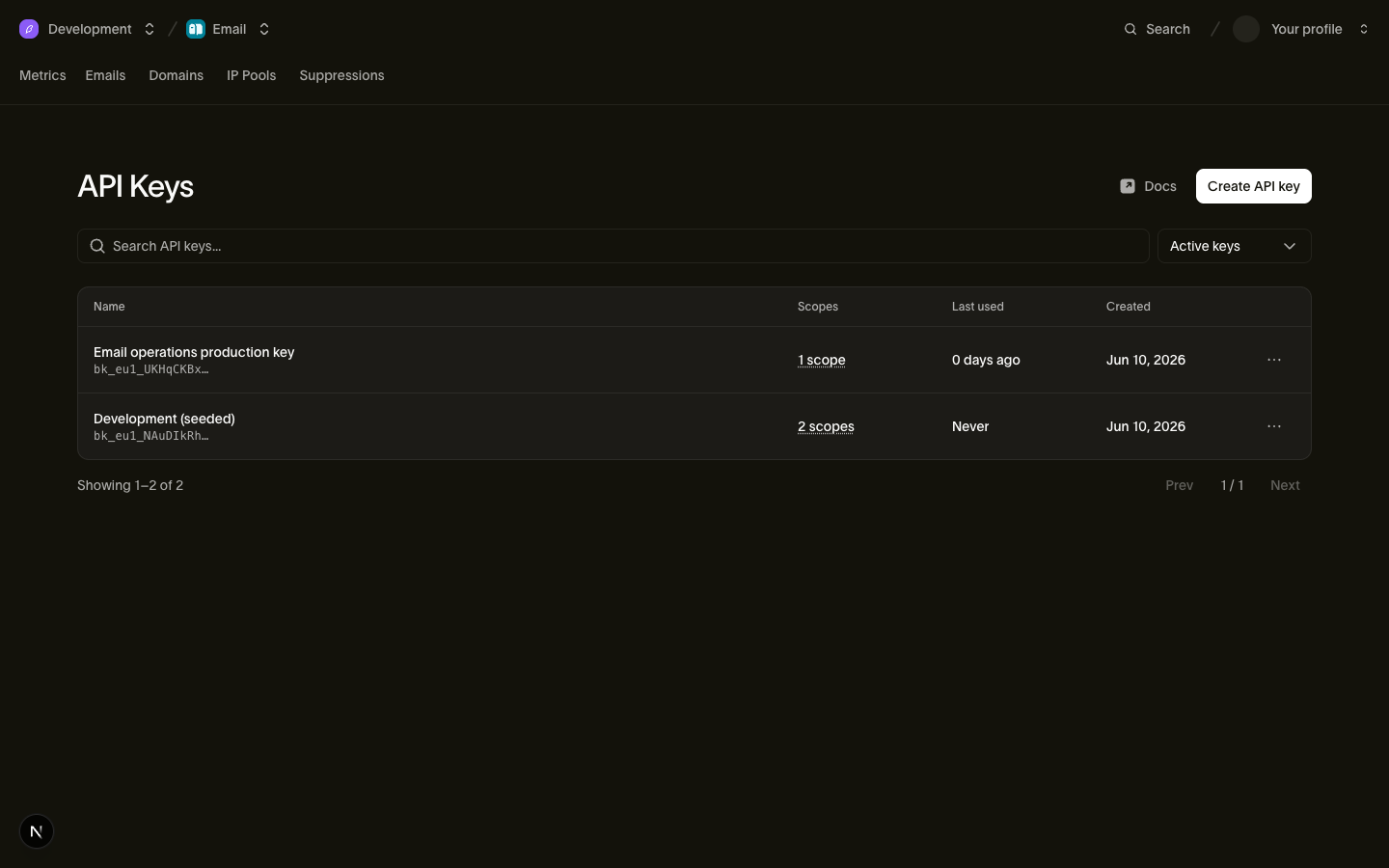
Sie können einen Key nach der Erstellung verwalten:
- Scopes sind bearbeitbar. Beim Bearbeiten wird der Berechtigungssatz ersetzt und das gleiche Secret beibehalten. Sie können Scopes gewähren, die Ihr eigenes Konto besitzt. Wurde der Key erstellt, bevor er eine Berechtigung wie
voiceunterstützen konnte, rotieren Sie ihn, um diese Berechtigung hinzuzufügen. Widerrufene Keys und Keys, die bereits durch Rotation ersetzt wurden, können nicht bearbeitet werden. - Das Ablaufdatum ist fest. Setzen Sie
expires_at, wenn ein Key zu einem bekannten Zeitpunkt aufhören soll zu funktionieren (Engagement eines Auftragnehmers, Migrationsfenster). Nach diesem Zeitpunkt gibt der Key401zurück; ein Key ohne Ablaufdatum lebt, bis er widerrufen wird. - Key-Verwaltung bleibt bei Personen. Das Erstellen, Bearbeiten und Widerrufen von Keys erfordert die
api_keys:write-Berechtigung, die von den Workspace-Rollen Admin und Developer gehalten wird (siehe Benutzer, Teams & Rollen) und niemals einem API-Key selbst gewährt werden kann. Ein kompromittierter Key kann keine weiteren Keys erzeugen.
Die API-Keys-Seite listet jeden Key mit seinem key_prefix, Scopes und last_used_on-Datum (tagesgenau) auf, sodass Sie veraltete Keys auf einen Blick erkennen können. Widerrufene Keys erscheinen nicht in der Liste, es sei denn, Sie wählen, sie anzuzeigen.
Scopes & Levels
Jeder Scope auf einem Key ist ein {scope, level}-Paar, wobei level entweder read oder write ist (write schließt read ein). API-Keys besitzen diese Scopes:
| Scope | read | write |
|---|---|---|
emails | Gesendete Nachrichten und Zustellstatus lesen | E-Mail senden |
email_management | Unterdrückungen, E-Mail-Konfiguration und Templates lesen | Unterdrückungen, E-Mail-Konfiguration und Templates verwalten |
email_marketing | Kontakte, Audiences und Broadcasts lesen | Kontakte, Audiences und Broadcasts verwalten |
domains | Sende-Domains und ihre DNS-Einträge lesen | Sende-Domains hinzufügen, verifizieren und verwalten |
sms | Gesendete SMS und Zustellstatus lesen | SMS senden |
sms_management | Absender, Registrierungen, Unterdrückungen, Keyword-Antworten, Ziele und Templates lesen | Absender, Registrierungen, Unterdrückungen, Keyword-Antworten, Ziele und Templates verwalten |
whatsapp | Gesendete WhatsApp-Nachrichten und Status lesen | WhatsApp-Nachrichten senden |
whatsapp_management | WhatsApp-Templates und -Einstellungen lesen | WhatsApp-Templates und -Einstellungen verwalten |
verify | Verifizierungsstatus lesen | Verifizierungscodes senden und prüfen |
realtime | Realtime-Apps, Channels und Channel-Mitglieder lesen | Apps erstellen und Events publizieren |
voice | Leg-Logs und Anrufstatistiken lesen | SIP-Anrufe authentifizieren und Session-Credentials erstellen |
voice_management | Trunks, Gateways, Nummern, Anrufer-IDs und Ziele lesen | Trunks, Gateways, Nummern, Anrufer-IDs und Ziele verwalten |
mailbox | Postfächer, Threads und Nachrichten lesen | Postfach-Nachrichten senden und beantworten |
mailbox_management | Empfangsregeln und Postfach-Konfiguration lesen | Postfächer und Empfangsregeln erstellen, aktualisieren und löschen |
assets | Assets und Ordner lesen | Assets und Ordner hochladen, aktualisieren und löschen |
compliance | Compliance-Anforderungen, Einreichungen, Anhänge und Unternehmensidentitäten lesen | Registrierungsunterlagen einreichen und korrigieren sowie Anhänge hochladen und löschen |
workspace | Name, Organisations-ID und Einstellungen des Workspace lesen | Nicht verfügbar |
webhooks | Webhook-Subscriptions und ihre Zustellversuche lesen | Webhooks erstellen, aktualisieren, löschen, testen, erneut abspielen und Secret rotieren |
lookup | Nicht verfügbar | Telefonnummern, E-Mail-Adressen und Identitätsübereinstimmungen nachschlagen |
Die Berechtigungen zum Ändern von Workspace-Einstellungen, Verwalten von Mitgliedern, Ausstellen von Keys und Verwalten von IP-Pools lassen sich bewusst nicht an API-Keys vergeben. Diese Aktionen laufen deshalb als Person statt als Key: über das Dashboard oder über den CLI- oder MCP-Server mit einem Grant, der den Scope besitzt. Gewähren Sie den kleinsten Satz, der funktioniert: Ein Key, der nur E-Mails sendet, sollte emails:write besitzen und sonst nichts.
lookup hat keine Read-Level-Operationen: Jeder Lookup-Endpunkt, einschließlich des Abrufens eines vorhandenen Ergebnisses, erfordert write.
Einen Key widerrufen
Widerrufen Sie einen Key aus seiner Zeile unter Platform tools > API-Keys. Der Widerruf ist dauerhaft: Ein widerrufener Key kann nicht reaktiviert werden, und sein Eintrag wird mit gesetztem revoked_at für die Prüfung aufbewahrt.
Der Widerruf wird in der Regel fast sofort wirksam, eine kurze Verzögerung ist jedoch möglich. Sobald er wirksam ist, geben Anfragen mit dem Key 401 zurück.
Einen Key rotieren
Die Rotation stellt einen Ersatz für einen vorhandenen Key aus und gibt dessen token einmal in dieser Antwort zurück. Der Ersatz übernimmt Name, Scopes und Quell-IP-Einschränkungen des Quell-Keys. Er startet ohne Ablaufdatum. Rotieren Sie einen Key aus seiner Zeile unter Platform tools > API-Keys oder ohne Browser mit bird api-keys rotate und dem api_keys_rotate MCP-Tool:
bird auth login --scope api_keys:write
bird api-keys rotate key_01hqz8kp3v9x2m --yes
Der vorherige Key funktioniert noch während einer Übergangsfrist, standardmäßig 24 Stunden, damit Sie den neuen Token deployen können, bevor der alte aufhört zu funktionieren. Wenn der Key offengelegt wurde, übergeben Sie grace_period: 0 (--grace-period 0 in der CLI), um ihn ohne Übergangsfrist zu widerrufen. Ein Key, dessen Ablaufdatum vor dem Ende der Übergangsfrist liegt, behält sein eigenes Ablaufdatum, weil Rotation die Lebensdauer eines Keys nie verlängert.
Bevor Sie die Key-Rotation automatisieren, beachten Sie zwei Einschränkungen. Eine Rotation übernimmt nie ein Ablaufdatum. Der Ersatz für einen Key, der zu einem bekannten Zeitpunkt ablaufen sollte, bleibt daher gültig, bis er widerrufen wird; erstellen Sie ihn mit create neu, wenn das Ablaufdatum wichtig ist. Außerdem kann ein Key nur einmal rotiert werden: Eine zweite Rotation desselben Keys gibt 409 zurück. Senden Sie deshalb einen Idempotency-Key, damit ein erneuter Versuch die ursprüngliche Antwort wiedergibt. Ohne ihn hat eine Rotation, deren Antwort Sie nie erhalten haben, einen aktiven Key erzeugt, dessen Token Sie nicht mehr auslesen können.
Zwei Keys manuell zu überlappen ist immer noch der sicherere Weg, wenn Sie nicht vorhersagen können, wie lange der Wechsel dauert, weil die Übergangsfrist beim Rotieren festgelegt wird und danach nicht verlängert werden kann:
- Erstellen Sie einen neuen Key mit denselben Scopes.
- Deployen Sie den neuen Key in Ihren Diensten.
- Beobachten Sie das
last_used_ondes alten Keys, bis der Traffic umgezogen ist. - Widerrufen Sie den alten Key.
Keys gehören zum Workspace
Ein API-Key ist an Ihren Workspace gebunden und authentifiziert sich mit der Autorität dieses Workspace. Die persönlichen Berechtigungen des Erstellers spielen keine Rolle. Das hat zwei praktische Konsequenzen:
- Keys überleben Abgänge. Wenn ein Mitarbeiter das Unternehmen verlässt und sein Benutzerkonto entfernt wird, funktionieren die von ihm erstellten Keys weiterhin. Sie haben nie einen Produktionsausfall, weil die Person, die "create" geklickt hat, das Unternehmen verlassen hat. (Ihr Abgang ist dennoch ein guter Anlass, Keys zu rotieren, auf die sie Zugriff hatten.)
- Die Reichweite des Keys endet am Workspace. Er kann niemals Operationen auf Organisationsebene ausführen: Abrechnung, Org-Mitglieder, Org-Einstellungen.
Da der Key den Workspace festlegt, benötigen Anfragen mit einem Key keinen zusätzlichen Kontext; siehe Workspace dazu, wie sich der Workspace und die darüberliegende Organisation aufteilen, was Sie erreichen können.
Der delegierte Pfad: OAuth-Tokens für die CLI und den MCP-Server
API-Keys sind für Dienste gedacht. Die Bird CLI und der Bird MCP-Server verwenden OAuth, wenn sich eine Person anmeldet. Sie melden sich über den Browser an, wählen einen Workspace und gewähren einen Teil Ihrer Berechtigungen. Das Tool erhält dann ein kurzlebiges bt_{region}_...-User-Token.
Jedes Token ist auf die Berechtigungen beschränkt, die Sie besitzen. Sie können den Zugriff für jedes Tool unter Profile > Connected apps widerrufen. Die Tools verwalten diese Tokens für Sie. Kopieren Sie sie deshalb nicht und speichern Sie sie nicht in einem Secret-Manager. Verwenden Sie API-Keys für Server-Workloads.
Nächste Schritte
- Authentifizierungsreferenz: Header-Semantik und Fehlerantworten
- Regionen: Regionale Hosts und Routing
- Benutzer, Teams & Rollen: Wer Keys verwalten kann
- Workspace: Der Workspace, an den ein Key gebunden ist
Für Integrationen, die mehrere Workspaces in einer Organisation verwalten, siehe Organization Master Keys. Diese Funktion ist auf Anfrage verfügbar. Wenden Sie sich an Ihren Bird-Ansprechpartner, um sie für Ihre Organisation zu aktivieren.