Dedizierte IPs und Pools
Auf geteilter Infrastruktur verlässt Ihre E-Mail IP-Adressen, die Sie mit anderen Kunden teilen. Wir halten diese IPs gesund, aber Ihre Reputation ist trotzdem mit der aller anderen gebündelt. Eine dedizierte IP ist eine Adresse, von der nur Ihre Organisation sendet, sodass Postfachanbieter Ihren Traffic ausschließlich anhand Ihrer eigenen Erfolgsbilanz bewerten. IP-Pools gruppieren dedizierte IPs in routbare Einheiten, und das Feld ip_pool_id beim Versand wählt den Pool für diese Nachricht.
Sie brauchen niemals dedizierte IPs zum Senden. Jede Organisation startet mit dem Shared Bird.com Pool als Standard, sodass E-Mails ab dem ersten Tag fließen, ohne dass Sie etwas konfigurieren müssen. Dedizierte IPs sind ein kostenpflichtiges Add-on, das sich nur bei konstantem Volumen lohnt. Eine wenig genutzte dedizierte IP baut Reputation langsamer auf, als der Shared Pool sie bereits hat, sodass Absender mit geringem Volumen in der Regel besser mit dem Shared Pool fahren. Verbessert eine dedizierte IP die E-Mail-Zustellbarkeit? erklärt, wie Sendevolumen und Reputation diese Entscheidung beeinflussen.
Zwei Dinge, die Sie vor dem Kauf wissen sollten:
- Neue IPs durchlaufen ein automatisches Warmup, bevor sie volles Volumen verarbeiten können; Überlauf wird in der Zwischenzeit über den Shared Pool geroutet.
- IPs und Pools gehören zu Ihrer Organisation.
Wo Sie sie verwalten
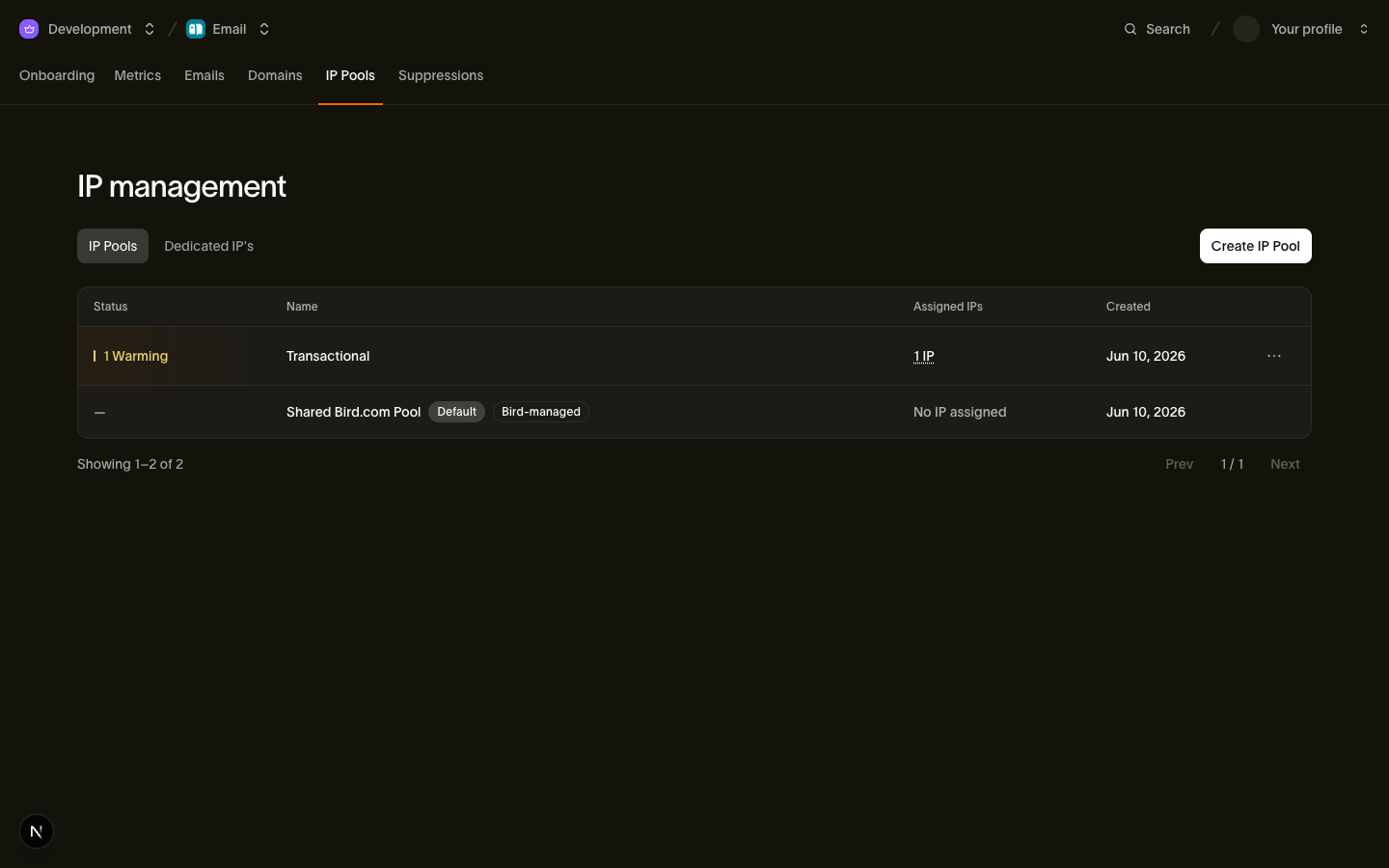
Verwalten Sie Pools und IPs unter Email > IP Pools im Dashboard oder mit den bird email ip-pools- und bird email dedicated-ips-CLI-Befehlen. Diese Operationen erfordern Berechtigungen auf Organisationsebene. Die SDKs enthalten keine typisierten Verwaltungsmethoden. Um eine Nachricht über einen Pool zu routen, setzen Sie ip_pool_id wie in Pool beim Versand auswählen beschrieben.
Eine dedizierte IP kaufen
Kaufen Sie eine IP über den Tab Dedicated IPs oder mit dem CLI:
bird email dedicated-ips create --quantity 1 --ip-pool-id ipp_1btmn1nnkd8y6a4jckbkvvt9eh- Beim ersten Kauf können Sie
--ip-pool-idweglassen: Wir erstellen Ihren ersten Pool mit dem Namen "Dedicated IPs" und provisionieren die IPs hinein. Sobald Ihre Organisation mindestens einen Pool hat, ist das Flag erforderlich; Sie wählen, wo jede neue IP landet. - Jede IP wird als monatliches Abonnement abgerechnet. Wenn Ihr Wallet-Guthaben den Kauf nicht deckt, meldet die Antwort
requires_topup(laden Sie Guthaben auf, um fortzufahren) oderpending_topup(eine Kartenbelastung wird verarbeitet); die IPs werden automatisch provisioniert, sobald die Mittel eingehen. - Käufe sind durch das
email_ip_dedicated_max-Kontingent Ihres Plans begrenzt, und Pools durchemail_ip_pools_max.
Jede provisionierte IP startet im Status warming und wird automatisch hochgefahren; IP-Warmup beschreibt den Zeitplan und wie Sie es überwachen. Das hostname der IP ist ihr Reverse-DNS-Name (PTR), der Name, mit dem sie sich bei empfangenden Mailservern vorstellt; fügen Sie ihn jeder Allowlist hinzu, die nach dem sendenden Hostnamen filtert.
Der Kauf einer IP ändert nicht Ihren Standard-Pool. Der Shared Pool bleibt der Standard, bis Sie ihn explizit umstellen, denn die Weiterleitung Ihres gesamten nicht zugeordneten Traffics auf eine kalte, sich noch aufwärmende IP würde Ihrer Zustellbarkeit schaden.
Eine IP meldet einen von vier Status:
| Status | Bedeutung |
|---|---|
warming | Die IP ist neu und wärmt sich auf. Sie übernimmt einen wachsenden Anteil Ihres Traffics; der Rest fließt über den Shared Pool. |
active | Warmup abgeschlossen. Die IP verarbeitet volles Volumen. |
suspended | Die IP ist vorübergehend gesperrt. |
pending_cancellation | Sie haben die IP gekündigt. Sie sendet weiter bis zum Ende des bereits bezahlten Abrechnungszeitraums, zählt aber nicht mehr, wenn die Standard-Pool-Regeln den Pool auswerten. |
IP-Pools
Pools trennen Sendeströme: Ein typisches Setup ist ein Pool für transaktionale E-Mails und ein weiterer für Marketing, damit die Reputation einer Kampagne niemals Ihre Passwort-Zurücksetzungen berührt. Pools können kostenlos erstellt werden, bis zum email_ip_pools_max-Kontingent Ihres Plans.
bird email ip-pools create Transactional{
"created_at": "2026-07-23T14:48:28Z",
"id": "ipp_01ky7q6288fqnsghxyem91ryjv",
"ips": [],
"is_default": false,
"name": "Transactional",
"organization_id": "org_01ky7m21hjffg9pxj5xz6nx6ew",
"protected": false,
"updated_at": "2026-07-23T14:48:28Z"
}Pools werden immer als Nicht-Standard und leer erstellt. Sie füllen sie, indem Sie direkt hinein kaufen (--ip-pool-id beim Kauf) oder vorhandene IPs verschieben. Das Auslesen eines Pools gibt seine enthaltenen IPs vollständig zurück:
bird email ip-pools get ipp_1btmn1nnkd8y6a4jckbkvvt9eh{
"created_at": "2026-06-29T13:56:39Z",
"id": "ipp_1btmn1nnkd8y6a4jckbkvvt9eh",
"ips": [
{
"address": "198.51.100.21",
"created_at": "2026-06-29T13:56:39Z",
"hostname": "mta1.send.goldcrest.dev",
"id": "dip_5g8r8h31kr8cz8zp1p4s837r4m",
"ip_pool_id": "ipp_1btmn1nnkd8y6a4jckbkvvt9eh",
"organization_id": "org_01ky7m235keybaf72b0fdgfwj4",
"purchased_at": "2026-06-29T13:56:39Z",
"status": "active",
"updated_at": "2026-07-23T13:56:39Z",
"warmup_completed_at": "2026-07-15T13:56:39Z",
"warmup_progress": 100,
"warmup_started_at": "2026-06-29T13:56:39Z"
}
],
"is_default": false,
"name": "Goldcrest Pool",
"organization_id": "org_01ky7m235keybaf72b0fdgfwj4",
"protected": false,
"updated_at": "2026-07-23T13:56:39Z"
}Pools gehören zur Organisation. Das hostname jeder IP wird beim Provisionieren automatisch zugewiesen; behandeln Sie es als Information, nicht als etwas, das Sie konfigurieren.
Ihre Pool-Liste enthält immer den Shared Bird.com Pool, markiert mit protected: true. Er erscheint wie jeder andere mit einer Pool-ID, und der reservierte Alias ipp_shared wird überall dort aufgelöst, wo eine Pool-ID akzeptiert wird. Schutz bedeutet, dass wir ihn verwalten: Er kann nicht umbenannt oder gelöscht werden, er kann keine dedizierten IPs enthalten, und er wird nicht auf Ihr Pool-Kontingent angerechnet. Das Einzige, was Sie daran ändern können, ist, ob er der Standard ist.
Eine IP zwischen Pools verschieben
Eine dedizierte IP befindet sich immer in genau einem Pool, ohne nicht zugewiesenen Zustand. Das Verschieben ist eine einzelne Zuweisung:
bird email dedicated-ips assign dip_5g8r8h31kr8cz8zp1p4s837r4m --ip-pool-id ipp_01ky7q6288fqnsghxyem91ryjvDer Shared Pool ist kein gültiges Ziel: Dedizierte IPs befinden sich nur in Ihren eigenen Pools.
Einen Pool löschen
Nur leere Pools können gelöscht werden. Das Löschen eines Pools, der noch IPs enthält, wird mit einem 409 abgelehnt; verschieben oder kündigen Sie seine IPs zuerst. Der Standard-Pool kann überhaupt nicht gelöscht werden; bestimmen Sie vorher einen anderen Standard.
bird email ip-pools delete ipp_01ky7q6288fqnsghxyem91ryjvDer Standard-Pool
Wenn ein Versand keinen Pool angibt, verwenden wir Ihren Standard-Pool. Die Regeln dafür sind streng, weil der Standard jeden Versand verarbeiten muss, der keinen Pool wählt:
- Genau ein Pool ist immer der Standard. Der Shared Pool ist der anfängliche Standard, sodass dies ab dem ersten Tag gilt.
- Der Standard wird verschoben, nie gelöscht. Ändern Sie ihn, indem Sie einen anderen Pool zum Standard machen. Das schaltet den bisherigen Standard im selben Moment ab, sodass es zu jedem Zeitpunkt genau einen Standard gibt. Das Abschalten von
is_defaultbeim aktuellen Standard wird mit einem422abgelehnt; um zum Shared Routing zurückzukehren, machen Sie stattdessen den Shared Pool zum Standard:
bird email ip-pools update ipp_shared --is-default- Ein dedizierter Pool braucht mindestens eine IP, die nicht ausläuft, um Standard werden zu können. Eine
warming-IP zählt; eine IP im Statuspending_cancellationnicht. Ihr Standard kann nie ausschließlich durch IPs gestützt werden, die auslaufen. Der Shared Pool ist davon ausgenommen und ist immer ein gültiger Standard. - Die letzte verbleibende IP kann den Standard-Pool nicht verlassen. Solange ein Pool die Standard-Bezeichnung trägt, kann seine letzte IP weder gekündigt noch verschoben werden; wechseln Sie zuerst den Standard und leeren Sie dann den Pool.
Zusammen stellen diese Regeln sicher, dass Ihr Standard-Pool immer etwas hat, womit er senden kann.
Pool beim Versand auswählen
Routing ist der Teil dieses Features, der in der öffentlichen API lebt. Wählen Sie einen Pool pro Nachricht mit dem optionalen Feld ip_pool_id bei POST /v1/email/messages:
await bird.email.send({
  from: "noreply@yourdomain.com",
  to: ["delivered@messagebird.dev"],
  subject: "Your receipt",
  html: "<p>Thanks for your order.</p>",
  ip_pool_id: "ipp_1btmn1nnkd8y6a4jckbkvvt9eh",
});client.email.send(
from_="noreply@yourdomain.com",
to=["delivered@messagebird.dev"],
subject="Your receipt",
html="<p>Thanks for your order.</p>",
ip_pool_id="ipp_1btmn1nnkd8y6a4jckbkvvt9eh",
)_, err := client.Email.Send(context.Background(), bird.EmailSendParams{
From: "noreply@yourdomain.com",
To: []string{"delivered@messagebird.dev"},
Subject: "Your receipt",
HTML: "<p>Thanks for your order.</p>",
IpPoolId: "ipp_1btmn1nnkd8y6a4jckbkvvt9eh",
})$bird->email->send(
from: 'noreply@yourdomain.com',
to: ['delivered@messagebird.dev'],
subject: 'Your receipt',
html: '<p>Thanks for your order.</p>',
ipPoolId: 'ipp_1btmn1nnkd8y6a4jckbkvvt9eh',
);bird email send \
--from noreply@yourdomain.com \
--html '<p>Thanks for your order.</p>' \
--ip-pool-id ipp_1btmn1nnkd8y6a4jckbkvvt9eh \
--subject 'Your receipt' \
--to delivered@messagebird.devcurl -X POST https://us1.platform.bird.com/v1/email/messages \
-H "Authorization: Bearer $BIRD_API_KEY" \
-H "Content-Type: application/json" \
-d '{
"from": "noreply@yourdomain.com",
"to": ["delivered@messagebird.dev"],
"subject": "Your receipt",
"html": "<p>Thanks for your order.</p>",
"ip_pool_id": "ipp_1btmn1nnkd8y6a4jckbkvvt9eh"
}'Die Auflösung funktioniert so:
ip_pool_idweggelassen: Der Versand verwendet Ihren Standard-Pool.ip_pool_id: "ipp_shared": Der Versand wird über den Shared Pool geroutet, unabhängig von Ihrem Standard. Nützlich, um einen unkritischen Strom auf geteilter Infrastruktur zu halten, während ein dedizierter Pool Ihr Standard ist.ip_pool_idauf eine Ihrer Pool-IDs gesetzt: Der Versand geht über diesen Pool.
Ein Wert, der unbekannt ist, zu einer anderen Organisation gehört oder einen Pool ohne verfügbare IPs benennt, wird mit einem 422 abgelehnt. Wir routen eine explizite Pool-Auswahl nicht auf geteilte Infrastruktur um.
Eine dedizierte IP kündigen
Die Kündigung erfolgt in zwei Phasen. Das Kündigen plant die Entfernung, statt die IP sofort zu entfernen:
bird email dedicated-ips delete dip_5g8r8h31kr8cz8zp1p4s837r4mDie IP wechselt in den Status pending_cancellation und erhält einen cancels_at-Zeitstempel, das Ende des bereits bezahlten Abrechnungszeitraums. Bis cancels_at sendet sie weiter als Teil ihres Pools; danach deprovisionieren wir sie innerhalb einer Stunde. Das Kündigen einer bereits ausstehenden IP hat keine weitere Wirkung.
Planen Sie die eine unmittelbare Konsequenz ein: Eine pending_cancellation-IP zählt sofort nicht mehr für die Standard-Pool-Regeln. Und der Standard-Pool-Schutz gilt weiterhin: Die letzte IP im Standard-Pool kann nicht gekündigt werden; verschieben Sie den Standard (zum Shared Pool oder einem anderen Pool) zuerst.
Nächste Schritte
- IP-Warmup: Wie neue dedizierte IPs auf volles Volumen hochfahren und wann Sie Ihren Standard umstellen
- E-Mail senden: Die vollständige Sendeanfrage, einschließlich
ip_pool_id - Zustellbarkeit · E-Mail: Das Reputationsmodell, in das sich dedizierte IPs einfügen
- Eine dedizierte IP kaufen: Ein Video, das eine IP im Dashboard kauft und den Start des Warmups zeigt
Verwandte Ressourcen
Weiter mit der Dokumentation, Anleitungen und Beispielen zu diesem Thema.