Configuration par pays
Lorsque vous vérifiez un numéro de téléphone, le pays de destination détermine comment le code est acheminé : quels canaux sont disponibles, lequel est essayé en premier, si la vérification est autorisée, et quelle langue le message utilise par défaut. La page Countries vous permet de gérer tout cela, une ligne par pays. Les destinataires uniquement par e-mail ne sont pas concernés : une adresse e-mail n'a pas de pays, donc la configuration par pays s'applique aux vérifications dont le destinataire inclut un numéro de téléphone.
Chaque pays est activé avec le routage plateforme de Bird par défaut. Utilisez cette page pour désactiver les pays que vous ne desservez pas, réordonner les canaux ou associer un expéditeur par pays. Désactiver les destinations inutilisées réduit aussi l'exposition au SMS pumping.
La page Countries
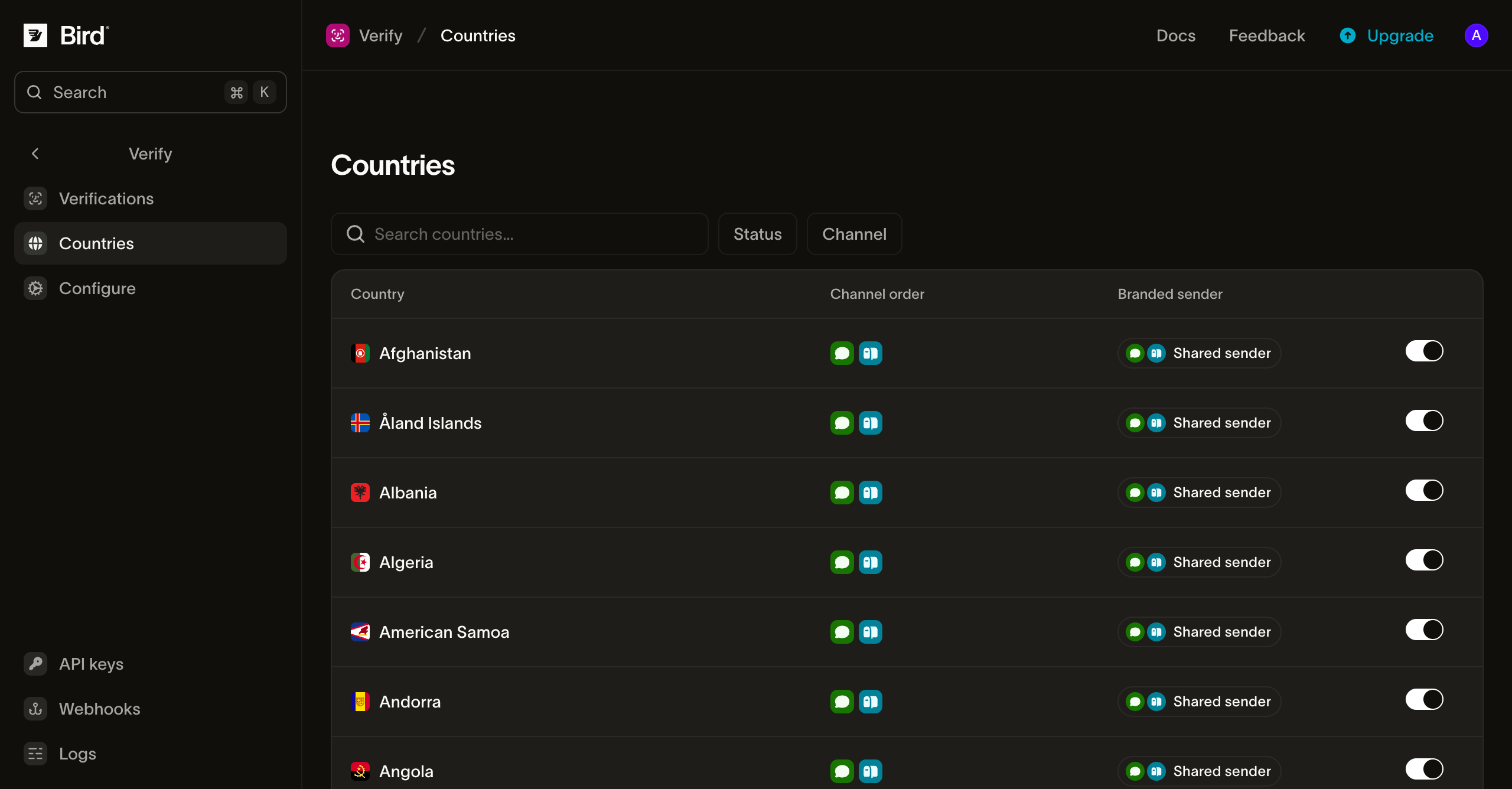
Chaque ligne affiche le pays, son ordre de canaux effectif, l'expéditeur utilisé par chaque canal et un bouton d'activation/désactivation. Filtrez par statut ou canal, ou recherchez par nom de pays. Un pays désactivé affiche toujours son ordre de canaux grisé, pour que vous puissiez voir ce que la réactivation rétablit.
Le bouton active ou désactive le pays entier. Si un destinataire inclut un numéro de téléphone dans un pays désactivé, la vérification ne résout aucun canal et la création échoue avec 422. Une adresse e-mail sur le même destinataire ne contourne pas le blocage. La réactivation supprime le verrouillage de désactivation au lieu de verrouiller sur "on", de sorte que le pays suit le routage plateforme de Bird. Les associations d'ordre de canaux et d'expéditeur survivent au basculement.
Routage par pays
Cliquez sur une ligne pour ouvrir le panneau de routage du pays :
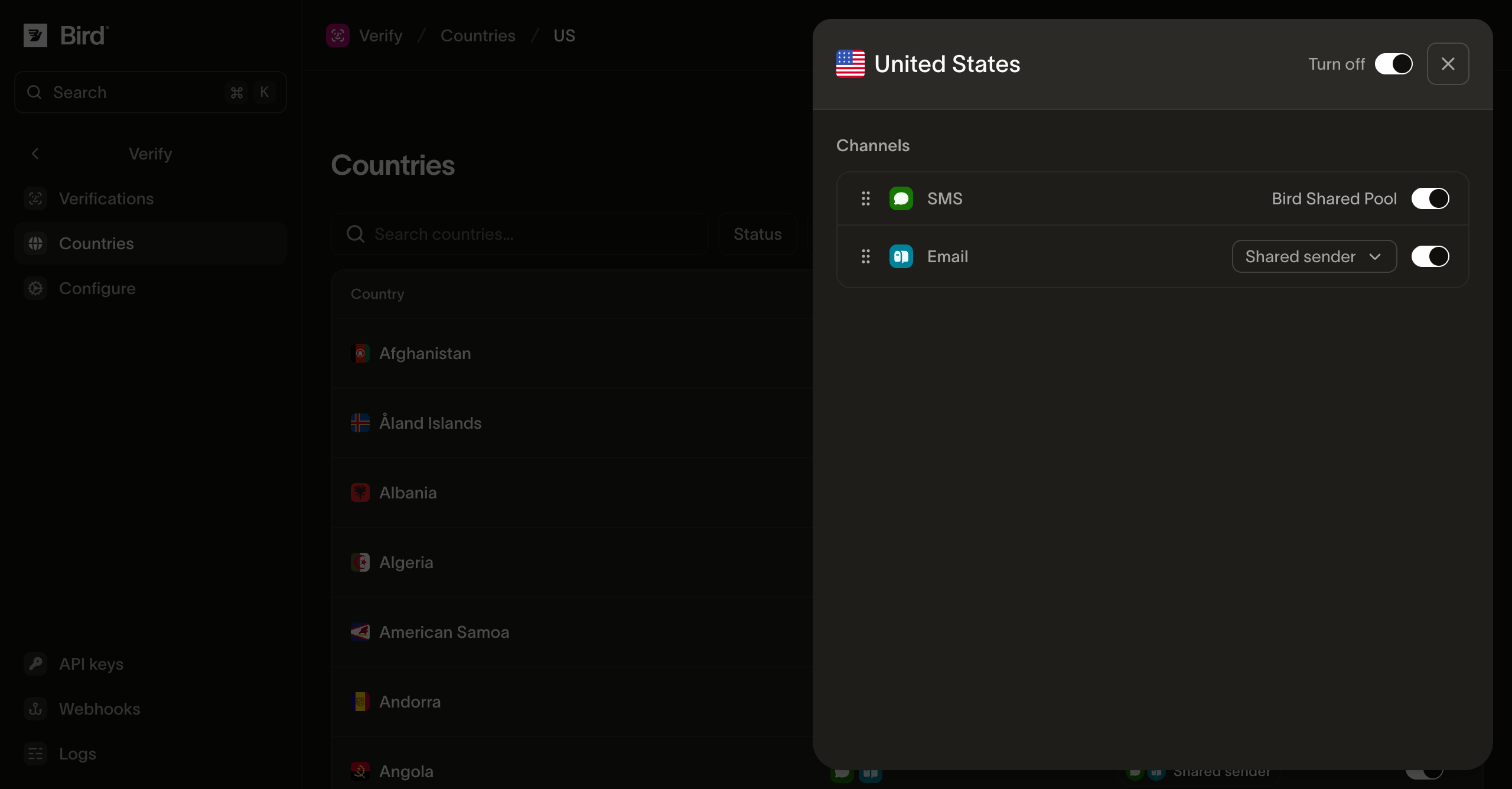
- Ordre des canaux : glissez les canaux pour définir l'ordre dans lequel Bird les essaie pour ce pays, par exemple SMS avant WhatsApp. Une vérification parcourt la liste jusqu'à ce qu'un envoi réussisse.
- Activation par canal : désactivez un canal individuel sans désactiver le pays. Les canaux que Bird n'a pas rendus disponibles dans un pays ne peuvent pas être activés ; la plateforme fixe ce plafond par pays.
- Expéditeur par canal : choisissez l'expéditeur pour l'e-mail, SMS ou WhatsApp dans ce pays. Héritez de la valeur par défaut de votre configuration, choisissez une identité gérée par Bird, ou utilisez votre domaine e-mail vérifié, un Sender ID SMS, ou un numéro WhatsApp connecté avec un modèle d'authentification approuvé. Un choix par pays l'emporte sur la valeur par défaut de la configuration. Un Sender ID SMS propre à un pays n'utilise pas le fallback d'expéditeur par défaut.
Où WhatsApp ne peut pas acheminer un code de vérification
L'expéditeur WhatsApp partagé de Bird ne distribue pas de codes de vérification vers le Bangladesh, l'Égypte, l'Inde, l'Indonésie, l'Irak, le Kazakhstan, le Koweït, la Malaisie, le Maroc, le Népal, le Nigéria, Oman, le Pakistan, l'Arabie saoudite, l'Afrique du Sud, le Sri Lanka, l'Ukraine ou les Émirats arabes unis. WhatsApp apparaît toujours dans l'ordre des canaux de ces pays et vous pouvez toujours le placer en tête, mais l'envoi est refusé lorsque Verify atteint ce canal, et la vérification continue dans la liste.
La tentative refusée est enregistrée comme tout autre échec, avec la raison channel_restricted, de sorte qu'un événement verify.attempt.undelivered indique pourquoi WhatsApp n'a pas distribué le message. Voir Événements et webhooks.
Gardez au moins un autre canal activé dans ces pays. Une vérification dont le seul canal est WhatsApp n'a aucune alternative, et la création échoue avec 422.
Pourquoi désactiver un pays
Les schémas de SMS pumping déclenchent des envois de codes de vérification vers des numéros dans des pays que votre entreprise ne dessert pas, consommant le solde de votre portefeuille. Si votre produit dessert un ensemble connu de marchés, désactivez les autres. Les plafonds de la plateforme de Verify offrent une limite supplémentaire, mais un pays désactivé ne peut pas engendrer de frais de distribution.
Étapes suivantes
| Page | Contenu |
|---|---|
| Expéditeurs et personnalisation | Expéditeurs partagés et personnalisés, et apparence des messages de code |
| Envoi de vérifications | Les appels d'envoi et de vérification, les surcharges de canal par requête et les limites |
| Présentation de Verify | Le plan de la section et le fonctionnement d'une vérification |
Ressources associées
Poursuivez avec la documentation, les guides et les exemples sur ce sujet.