Authentification et clés API
Chaque requête programmatique vers l'Bird API s'authentifie avec une clé API transmise comme jeton bearer. Les clés appartiennent à un espace de travail, portent des permissions que vous pouvez modifier, et ne sont affichées en intégralité qu'une seule fois.
Pour la distinction entre identifiants de service et accès délégué, voir Clés API et jetons OAuth.
Comment les requêtes s'authentifient
Transmettez votre clé dans l'en-tête Authorization à chaque requête. Les SDK et le CLI prennent la clé une seule fois et définissent l'en-tête pour vous :
import { BirdClient } from "@messagebird/sdk";

const bird = new BirdClient({ apiKey: process.env.BIRD_API_KEY! });

await bird.email.send({
  from: "hello@yourdomain.com",
  to: ["delivered@messagebird.dev"],
  subject: "Hi",
  text: "Hello.",
});
import os
from bird import Bird
client = Bird(api_key=os.environ["BIRD_API_KEY"])
client.email.send(
from_="hello@yourdomain.com",
to=["delivered@messagebird.dev"],
subject="Hi",
text="Hello.",
)client, err := bird.NewClient(option.WithAPIKey(os.Getenv("BIRD_API_KEY")))
if err != nil {
log.Fatal(err)
}
_, err = client.Email.Send(context.Background(), bird.EmailSendParams{
From: "hello@yourdomain.com",
To: []string{"delivered@messagebird.dev"},
Subject: "Hi",
Text: "Hello.",
})use MessageBird\Bird;
$bird = new Bird(getenv('BIRD_API_KEY') ?: '');
$bird->email->send(
from: 'hello@yourdomain.com',
to: ['delivered@messagebird.dev'],
subject: 'Hi',
text: 'Hello.',
);export BIRD_API_KEY="bk_us1_..."
bird email send \
--from hello@yourdomain.com \
--to delivered@messagebird.dev \
--subject Hi \
--text Hello.curl -X POST https://us1.platform.bird.com/v1/email/messages \
-H "Authorization: Bearer $BIRD_API_KEY" \
-H "Content-Type: application/json" \
-d '{ "from": "hello@yourdomain.com", "to": ["delivered@messagebird.dev"], "subject": "Hi", "text": "Hello." }'La région dans le préfixe de la clé vous indique quel hôte appeler : les clés bk_us1_... vont vers https://us1.platform.bird.com, les clés bk_eu1_... vers https://eu1.platform.bird.com. Les SDK officiels Bird et le CLI lisent la région depuis la clé et sélectionnent l'hôte pour vous. Une clé envoyée au mauvais hôte régional renvoie 421 (type misdirected_error) ; voir Régions.
Une clé manquante ou invalide renvoie 401. Une clé valide qui ne possède pas la permission requise par un endpoint renvoie 403. La sémantique des en-têtes et les réponses d'erreur se trouvent dans la référence d'authentification.
Anatomie d'une clé
bk_us1_Ab3xKq9mP2wR5tY8uI1oL4n3A3aww
└┬┘└┬┘ └──────────┬──────────┘└─┬──┘
 │  │          payload      checksum
 │  └ region (routes the request)
└ Bird key prefix- Préfixe :
bk_{region}_nomme le type d'identifiant et sa région. Le préfixe fixe et distinctif permet aux scanners de secrets de reconnaître une clé Bird dans le code, et le segment de région dirige votre requête vers le bon hôte. - Charge utile : 23 caractères aléatoires portant 136 bits d'entropie.
- Somme de contrôle : les 6 derniers caractères sont une somme de contrôle du reste de la clé, de sorte qu'un SDK ou le API peut rejeter immédiatement une clé mal saisie ou tronquée, avant même de la rechercher.
La clé complète n'est renvoyée qu'une seule fois, dans la réponse qui la crée. Vous ne pouvez pas récupérer le texte en clair par la suite. Les réponses suivantes incluent les 15 premiers caractères sous la forme key_prefix, par exemple bk_us1_Ab3xKq9m. Elles incluent également un fingerprint stable de 12 caractères pour identifier une clé dans les journaux et les échanges avec le support sans exposer sa valeur.
Si vous perdez une clé, effectuez une rotation pour obtenir un nouveau secret, ou révoquez-la et créez-en une nouvelle.
Créer une clé
Créez des clés dans le tableau de bord sous Platform tools > Clés API. Une clé est créée avec un nom, une ou plusieurs portées, et une expiration facultative. La réponse qui la crée est la seule à contenir le champ token (la clé complète) : stockez-la immédiatement dans votre gestionnaire de secrets.
Vous pouvez aussi en créer une sans navigateur, avec bird api-keys create. L'émission de clés nécessite la portée api_keys:write, que la connexion en lecture seule par défaut n'inclut pas ; demandez-la lors de la connexion :
bird auth login --scope api_keys:write
bird api-keys create --body-file - <<'JSON'
{
  "name": "Email operations production key",
  "scopes": [{ "scope": "emails", "level": "write" }]
}
JSON
Exécutez bird api-keys create --example pour afficher un corps de requête complet à modifier.
Les portées sont la seule chose qu'une clé ne peut pas s'accorder elle-même : api_keys:write n'est pas disponible pour les clés API, donc une clé ne peut jamais émettre une autre clé. L'émission s'exécute en votre nom, via une session du tableau de bord ou un grant CLI ou MCP.
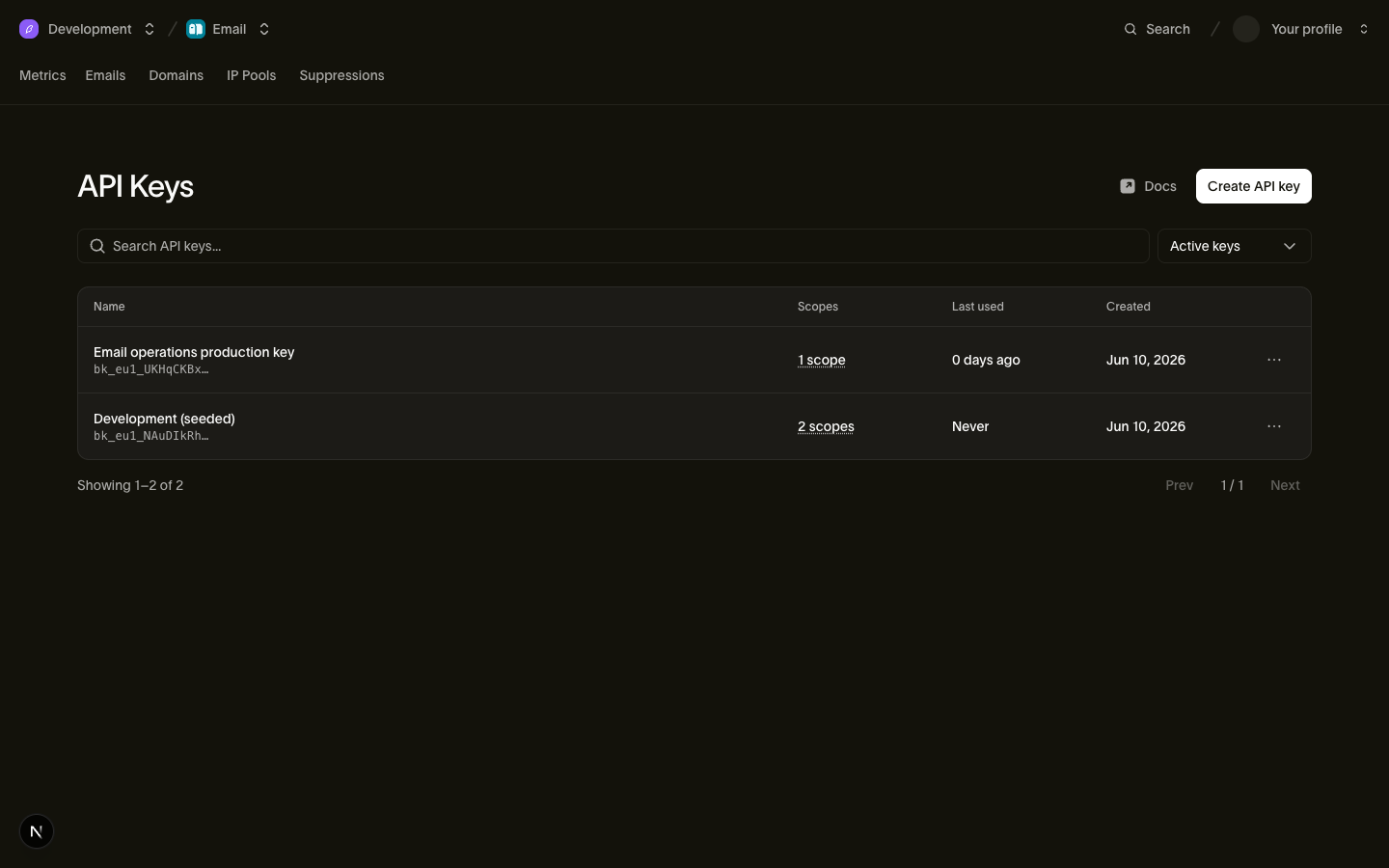
Vous pouvez gérer une clé après l'avoir créée :
- Les portées sont modifiables. La modification remplace l'ensemble de permissions et conserve le même secret. Vous pouvez accorder les portées détenues par votre propre compte. Si la clé a été créée avant de pouvoir prendre en charge une permission telle que
voice, effectuez une rotation pour ajouter cette permission. Les clés révoquées et les clés déjà remplacées par rotation ne peuvent pas être modifiées. - L'expiration est fixe. Définissez
expires_atlorsqu'une clé doit cesser de fonctionner à un moment connu (engagement d'un prestataire, fenêtre de migration). Passé ce moment, la clé renvoie401; une clé sans expiration reste active jusqu'à sa révocation. - La gestion des clés reste entre les mains des personnes. Créer, modifier et révoquer des clés nécessite la permission
api_keys:write, détenue par les rôles administrateur et développeur de l'espace de travail (voir Utilisateurs, équipes et rôles) et jamais accordable à une clé API elle-même. Une clé compromise ne peut pas créer d'autres clés.
La page des clés API liste chaque clé avec son key_prefix, ses portées et sa date de last_used_on (précision au jour), pour que vous puissiez repérer les clés inutilisées en un coup d'œil. Les clés révoquées n'apparaissent pas dans la liste, sauf si vous choisissez de les afficher.
Portées et niveaux
Chaque portée d'une clé est une paire {scope, level}, où level est read ou write (write inclut read). Les clés API détiennent ces portées :
| Portée | read | write |
|---|---|---|
emails | Lire les messages envoyés et le statut de livraison | Envoyer des e-mails |
email_management | Lire les suppressions, la configuration e-mail et les modèles | Gérer les suppressions, la configuration e-mail et les modèles |
email_marketing | Lire les contacts, les audiences et les diffusions | Gérer les contacts, les audiences et les diffusions |
domains | Lire les domaines d'envoi et leurs enregistrements DNS | Ajouter, vérifier et gérer les domaines d'envoi |
sms | Lire les SMS envoyés et le statut de livraison | Envoyer des SMS |
sms_management | Lire les expéditeurs, les inscriptions, les suppressions, les réponses par mot-clé, les destinations et les modèles | Gérer les expéditeurs, les inscriptions, les suppressions, les réponses par mot-clé, les destinations et les modèles |
whatsapp | Lire les messages WhatsApp envoyés et leur statut | Envoyer des messages WhatsApp |
whatsapp_management | Lire les modèles et paramètres WhatsApp | Gérer les modèles et paramètres WhatsApp |
verify | Lire le statut de vérification | Envoyer et vérifier des codes de vérification |
realtime | Lire les applications Realtime, les canaux et les membres de canaux | Créer des applications et publier des événements |
voice | Lire les journaux de segments d'appel et les statistiques d'appel | Authentifier les appels SIP et créer des identifiants de session |
voice_management | Lire les trunks, passerelles, numéros, identifiants d'appelant et destinations | Gérer les trunks, passerelles, numéros, identifiants d'appelant et destinations |
mailbox | Lire les boîtes aux lettres, les fils de discussion et les messages | Envoyer des messages et répondre aux messages de la boîte aux lettres |
mailbox_management | Lire les règles de réception et la configuration des boîtes aux lettres | Créer, mettre à jour et supprimer des boîtes aux lettres et des règles de réception |
assets | Lire les ressources et les dossiers | Téléverser, mettre à jour et supprimer des ressources et des dossiers |
workspace | Lire le nom, l'identifiant d'organisation et les paramètres de l'espace de travail | Non disponible |
webhooks | Lire les abonnements webhook et leurs tentatives de livraison | Créer, mettre à jour, supprimer, tester, rejouer et effectuer la rotation du secret d'un webhook |
lookup | Non disponible | Rechercher des numéros de téléphone, des adresses e-mail et des correspondances d'identité |
La modification des paramètres de l'espace de travail, la gestion des membres, l'émission de clés et la gestion des pools d'IP ne sont délibérément pas accordables aux clés API, de sorte qu'elles s'exécutent en tant que personne et non en tant que clé : via le tableau de bord, ou via le CLI ou le serveur MCP avec un grant détenant la portée. Accordez l'ensemble le plus restreint possible : une clé qui ne fait qu'envoyer des e-mails ne devrait détenir que emails:write et rien d'autre.
lookup n'a pas d'opérations en lecture : chaque endpoint de consultation, y compris la récupération d'un résultat existant, nécessite write.
Révoquer une clé
Révoquez une clé depuis sa ligne sous Platform tools > Clés API. La révocation est permanente : une clé révoquée ne peut pas être réactivée, et son enregistrement est conservé pour audit avec revoked_at défini.
La révocation se propage rapidement, mais pas instantanément. La validation des clés passe par un cache de courte durée, de sorte qu'une clé fraîchement révoquée peut continuer à fonctionner pendant quelques secondes (cinq au maximum) avant que chaque requête l'utilisant ne renvoie 401.
Rotation d'une clé
La rotation émet un remplacement pour une clé que vous possédez déjà et renvoie son token une seule fois, dans cette réponse. Le remplacement reprend le nom, les portées et les restrictions d'IP source de la clé d'origine. Il démarre sans expiration. Effectuez la rotation d'une clé depuis sa ligne sous Platform tools > Clés API, ou sans navigateur avec bird api-keys rotate et l'outil api_keys_rotate MCP :
bird auth login --scope api_keys:write
bird api-keys rotate key_01hqz8kp3v9x2m --yes
La clé précédente continue de fonctionner pendant une période de grâce, 24 heures par défaut, pour que vous puissiez déployer le nouveau jeton avant que l'ancien ne cesse de fonctionner. Passez grace_period: 0 (--grace-period 0 sur le CLI) pour révoquer immédiatement la clé précédente, ce qui est la marche à suivre pour une clé compromise : il n'y a pas de chevauchement, et chaque requête qui l'utilise encore commence à échouer. Une clé dont l'expiration est antérieure à la période de grâce conserve sa propre expiration, car la rotation ne prolonge jamais la durée de vie d'une clé.
Avant d'automatiser la rotation des clés, notez deux contraintes. Une rotation ne reporte jamais l'expiration : le remplacement d'une clé qui expirait à une date connue vit jusqu'à sa révocation ; recréez-la avec create quand l'expiration compte. De plus, une clé ne peut être tournée qu'une seule fois : une seconde rotation de la même clé renvoie 409, envoyez donc un Idempotency-Key pour qu'une nouvelle tentative rejoue la réponse d'origine. Sans cela, une rotation dont vous n'avez jamais reçu la réponse a créé une clé active dont vous ne pouvez pas relire le jeton.
Faire coexister deux clés manuellement reste le chemin le plus sûr lorsque vous ne pouvez pas prévoir la durée de la bascule, car la période de grâce est fixée au moment de la rotation et ne peut pas être prolongée ensuite :
- Créez une nouvelle clé avec les mêmes portées.
- Déployez la nouvelle clé sur vos services.
- Surveillez le
last_used_onde l'ancienne clé jusqu'à ce que le trafic ait basculé. - Révoquez l'ancienne clé.
Les clés appartiennent à l'espace de travail
Une clé API est liée à votre espace de travail et s'authentifie avec l'autorité de cet espace de travail. Les permissions personnelles du créateur n'ont aucun effet. Cela a deux conséquences pratiques :
- Les clés survivent aux départs. Lorsqu'un employé quitte l'entreprise et que son compte utilisateur est supprimé, les clés qu'il a créées continuent de fonctionner. Vous n'avez jamais de panne de production parce que la personne qui a cliqué sur "create" a quitté l'entreprise. (Son départ reste toutefois un bon signal pour effectuer la rotation des clés auxquelles elle avait accès.)
- La portée de la clé s'arrête à l'espace de travail. Elle ne peut jamais effectuer d'opérations au niveau de l'organisation : facturation, membres de l'organisation, paramètres de l'organisation.
Parce que la clé est attachée à l'espace de travail, les requêtes avec une clé n'ont besoin d'aucun contexte supplémentaire ; voir Espace de travail pour savoir comment l'espace de travail et l'organisation au-dessus de lui répartissent ce que vous pouvez atteindre.
Le chemin délégué : jetons OAuth pour le CLI et le serveur MCP
Les clés API sont destinées aux services. Le Bird CLI et le serveur Bird MCP utilisent OAuth lorsqu'une personne se connecte. Vous vous connectez via le navigateur, choisissez un espace de travail et accordez un sous-ensemble de vos permissions. L'outil reçoit alors un jeton utilisateur bt_{region}_... de courte durée.
Chaque jeton est limité aux permissions que vous détenez. Vous pouvez révoquer l'accès de chaque outil sous Profile > Connected apps. Les outils gèrent ces jetons pour vous ; ne les copiez pas et ne les stockez pas dans un gestionnaire de secrets. Utilisez les clés API pour les charges de travail serveur.
Étapes suivantes
- Référence d'authentification : sémantique des en-têtes de requête et réponses d'erreur
- Régions : hôtes régionaux et routage
- Utilisateurs, équipes et rôles : qui peut gérer les clés
- Espace de travail : l'espace de travail auquel une clé est liée