Expéditeurs et image de marque
Chaque code Verify parvient à votre utilisateur sous forme d'e-mail, de SMS, de WhatsApp ou de message Telegram. Pour l'e-mail, les SMS et les WhatsApp, choisissez une identité gérée par Bird, Bird Verify ou Authifly, ou utilisez un expéditeur appartenant à votre espace de travail. Telegram utilise son propre compte de notification vérifié et ne propose aucun expéditeur à sélectionner.
Les exemples de cette page montrent les versions anglaises des messages de Bird. Les e-mails, les SMS et les messages WhatsApp partagés de Bird sont disponibles en 40 traductions, choisies par vérification à partir du numéro de téléphone du destinataire ou de votre options.language. Votre propre modèle WhatsApp fournit ses propres langues approuvées et sa propre formulation. Voir Langue du message.
Les expéditeurs se trouvent dans l'onglet Channels de la page Configure, une ligne par canal :
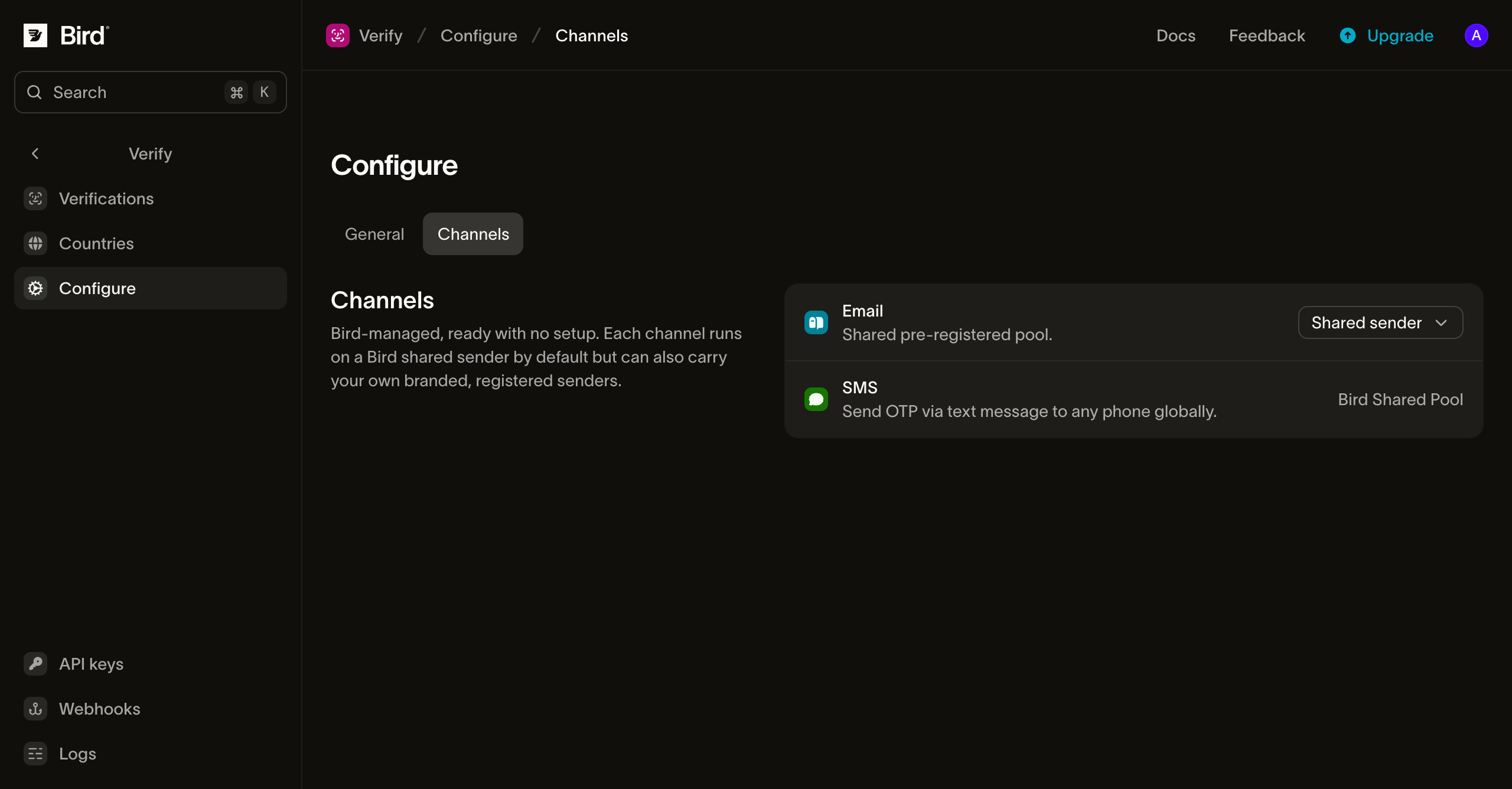
D'où proviennent vos codes
L'e-mail, les SMS et les WhatsApp offrent les choix d'expéditeur suivants :
- Bird Verify est l'option par défaut et ne nécessite aucune configuration. Les codes sont envoyés sous l'identité propre de Bird.
- Authifly est la marque de vérification indépendante de Bird. Les codes sont envoyés sous Authifly à la place, de sorte qu'aucun éditeur de plateforme n'apparaît devant vos utilisateurs. Un destinataire qui fait une recherche trouve authifly.com, qui explique qu'Authifly livre des codes à usage unique pour le compte d'une entreprise.
- Votre propre expéditeur est un domaine d'envoi vérifié pour l'e-mail, un Sender ID d'espace de travail existant pour les SMS, ou un numéro d'espace de travail connecté associé à un modèle d'authentification approuvé pour les WhatsApp. Voir Expéditeur e-mail personnalisé, Votre Sender ID SMS et Votre numéro WhatsApp.
Sélectionnez un expéditeur par canal dans l'onglet Channels. Vous pouvez aussi choisir un expéditeur différent pour un pays donné dans la configuration par pays ; le choix par pays l'emporte sur la valeur par défaut du canal pour les destinataires de ce pays.
Changer d'identité modifie l'expéditeur que votre utilisateur voit. Le code, l'expiration et tous les autres paramètres de vérification restent inchangés.
L'e-mail reçu par votre utilisateur
Par défaut, l'e-mail contenant le code arrive de Bird Verify <otp@verify.bird.com> avec l'objet "Your verification code". Avec Authifly, il arrive de Authifly OTP <otp@verify.authifly.com>, avec le même objet.
Le corps est une carte unique : un en-tête nommant l'identité partagée, le code affiché en grand en police à chasse fixe, la ligne d'expiration et une clause de non-responsabilité. Chaque identité a ses propres couleurs. La version en texte brut contient le même contenu :
Your verification code is 123456.suivi de la fenêtre d'expiration avec un avertissement de ne jamais partager le code, et d'une ligne de clôture indiquant que l'e-mail peut être ignoré si le code n'a pas été demandé.
La ligne d'expiration affiche la durée de vie du code configurée lors du premier envoi et la fenêtre restante lors d'un renvoi. L'objet et le corps s'affichent dans la langue du message de la vérification. L'arabe et l'hébreu s'affichent de droite à gauche, le code lui-même restant de gauche à droite. L'e-mail OTP ne comporte aucun suivi d'ouverture ni de clic car il ne contient aucun lien, et les pixels de suivi peuvent nuire à la délivrabilité des e-mails transactionnels.
Le SMS reçu par votre utilisateur
Le SMS commence par le code, là où un coup d'œil (et le remplissage automatique du code par l'OS) regarde en premier :
123456 is your verification code. It expires in 10 minutes. Do not share it.Lorsqu'un pays autorise les Sender ID alphanumériques de marque, le code arrive de Bird Verify, d'Authifly ou du Sender ID que vous avez sélectionné. Les pays qui exigent un numéro local ou un numéro court affichent cet expéditeur à la place. Le texte du message utilise le modèle OTP de Bird dans la langue du message de la vérification.
Le message WhatsApp reçu par votre utilisateur
Avec un expéditeur WhatsApp partagé, le code arrive d'un numéro professionnel géré par Bird sous forme de message de modèle d'authentification : le numéro Bird Verify par défaut, ou le numéro Authifly lorsque vous sélectionnez cette identité. WhatsApp fixe la mise en page de ces modèles d'authentification, de sorte que le corps commence par le code et propose un bouton Copy code en un seul appui :
123456 is your verification code. For your security, do not share this code.Pour les modèles partagés de Bird, le code est la seule variable, et la formulation suit la langue du message de la vérification. Le mongol est la seule traduction que ces modèles ne proposent pas ; cette langue envoie donc le message en anglais avec un expéditeur partagé.
Les deux identités diffèrent d'une seule manière visible. Sous Authifly, le message comporte un second bouton, une réponse indiquant "I didn't request a code", que WhatsApp génère pour les modèles d'authentification. Le modèle Bird Verify n'a qu'un seul bouton, la copie du code. WhatsApp gère le bouton supplémentaire de bout en bout : un appui reste dans WhatsApp, n'atteint aucun webhook et laisse la vérification en cours. Il n'existe pas d'appel API pour annuler une vérification désavouée ; traitez la réponse comme un signal dans votre propre logique antifraude.
La livraison est un envoi de modèle WhatsApp ordinaire, le destinataire doit donc avoir WhatsApp sur ce numéro ; dans le cas contraire, ou si le message ne peut pas être livré, la vérification passe à son canal suivant.
Votre Sender ID SMS
Pour envoyer des SMS depuis votre propre expéditeur, ajoutez un Sender ID dans le même espace de travail et effectuez toute inscription requise par les pays de destination. Dans Configure > Channels, ouvrez le menu d'expéditeur SMS, sélectionnez Your SMS Sender IDs et choisissez-en un dans la liste. Le menu renvoie vers Manage Sender IDs si vous devez en ajouter un. Vous pouvez aussi choisir un Sender ID pour un seul pays sur la page Countries.
Un Sender ID SMS doit être pris en charge et enregistré pour le pays du destinataire, et autorisé pour les messages d'authentification. Si votre valeur par défaut échoue à l'une de ces vérifications, Verify réessaie avec l'expéditeur Bird Verify pour cette destination. Les autres échecs, y compris les erreurs de facturation ou de fournisseur, ne changent pas l'expéditeur. Un Sender ID sélectionné spécifiquement pour un pays ne bénéficie jamais de ce repli d'expéditeur ; s'il ne peut pas envoyer dans ce pays, Verify passe au canal suivant dans le plan de vérification.
Votre numéro WhatsApp
Pour envoyer depuis votre propre numéro WhatsApp, connectez le numéro au même espace de travail et disposez d'un modèle d'authentification approuvé dans son WhatsApp Business Account. Dans Configure > Channels, ouvrez le menu d'expéditeur WhatsApp, sélectionnez Your WhatsApp numbers, puis choisissez le numéro et un modèle d'authentification approuvé existant. Les menus du numéro et du modèle renvoient vers leurs pages de gestion. Vous pouvez aussi choisir une paire différente pour un pays sur la page Countries.
Verify insère le code de vérification dans le modèle sélectionné. Les langues approuvées et la politique linguistique du modèle déterminent la formulation et les requêtes qu'il peut envoyer. S'il ne dispose d'aucune langue utilisable pour une vérification, cette tentative WhatsApp échoue et Verify passe au canal suivant. Verify ne crée ni ne soumet jamais de modèle à votre place.
Si le modèle comporte un pied de page Code expiration (minutes), faites-le correspondre à Duration sur la page Configure de Verify. Verify envoie uniquement le code de vérification et ne met pas à jour ni ne vérifie le pied de page du modèle. Un décalage peut indiquer au destinataire une expiration erronée. Le pied de page accepte de 1 à 90 minutes entières ; les autres durées Verify ne peuvent pas correspondre exactement.
Le message Telegram reçu par votre utilisateur
Sur Telegram, le code arrive du compte de notification vérifié de Telegram. Telegram contrôle le compte, la mise en page du message et la formulation ; le canal n'a donc aucun expéditeur à sélectionner, et ni Bird ni votre organisation n'apparaît comme expéditeur :
123456 is your verification code.Le numéro de téléphone du destinataire doit être enregistré sur Telegram. Avant l'envoi, le système vérifie si le numéro peut recevoir un message Telegram ; si ce n'est pas le cas, la vérification passe au canal suivant sans envoyer de message.
Expéditeur e-mail personnalisé
Vous pouvez remplacer l'expéditeur e-mail partagé par une adresse sur votre propre domaine, afin que les codes arrivent de verify@yourdomain.com au lieu d'une adresse gérée par Bird. Le prérequis est un domaine d'envoi vérifié dans le même espace de travail : Verify n'enverra pas depuis un domaine dont vous n'avez pas prouvé la propriété.
Dans l'onglet Channels, ouvrez le contrôle d'expéditeur de la ligne Email, sélectionnez Custom sender, choisissez une partie locale (la partie avant le @) et l'un de vos domaines vérifiés, puis enregistrez. Sélectionner Bird Verify (default) ou Authifly revient à une identité partagée à tout moment. Vous pouvez aussi associer un expéditeur différent pour un pays dans la configuration par pays ; un choix par pays l'emporte sur cette valeur par défaut pour les destinataires de ce pays.
Deux points à connaître avant de changer :
- Le corps ne mentionne plus d'identité. Le corps d'une identité partagée indique au lecteur que Bird Verify ou Authifly ne lui demandera jamais le code. L'envoi depuis votre propre domaine supprime ce nom au lieu de le remplacer, car vos destinataires n'ont de relation avec aucun des deux : l'en-tête affiche "Verification" et l'avertissement devient "Don't share it with anyone." L'objet et la mise en page du code restent inchangés, le texte s'affiche toujours dans la langue du message de la vérification, et vous ne pouvez pas personnaliser le modèle.
- Le domaine doit rester vérifié. Un domaine associé à une configuration active ne peut pas être supprimé, mais un domaine dont le DNS régresse ne peut plus envoyer. Les envois depuis ce domaine échouent alors, et la livraison passe au canal suivant de la vérification au lieu de revenir silencieusement à une identité partagée. Corrigez le domaine, ou rebasculez le canal sur une identité partagée.
Étapes suivantes
| Page | Contenu |
|---|---|
| Domaines d'envoi | Enregistrement et vérification du domaine nécessaire à un expéditeur personnalisé |
| Configuration par pays | Association d'expéditeurs et ordre des canaux par pays |
| Envoi de vérifications | Les appels d'envoi et de vérification et les paramètres de vérification |
Ressources associées
Poursuivez avec la documentation, les guides et les exemples sur ce sujet.