Templates SMS
Un modèle (template) est un message réutilisable que vous envoyez par référence, en fournissant des valeurs telles qu'un code de vérification à usage unique ou un numéro de commande. Les modèles système intégrés de Bird couvrent les messages d'authentification et transactionnels. La création de modèles d'espace de travail est en préversion API ; le tableau de bord continue d'afficher le catalogue intégré.
Un modèle fournit la catégorie de message utilisée pour les vérifications de conformité de la destination. Les modèles intégrés sélectionnent aussi l'expéditeur pour la destination, vous pouvez donc omettre from. Les modèles d'espace de travail exigent votre propre expéditeur, comme un envoi en texte libre.
Parcourir les templates dans le tableau de bord
La page Templates sous SMS liste les modèles intégrés. Recherchez par nom ou filtrez par statut et catégorie.
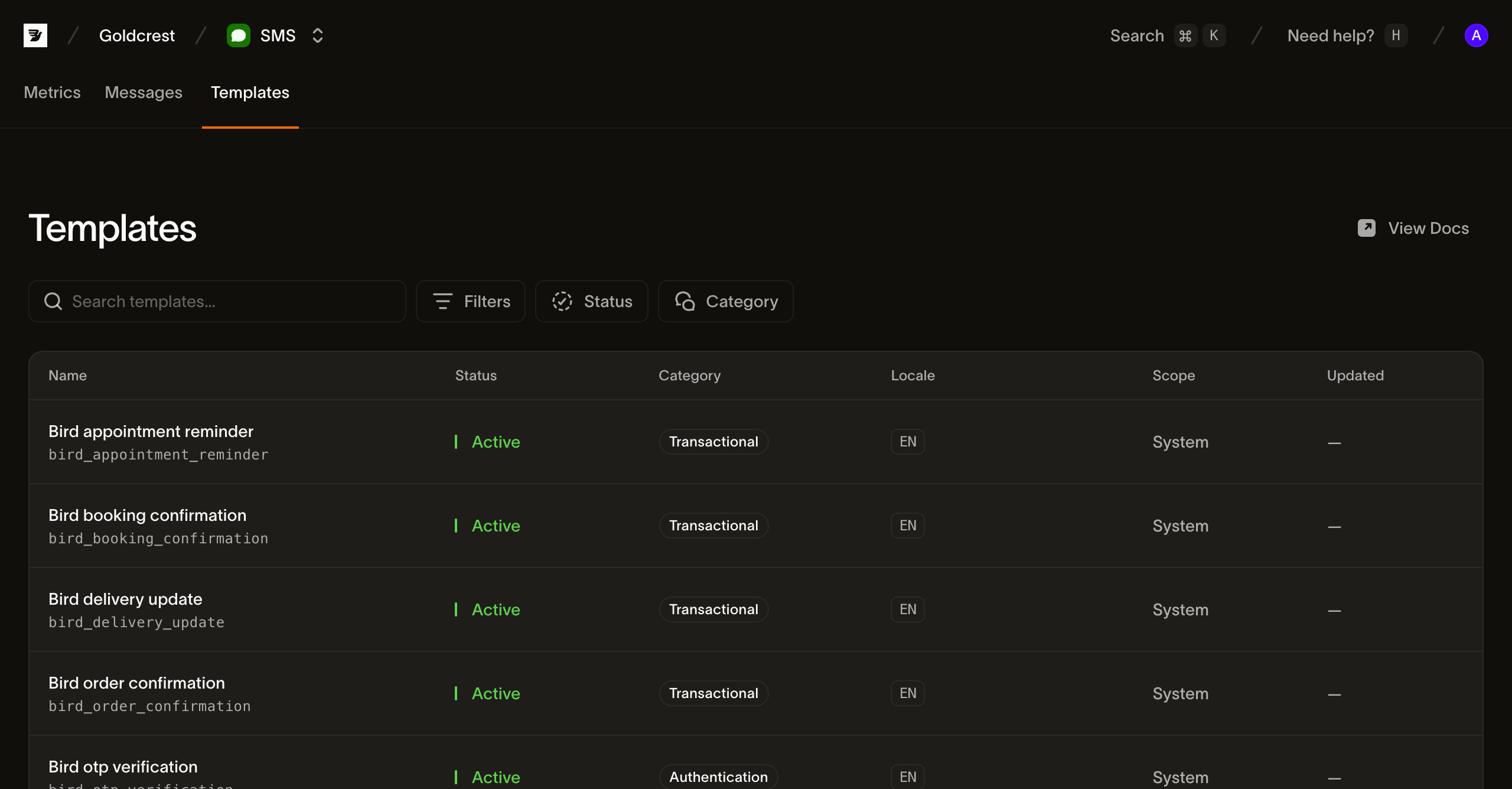
Chaque ligne affiche les champs nécessaires pour choisir et envoyer un template :
- Name : le nom d'affichage du template et son
slug(par exemplebird_order_confirmation). Le slug est l'identifiant que vous passez lors de l'envoi ; il est fixé à la création. - Status : les modèles intégrés sont Active et prêts à l'envoi. Les modèles d'espace de travail sont Draft jusqu'à leur publication, puis Active. Considérez le champ de statut partagé comme un ensemble ouvert.
- Category : la classification du contenu (
transactional,marketingouauthentication) appliquée aux messages envoyés depuis le modèle. - Language : les langues dans lesquelles le template est disponible, sous forme de balises BCP 47. Les premières sont affichées sous forme de pastilles avec un dépassement
+Nlorsqu'un template est localisé dans de nombreuses langues. - Scope : System pour les modèles intégrés de Bird. Workspace identifie les modèles que vous créez via la préversion API.
- Updated : date de dernière modification du template. Les templates intégrés n'affichent pas de date.
Contenu d'un template
En plus de son nom, sa catégorie et ses langues, chaque modèle définit les variables qu'il remplit au moment de l'envoi. Une variable possède un key, un type, un indicateur required et un constraint lisible. Les modèles intégrés ont des emplacements typés ; les modèles d'espace de travail infèrent des emplacements text génériques et acceptent des valeurs de paramètre scalaires. Une variable sensitive est remplacée dans le contenu du message stocké. Les files de transport portent toujours le texte nécessaire à la livraison. Fournissez chaque variable requise et aucune clé non déclarée.
Un modèle est disponible dans une ou plusieurs langues, et son default_language est ce qu'un envoi obtient quand il n'en spécifie aucune. Demandez une langue dans laquelle le modèle n'est pas disponible et Bird se rabat : d'abord sur une forme plus générale de la même langue, puis sur la langue par défaut, parce que les modèles SMS fixent on_missing_language par défaut à fallback. Les modèles intégrés utilisent language_source_required: false. Les modèles d'espace de travail peuvent exiger une langue ou définir on_missing_language: fail ; ces politiques prennent effet immédiatement, tandis que les modifications de contenu et de langue par défaut prennent effet à la publication.
Lister les templates depuis API
GET /v1/sms/templates renvoie une page paginée par curseur de résumés de modèles. Suivez next_cursor via starting_after jusqu'à ce qu'il soit null ; une page ne représente pas l'ensemble du catalogue. La lecture des modèles nécessite une clé API avec le scope sms_management, distinct du scope sms utilisé par un envoi. Filtrez par scope, category, status ou language, ou recherchez avec q :
for await (const tpl of bird.smsTemplates.list({ scope: "system" })) {
  console.log(tpl.id, tpl.slug);
}
for template in client.sms_templates.list(scope="system"):
print(template.id, template.slug)for tpl, err := range client.SmsTemplates.List(context.Background(), bird.SMSTemplateListParams{
Scope: "system",
}) {
if err != nil {
log.Fatal(err)
}
fmt.Println(tpl.Id, *tpl.Slug)
}foreach ($bird->smsTemplates->list(['scope' => 'system']) as $template) {
echo $template->getId(), ' ', $template->getSlug(), "\n";
}bird sms templates listcurl "https://eu1.platform.bird.com/v1/sms/templates?category=authentication" \
-H "Authorization: Bearer bk_eu1_..."Les résumés de modèles contiennent l'identité, la catégorie, le statut, les langues disponibles et les références aux versions brouillon/publiée. Ils omettent le texte source et les variables. Récupérez un modèle par slug ou ID avec GET /v1/sms/templates/{template_ref}. Utilisez son draft_version_id pour inspecter le contenu modifiable de l'espace de travail, ou son live_version_id pour inspecter ce que les envois utilisent. Un nouveau modèle d'espace de travail n'a pas de version publiée tant qu'il n'est pas publié.
Lisez la version sélectionnée via GET /v1/sms/templates/{template_ref}/versions/{version_id}. La réponse contient les variables et une carte de contenu indexée par langue. Pour récupérer une seule langue, ajoutez /languages/{language}. Le filtre language de la liste correspond au contenu publié ; les langues uniquement en brouillon ne correspondent pas.
Les modèles intégrés exposent une seule version en lecture seule. Son ID stable identifie l'entrée du catalogue ; son hash de contenu distingue les mises à jour de la source. Les versions publiées des modèles d'espace de travail préservent un historique immuable. Les listes de versions utilisent aussi la pagination par curseur et omettent le texte source.
Création de modèles d'espace de travail en préversion API
Utilisez une clé API avec un accès en écriture sms_management. Envoyez des requêtes JSON vers l'hôte régional API de votre clé, avec Authorization: Bearer <API_KEY> et Content-Type: application/json. Attribuez à chaque mutation sa propre Idempotency-Key ; ne réutilisez cette clé que pour réessayer la même requête.
- Créez le modèle avec
POST /v1/sms/templateset{"slug":"order-shipped","category":"transactional"}. La réponse201contientidetdraft_version_id; le modèle démarre avec un brouillon anglais vide. Conservez les deux ID pour les appels suivants. - Enregistrez le texte avec
PUT /v1/sms/templates/{id}/versions/{draft_version_id}/languages/enet{"text":"Your order {{ order_number }} has shipped."}. La réponse200inclutdraft_revision. - Publiez avec
POST /v1/sms/templates/{id}/versions/{draft_version_id}/submit, en passant cette révision comme{"expected_revision":1}(remplacez1par la valeur renvoyée). Une réponse200avecvalid: trueidentifie la version publiée. Une réponse422signale un contenu de brouillon invalide ; corrigez les problèmes de langue renvoyés et soumettez à nouveau avec une nouvelle clé d'idempotence.
La publication exige un texte non vide et les mêmes variables dans chaque langue. Elle prend effet de manière synchrone, sans approbation du fournisseur. API prend aussi en charge la prévisualisation, la duplication, la réinitialisation du brouillon au contenu publié et le retour à une version publiée. La modification via le tableau de bord n'est pas disponible.
Lisez la révision courante avant de mettre à jour les paramètres du modèle ou de revenir en arrière. Les sauvegardes de langue peuvent aussi inclure un verrou de révision ; un verrou périmé renvoie 409. La prévisualisation utilise la version sélectionnée et les paramètres pour rapporter le texte rendu, la langue résolue, l'encodage et le nombre de segments avant l'envoi.
Envoyer avec un modèle
Définissez l'objet template de l'envoi au lieu de text. Omettez category et media_urls. Pour le modèle intégré ci-dessous, omettez aussi from. Un modèle d'espace de travail exige from et doit avoir une version publiée.
Un modèle intégré d'authentification sélectionne aussi la marque d'expéditeur partagée : bird_otp_verification_ttl utilise Authifly, tandis que bird_otp_verification_ttl_bird_verify utilise Bird Verify. La destination détermine si l'expéditeur apparaît comme nom de marque, numéro court ou numéro de téléphone.
Envoyer un modèle intégré :
await bird.sms.send({
  to: "+14155550100",
  template: { slug: "bird_otp_verification", parameters: { code: "123456" } },
});client.sms.send(
to="+14155550100",
template="bird_otp_verification",
parameters={"code": "123456"},
)msg, err := client.Sms.Send(context.Background(), bird.SmsSendParams{
To: "+14155550100",
Template: "bird_otp_verification",
Parameters: map[string]any{"code": "123456"},
})
if err != nil {
log.Fatal(err)
}
fmt.Println(msg.Id)$message = $bird->sms->send(
to: '+14155550100',
template: 'bird_otp_verification',
parameters: ['code' => '123456'],
);
echo $message->getId(), ' ', $message->getStatus();bird sms send \
--parameters '{"code":"123456"}' \
--template bird_otp_verification \
--to +14155550100curl -X POST "https://eu1.platform.bird.com/v1/sms/messages" \
-H "Authorization: Bearer bk_eu1_..." \
-H "Content-Type: application/json" \
-d '{
"to": "+14155550100",
"template": {
"slug": "bird_otp_verification_ttl",
"language": "en",
"parameters": { "code": "481920", "ttl": "10" }
}
}'slug est le handle du modèle dans le catalogue (vous pouvez aussi identifier un modèle par son id). language sélectionne le corps localisé ; omettez-le pour la langue par défaut du modèle. parameters fournit une valeur pour chacune des variables du modèle, indexée par nom de variable. Une variable requise manquante, une clé non déclarée, une valeur ne respectant pas la contrainte de sa variable ou un objet parameters sérialisé de plus de 16 Ko est rejeté avec une 422.
La réponse 202 inclut le from sélectionné, la catégorie du modèle, les ID de modèle et de version, le hash source et les langues demandées/résolues. Le texte des messages d'authentification est renvoyé sous forme de **REDACTED**. Les messages acceptés conservent le contenu rendu et la version sélectionnée même si vous publiez, revenez en arrière ou supprimez le modèle par la suite.
Tout le reste de l'envoi (le destinataire, les tags, les métadonnées, la liste d'autorisation de destination et le modèle asynchrone 202) fonctionne exactement comme pour un envoi en texte libre.
Étapes suivantes
- Envoyer des SMS : ajoutez le champ
templateà un payload d'envoi. - Journal SMS : retrouvez un message envoyé et suivez son cycle de vie.
- Événements : recevez les événements de livraison de chaque message.
- Envoyer un SMS avec un template : une vidéo qui envoie l'un des modèles pré-approuvés depuis un terminal
Ressources associées
Poursuivez avec la documentation, les guides et les exemples sur ce sujet.