Webhooks et événements
Quand quelque chose se produit dans votre espace de travail (un e-mail est distribué, un destinataire rebondit, un message WhatsApp est lu), Bird envoie par POST un événement JSON signé à chaque endpoint webhook abonné à ce type d'événement. Bird suit la spécification Standard Webhooks pour les en-têtes, la signature et la structure du payload : si vous vérifiez déjà des webhooks provenant d'une autre plateforme Standard Webhooks, le même code de vérification fonctionne ici sans modification.
Pour une vue d'ensemble des endpoints webhook et de la livraison, consultez Qu'est-ce qu'un webhook ?.
Créer un endpoint
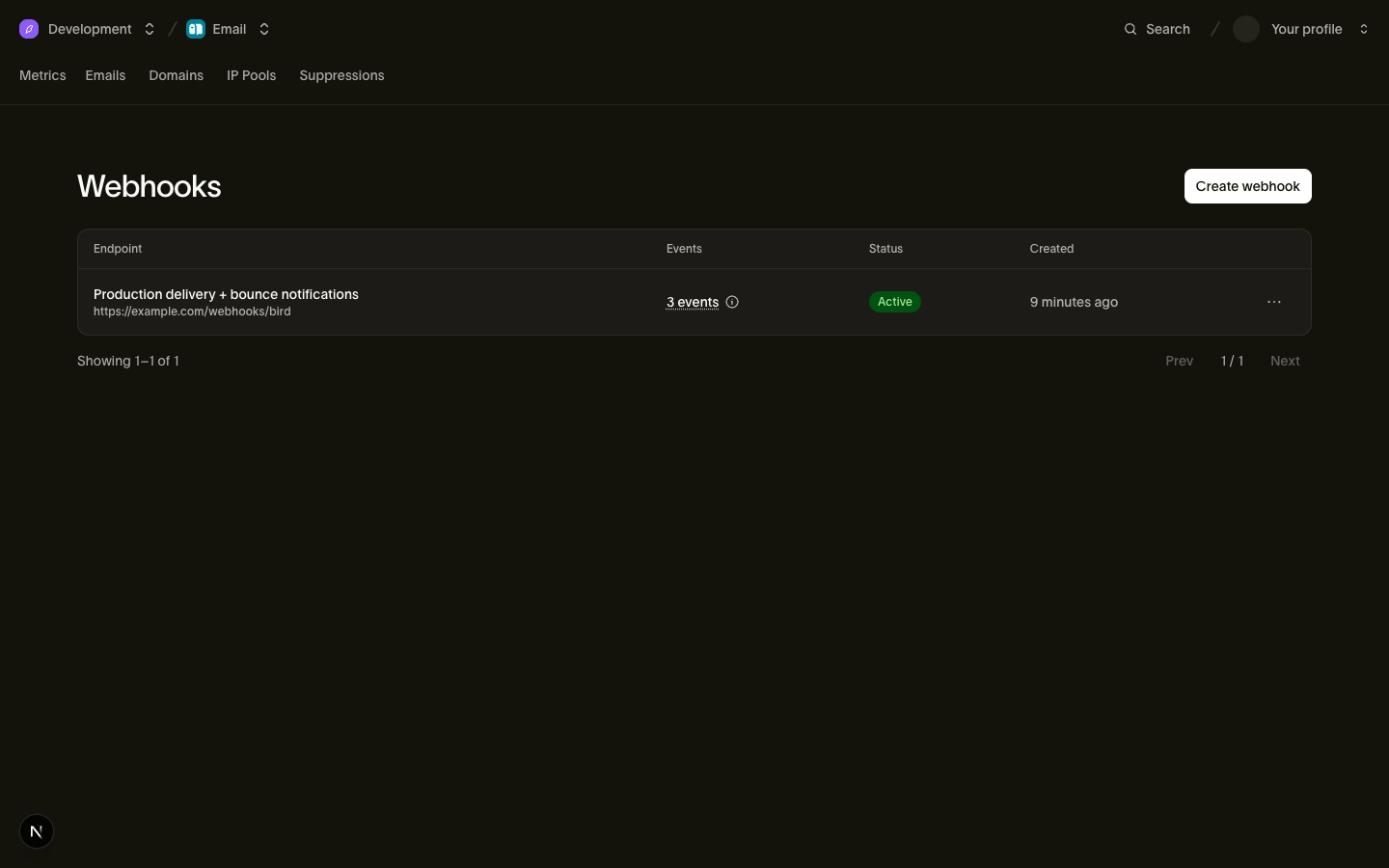
Enregistrez un endpoint dans le tableau de bord sous Developers > Webhooks, ou depuis le terminal avec le bird CLI :
bird webhooks create --url https://example.com/webhooks/bird \
  --events email.delivered,email.bounced,email.complained \
  --description "Production delivery + bounce notifications"
La gestion des endpoints requiert le scope webhooks. Les sessions du tableau de bord et le login du CLI le portent via votre rôle utilisateur, et les clés API peuvent aussi le détenir : accordez webhooks:read pour inspecter les endpoints et les tentatives de livraison, ou webhooks:write pour les gérer. Les opérations sous-jacentes commencent à POST /v1/webhooks.
Les URL d'endpoint doivent être HTTPS, de 2 048 caractères au maximum, et accessibles publiquement. Les URL sur des adresses privées, de bouclage, link-local ou autrement internes sont refusées avec une erreur 422 lorsque vous créez ou mettez à jour l'endpoint. Les livraisons proviennent de l'infrastructure de livraison de Bird, en dehors de votre réseau.
Le tableau events liste jusqu'à 100 types issus du catalogue d'événements. Un endpoint ne reçoit que les types qu'il liste. Utilisez PATCH /v1/webhooks/{webhook_id} pour remplacer la liste complète pour les futures livraisons. Pour recevoir tous les événements, abonnez-vous à chaque type : un type hors catalogue est refusé avec une erreur 422, y compris un joker tel que sms.*. Les abonnements existants ne s'élargissent pas lorsque de nouveaux types deviennent disponibles.
La réponse de création inclut le secret de signature de l'endpoint (préfixé whsec_) une seule fois. Stockez-le immédiatement dans votre gestionnaire de secrets ; il ne peut pas être récupéré à nouveau, et si vous le perdez, effectuez une rotation.
{
  "id": "whk_01ky7q639cfh99xb7ysy2x2gzj",
  "url": "https://example.com/webhooks/bird",
  "events": ["email.delivered", "email.bounced", "email.complained"],
  "description": "Production delivery + bounce notifications",
  "status": "active",
  "secret": "whsec_c+dgRBsFELJ9mR4tu2cyhK0gTMMkqntv",
  "created_at": "2026-07-23T14:48:29.740Z",
  "updated_at": "2026-07-23T14:48:29.740Z"
}
Les endpoints supportent le CRUD complet : list, get, update et delete. Supprimer un endpoint arrête toutes les livraisons vers celui-ci, y compris les réessais de livraisons échouées précédentes, et ne peut pas être annulé ; pour arrêter temporairement les livraisons, définissez status à paused à la place. Un espace de travail peut enregistrer plusieurs endpoints, chacun avec sa propre URL, son filtre d'événements et son secret.
Envoyer des événements à un outil no-code ou à une plateforme d'agents
Tout récepteur acceptant un POST HTTPS fonctionne comme un endpoint simple, y compris un "Catch Hook" Zapier, un webhook personnalisé Make ou un nœud Webhook n8n. Créez le déclencheur dans cet outil, copiez son URL et enregistrez-le comme ci-dessus. Dans n8n, utilisez l'URL de production du workflow : l'URL de test n'écoute que lorsque l'éditeur attend un événement de test.
Pour que Claude Managed Agents ou Grok Bot répondent aux messages que vous recevez, suivez plutôt Acheminer les messages vers votre agent IA. Un client MCP tel que ChatGPT peut s'abonner lui-même aux événements via MCP Events. Pour évaluer les messages entrants avant qu'un agent n'agisse dessus, consultez Superagent.
Avant de créer un endpoint simple, filtrez GET /v1/webhooks par url pour trouver un endpoint créé par une configuration précédente, et modifiez-le avec PATCH /v1/webhooks/{webhook_id} au lieu d'en créer un second. Plusieurs endpoints peuvent partager une même URL : vérifiez la description et les événements d'une correspondance avant de la modifier. Le filtre ne fait que trouver les correspondances, il n'empêche pas les doublons :
bird webhooks list --url https://hooks.zapier.com/hooks/catch/123/abc/
bird webhooks update whk_01krdgeqcxet5s7t44vh8rt9mg --events sms.received,whatsapp.received
Ensuite, envoyez un événement de test pour confirmer que le récepteur l'accepte.
Configuration avec un agent IA
Le bird CLI et le serveur MCP embarquent une procédure webhooks.setup qui guide un agent à travers ce flux : ce qu'il doit vous demander (l'URL du récepteur, les événements, les éventuels identifiants), la recherche d'un endpoint existant, la création d'un endpoint et l'envoi d'un événement de test avant de signaler le succès. Demandez à votre agent de "send Bird's inbound SMS to my Zapier hook" et il suit les mêmes étapes.
Vérifier les signatures
Chaque livraison porte trois en-têtes :
| En-tête | Valeur |
|---|---|
webhook-id | Identifie la livraison de l'événement. Les réessais et rejeux réutilisent la même valeur. |
webhook-timestamp | Horodatage Unix (secondes) de cette tentative de livraison |
webhook-signature | v1,<base64 HMAC-SHA256>, possiblement plusieurs signatures séparées par des espaces |
La signature est un HMAC-SHA256 sur la chaîne {webhook-id}.{webhook-timestamp}.{raw request body}, calculé avec le secret de votre endpoint (retirez le préfixe whsec_ et décodez le reste en base64 pour obtenir les octets de la clé). Votre handler doit vérifier la signature, rejeter les livraisons dont le webhook-timestamp date de plus de 5 minutes, et dédupliquer sur webhook-id : Bird livre au moins une fois, donc la même livraison peut arriver plus d'une fois.
Avec la Bird SDK, la vérification de la signature et de l'horodatage se fait en un seul appel ; la déduplication reste dans votre handler :
// Pass the RAW request body; set the secret via new BirdClient({ webhooks: { secret } }).
const event = bird.webhooks.unwrap(rawBody, headers);
console.log(event.type); // discriminated union: narrow on event.type
# Pass the RAW request body (bytes) and the request headers.
event = client.webhooks.unwrap(request.body, request.headers)
if event.root.type == "email.delivered":
print(event.root.data.email_id)package main
import (
"fmt"
"io"
"log"
"net/http"
"os"
bird "github.com/messagebird/bird-sdk-go"
"github.com/messagebird/bird-sdk-go/option"
)
func main() {
client, err := bird.NewClient(
option.WithAPIKey(os.Getenv("BIRD_API_KEY")),
option.WithWebhookSecret(os.Getenv("BIRD_WEBHOOK_SECRET")),
)
if err != nil {
log.Fatal(err)
}
http.HandleFunc("/webhooks/bird", func(w http.ResponseWriter, r *http.Request) {
body, _ := io.ReadAll(r.Body)
event, err := client.Webhooks.Unwrap(body, r.Header)
if err != nil {
http.Error(w, "invalid signature", http.StatusBadRequest)
return
}
w.WriteHeader(http.StatusNoContent) // ack fast, then process
payload, _ := event.AsAny()
switch p := payload.(type) {
case bird.EmailDeliveredEvent:
fmt.Println("delivered:", p.Data.EmailId, p.Data.Recipient)
case bird.EmailBouncedEvent:
fmt.Println("bounced:", p.Type)
}
})
}// Pass the raw request body because parsing changes the bytes used to compute
// the signature.
$rawBody = file_get_contents('php://input') ?: '';
try {
$event = $bird->webhooks->unwrap($rawBody, getallheaders());
// $event is the decoded payload as an array; branch on $event['type'].
echo $event['type'];
} catch (WebhookVerificationError) {
http_response_code(400); // bad signature, stale timestamp, or missing/malformed headers
}Rejeter une livraison avec 400, comme le font les exemples ci-dessus, ne supprime pas l'événement : nous le réessayons selon le calendrier ci-dessous. C'est délibéré, et c'est ce que vous voulez. La cause habituelle d'un échec de vérification est un secret que votre handler ne possède pas encore, pendant une rotation ou un déploiement défectueux : la fenêtre de réessai est votre chance de corriger le secret et de recevoir quand même l'événement. Retournez 2xx uniquement quand vous voulez définitivement écarter la livraison.
Toute bibliothèque de référence Standard Webhooks fonctionne aussi. Si vous vérifiez manuellement, la recette est :
import { createHmac, timingSafeEqual } from "node:crypto";

function verify(rawBody: string, headers: Record<string, string>, secret: string): boolean {
  const id = headers["webhook-id"];
  const timestamp = headers["webhook-timestamp"];
  if (Math.abs(Date.now() / 1000 - Number(timestamp)) > 300) return false; // 5-minute tolerance

  const key = Buffer.from(secret.slice("whsec_".length), "base64");
  const expected = createHmac("sha256", key)
    .update(`${id}.${timestamp}.${rawBody}`)
    .digest("base64");

  // During secret rotation, the header can contain several signatures. Accept any match.
  return headers["webhook-signature"].split(" ").some((part) => {
    const sig = Buffer.from(part.replace(/^v1,/, ""), "base64");
    return (
      sig.length === Buffer.byteLength(expected, "base64") &&
      timingSafeEqual(sig, Buffer.from(expected, "base64"))
    );
  });
}
Calculez toujours le HMAC sur les octets bruts du corps de la requête. Parser puis re-sérialiser le JSON modifie les espaces ou l'ordre des clés et casse la signature.
Sémantique de livraison
Chaque livraison est un événement par POST HTTP avec Content-Type: application/json, sans regroupement. Votre endpoint dispose de 15 secondes pour répondre ; tout statut 2xx compte comme un succès, et tout le reste (y compris les redirections 3xx et les timeouts) compte comme un échec. Chaque échec suit le même calendrier de réessai. Le statut que vous retournez modifie ce que vous voyez dans le journal des tentatives de livraison, pas le fait que nous réessayions : aucun code de statut n'arrête la livraison prématurément. Répondez rapidement et traitez de manière asynchrone : mettez l'événement en file d'attente et retournez 200 avant d'effectuer le traitement réel.
Après la première tentative, les livraisons échouées sont réessayées selon ce calendrier, avec un jitter de ±20 % pour que les réessais ne se synchronisent pas :
| Réessai | Délai après la tentative précédente |
|---|---|
| 1 | 5 secondes |
| 2 | 5 minutes |
| 3 | 30 minutes |
| 4 | 2 heures |
| 5 | 5 heures |
| 6 | 10 heures |
| 7 | 10 heures |
Cela représente huit tentatives sur environ 27,5 heures. Un 429 ou un timeout relève tout délai planifié inférieur à 60 secondes à 60 secondes, ce qui en pratique n'affecte que le premier réessai : après le jitter, il arrive 48 à 72 secondes plus tard. Un en-tête Retry-After sur une réponse en échec peut allonger l'attente suivante. L'en-tête est accepté sous forme de secondes de délai ou d'une date HTTP. Un délai demandé plus long que le délai planifié le remplace, plafonné à deux fois le délai planifié (après tout relèvement à 60 secondes) ; un délai plus court est ignoré, l'en-tête n'avance donc jamais un réessai. Le jitter s'applique par-dessus. Chaque réessai porte le même webhook-id, c'est ce qui permet à la déduplication de fonctionner. Après le dernier réessai, la livraison est définitivement en échec ; le rejeu la récupère.
Les livraisons ne sont pas ordonnées. Un email.delivered peut arriver avant le email.accepted pour le même message, surtout quand des réessais sont en jeu. Triez par le champ timestamp dans le payload de l'événement, jamais par l'ordre d'arrivée.
Exploiter vos endpoints
Envois de test
POST /v1/webhooks/{webhook_id}/test envoie un événement synthétique signé à votre endpoint et retourne le résultat de manière synchrone : si votre endpoint l'a accepté, le statut HTTP retourné et la latence aller-retour. Le corps du test est un stub JSON minimal ne portant que le type de l'événement, signé exactement comme une vraie livraison ; il ne reproduit pas un vrai payload d'événement. Passez {"event_type": "email.delivered"} pour choisir n'importe quel type du catalogue, souscrit ou non, ou omettez le corps pour utiliser le premier type d'événement souscrit de l'endpoint.
Votre endpoint dispose de 10 secondes pour répondre. Un endpoint injoignable produit status: failed dans le corps de la réponse, tandis que la requête elle-même réussit. Utilisez ce résultat pour déboguer la connectivité. Les envois de test vont directement à votre endpoint : ils fonctionnent sur un endpoint en pause et ne sont pas enregistrés dans le journal des tentatives de livraison. Un 412 signifie que l'endpoint ne peut pas encore être testé car il lui manque un secret de signature valide ou un type d'événement souscrit.
Pour des tests de bout en bout avec de vrais flux d'événements, envoyez aux adresses sandbox : les envois sandbox émettent de vrais événements webhook via le chemin de livraison normal, ce qui est le meilleur moyen de tester votre handler avant la mise en production.
Rejeu des livraisons échouées
POST /v1/webhooks/{webhook_id}/replay met en file d'attente la redistribution des livraisons échouées. Les événements déjà reçus avec succès par l'endpoint sont ignorés, donc un rejeu ne livre jamais en double ; un événement redistribué porte son webhook-id d'origine, donc votre vérification de déduplication couvre aussi les rejeux. Seules les tentatives échouées sont rejouées : un événement qui n'a jamais été envoyé à votre endpoint n'a pas de tentative échouée, donc un rejeu ne le récupère pas.
Passez des horodatages since/until pour délimiter la fenêtre (par défaut : les dernières 24 heures jusqu'au moment de la requête). Les deux bornes sont inclusives et sélectionnent selon le moment où la livraison a été tentée, non selon le moment où l'événement s'est produit : une nouvelle tentative décalée d'un jour par rapport à son événement tombe dans la fenêtre à l'heure où elle a été tentée. Le rejeu lit le journal des tentatives de livraison, qui conserve trois jours d'historique, c'est donc la limite la plus ancienne qu'il atteint : un since antérieur élargit la fenêtre sans récupérer quoi que ce soit de plus ancien. Un rejeu couvre au maximum les 10 000 événements les plus anciens de la fenêtre.
La requête retourne 202 et les événements sont redistribués de manière asynchrone. Une redistribution ne bénéficie que d'une seule tentative, pas du calendrier de réessai ci-dessus. La tentative est enregistrée et le travail est terminé que votre endpoint l'ait acceptée ou non : un rejeu vers un endpoint encore en panne coûte une requête par événement au lieu de huit ; corrigez l'endpoint et rejouez à nouveau. Ces échecs n'affectent pas la santé de l'endpoint : un rejeu ne peut pas pousser un endpoint à degraded ni le mettre en pause automatiquement. Une redistribution acceptée par votre endpoint efface les deux.
Rejouez un endpoint paused et la requête retourne toujours 202, mais rien n'est redistribué. Réactivez-le d'abord, comme le décrit Pause automatique et réactivation.
Les rejeux sont limités à 20 par organisation et par jour UTC ; au-delà, la requête retourne une erreur 429 (WebhookReplayQuotaExceeded). La réponse n'inclut ni compteur ni identifiant de tâche. Suivez les résultats avec GET /v1/webhooks/{webhook_id}/attempts, qui liste les tentatives de livraison récentes de la plus récente à la plus ancienne avec les codes de statut et la latence. Chaque requête HTTP a sa propre entrée : un événement réessayé apparaît une fois par tentative, et une redistribution apparaît comme une tentative de plus.
Rotation du secret de signature
POST /v1/webhooks/{webhook_id}/rotate-secret génère un nouveau secret et le retourne une seule fois. Pendant les 24 heures suivantes, Bird signe chaque livraison avec les deux secrets. L'en-tête webhook-signature contient les signatures séparées par des espaces (v1,<old> v1,<new>), vous permettant de déployer le nouveau secret pendant le chevauchement. Les bibliothèques Standard Webhooks essaient automatiquement toutes les signatures. Après 24 heures, l'ancien secret cesse de signer. Un endpoint détient au maximum 5 secrets valides simultanément : effectuer des rotations répétées pendant la fenêtre de chevauchement échoue avec WebhookTooManySecrets jusqu'à ce qu'un ancien secret expire.
Pause automatique et réactivation
Le status de l'endpoint est active, degraded ou paused. Des échecs de livraison récents marquent un endpoint degraded comme avertissement de santé ; nous continuons à livrer et réessayer. Un endpoint qui échoue continuellement pendant environ cinq jours est automatiquement paused et toute livraison s'arrête ; une seule livraison réussie pendant cette période remet le compteur à zéro. Un endpoint en pause ne reprend jamais de lui-même. Réactivez-le avec PATCH /v1/webhooks/{webhook_id} et {"status": "active"} (ou depuis la page Webhooks du tableau de bord), puis rejouez pour redistribuer les tentatives échouées avant la mise en pause. Réactivez d'abord : un rejeu demandé tant que l'endpoint est encore en pause ne redistribue rien. Les événements arrivés pendant la pause n'ont jamais été envoyés, donc un rejeu ne les récupère pas.
N'importe laquelle de ces actions ramène un endpoint degraded à active :
| Ce qui l'efface | Pourquoi |
|---|---|
| Une livraison réussit | L'endpoint a de nouveau accepté un événement. |
Changement de l'url de l'endpoint | Les échecs enregistrés décrivent une destination que vous n'utilisez plus. |
Réactivation d'un endpoint paused | Il reprend du service, ses anciens échecs ne s'appliquent plus. |
Un envoi de test retournant 2xx | Vous avez montré que l'endpoint est joignable. |
Modifier la description d'un endpoint ou ses types d'événements souscrits ne dit rien sur la joignabilité : cela laisse degraded en place, tout comme un envoi de test qui échoue.
Nous envoyons un e-mail aux propriétaires de l'organisation lorsqu'un endpoint passe en degraded pour la première fois, une fois par épisode et non à chaque livraison en échec. Une dégradation ultérieure après un rétablissement déclenche un nouvel e-mail, soumis à un délai de 24 heures : nous envoyons au maximum un e-mail de dégradation par endpoint toutes les 24 heures, afin qu'un endpoint qui alterne entre active et degraded n'inonde pas leur boîte de réception. Changer l'url de l'endpoint réinitialise le délai, de sorte que la première dégradation à une nouvelle URL peut déclencher un e-mail même dans les 24 heures suivant le dernier.
Catalogue d'événements
Les payloads d'événements contiennent des données compactes, ciblées par destinataire, pour la corrélation avec votre système. Ils ne contiennent pas la ressource complète. Si vous avez besoin de plus de contexte, récupérez la ressource par son identifiant. Les types d'événements suivent la convention de nommage resource.action et sont regroupés par produit ; la page d'événements de chaque produit porte les champs de payload par événement :
- Événements email : le cycle de vie de la livraison (
email.acceptedàemail.deliveredouemail.bounced), l'engagement (email.opened,email.clicked), les désinscriptions et l'e-mail entrant - Événements SMS : le cycle de vie du message de
sms.acceptedà un statut terminal - Webhooks WhatsApp :
whatsapp.acceptedàwhatsapp.delivered,whatsapp.read,whatsapp.failed,whatsapp.rejected,whatsapp.receivedpour un message entrant,whatsapp.reactedlorsqu'un utilisateur réagit à l'un des vôtres, etwhatsapp.group.join_request_createdetwhatsapp.group.join_request_revokedlorsqu'une personne demande à rejoindre un groupe nécessitant une approbation ou retire sa demande - Événements Verify : le cycle de vie de la vérification (
verify.verification.created,verify.verification.verified) et la livraison de chaque tentative de code de vérification (verify.attempt.sent,verify.attempt.delivered,verify.attempt.undelivered) - Événements Preference : l'enregistrement de consentement multicanal :
preference.granted,preference.revokedetpreference.deleted
Chaque corps de livraison est l'enveloppe imbriquée Standard Webhooks avec type, timestamp et un objet data spécifique au type. L'en-tête webhook-id porte l'identité de l'événement. Le champ timestamp de l'enveloppe enregistre le moment où l'événement s'est produit. L'en-tête webhook-timestamp enregistre la tentative de livraison en cours et change à chaque réessai.
{
  "type": "email.delivered",
  "timestamp": "2026-06-10T14:30:00Z",
  "data": {
    "email_id": "em_01krdgeqcxet5s7t44vh8rt9mg",
    "recipient_id": "er_01krdgeqcxet5s7t44vh8rt9mg",
    "workspace_id": "ws_01krdgeqcxet5s7t44vh8rt9mg",
    "recipient": "user@example.com",
    "recipient_role": "to",
    "tags": [{ "name": "category", "value": "welcome" }],
    "metadata": { "order_id": "ord_123" },
    "broadcast_id": null
  }
}
Le data de chaque événement email inclut email_id, recipient_id, workspace_id, l'adresse recipient et son recipient_role d'enveloppe. Il inclut aussi les tags et metadata de la requête d'envoi, ou null quand ils ne sont pas fournis. Il porte également broadcast_id, nommant la diffusion dont l'envoi faisait partie, ou null quand il n'y avait pas de diffusion associée. Sur email.unsubscribed et email.list_unsubscribed, null n'exclut pas une diffusion ; la page événements email explique pourquoi. Les types d'événements ajoutent leurs propres champs à cette base. Chaque variante a un ensemble de champs stable : les champs sont requis par défaut, et leur présence dépend uniquement du type d'événement.
Les noms d'événements ne sont jamais renommés, et de nouveaux types sont ajoutés au fur et à mesure que les produits sont lancés : écrivez votre handler pour ignorer les types qu'il ne reconnaît pas.
Événements Preference
Les préférences déclarées (les consentements et les désinscriptions décrits dans le guide de chaque canal : email, SMS, WhatsApp) couvrent plusieurs canaux, leurs événements indiquent donc le canal dans le payload plutôt que dans le type. preference.granted se déclenche quand un consentement prend effet, preference.revoked quand une désinscription prend effet, et preference.deleted quand une déclaration enregistrée est supprimée et que sa clé revient à l'état sans enregistrement. Un événement signifie que l'enregistrement actuel de la clé a changé : une déclaration qui répète l'enregistrement actuel ne déclenche rien, et une déclaration refusée comme étant hors ordre ne déclenche rien non plus. Le champ timestamp de l'enveloppe correspond au moment où la déclaration a pris effet, ce qui, pour une déclaration antidatée, est le moment où elle a été faite et non le moment où elle a atteint Bird.
Chaque payload porte la clé de préférence complète : channel, handle, sender_scope et topic_id, avec les champs de portée présents-avec-null quand ils ne la restreignent pas. À côté de la clé figurent le coverage de la déclaration, le preference_id, le transition_id de l'entrée d'historique que l'écriture a ajoutée, et le contact_id dont le handle correspondait quand la déclaration a été enregistrée, ou null :
{
  "type": "preference.revoked",
  "timestamp": "2026-08-25T14:52:03.192524705Z",
  "data": {
    "preference_id": "prf_01krdgeqcxet5s7t44vh8rt9mg",
    "transition_id": "prt_01krdgeqcxet5s7t44vh8rt9mg",
    "channel": "sms",
    "handle": "+15550001234",
    "sender_scope": null,
    "topic_id": null,
    "coverage": "non_transactional",
    "contact_id": null
  }
}
Étapes suivantes
- Référence API Webhooks : documentation complète des endpoints et du schéma
- Événements email : champs de payload par événement
- Tests et sandbox : les envois sandbox déclenchent de vraies livraisons webhook, idéal pour tester les handlers
Ressources associées
Poursuivez avec la documentation, les guides et les exemples sur ce sujet.