Suppressions
Votre espace de travail possède une liste de suppression : un ensemble d'adresses e-mail auxquelles nous ne livrons pas. Les rebonds définitifs et les plaintes pour spam y sont ajoutés automatiquement, et vous pouvez aussi ajouter des adresses vous-même. Envoyer de façon répétée à des adresses qui rebondissent ou signalent du spam peut faire bloquer votre domaine par les fournisseurs de messagerie, c'est pourquoi nous arrêtons ces envois avant qu'ils ne quittent la plateforme.
Un nouveau désabonnement n'ajoute pas d'enregistrement de suppression. Il enregistre la préférence déclarée du destinataire plutôt qu'un fait de délivrabilité, et apparaît donc dans l'onglet Preferences à la place. Consultez Liens de désabonnement pour en savoir plus.
Gérez la liste dans Email > Suppressions, via les suppressions API, ou avec bird email suppressions.
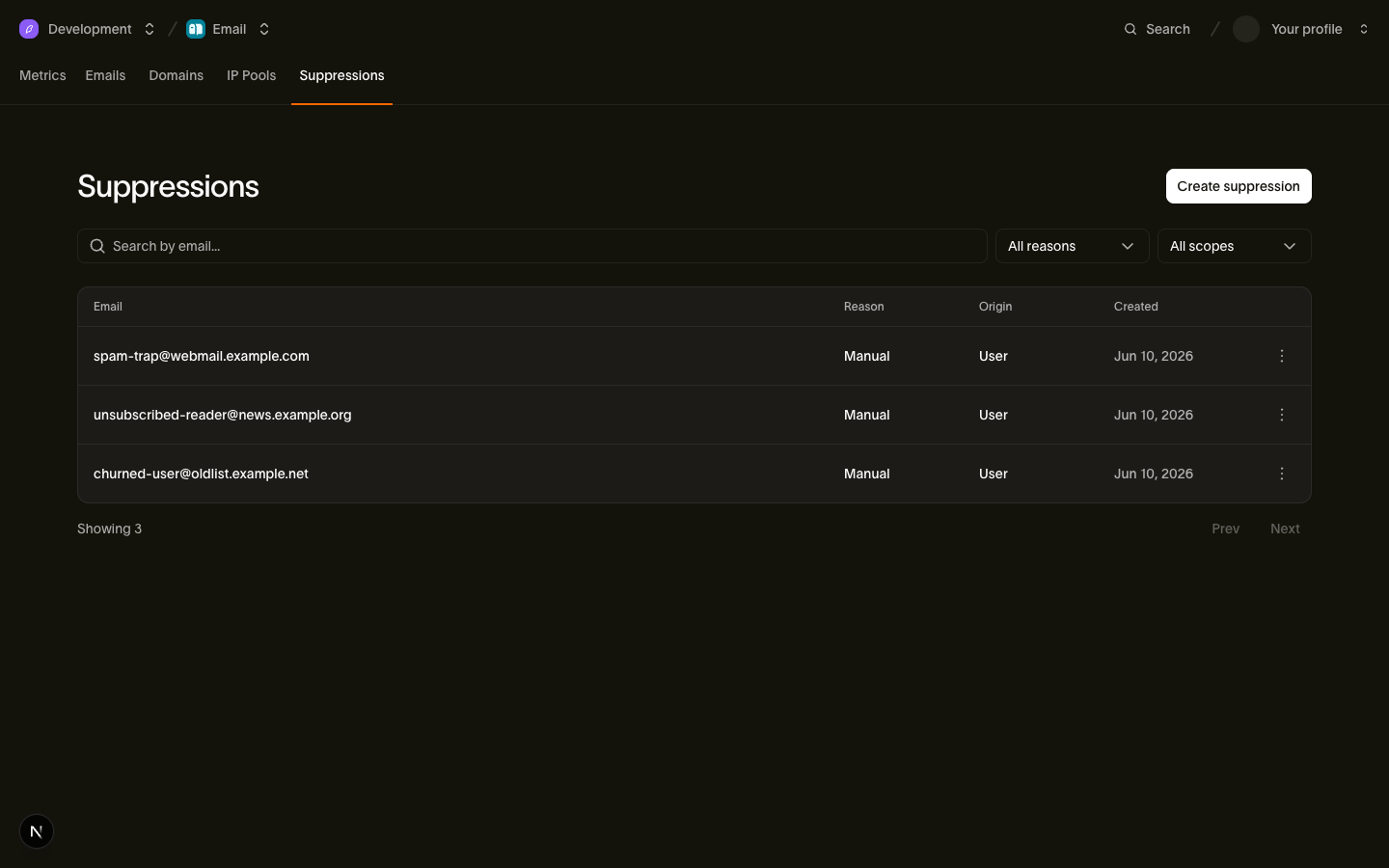
Les trois motifs et ce qu'ils bloquent
Chaque enregistrement possède un reason indiquant pourquoi l'adresse est listée, et une politique applies_to contrôlant quelles catégories il bloque :
| Motif | applies_to | Catégorie marketing | Catégorie transactionnelle |
|---|---|---|---|
hard_bounce | all | Bloqué | Bloqué |
complaint | non_transactional | Bloqué | Autorisé |
manual | all | Bloqué | Bloqué |
Cette répartition découle de la signification de chaque motif :
hard_bounce: l'adresse n'existe pas. L'envoi est inutile quelle que soit la catégorie, donc tout est bloqué.complaint: une déclaration concernant du courrier indésirable. Une personne ayant signalé votre newsletter comme spam peut encore avoir besoin d'une réinitialisation de mot de passe ou d'une confirmation de commande, donc seuls les envois non transactionnels sont bloqués.manual: une décision délibérée de votre part ou de celle de votre équipe. Nous ne la remettons pas en question, donc une suppression manuelle bloque toutes les catégories, y compris les transactionnelles.
Une adresse contient un enregistrement par motif, de sorte qu'un rebond définitif et une plainte antérieure coexistent comme des enregistrements distincts, et la livraison reste bloquée tant qu'un enregistrement bloquant subsiste. Nous appliquons le blocage par défaut sur tout ce que nous ne reconnaissons pas : si un enregistrement revient avec un applies_to que votre intégration n'a jamais vu, traitez-le comme bloquant toutes les catégories, ce que nous faisons nous-mêmes.
Remarque : reason: unsubscribe est obsolète sur les suppressions API. Les nouveaux désabonnements enregistrent une préférence au lieu d'une suppression. Le filtre obsolète ?reason=unsubscribe renvoie encore les anciens enregistrements de suppression avec origin: unsubscribe_link ou origin: unsubscribe_event jusqu'à ce que ces enregistrements soient retirés.
Comment les adresses sont ajoutées automatiquement
Nous ajoutons des suppressions en réponse aux signaux des destinataires, un rebond ou une plainte ne nécessite donc aucune action de votre part :
| Déclencheur | Suppression résultante |
|---|---|
Rebond définitif (email.bounced) | reason: hard_bounce, origin: bounce_event, applies_to: all |
Rebond définitif hors bande (email.out_of_band_bounce) | reason: hard_bounce, origin: bounce_event, applies_to: all |
Plainte pour spam (email.complained) | reason: complaint, origin: complaint_event, applies_to: non_transactional |
Un désabonnement, que ce soit via le lien dans le corps du message ou le bouton de désabonnement en un clic, n'apparaît pas ici : il enregistre une préférence dans l'onglet Preferences au lieu d'ajouter une ligne à cette liste.
Seul un rebond de classe hard entraîne une suppression, et le tableau de classification indique quelles valeurs bounce_class sont considérées comme définitives. Deux résultats qui ressemblent à des échecs laissent l'adresse envoyable :
- Rebonds temporaires et reports (
email.deferred, ouemail.bouncedavecbounce_type: "soft") : des échecs transitoires comme une boîte aux lettres pleine. Nous réessayons. - Rejets côté envoi : les échecs de génération et les rejets de politique sont des problèmes liés à l'envoi plutôt qu'à l'adresse. Ils produisent des événements
email.rejectedet aucune suppression.
Les signaux répétés pour une adresse déjà sur la liste de suppression pour le même motif ne modifient pas l'enregistrement d'origine, y compris son created_at. L'enregistrement conserve source_email_id et source_recipient_id, qui relient une suppression automatique au message et au destinataire exacts qui l'ont provoquée. Ces deux champs répondent à la question du support "why did this person stop getting our email", et ils valent null pour les ajouts manuels.
Chaque ajout, automatique ou manuel, déclenche un événement email_suppression.created vers votre point de terminaison webhook avec le suppression_id, l'adresse email sur la liste de suppression, le reason et le workspace_id, afin que votre propre système puisse reproduire la liste sans interrogation périodique :
{
  "type": "email_suppression.created",
  "timestamp": "2026-07-23T14:52:03.192524705Z",
  "data": {
    "email": "user@example.com",
    "reason": "manual",
    "suppression_id": "sup_01ky7qckqrf06r38g49b9kxdbc",
    "workspace_id": "ws_01ky7m21hjffh9s8kq76gyb1xf"
  }
}
Gérer les suppressions via le API
Le API permet d'ajouter, de lister, de consulter et de supprimer des enregistrements individuels. Les adresses sont mises en minuscules avant le stockage et la recherche, et n'apparaissent jamais dans un chemin d'URL, car un chemin se retrouve dans les journaux d'accès et une adresse e-mail est une donnée personnelle. Pour trouver l'enregistrement d'une adresse, filtrez la liste avec ?email=.
Chaque SDK expose ces opérations sous forme de méthodes typées sur sa ressource suppressions.
Ajouter une adresse
const suppression = await bird.suppressions.add({ email: "user@example.com" });
console.log(suppression.id);
suppression = client.suppressions.add(email="user@example.com")
print(suppression.id)suppression, err := client.Suppressions.Add(context.Background(), bird.SuppressionsAddParams{
Email: "user@example.com",
})
if err != nil {
log.Fatal(err)
}
fmt.Println(suppression.Id)$suppression = $bird->suppressions->add(
(new SuppressionCreate())->setEmail('user@example.com'),
);
echo $suppression->getId();bird email suppressions add --email user@example.comcurl -X POST https://us1.platform.bird.com/v1/email/suppressions \
-H "Authorization: Bearer $BIRD_API_KEY" \
-H "Content-Type: application/json" \
-d '{ "email": "user@example.com" }'Les ajouts manuels reçoivent reason: manual et applies_to: all, ils bloquent donc toutes les catégories. L'appel est idempotent : une nouvelle suppression renvoie 201 Created, et une adresse déjà ajoutée manuellement sur la liste de suppression renvoie 200 OK avec l'enregistrement existant plutôt qu'un conflit. Dans les deux cas, le corps est l'objet de suppression :
{
  "applies_to": "all",
  "created_at": "2026-07-23T14:52:03.192524705Z",
  "email": "user@example.com",
  "id": "sup_01ky7qckqrf06r38g49b9kxdbc",
  "origin": "api_key",
  "reason": "manual",
  "scope": {
    "id": "ws_01ky7m21hjffh9s8kq76gyb1xf",
    "type": "workspace"
  }
}
Le champ origin enregistre comment l'enregistrement a été créé. Les ajouts manuels reçoivent api_key ou user, selon que l'appelant s'est authentifié avec une clé API ou une session du tableau de bord. Les ajouts automatiques reçoivent bounce_event ou complaint_event, selon le signal qui les a créés.
Lister et consulter
Ces appels renvoient la première page. En Go, le troisième argument vide lance la pagination ; passez le NextCursor de la page précédente pour lire la page suivante.
const page = await bird.suppressions.list({ limit: 25 });
console.log(page.data.length);
page = client.suppressions.list(limit=25)
print(len(page.data))page, err := client.Suppressions.ListPage(context.Background(), bird.SuppressionsListParams{Limit: 25}, "")
if err != nil {
log.Fatal(err)
}
fmt.Println(len(page.Data))$page = $bird->suppressions->list(['limit' => 25])->fetch();
echo count($page->data);bird email suppressions list --limit 25curl "https://us1.platform.bird.com/v1/email/suppressions?limit=25" \
-H "Authorization: Bearer $BIRD_API_KEY"La liste est paginée par curseur, du plus récent au plus ancien, et filtrable par reason. Pour vérifier une adresse, passez-la comme paramètre de requête email :
const page = await bird.suppressions.list({ email: "user@example.com" });
console.log(page.data.length);
page = client.suppressions.list(email="user@example.com")
print(len(page.data))page, err := client.Suppressions.ListPage(context.Background(), bird.SuppressionsListParams{
Email: "user@example.com",
}, "")
if err != nil {
log.Fatal(err)
}
fmt.Println(len(page.Data))$page = $bird->suppressions->list(['email' => 'user@example.com'])->fetch();
echo count($page->data);bird email suppressions list --email user@example.comcurl "https://us1.platform.bird.com/v1/email/suppressions?email=user@example.com" \
-H "Authorization: Bearer $BIRD_API_KEY"Le filtre email effectue une correspondance par préfixe, sans tenir compte de la casse : user@example.com correspond aussi à user@example.com.au. Comparez chaque adresse renvoyée avec l'adresse complète demandée, et suivez next_cursor sur toutes les pages avant de décider si un enregistrement correspondant existe. Plusieurs enregistrements peuvent s'appliquer à une même adresse. Les appelants MCP peuvent utiliser email_suppressions_check pour cette recherche d'adresse exacte.
Une fois que vous avez un ID de suppression, GET /v1/email/suppressions/{suppression_id} renvoie cet enregistrement unique : suppressions.get dans les SDK, ou bird email suppressions get <id> sur le CLI.
Supprimer une adresse
await bird.suppressions.remove("sup_01ky7qckqrf06r38g49b9kxdbc");client.suppressions.remove("sup_01ky7qckqrf06r38g49b9kxdbc")if err := client.Suppressions.Remove(context.Background(), "sup_01ky7qckqrf06r38g49b9kxdbc"); err != nil {
log.Fatal(err)
}$bird->suppressions->remove('sup_01ky7qckqrf06r38g49b9kxdbc');bird email suppressions remove sup_01ky7qckqrf06r38g49b9kxdbc --yescurl -X DELETE https://us1.platform.bird.com/v1/email/suppressions/sup_01ky7qckqrf06r38g49b9kxdbc \
-H "Authorization: Bearer $BIRD_API_KEY"Un motif ne peut pas être supprimé de cette façon. Un enregistrement complaint ne peut être retiré que par un utilisateur connecté au tableau de bord ; une clé API reçoit 422 SuppressionNotRemovableByAPIKey. Les enregistrements hard_bounce et manual peuvent être supprimés dans les deux cas.
Renvoie 204 No Content et supprime définitivement cet enregistrement. Les autres enregistrements pour la même adresse restent en place, et la livraison reste bloquée tant qu'un enregistrement restant bloque la catégorie du message. Pour supprimer des enregistrements par adresse, paginez la recherche ?email=, sélectionnez uniquement les correspondances d'adresse complètes, et supprimez chaque enregistrement visé par son ID. Réfléchissez avant de supprimer un enregistrement hard_bounce : une adresse qui n'existe toujours pas rebondit au prochain envoi et se remet d'elle-même sur la liste de suppression.
Ce qui se passe quand vous envoyez à une adresse sur la liste de suppression
Nous rejetons le destinataire de façon visible. Le destinataire reçoit un recipient_id et apparaît dans la liste des destinataires du message avec le statut rejected. Les événements API et vos webhooks enregistrent un événement email.rejected avec rejection_reason: "recipient_suppressed". Les autres destinataires sont livrés normalement.
Le message lui-même est tout de même accepté avec un 202, même si tous ses destinataires sont sur la liste de suppression. Nous appliquons la suppression après avoir accepté l'envoi, pendant le traitement du message : une adresse que vous ajoutez maintenant prend effet en quelques minutes et n'arrête jamais un envoi déjà en cours.
Tester avec le sandbox
Le sandbox de test teste la gestion des suppressions de manière déterministe. L'envoi à suppressed@messagebird.dev se comporte comme si l'adresse figurait sur votre liste : le destinataire est rejeté avec rejection_reason: "recipient_suppressed" et n'atteint jamais la livraison. Les adresses de rebond et de plainte du sandbox (bounce@messagebird.dev, complaint@messagebird.dev) font passer leurs résultats par le pipeline d'événements réel sans rien écrire dans votre liste de suppression, de sorte que les mêmes adresses de test restent réutilisables d'une exécution à l'autre.
Étapes suivantes
- Catégories :
transactionalversusmarketing, et comment la catégorie interagit avec la politique de suppression - Liens de désabonnement : comment les désinscriptions enregistrent une préférence déclarée au lieu d'une suppression
- Événements et webhooks : le payload
email.rejectedet les événements du cycle de vie qui déclenchent la suppression automatique - Sandbox de test : adresses magiques pour simuler chaque résultat de livraison
- Référence API : Suppressions : schémas complets de requête et de réponse
- Ce qui se passe quand quelqu'un se désinscrit : une vidéo qui suit un destinataire de la page de désabonnement jusqu'à un envoi rejeté
Ressources associées
Poursuivez avec la documentation, les guides et les exemples sur ce sujet.