Add DNS records · GoDaddy
When you add a sending domain to Bird, the domain's detail page in the Bird dashboard lists every DNS record to publish, each with a copyable host and value. Keep that page open in one tab and GoDaddy in another — every value below is copied straight from Bird, never typed by hand.
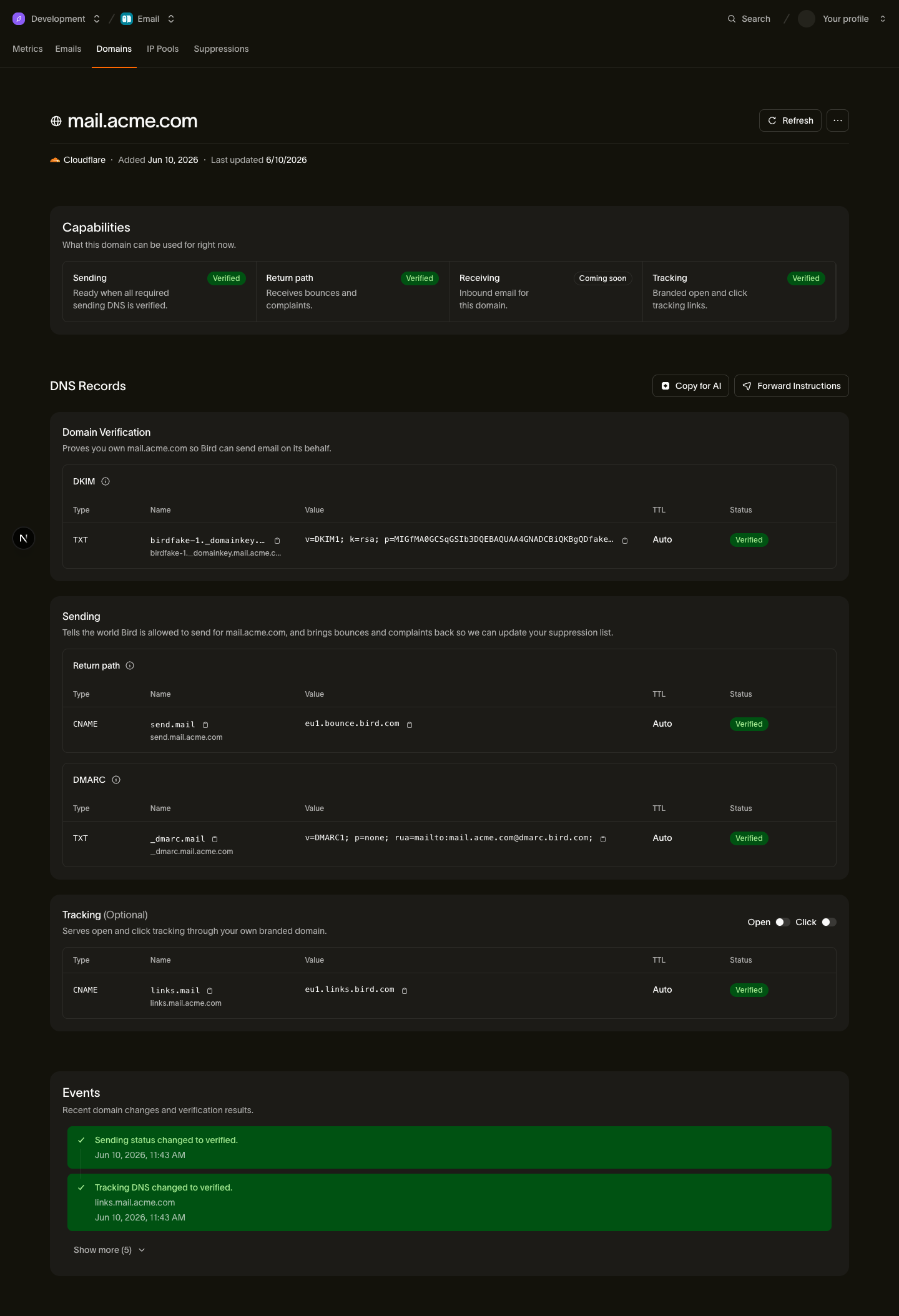
The records you'll add
| Type | Host | Value (copy from Bird) |
|---|---|---|
| TXT | <selector>._domainkey.example.com | Your DKIM key |
| CNAME | send.example.com | <region>.bounce.bird.com |
| TXT | _dmarc.example.com | Your DMARC policy |
| CNAME | links.example.com (optional) | <region>.links.bird.com |
The tracking CNAME (links) is optional — it only enables branded open and click tracking, not sending itself.
Add the records in GoDaddy
- Log in to GoDaddy and open My Products.
- Find your domain in the list and click DNS (or click the domain, then choose the DNS tab).
- Click Add New Record.
- For the DKIM record: set Type to TXT, enter the host's subdomain part (everything before your domain, for example <selector>._domainkey) in Name, paste the DKIM value from Bird into Value, and set TTL to 600 seconds (the lowest option). GoDaddy caps how much text a single TXT value accepts — if it rejects the paste, run the value through the DNS record splitter to get chunks it will take. Click Save.
- Click Add New Record again. For the return-path record: set Type to CNAME, enter send in Name, paste the target from Bird (for example <region>.bounce.bird.com) into Value, and set TTL to 600 seconds. Click Save.
- Click Add New Record again. For the DMARC record: set Type to TXT, enter _dmarc in Name, paste the DMARC value from Bird into Value, and set TTL to 600 seconds. Click Save.
- If you want branded tracking, add the optional tracking record the same way as step 5: Type CNAME, Name links, Value <region>.links.bird.com. Click Save.
GoDaddy-specific gotchas
- The Name field is relative to your domain. Enter send, not send.example.com — GoDaddy appends the domain for you, and entering the full name publishes send.example.com.example.com. Use @ only when a record belongs at the domain root (none of Bird's records do).
- Pick the lowest TTL. GoDaddy defaults to a 1-hour TTL; choosing 600 seconds means any typo you fix is re-checked within minutes instead of an hour, which speeds up verification.
- Remove conflicting "Parked" records. Domains that have never hosted anything often carry GoDaddy's parking records. If an existing record sits at the same name as one you are adding (especially a CNAME at send or links), delete the parked record first — DNS does not allow a CNAME to coexist with another record at the same name.
After you publish
Bird checks your DNS automatically — verification usually completes within minutes of the records going live, and you can trigger an immediate re-check from the domain's detail page. If the domain stays pending longer than expected, see Verification delays.