Suppressions
Your workspace owns a suppression list: a set of email addresses we do not deliver to. Hard bounces and spam complaints land on it on their own, and you can add addresses yourself. Repeatedly mailing addresses that bounce or report spam can get your domain blocked by mailbox providers, so we stop those sends before they leave the platform.
A new unsubscribe does not add a suppression record. It records the recipient's own stated preference rather than a deliverability fact, so it lives on the Preferences tab instead. See Unsubscribe links for how that works.
Manage the list in Email > Suppressions, through the suppressions API, or with bird email suppressions.
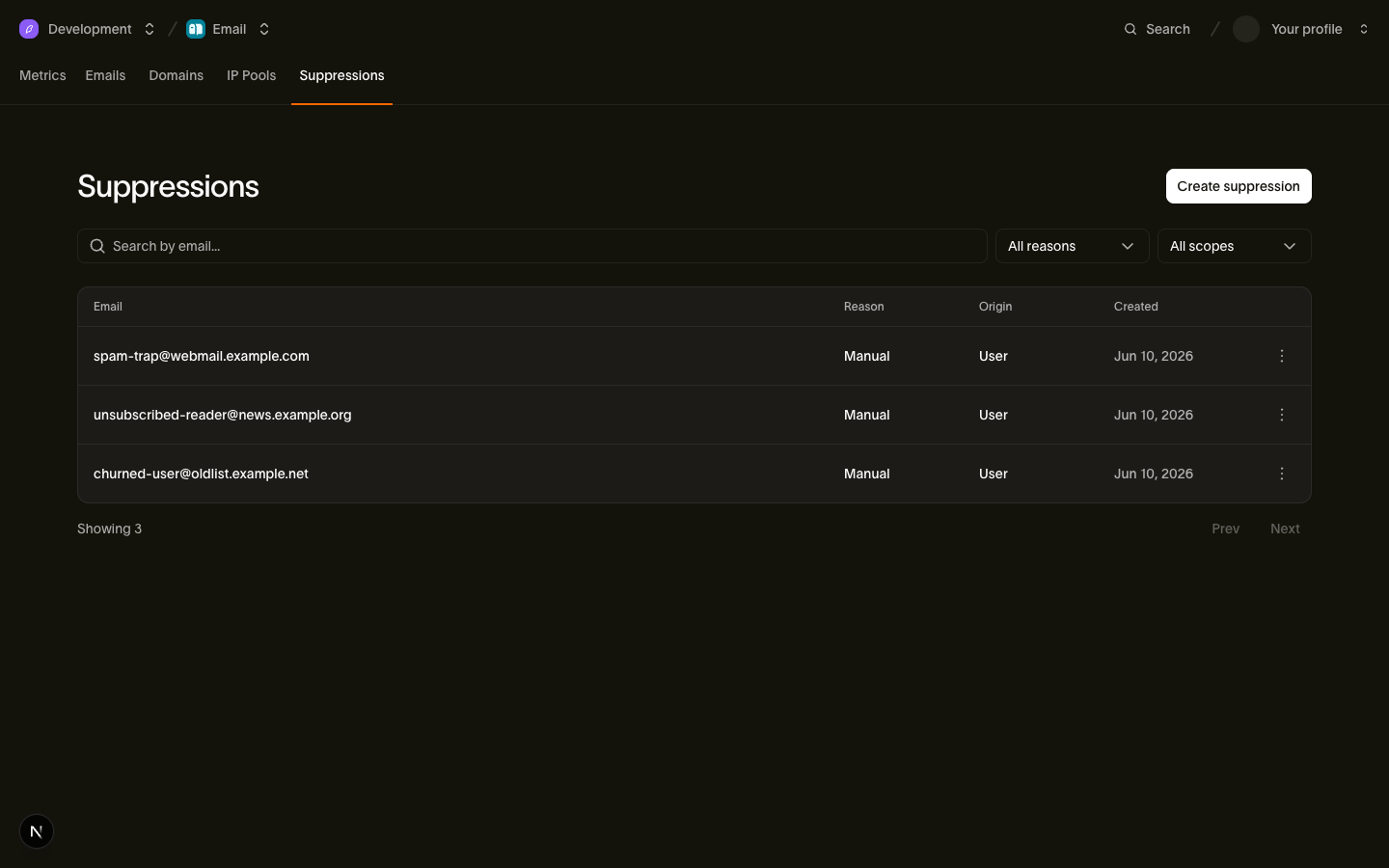
The three reasons and what they block
Each record has a reason saying why the address is listed, and an applies_to policy controlling which categories it blocks:
| Reason | applies_to | Marketing category | Transactional category |
|---|---|---|---|
| hard_bounce | all | Blocked | Blocked |
| complaint | non_transactional | Blocked | Allowed |
| manual | all | Blocked | Blocked |
The split follows from what each reason means:
- hard_bounce: the address does not exist. Sending is pointless in any category, so it blocks everything.
- complaint: a statement about unwanted mail. Someone who reported your newsletter as spam may still need a password reset or an order confirmation, so it blocks only non-transactional sends.
- manual: a deliberate decision by you or your team. We do not second-guess it, so a manual suppression blocks every category, including transactional.
An address holds one record per reason, so a hard bounce and an earlier complaint sit side by side as separate records, and delivery stays blocked while any blocking record remains. We fail closed on anything we do not recognize: if a record comes back with an applies_to your integration has never seen, treat it as blocking every category, which is how we treat it ourselves.
Note: reason: unsubscribe is deprecated on the suppressions API. New unsubscribes record a preference instead of a suppression. The deprecated ?reason=unsubscribe filter still returns legacy suppression records with origin: unsubscribe_link or origin: unsubscribe_event until those records are removed.
How addresses get added automatically
We add suppressions in response to recipient signals, so a bounce or complaint needs no action from you:
| Trigger | Resulting suppression |
|---|---|
| Hard bounce (email.bounced) | reason: hard_bounce, origin: bounce_event, applies_to: all |
| Out-of-band hard bounce (email.out_of_band_bounce) | reason: hard_bounce, origin: bounce_event, applies_to: all |
| Spam complaint (email.complained) | reason: complaint, origin: complaint_event, applies_to: non_transactional |
An unsubscribe, whether through the in-body link or the one-click button, does not appear here: it records a preference on the Preferences tab instead of adding a row to this list.
Only a hard-class bounce suppresses, and the classification table shows which bounce_class values count as hard. Two outcomes that look like failures leave the address sendable:
- Soft bounces and deferrals (email.deferred, or email.bounced with bounce_type: "soft"): transient failures like a full mailbox. We retry.
- Send-side rejections: generation failures and policy rejections are problems with the send rather than the address. They produce email.rejected events and no suppression.
Repeat signals for an address that is already suppressed for the same reason leave the original record alone, including its created_at. The record keeps source_email_id and source_recipient_id, which link an automatic suppression back to the exact message and recipient that caused it. Those two fields answer the support question "why did this person stop getting our email", and they are null on manual additions.
Every addition, automatic or manual, fires an email_suppression.created event to your webhook endpoint with the suppression_id, the suppressed email, the reason, and the workspace_id, so your own system can mirror the list without polling:
Code example
{
  "type": "email_suppression.created",
  "timestamp": "2026-07-23T14:52:03.192524705Z",
  "data": {
    "email": "user@example.com",
    "reason": "manual",
    "suppression_id": "sup_01ky7qckqrf06r38g49b9kxdbc",
    "workspace_id": "ws_01ky7m21hjffh9s8kq76gyb1xf"
  }
}
Managing suppressions via the API
The API adds, lists, looks up, and deletes single records. Addresses are lowercased before storage and lookup, and they never appear in a URL path, because a path lands in access logs and an email address is personal data. To find the record for an address, filter the list with ?email=.
Each SDK exposes these operations as typed methods on its suppressions resource.
Add an address
const suppression = await bird.suppressions.add({ email: "user@example.com" });
console.log(suppression.id);
suppression = client.suppressions.add(email="user@example.com")
print(suppression.id)suppression, err := client.Suppressions.Add(context.Background(), bird.SuppressionsAddParams{
Email: "user@example.com",
})
if err != nil {
log.Fatal(err)
}
fmt.Println(suppression.Id)$suppression = $bird->suppressions->add(
(new SuppressionCreate())->setEmail('user@example.com'),
);
echo $suppression->getId();bird email suppressions add --email user@example.comcurl -X POST https://us1.platform.bird.com/v1/email/suppressions \
-H "Authorization: Bearer $BIRD_API_KEY" \
-H "Content-Type: application/json" \
-d '{ "email": "user@example.com" }'Manual additions get reason: manual and applies_to: all, so they block every category. The call is idempotent: a new suppression returns 201 Created, and an address already manually suppressed returns 200 OK with the existing record rather than a conflict. Either way the body is the suppression object:
Code example
{
  "applies_to": "all",
  "created_at": "2026-07-23T14:52:03.192524705Z",
  "email": "user@example.com",
  "id": "sup_01ky7qckqrf06r38g49b9kxdbc",
  "origin": "api_key",
  "reason": "manual",
  "scope": {
    "id": "ws_01ky7m21hjffh9s8kq76gyb1xf",
    "type": "workspace"
  }
}
The origin field records how the record came to exist. Manual additions get api_key or user, depending on whether the caller authenticated with an API key or a dashboard session. Automatic additions get bounce_event or complaint_event, depending on which signal created them.
List and look up
These calls return the first page. In Go, the empty third argument starts pagination; pass the previous page's NextCursor to read the next page.
const page = await bird.suppressions.list({ limit: 25 });
console.log(page.data.length);
page = client.suppressions.list(limit=25)
print(len(page.data))page, err := client.Suppressions.ListPage(context.Background(), bird.SuppressionsListParams{Limit: 25}, "")
if err != nil {
log.Fatal(err)
}
fmt.Println(len(page.Data))$page = $bird->suppressions->list(['limit' => 25])->fetch();
echo count($page->data);bird email suppressions list --limit 25curl "https://us1.platform.bird.com/v1/email/suppressions?limit=25" \
-H "Authorization: Bearer $BIRD_API_KEY"The list is cursor-paginated, newest first, and filterable by reason. To check one address, pass it as the email query parameter:
const page = await bird.suppressions.list({ email: "user@example.com" });
console.log(page.data.length);
page = client.suppressions.list(email="user@example.com")
print(len(page.data))page, err := client.Suppressions.ListPage(context.Background(), bird.SuppressionsListParams{
Email: "user@example.com",
}, "")
if err != nil {
log.Fatal(err)
}
fmt.Println(len(page.Data))$page = $bird->suppressions->list(['email' => 'user@example.com'])->fetch();
echo count($page->data);bird email suppressions list --email user@example.comcurl "https://us1.platform.bird.com/v1/email/suppressions?email=user@example.com" \
-H "Authorization: Bearer $BIRD_API_KEY"The email filter matches case-insensitively by prefix: user@example.com also matches user@example.com.au. Compare each returned address with the complete address you requested, and follow next_cursor through every page before deciding whether a matching record exists. Several records can apply to one address. MCP callers can use email_suppressions_check for this exact-address lookup.
Once you have a suppression ID, GET /v1/email/suppressions/{suppression_id} returns that one record: suppressions.get in the SDKs, or bird email suppressions get <id> on the CLI.
Remove an address
await bird.suppressions.remove("sup_01ky7qckqrf06r38g49b9kxdbc");client.suppressions.remove("sup_01ky7qckqrf06r38g49b9kxdbc")if err := client.Suppressions.Remove(context.Background(), "sup_01ky7qckqrf06r38g49b9kxdbc"); err != nil {
log.Fatal(err)
}$bird->suppressions->remove('sup_01ky7qckqrf06r38g49b9kxdbc');bird email suppressions remove sup_01ky7qckqrf06r38g49b9kxdbc --yescurl -X DELETE https://us1.platform.bird.com/v1/email/suppressions/sup_01ky7qckqrf06r38g49b9kxdbc \
-H "Authorization: Bearer $BIRD_API_KEY"One reason cannot be removed this way. A complaint record comes off only for a signed-in dashboard user; an API key gets 422 SuppressionNotRemovableByAPIKey. hard_bounce and manual records are removable either way.
Returns 204 No Content and permanently removes that record. Other records for the same address remain, and delivery stays blocked while any remaining record blocks the message category. To remove records by address, paginate the ?email= lookup, select only complete-address matches, and delete each intended record by ID. Be deliberate about removing a hard_bounce record, because an address that still does not exist bounces on the next send and re-suppresses itself.
What happens when you send to a suppressed address
We reject the recipient where you can see it. The recipient gets a recipient_id and appears in the message's recipient list with status rejected. The events API and your webhooks record an email.rejected event with rejection_reason: "recipient_suppressed". The rest of the recipients deliver normally.
The message itself is still accepted with a 202, even when every one of its recipients is suppressed. We resolve suppression after accepting the send, while we process the message, so an address you add now applies within a few minutes and never stops a send already in flight.
Testing with the sandbox
The testing sandbox exercises suppression handling deterministically. Sending to suppressed@messagebird.dev behaves as though the address were on your list: the recipient is rejected with rejection_reason: "recipient_suppressed" and never reaches delivery. The sandbox bounce and complaint addresses (bounce@messagebird.dev, complaint@messagebird.dev) run their outcomes through the real event pipeline while writing nothing to your suppression list, so the same test addresses stay reusable across runs.
Next steps
- Categories: transactional versus marketing, and how the category interacts with suppression policy
- Unsubscribe links: how opt-outs record a stated preference instead of a suppression
- Events and webhooks: the email.rejected payload and the lifecycle events that drive automatic suppression
- Testing sandbox: magic addresses for simulating every delivery outcome
- API reference: Suppressions: full request and response schemas
- What happens when someone opts out: a video that follows one recipient from the unsubscribe page to a rejected send
Related resources
Continue with the documentation, guides and examples for this topic. Resources are in English.
Understand the conceptWhat is one-click unsubscribe, and how do I implement List-Unsubscribe?Explore the capabilityEmail opt-outsFollow the learning pathOperate messaging reliably
Get an implementation brief