
Key Takeaways
- Apple Mail Privacy Protection (MPP) pre-fetches and caches images, causing false opens across iOS 15+, iPadOS 15+, and macOS Mail clients.
- Open rates from Apple Mail can no longer be trusted since almost all messages appear “opened.”
- Clicks, bounces, and complaints are not affected by MPP; those metrics remain reliable.
- User behavior matters: MPP only triggers when Apple Mail is set up on the device, not based solely on the email provider.
- MPP hides location accuracy by masking IPs (approximate location only).
- Pre-fetched opens are different from real engagement and need to be separated in analytics.
- Senders must shift away from open-based engagement strategies toward clicks, on-site behavior, and multi-channel signals.
- Deliverability strategies need updates because relying on opens alone is no longer valid.
- Bird flags pre-fetched opens, helping senders distinguish between real and proxy engagement.
- Email programs must rethink re-engagement, list hygiene, warm-ups, and segmentation under a world where opens are inflated.
In June 2021, Apple introduced Mail Privacy Protection (MPP) for the Mail app on iOS 15, iPadOS 15, and macOS Monterey devices.
The Basics
How are pixels affected?
Open pixels are pre-fetched by Apple's proxy servers. Because Apple pre-fetches images in the background, emails delivered to Apple Mail clients with MPP enabled are reported as opened even when the recipient has not viewed them.
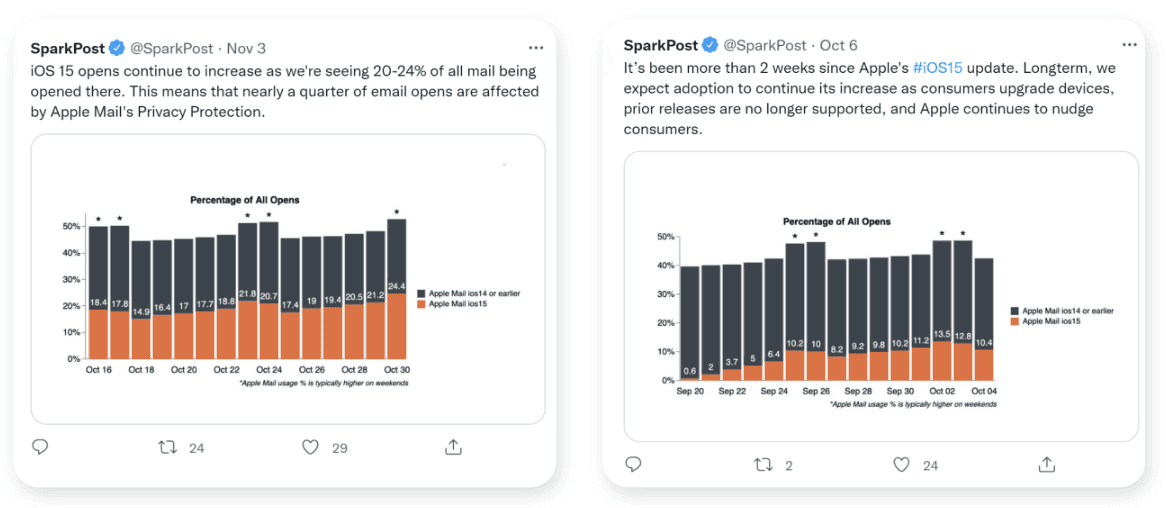
How much impact is MPP having on open tracking?
Apple Mail Privacy Protection inflates open rates across all senders whose recipients use the native Apple Mail client.
What about clicks? Will tracking on those be affected? What about bounces or other metrics?
When “iCloud Private Relay” (part of iCloud+ and distinct from MPP) is enabled, web browsing activities through Safari are encrypted and routed through multiple proxy servers. Private Relay masks the user's IP address over both HTTP and HTTPS sites.
Additionally, Apple has not been modifying the query string, nor have they been changing the user agent string. So, first-party click tracking is not impacted by this feature. Similarly, since MPP doesn’t actually change the mailbox provider (for that, users would use Hide My Email), bounces and complaints are not impacted by MPP.
When did MPP start?
The industry didn’t get a lot of time to prepare for this. Shortly after the June announcement, we started seeing iOS 15 beta activity in our testing. iOS 15 went live officially on September 20, 2021.
How do users control their Mail Privacy Protection via their iOS 15 Mail app?
Here is how the privacy protection feature is presented to iOS users:
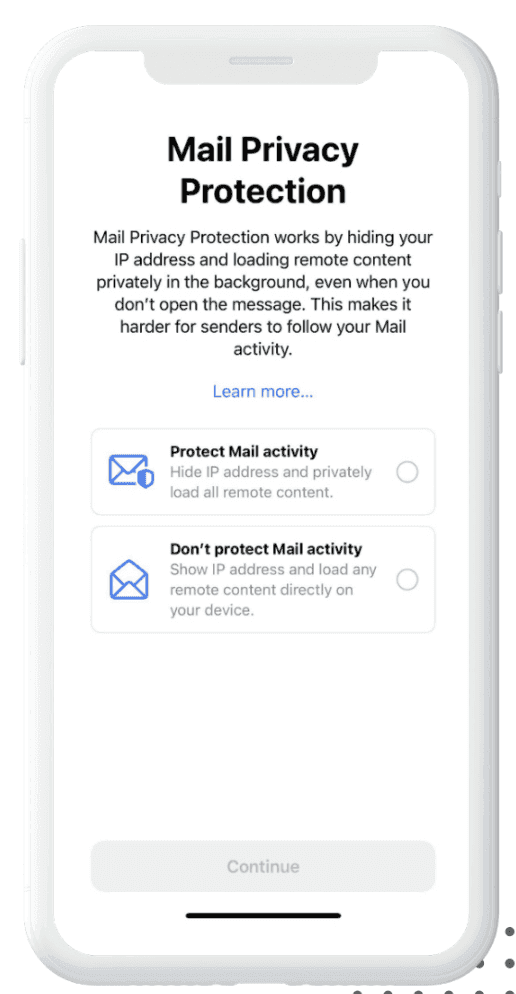
What are the resulting implications when “Protect Mail Activity” is selected by a user?
Apple is pre-fetching images in an email, even for emails that have not been opened. This means almost all emails sent to recipients using the Mail app may have obfuscated results showing false opens.
Does it matter if the user is on Gmail or some other mail service?
The mail service doesn’t matter here, nor does where the user actually opens the email. If the user has their mail going to the Mail app on iOS 15, iPadOS 15, or macOS Monterey operating systems, Apple will pre-fetch those emails causing an open to be tracked even though it wasn’t a user open.
What if the user has iOS 15 and is using the Gmail app or some other email app that isn’t the native Apple Mail app?
It’s not the operating system alone allowing for this tracking. It’s only when the user has iOS 15 or MontereyOS AND has that same email address receiving their emails via the native Apple Mail app. If the user is on Gmail or another mail app that is not Apple Mail, even if on iOS 15, the privacy controls will not be in effect.
How many people use Apple’s Mail app?
As a high-volume email sender delivering commercial and transactional email globally, we have a broad view of the email client footprint. In our 2021 Benchmark Report, we saw 38.1% of all opens and clicks coming from one of the Apple Mail app clients (and closer to 50% in subsequent data), with 25.7% on iPhone, 9.6% on desktop and 2.8% on iPad. This is second only to Gmail (on mobile and desktop) as the largest market share of any device/client family.
Is location being lost?
Somewhat. When configuring Private Relay, the user is presented with two options for protecting their location information. The user can choose to have an anonymous IP address that preserves the user’s approximate location, or they can choose to have an IP address that will be located in a broader region.
In our testing, the IP address when choosing the first option was located in the metropolitan area that the test lived within, but it was not identifiable to their home neighborhood. When choosing the broader region option, the IP address was in an entirely different state, but it was still in the same country.
Assuming this behavior remains the same in the future, sites will still be able to use the IP information to make privacy compliance, segmentations, and similar geographic/regional decisions.
Why is Apple doing this?
Apple positions privacy as a core platform feature, matching regulatory trends across many countries. As the owner of the operating system and default mail client, Apple has applied similar privacy controls across its ecosystem, including App Tracking Transparency (IDFA prompts introduced in iOS 14.5), Private Email Relay (Hide My Email), and third-party cookie restrictions in Safari.
Do you think other mailbox providers will follow Apple’s strategy on this?
Other mailbox providers also proxy or cache images, so email programs should treat open tracking as an imprecise signal across providers.
How does Bird handle this in its products?
Bird’s Inbox Insights and Competitive insights products do not rely on tracking pixels to measure inbox placement, so they are unaffected by MPP image pre-fetching. On the sending side, Bird includes pre-fetched open indicators in webhooks and email events as well as tracking and metrics so you can separate Apple proxy pre-fetches from direct recipient opens. Pre-fetched opens remain recorded because they confirm that an address is linked to an active Apple Mail client, while the event metadata lets you filter them out of engagement-based automation.
The Technical Details
What are the technical details of what is happening here?
When a user receives an email at their mailbox provider, one of the Apple Mail apps pre-fetches the message without the user interacting with the message. This pre-fetching often does not happen immediately and occurs primarily when the user’s phone is plugged in and on wifi. Once the message is pre-fetched, the mail client then preloads and caches all of the images using Apple’s proxy service. This preloading of the images causes image pixels to fire, resulting in a false open.
What’s the difference between something opened behind a proxy and pre-fetched?
Descriptions for the different types of opens:
“Regular” Opens: These are emails that are opened by your intended recipient, and the open accurately conveys both that they opened the mail, as well as the device they used to view the mail and the IP that they accessed it from.
Proxied Opens: These are emails where the image open happens through a privacy proxy. The open was still initiated by your recipient, but the device and the IP/location information associated with the open are hidden from you.
Pre-fetched Opens: These are a new and special kind of open where the user's device opens the email and fetches (and caches) the image without them taking any action. For pre-fetched opens, it is impossible to tell if the actual recipient truly looked at your mail or if their device just pulled it and they never looked at it.
| Type | What It Means | What You Can Still Trust |
|---|---|---|
| Regular open | User actively opened the email; device + IP are real | High-confidence engagement and accurate environment data |
| Proxied open | User opened the email but Apple hides device/IP via proxy | Engagement is real, but device/location signals are masked |
| Pre-fetched open | Apple loads images without the user opening the email | Valid email address signal only, not real engagement |
With all of these classifications, some small portion of emails (independent of the above types) are opened and inspected by security services and may trigger false opens. When an open is classified as a regular open, it can be relied on with high confidence rather than certainty.
Does a user have to actively use Mail.app for email to be impacted by MPP?
Let’s consider a common scenario: a user sets up their email account in Apple Mail.app, Gmail’s mobile app, and also routinely makes use of the Gmail web app. Even if the user rarely (or never) opens their email in Apple Mail.app, Mail Privacy Protection will still pre-load images because the email account was set up in Apple’s Mail.app. In this case, a sender will see opens from Apple’s image proxy and Gmail’s image proxy.
Is Apple pre-fetching all images now?
This is only seen when the user is on wifi and their device is plugged in.
How quickly is the pre-fetching happening?
According to Movable Ink, 85% of Apple Mail users who clicked on a link saw the content rendered less than a minute prior to open.
Overall, given the manner in which MPP pre-fetches images, open events happen anywhere from minutes to hours after delivery. Because MPP primarily pre-fetches when the device is on Wi-Fi and connected to power, the impact on open-time content rendering is smaller when users open messages shortly after delivery.
Will MPP affect web tracking pixels that track web behavior?
Unless the user has blocked tracking via their browser, web tracking will work as it normally does. MPP will not affect web tracking.
How do we parse out the recipients that have MPP enabled? What should I be looking for?
Apple’s proxy servers send a generic Mozilla/5.0 user-agent string when requesting images. In Bird, webhook payloads, the Events API, and tracking and metrics distinguish pre-fetched and proxy opens from direct user opens.
These pre-fetched opens are still recorded because they indicate that the email address is connected to an active Apple device, while the event classification lets you exclude proxy pre-fetches from engagement segments and reports.
What user-agent string tells me that MPP is enabled?
A browser’s user-agent string identifies which client, version, and operating system made an HTTP request. Apple’s proxy servers send Mozilla/5.0 when requesting images. That user-agent string, combined with Apple proxy IP ranges, identifies requests coming from Apple’s image proxies so senders can filter Apple proxy opens from engagement metrics or segment them separately.
Is Apple cloaking IP addresses?
Click tracking IPs are obscured only when recipients use iCloud Private Relay in Safari.
Unique clicks remain accurate either way because Bird tracks clicks uniquely per email sent (each link in each message to each recipient is uniquely identified).
Does MPP still work if the message lands in the spam folder?
MPP does not pre-fetch images for emails delivered to the spam folder.
Will Apple Mail proxy respect the image caching headers?
No, MPP does not respect image cache headers. Images are cached for a period of 2-3 days. If no image cache header is applied, images seem to be cached indefinitely.
Will Apple report multiple opens if they pre-fetch the email and then the user actually opens?
No. The image will be cached for a certain amount of time and additional opens inside that window will not be reported.
Is Apple applying the Mail Privacy Protection to just the classic 1x1 pixel, or are they blocking all image loading (à la Outlook circa 2005)? And given that a lot of other content will be images, is there a way around this by adding tracking data to the other content in the email?
Apple is not blocking pixels but instead has their devices aggressively pre-fetch and cache all images in emails. So you will get an open regardless of whether the user actually opened the mail.
Is it safe to assume that bounced email addresses will continue to report bounces and will not report back opens?
Yes.
We are concerned about the impact on our spam trap controls (e.g. spam traps reporting engagement). Is there a perspective you can share about the potential for pristine spam traps to report opens given the answer to the question above (i.e. would the spamtrap operator need to sync their monitored mailbox in the iOS app for an open to come through)?
Yes, a trap operator would need to have an Apple Mail client attached to the inbox in question, which seems highly unlikely. A major trap operator told us that Apple is not involved in their monitoring process. The bigger risk in the industry is people abandoning non-engaging as a way of filtering their lists.
I’ve heard rumblings about Apple only pre-fetching when the phone is on wifi and plugged in. Are you seeing this too?
Testing confirms that background preloading happens primarily when the device is on Wi-Fi and connected to power.
Is there a technical hack or workaround to overcome the impacts of MPP?
Technical workarounds that attempt to bypass privacy features are short-lived, harm sender reputation, and get patched quickly. Senders should not rely on workarounds to evade Apple’s image preloading.
Observed Mail Privacy Protection behavior:
- Pre-fetching occurs primarily on Wi-Fi and power. Background preloading happens when the device is on Wi-Fi and charging, which means open events can fire when the recipient opens the message, or hours later when the device charges on Wi-Fi without the recipient ever viewing the email. As a result, raw open timestamps and open counts on Apple Mail clients cannot be used as reliable indicators of recipient action.
- External CSS image loading. In early testing, loading an image via an external CSS file triggered only on user-initiated opens. Do not use this workaround: mailbox clients patch CSS tracking loopholes, and recipients who enable Mail Privacy Protection have explicitly opted out of open tracking. Bypassing that preference erodes subscriber trust and damages your brand reputation.
Strategic Recommendations
What is considered the best practice way to handle MPP going forward? Are most companies removing the Apple Mail opens, or just reporting it with the expectation that it will be inflated?
Expand “engagement” to encompass both clicks and opens (if you haven’t already), and exclude proxy pre-fetch opens from automated engagement triggers. This retains the utility of opens for non-MPP clients and prepares your reporting for any mailbox provider that proxies images.
You should also consider looking at a customer’s engagement in other channels with your brand. One strategy we’re interested in is if no activity is seen in email, then look to other channels before determining if re-engagement is needed. If no activity is registered in other channels or in purchase activities, then it is safe to assume that the user needs to be re-engaged and potentially removed from the email list. It’s not perfect, but it will tell you about a customer’s brand engagement.
What will the effects on deliverability be when we’re no longer able to suppress folks who are unengaged?
Firstly, you will still be able to suppress the unengaged. You just need to look at metrics other than opens to determine if they are engaged or not. Most senders will have other metrics to measure engagement (clicks, website visits, purchases). If none of these apply, we suggest adding additional metrics. You can also implement a seed list to track inbox placement.
If you are concerned about gaining clicks and beyond in the conversion funnel, you can send emails containing gamification in different stages and offering some type of reward to subscribers: tell us more about you, update your profile, or any clear call to action that drives a click. Additionally, you can run multi-touch re-engagement emails to users who have no click or website/conversion activity after 90 days. If they don’t respond to your sequence, then you should probably sunset these users and try to get them to opt-in again via targeting in other channels.
How do I execute a deliverability warm-up in my new ESP now that I can’t see open engagement to warm up by using engaged subscribers?
For your unaffected audience, nothing changes. Before you move off of your old ESP to the new one, make sure you are flagging the non-Apple vs. Apple audiences at the record level.
For those on Apple, the list will be much smaller, but look for people that are closest to the brand in other ways, such as loyalty club members, recent purchasers, those that have recently clicked and have shown intent signals on other channels.
Should I consider double opt-in for all new subscribers?
Double opt-in (also called Confirmed Opt-In, or COI) keeps your list cleaner and improves inbox placement regardless of MPP. Blocklist operators such as Spamhaus recommend confirmed opt-in and frequently require it before delisting an IP that has been flagged for spam.
We send editorial, content driven emails. For us, success is an open, not a click. What should we do?
Even when your primary content lives inside the email, you can add interactive elements that invite a click, such as profile updates, polls, podcast links, or referral prompts, to measure active readership.
Pay close attention to negative feedback as well: spam complaints, unsubscribes, abuse reports, Microsoft SNDS, and Google Postmaster Tools. If negative signals rise or active readership drops month over month, adjust your targeting and cadence.
What other engagement metrics should I be looking at to understand audience engagement?
Clicks, site traffic from email, loyalty club status, and purchase data are all positive metrics to use to gather audience engagement.
Conversely, negative engagement metrics are useful as well. High complaint rates on a particular campaign or messaging stream could be an indicator of less engaged or low quality subscribers.
Will panel data become more valuable to evaluate performance for my audience?
Having visibility into inbox placement outside of tracking pixels is essential. Bird’s Inbox Insights and Competitive insights products do not rely on open pixels, so they provide visibility into inbox placement and campaign performance without distortion from MPP. Monitoring inbox placement directly ensures you do not mistake inflated proxy opens for healthy deliverability.
Q&A
What exactly does MPP break in email tracking?
It invalidates open tracking by pre-fetching images through Apple proxies, making opens unreliable and inflated.
Are clicks affected?
No. Clicks remain accurate because Apple does not alter query strings or user agents for link interactions.
Does MPP impact bounces or complaints?
No. Mailbox provider-level metrics like bounces, blocks, and complaints are untouched.
How can I tell if an open is MPP-driven?
Bird flags pre-fetched opens via Events API/Webhooks. MPP currently uses a Mozilla/5.0 user-agent for proxy requests.
What should I use to measure engagement now that opens are unreliable?
Clicks, site traffic from email, purchase activity, loyalty status, conversions, and cross-channel interactions.
How do I handle re-engagement if opens can’t be trusted?
Use clicks, web visits, or purchase history. If no activity across channels, treat the user as unengaged.
Does MPP affect Gmail or other mail clients on iOS?
Only if the email account is added to the native Apple Mail app. Using Gmail app on iOS bypasses MPP.
Should I use technical workarounds to bypass MPP?
No. Workarounds break user trust, harm deliverability, and will be patched by Apple. Follow best practices instead.